


An AI voice bot is a software application that conducts continuous, two-way voice conversations with a user by chaining speech-to-text, a large language model, and text-to-speech in real time. VideoSDK provides an open-source Python Agent SDK that connects these components into a managed room, handling the WebRTC transport, turn detection, and session lifecycle so you can focus on conversation logic. Start with the VideoSDK AI Agents introduction to see the full integration path.
Voice-first interfaces have moved from novelty to infrastructure. Developers building customer support automation, language tutoring apps, and in-app copilots now treat conversational voice as a core feature, not a side experiment. Python is a practical choice for this work because the ecosystem around speech processing, machine learning, and real-time APIs is mature and well-documented.
A high-quality AI voice bot does four things well: it detects when the user starts and stops speaking (turn detection), it lets the user interrupt mid-response (barge-in), it responds with low enough latency to feel natural (under one second end-to-end), and it maintains conversation state across turns. Get any one of these wrong and the bot feels broken, no matter how smart the underlying language model is.
By the end of this guide you will understand the full architecture of a Python voice bot, how to choose the right building blocks, how to implement turn-taking and barge-in, how to pick a transport layer, and what it takes to ship a production-ready voice experience that can run in a browser or over a phone call.
What Is an AI Voice Bot?
An AI voice bot is defined as a software system that conducts continuous, two-way audio conversations with a human by transcribing incoming speech, generating a response with a language model, and synthesizing that response back into audio in real time. Unlike a simple text-to-speech system that reads predefined text aloud, a voice bot processes live user input and produces dynamic, context-aware replies.
A voice bot also differs from voicemail transcription or request/response bots. Those systems operate in a one-shot mode: the user sends a message, the system processes it, and the interaction ends. A true voice bot maintains an open audio session where the user can speak, pause, resume, interrupt the bot, and change topics without restarting the conversation. This continuous interaction model is what makes voice bots feel like talking to a person rather than talking to a form.
Core Architecture of a Python Voice Bot
Every Python voice bot shares the same fundamental pipeline: audio comes in from a microphone or phone line, gets transcribed to text, flows through a language model for reasoning, and the resulting text gets synthesized back into audio that plays through a speaker or handset. The critical piece that binds these stages together is a turn-taking controller that decides when to listen, when to think, and when to speak.
The transport layer matters as much as the AI pipeline itself. If audio packets arrive late or out of order, the speech-to-text service produces garbage transcriptions and the language model responds to sentences that were never spoken. WebRTC provides sub-300-millisecond media transport for browser-based bots, while SIP gateways bridge traditional phone networks into the same pipeline. VideoSDK handles both transport modes through its real-time communication SDKs and telephony integration.
Common provider options for each pipeline stage include Deepgram and AssemblyAI for speech-to-text, OpenAI and Google Gemini for language models, and ElevenLabs and Cartesia for text-to-speech. Open-source frameworks like Pipecat provide the orchestration layer, while VideoSDK's Agent SDK offers a managed alternative with built-in session management and deployment options.
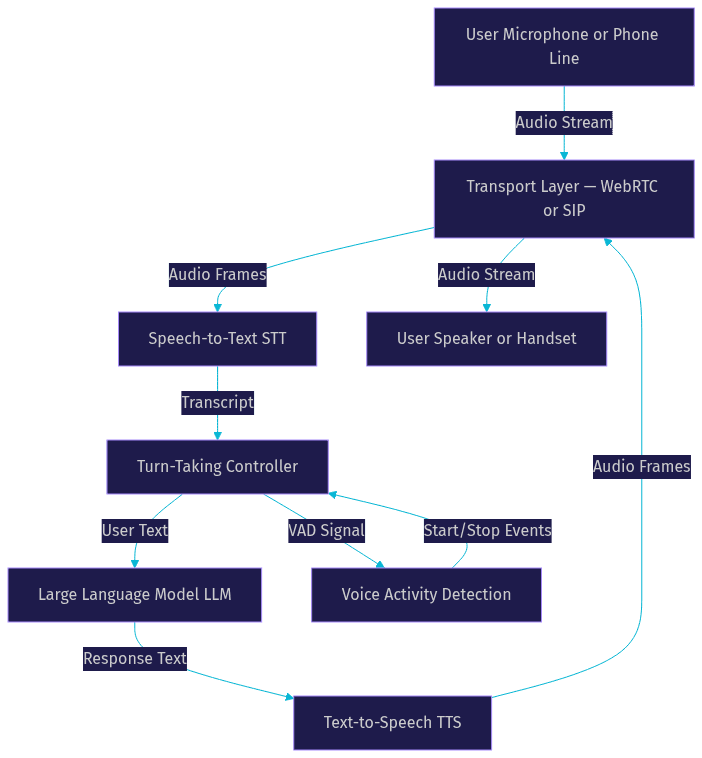
The diagram above shows the cyclical nature of the pipeline. Audio flows in, gets processed, and audio flows back out. The turn-taking controller sits in the middle, using voice activity detection signals to decide when the user has finished speaking and when the bot should begin responding.
Choosing the Right Building Blocks
The first architectural decision is whether to use a hosted voice agent API or build a do-it-yourself pipeline. Hosted APIs like OpenAI's Realtime API and Google Gemini Live offer a single WebSocket connection that handles STT, LLM, and TTS in one stream. They are fast to integrate and have predictable latency, but they lock you into one provider's models and pricing structure.
A DIY pipeline gives you full control over each stage. You can pair Deepgram's Nova-3 for transcription with Anthropic Claude for reasoning and ElevenLabs for synthesis, optimizing each component independently. The tradeoff is increased integration complexity and the need to manage latency across multiple network hops.
Here is a decision framework for selecting your STT, TTS, and LLM combination:
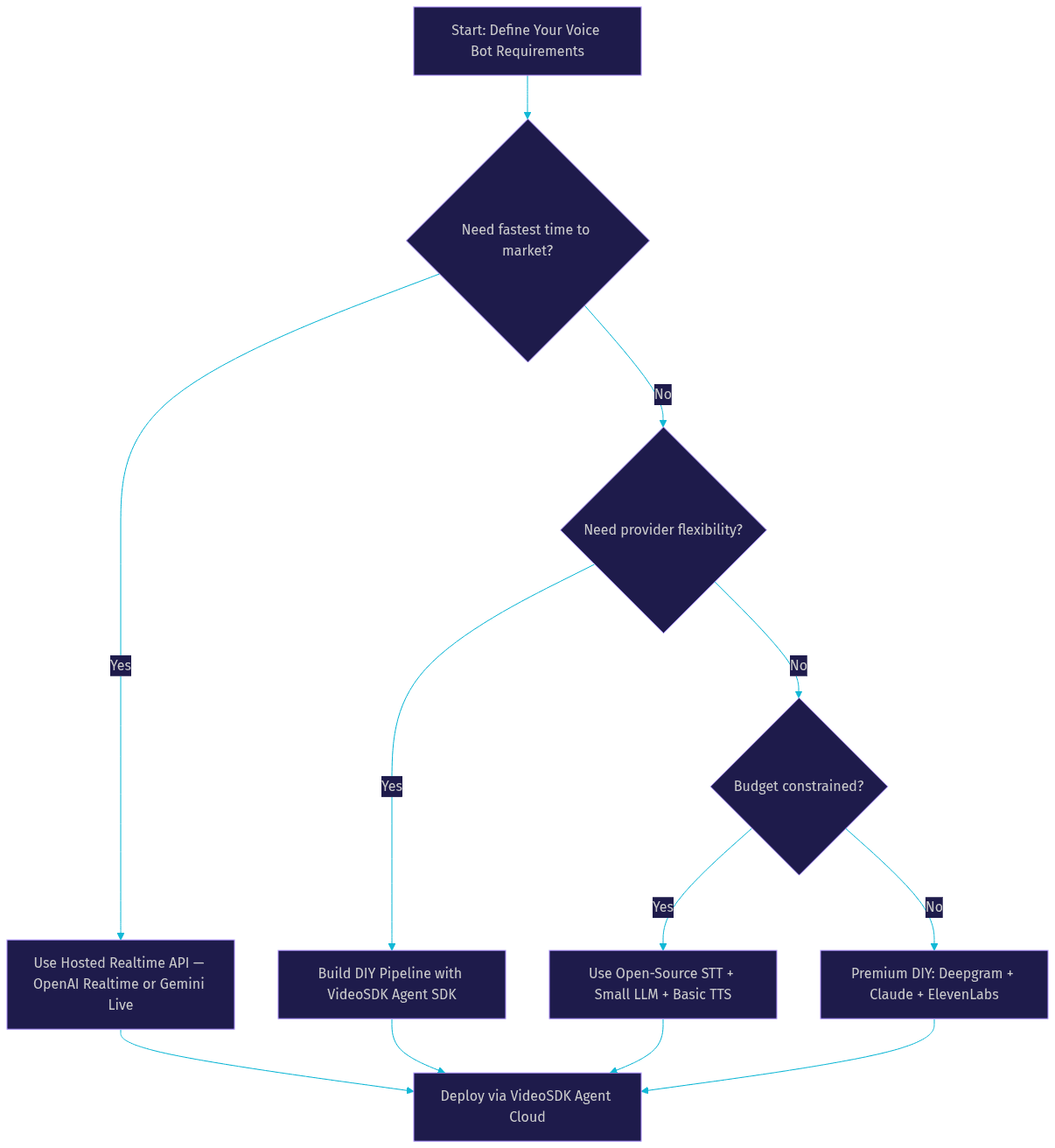
For most production deployments, the DIY pipeline approach using VideoSDK's AI Agent SDK hits the sweet spot. You get provider flexibility, the ability to swap individual components as models improve, and managed infrastructure for the transport and session layers. The VideoSDK Agent SDK supports a wide range of STT, LLM, and TTS providers, so you are not locked into a single vendor's roadmap.
Setting Up the Development Environment
Start with Python 3.10 or later. Create an isolated virtual environment for your voice bot project so dependencies do not conflict with other Python applications on your machine. The key system-level libraries you will need are FFmpeg for audio format conversion and PortAudio for microphone access during local testing.
Manage your API keys securely using environment variables loaded from a local configuration file that you never commit to version control. Each provider you integrate, whether that is OpenAI, Deepgram, ElevenLabs, or VideoSDK itself, will issue you an API key and secret pair. Store these as environment variables and access them through Python's environment interface at runtime.
For local testing with WebRTC, you need HTTPS or localhost. Browsers block microphone access on plain HTTP connections served from non-local addresses. Use a local tunneling tool to expose your development server over HTTPS when testing on a network device, or stick to localhost during initial development.
Implementing Turn-Taking and Barge-In
Turn-taking is the hardest part of building a voice bot. Get it wrong and the bot either talks over the user or waits too long in awkward silence. The core mechanism is voice activity detection, or VAD, which analyzes incoming audio frames and classifies them as speech or silence based on energy thresholds and spectral characteristics.
A typical VAD implementation uses a frame size of 20 to 30 milliseconds and applies a threshold to determine whether a frame contains speech. When speech frames are detected, the bot enters a listening state. When silence persists beyond a configurable duration, usually 300 to 700 milliseconds, the bot considers the user's turn complete and triggers the LLM response.
The gap between the user finishing speaking and the bot starting to respond is called the end-of-turn latency. To keep this under one second, you need to overlap operations. Start LLM inference as soon as the VAD signals end-of-speech, and begin TTS synthesis as soon as the first sentence boundary appears in the LLM's streaming output. This pipeline parallelism is what separates natural-feeling bots from sluggish ones.
Barge-in handling is equally important. When the user starts speaking while the bot is still talking, the system must immediately stop TTS audio playback, discard any unfinished LLM output, and resume listening. This requires the turn-taking controller to maintain tight control over the TTS stream and to interrupt it mid-utterance without producing audio glitches. VideoSDK's Agent SDK handles this through its built-in turn detection and preemptive response features, which manage the audio stream lifecycle automatically.
The combination of accurate VAD, streaming LLM responses, and instant barge-in handling is what makes a voice bot feel conversational rather than transactional. Developers who skip any one of these pieces end up with a bot that users abandon after one interaction.
Managing Conversation State
A voice bot without memory is just a repeating question-and-answer machine. To maintain coherent multi-turn conversations, the bot needs to persist recent dialogue history and pass it to the language model as context on every turn.
The simplest approach is an in-memory buffer that stores the last N turns of conversation as structured messages. This works for single-session bots but falls apart when you need to resume a conversation after a disconnection or share state across multiple agent instances.
For production deployments, Redis is a strong choice for conversation state caching. It provides sub-millisecond read and write latency, supports automatic key expiration for session cleanup, and handles concurrent access from multiple agent workers. For simpler deployments, a lightweight JSON file or SQLite database can suffice, though you lose the concurrency benefits.
The way you pass state to the LLM matters as much as where you store it. The system prompt should establish the bot's persona, rules, and available tools, while the conversation history provides the contextual thread. VideoSDK's Agent SDK includes built-in context management and memory features that handle this automatically, including context window management to prevent token overflow on long conversations.
Transport Layer: WebRTC vs. Telephony
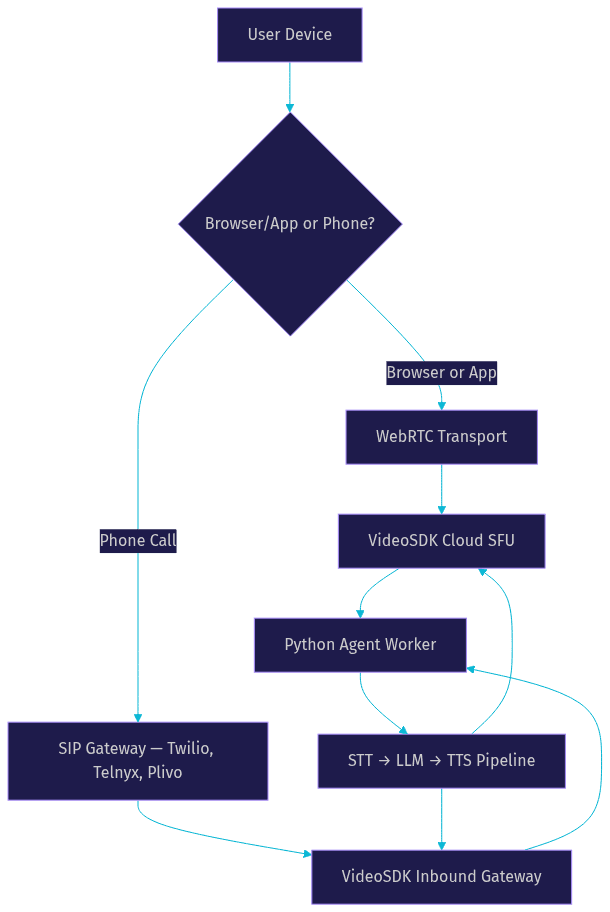
The transport layer determines how audio moves between the user and your Python voice bot. The two primary options are WebRTC for browser and mobile app-based bots, and SIP telephony for phone call-based bots.
WebRTC is the standard for real-time audio in browsers and native apps. It uses peer-to-peer connections with UDP transport for low latency, typically under 300 milliseconds. WebRTC handles audio encoding, NAT traversal through STUN and TURN servers, and adaptive bitrate adjustment based on network conditions. For a voice bot that users interact with through a web interface or mobile app, WebRTC is the right choice.
SIP telephony bridges traditional phone networks into your bot pipeline. When a user calls a phone number, the SIP gateway converts the PSTN audio into a format your bot can process, and converts the bot's response back into telephony audio. This is essential for customer support bots, automated appointment scheduling, and any use case where the user's interface is a phone call rather than an app.
| Factor | WebRTC | SIP Telephony |
|---|---|---|
| Latency | Sub-300ms | 150-400ms depending on carrier |
| User Interface | Browser or mobile app | Any phone |
| Setup Complexity | Moderate (STUN/TURN required) | Higher (SIP trunk, gateway) |
| Best For | In-app copilots, web-based assistants | Call centers, outbound calling, phone-first users |
| VideoSDK Support | Full SDK coverage | SIP integration with Twilio, Telnyx, Plivo |
VideoSDK supports both transport modes. You can start with a WebRTC-based web bot and later add telephony support without rewriting your agent pipeline, because the Agent SDK abstracts the transport layer from the conversation logic.
Production-Ready Considerations
Shipping a voice bot from prototype to production introduces a new set of challenges. Latency budgeting is the first concern. Your total end-to-end latency, from the user finishing speech to the bot starting to respond, should stay under one second for natural conversation. Break this budget down across components: VAD end-of-speech detection takes 300 to 700 milliseconds, LLM time-to-first-token takes 200 to 500 milliseconds, and TTS time-to-first-audio takes 100 to 300 milliseconds. If any component exceeds its budget, the conversation starts feeling laggy.
Monitoring these latencies in production requires logging timestamps at each pipeline stage. VideoSDK's Agent SDK includes pipeline observability features that expose timing metrics for each stage, so you can identify bottlenecks without instrumenting the code yourself.
Security is non-negotiable for production voice bots. Token-based authentication ensures that only authorized users can join a conversation session. VideoSDK uses JWT-based meeting tokens generated server-side from your API key and secret, never exposed on the client. Room access control lets you restrict who can join, what roles they have, and when the room expires. For sensitive conversations like healthcare or financial services, end-to-end encryption ensures that audio content cannot be intercepted between the user and the server.
Scaling a voice bot means handling multiple concurrent conversations. Each conversation runs as an independent agent worker process, so horizontal scaling is a matter of provisioning enough worker instances. VideoSDK's Agent Cloud manages this automatically, spinning up worker processes on demand and tearing them down when conversations end. For self-hosted deployments, container orchestration with Kubernetes handles the same workload.
Cost estimation depends heavily on your provider choices. A typical configuration using Deepgram for STT, a mid-tier LLM for reasoning, and ElevenLabs for TTS might cost between $0.05 and $0.15 per conversation minute at current provider pricing. VideoSDK's infrastructure costs are separate and scale with concurrent room usage. For high-volume deployments, TTS caching can significantly reduce costs by reusing synthesized audio for common responses like greetings and confirmations.
Testing and Debugging Tips
Testing a voice bot requires listening to actual audio, not just reading transcripts. Save audio logs of both the user's input and the bot's output for every test session. When something goes wrong, replaying the audio reveals whether the issue was a transcription error, a bad LLM response, or a TTS glitch.
Visualizing VAD events helps debug turn-taking issues. Log the timestamps of each speech and silence transition, then plot them alongside the transcript and response timeline. This makes it obvious when the bot is cutting off the user too early or waiting too long to respond.
Common pitfalls include invalid or expired tokens causing authentication failures, missing TURN servers causing WebRTC connection failures on restrictive networks, and audio format mismatches between the transport layer and the STT service producing garbled transcriptions. Each of these has a straightforward fix: regenerate tokens with proper expiry, configure TURN servers in your WebRTC settings, and ensure the audio sample rate and encoding format match what your STT provider expects.
Real-World Use Cases
AI voice bots built with Python are deployed across several industries today. Customer support call centers use them to handle tier-one inquiries, route complex issues to human agents, and collect initial information before transferring the call. Language tutoring apps use voice bots for conversational practice, where the bot evaluates pronunciation and provides real-time feedback. Voice-enabled IoT devices use embedded voice bots for hands-free control in industrial and home automation settings. In-app copilots provide voice-driven interfaces for complex software workflows.
One concrete example: a healthcare startup built a Python-based voice bot using VideoSDK's Agent SDK to automate appointment scheduling over phone calls. The bot uses Deepgram for transcription, OpenAI for conversation reasoning, and ElevenLabs for natural-sounding speech synthesis. It handles inbound calls, verifies patient identity, checks available slots, books appointments, and sends confirmations. The bot processes thousands of calls per week with a median response latency of 850 milliseconds, well within the natural conversation threshold.
Definitions Glossary
Voice Activity Detection (VAD): A signal processing technique that classifies audio frames as speech or silence based on energy and spectral features. In a VideoSDK agent, VAD drives the turn-taking controller's decisions about when to listen and when to respond.
Turn-Taking Controller: The orchestration layer that coordinates STT, LLM, and TTS to produce natural conversational timing. VideoSDK's Agent SDK implements this through its built-in turn detection and preemptive response features.
Barge-In: The ability of a user to interrupt the bot mid-speech, causing the bot to stop TTS playback and resume listening. This requires immediate audio stream cancellation and LLM output discarding.
Agent Worker: The Python process that runs a VideoSDK AI agent and manages its session lifecycle, including the STT-to-LLM-to-TTS pipeline and all conversation state.
SIP (Session Initiation Protocol): The signaling protocol that bridges traditional phone networks to WebRTC-based voice bot pipelines. VideoSDK's telephony integration supports SIP trunks from Twilio, Telnyx, Plivo, and other providers.
Key Takeaways
- A production-quality AI voice bot requires four core behaviors: accurate turn detection, barge-in support, sub-second latency, and persistent conversation state.
- The architecture follows a pipeline pattern: microphone to STT to LLM to TTS to speaker, with a turn-taking controller coordinating the flow.
- Choosing between hosted realtime APIs and DIY pipelines depends on your need for provider flexibility versus time to market.
- WebRTC is the right transport for browser and app-based bots, while SIP telephony serves phone call use cases. VideoSDK supports both through a single Agent SDK.
- Production deployment requires latency budgeting, token-based authentication, horizontal scaling of agent workers, and cost monitoring across all provider stages.
Conclusion
Building an AI voice bot with Python is a multi-stage engineering effort that spans speech processing, language model integration, real-time transport, and production operations. The good news is that the building blocks are mature, the provider ecosystem is competitive, and frameworks like VideoSDK's Agent SDK abstract away the hardest parts. Start with a clear use case, pick your providers based on latency and cost requirements, and iterate on turn-taking behavior until the conversation feels natural. Ready to build? Head to the VideoSDK AI Agents documentation for the full integration guide, or explore the open-source agents SDK on GitHub to see working examples. What are you building with VideoSDK? Drop a comment below, I would love to hear what kind of voice bot use case you are working on.
Free $20 Balance for AI Voice Agents & Video Calls
FAQ