


Introduction to AI Voice Agents in the Automotive Industry
What is an AI Voice Agent?
AI Voice Agents are sophisticated software systems designed to interact with users through voice commands. These agents leverage technologies such as Speech-to-Text (STT), Text-to-Speech (TTS), and Natural Language Processing (NLP) to understand and respond to user queries. In the automotive industry, AI Voice Agents can enhance user experience by providing hands-free assistance, improving safety, and offering personalized services.
Why are they important for the automotive industry?
In the automotive sector, AI Voice Agents play a crucial role in enhancing driver and passenger experience. They allow users to control in-car systems, access navigation, manage entertainment, and receive real-time updates without taking their hands off the wheel. This not only improves safety but also makes driving more enjoyable and efficient.
Core Components of a Voice Agent
A typical AI Voice Agent consists of several core components:
- Speech-to-Text (STT): Converts spoken language into text.
- Text-to-Speech (TTS): Converts text back into spoken language.
- Natural Language Processing (NLP): Understands and processes user intent.
- Voice Activity Detection (VAD): Detects when the user is speaking.
- Turn Detection: Determines when the agent should respond.
For a comprehensive understanding, refer to the AI voice Agent core components overview.
What You'll Build in This Tutorial
In this tutorial, you will learn how to build an AI Voice Agent tailored for the automotive industry using the VideoSDK AI Agents framework. We will guide you through setting up the development environment, creating a custom agent, defining a processing pipeline, and testing the agent in a simulated environment.
Architecture and Core Concepts
High-Level Architecture Overview
The architecture of an AI Voice Agent involves several interconnected components that work together to process audio input, interpret user intent, and generate appropriate responses. The VideoSDK framework provides a robust architecture that simplifies the integration of these components.
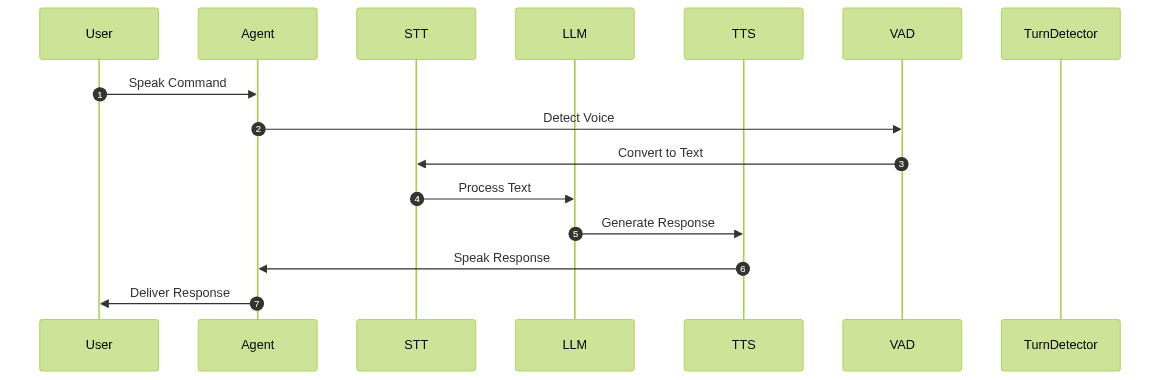
Understanding Key Concepts in the VideoSDK Framework
Agent
The
Agent class is the core of your voice agent. It defines the behavior and responses of the agent, including how it interacts with users.CascadingPipeline
The
CascadingPipeline orchestrates the flow of data through various processing stages, including STT, NLP, and TTS. This pipeline ensures that audio input is accurately processed and converted into meaningful responses. Learn more about the Cascading pipeline in AI voice Agents.VAD & TurnDetector
Voice Activity Detection (VAD) and Turn Detection are crucial for determining when the agent should listen and when it should respond. VAD identifies active speech, while the Turn Detector ensures the agent waits for the user to finish speaking before replying.
Setting Up the Development Environment
Prerequisites
Before you begin, ensure you have the following:
- Python 3.8+
- A VideoSDK account
- API keys for STT, TTS, and LLM services
Step 1: Create a Virtual Environment
Create a virtual environment to manage dependencies:
1python -m venv venv
2source venv/bin/activate  # On Windows use `venv\Scripts\activate`
3
Step 2: Install Required Packages
Install the necessary packages using pip:
1pip install videosdk-agents videosdk-plugins
2
Step 3: Configure API Keys in a .env file
Create a
.env file in your project directory and add your API keys:1VIDEOSDK_API_KEY=your_videosdk_api_key
2DEEPGRAM_API_KEY=your_deepgram_api_key
3OPENAI_API_KEY=your_openai_api_key
4ELEVENLABS_API_KEY=your_elevenlabs_api_key
5Building the AI Voice Agent: A Step-by-Step Guide
Step 4.1: Generating a VideoSDK Meeting ID
To interact with your agent, you need a meeting ID. Use the VideoSDK API to generate one. This ID allows your agent to join a session and interact with users.
Step 4.2: Creating the Custom Agent Class
Define a custom agent class by extending the
Agent class. This class will handle user interactions and define the agent's behavior.1class MyVoiceAgent(Agent):
2 def __init__(self):
3 super().__init__(instructions=agent_instructions)
4 async def on_enter(self): await self.session.say("Hello! How can I help?")
5 async def on_exit(self): await self.session.say("Goodbye!")
6Step 4.3: Defining the Core Pipeline
Set up the
CascadingPipeline to manage the flow of audio data through STT, LLM, and TTS components.1pipeline = CascadingPipeline(
2 stt=DeepgramSTT(model="nova-2", language="en"),
3 llm=OpenAILLM(model="gpt-4o"),
4 tts=ElevenLabsTTS(model="eleven_flash_v2_5"),
5 vad=SileroVAD(threshold=0.35),
6 turn_detector=TurnDetector(threshold=0.8)
7)
8Step 4.4: Managing the Session and Startup Logic
Initialize the
AgentSession and manage the startup logic to ensure the agent is ready to interact with users.1async def start_session(context: JobContext):
2 agent = MyVoiceAgent()
3 conversation_flow = ConversationFlow(agent)
4 session = AgentSession(
5 agent=agent,
6 pipeline=pipeline,
7 conversation_flow=conversation_flow
8 )
9 try:
10 await context.connect()
11 await session.start()
12 await asyncio.Event().wait()
13 finally:
14 await session.close()
15 await context.shutdown()
16Running and Testing the Agent
Step 5.1: Running the Python Script
Run your Python script to start the agent:
1python main.py
2
Step 5.2: Interacting with the Agent in the Playground
After starting your agent, use the AI Agent playground link provided in the console to join the session and interact with your agent. Test various automotive-related queries to see how the agent responds.
Advanced Features and Customizations
Extending Functionality with Custom Tools
Enhance your agent by integrating additional plugins or custom tools to expand its capabilities, such as integrating a calendar API for scheduling.
Exploring Other Plugins
Experiment with other plugins available in the VideoSDK framework to customize your agent further, such as different STT or TTS providers.
Troubleshooting Common Issues
API Key and Authentication Errors
Ensure your API keys are correctly configured in the
.env file and that you have the necessary permissions.Audio Input/Output Problems
Check your microphone and speaker settings to ensure audio is being captured and played correctly.
Dependency and Version Conflicts
Ensure all dependencies are up-to-date and compatible with your Python version.
Conclusion
Summary of What You've Built
You've successfully built an AI Voice Agent for the automotive industry using the VideoSDK framework, capable of handling various automotive-related queries.
Next Steps and Further Learning
Explore additional features and plugins to enhance your agent's capabilities, and consider deploying it in a real-world automotive application for further testing and development.
FAQ