


AI voice bot SIP integration connects traditional telephony systems with real-time AI processing pipelines, enabling automated, conversational agents to handle inbound and outbound phone calls. By bridging SIP signaling and RTP media streams to speech-to-text, large language models, and text-to-speech engines, developers can build scalable, low-latency voice assistants. VideoSDK provides built-in SIP integration and AI voice agent capabilities to deploy these workflows in production.
AI voice bot SIP integration is changing how developers approach call routing and automated support. Traditional PBX systems and SIP trunks handle millions of calls daily, yet they rely on outdated DTMF menus and static routing logic. By integrating an AI voice bot into a SIP network, you can replace frustrating phone menus with natural, conversational AI that understands context, handles interruptions, and resolves queries autonomously.
Building this bridge introduces specific engineering challenges. SIP signaling and RTP media streams operate differently than the WebSocket-based APIs used by modern AI providers. Developers must manage codec compatibility, network traversal, and real-time latency to prevent awkward delays during conversations. When architected correctly, the result is a seamless experience where callers interact with a responsive AI agent over a standard phone line.
In this guide, you will learn the complete architecture for AI voice bot SIP integration, from selecting the right SIP server to configuring the AI processing pipeline. We will cover deployment strategies, security considerations, and production monitoring to help you build a robust, scalable telephony AI solution.
What is AI Voice Bot SIP Integration?
AI voice bot SIP integration is defined as the architectural process of connecting Session Initiation Protocol (SIP) telephony networks with conversational AI pipelines. This integration allows a standard phone call to be routed to an AI agent instead of a human operator or static IVR system.
The system works by intercepting the audio stream from a standard SIP call and redirecting it through an AI processing pipeline. When a caller speaks, the voice bot captures the real-time audio, sends it to a speech-to-text (STT) provider for transcription, passes the text to a large language model (LLM) to generate a response, and converts the response back to audio using a text-to-speech (TTS) engine. The synthesized audio is then streamed back over the RTP connection to the caller.
This architecture delivers several immediate benefits for telephony applications. It enables fully automated customer support that is available 24/7, reducing the burden on human call centers. AI voice bots can handle multilingual conversations natively, dynamically routing calls based on detected language. For enterprises, this translates to significant cost reduction and improved customer satisfaction, as callers no longer navigate complex button-based menus.
Core Architecture Overview
A robust AI voice bot SIP integration relies on a clear separation of concerns between telephony signaling, media streaming, and AI processing. The architecture must handle the SIP call setup, extract the audio media, process it through the AI pipeline, and return the response without introducing noticeable latency.
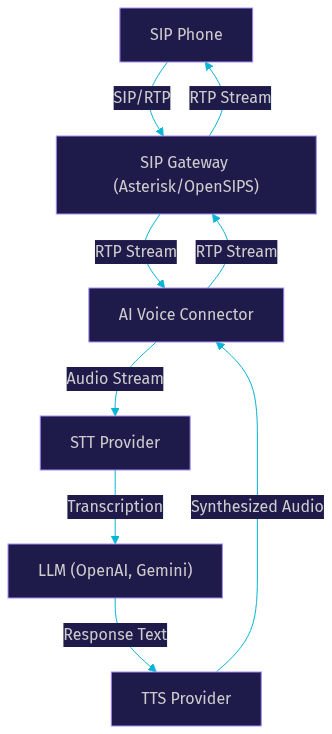
The core components include a SIP server for signaling, an AI voice connector for media bridging, and external AI services for cognitive processing. The SIP server, such as Asterisk or OpenSIPS, handles the initial call connection and routing. The AI voice connector acts as a middleware layer, translating between the telephony network and the AI providers. VideoSDK simplifies this architecture by providing a built-in SIP integration layer that natively connects to its AI agent pipeline.
The data path follows a predictable sequence. An inbound call arrives at the SIP server, which forwards the media stream to the AI voice connector. The connector streams the audio to the STT provider, waits for the transcription, and sends it to the LLM. The LLM generates a response, which the TTS provider converts back to audio. The connector then streams this audio back through the SIP server to the caller.
Choosing the Right SIP Server
Selecting the right SIP server is a critical decision that impacts how easily your AI voice bot integrates with the telephony network. The SIP server manages call routing, registration, and media handling, serving as the entry point for all voice traffic.
OpenSIPS is a highly scalable SIP proxy that excels at call routing and load balancing. It is ideal for high-volume environments where the primary goal is directing calls to the appropriate AI connector. However, OpenSIPS does not natively handle media, meaning you need a separate media server for RTP processing.
Asterisk is a versatile PBX and media server that handles both signaling and media. Its extensive module ecosystem allows developers to intercept audio streams and forward them to external applications. Asterisk is often the preferred choice for AI voice bot SIP integration because it can natively manage codec translation and RTP streaming.
FreeSWITCH offers a modern alternative with strong support for WebRTC and advanced media handling. It provides built-in capabilities for streaming media to external services, making it a strong candidate for connecting telephony to AI pipelines. When choosing a server, evaluate module extensibility, community support, and native RTP handling capabilities to ensure it meets your integration requirements.
Selecting AI Providers
The performance of your AI voice bot depends heavily on the AI providers you select for the STT and TTS components. Latency, accuracy, and naturalness of the AI models directly impact the caller experience.
For speech-to-text, Deepgram is known for its low-latency streaming APIs and high accuracy on conversational audio. OpenAI Whisper offers robust transcription across multiple languages, while Azure Speech provides enterprise-grade reliability and compliance. When evaluating STT providers, prioritize real-time streaming capabilities over batch processing to maintain conversational flow.
For text-to-speech, ElevenLabs leads in voice naturalness and emotional expressiveness. OpenAI TTS provides a solid balance of speed and quality, and Google Cloud TTS offers extensive language support. The key factor here is latency: the TTS provider must generate audio fast enough to prevent awkward pauses in the conversation.
A practical approach is to use a multi-provider strategy. VideoSDK's AI agent architecture supports multiple STT and TTS providers, allowing you to route traffic based on language, latency requirements, or cost constraints. This flexibility ensures your voice bot remains responsive even if a single provider experiences degraded performance.
Configuring the AI Voice Connector
The AI voice connector is the middleware that bridges your SIP infrastructure with your AI providers. Configuring it properly ensures reliable audio streaming and accurate conversation handling.
Configuration involves setting up environment variables for SIP credentials, AI provider API keys, and model selections. The connector needs to know how to register with your SIP server, including the server address, port, and authentication details. It also requires credentials for your chosen STT, LLM, and TTS providers.
Voice activity detection (VAD) and turn detection are critical settings. VAD determines when the caller has started and stopped speaking, while turn detection decides when the AI should respond. Configuring these thresholds correctly prevents the bot from interrupting callers or waiting too long to reply.
Codec compatibility is another essential configuration step. SIP networks typically use telephony codecs like PCMU or PCMA (G.711), while AI providers often work with higher-quality audio formats. The connector must handle codec translation seamlessly to prevent audio degradation.
Deploying the Solution
Deploying an AI voice bot SIP integration requires careful attention to network topology and infrastructure scaling. The deployment strategy affects both the reliability of the SIP signaling and the latency of the AI processing.
Container-based deployment using Docker is the standard approach for modern telephony applications. Containers allow you to package the SIP server, AI connector, and dependencies into isolated environments that can be scaled horizontally. For production, use an orchestration platform like Kubernetes to manage container health, scaling, and automated restarts.
Network considerations are paramount. SIP signaling typically operates on ports 5060 (UDP/TCP) and 5061 (TLS), while RTP media streams use a dynamic range of UDP ports. You must configure your firewalls to allow this traffic and handle NAT traversal using STUN or TURN servers. Failing to properly configure NAT traversal results in one-way audio or failed call setups.
For a production-ready rollout, security and monitoring must be baked into the deployment. Enable TLS for SIP signaling to prevent eavesdropping and SRTP for media encryption. Deploy monitoring agents alongside the connector to track system health and alert on anomalies. VideoSDK's Agent Cloud handles much of this complexity by providing a managed environment for deploying AI voice agents with built-in telephony support.
Handling Call Flow Scenarios
A well-designed AI voice bot must handle various call flow scenarios gracefully, from inbound customer queries to outbound reminders and human handoffs.
For inbound calls, the AI voice bot should answer with a contextual greeting and dynamically determine the caller's intent. Instead of a static menu, the bot engages in natural conversation, asking clarifying questions and providing relevant information. If the caller's intent is unclear, the bot can use fallback prompts to guide the conversation.
Outbound call scenarios, such as appointment reminders or proactive notifications, require the bot to initiate the SIP call. The connector triggers the SIP server to dial the target number, and once the call connects, the AI bot delivers its message. It must be prepared to handle voicemail systems and DTMF responses from automated answering systems.
Call transfer to a human agent is a critical capability. Using SIP REFER, the AI bot can transfer the call to a human queue while passing along the conversation context. The bot should also support barge-in, allowing callers to interrupt the AI's speech if they already know what they want. VideoSDK's telephony integration supports these advanced call flows, including warm transfers and DTMF event handling.
Monitoring, Logging, and Troubleshooting
Operating an AI voice bot SIP integration in production requires rigorous monitoring and structured logging to maintain quality of service.
Key metrics to track include latency per conversational turn, RTP packet loss, and AI provider error rates. High latency between the caller finishing a sentence and the AI responding creates a poor user experience. Packet loss leads to choppy audio, while provider errors cause dropped conversations. Monitoring these metrics in real-time allows you to identify and resolve issues before they impact callers.
Log aggregation should use structured formats with correlation IDs. Every call should generate a unique ID that ties together SIP signaling logs, AI connector events, and AI provider responses. This allows you to trace the exact path of a failed call through the entire system.
Common issues include codec mismatches, where the SIP server and AI connector fail to agree on an audio format, and VAD misfires, where the bot incorrectly detects silence or background noise as speech. SIP registration failures are also frequent, often caused by incorrect credentials or firewall blocks. VideoSDK provides pipeline observability tools that help diagnose these issues within the agent session.
Security and Compliance
Securing an AI voice bot SIP integration involves protecting both the telephony traffic and the sensitive voice data processed by the AI models.
SIP traffic should always be secured using TLS for signaling and SRTP for media streams. Unencrypted SIP leaves call metadata and audio vulnerable to interception. Implement IP whitelisting on your SIP server to ensure only authorized AI connectors can initiate sessions.
Protecting AI API keys is equally important. Never hardcode credentials in your deployment configuration. Use a secure secrets management system to inject API keys into the connector environment at runtime.
Compliance with regulations like GDPR is mandatory when handling voice data. Callers should be informed that their conversation is being processed by AI. Implement data retention policies to ensure voice recordings and transcriptions are deleted after a specified period. VideoSDK's architecture supports secure SIP configurations and provides tools to manage data privacy within your AI agent workflows.
Real-World Use Cases
AI voice bot SIP integration is transforming several industries by automating complex voice interactions.
Customer support IVR is the most common use case. Instead of navigating a menu of options, callers interact with an AI bot that understands natural language. The bot can resolve common issues, look up account information, and triage complex problems before routing to a human agent.
Healthcare providers use AI voice bots for automated outbound reminder calls. The bot dials patients to confirm upcoming appointments, reducing no-show rates. If a patient needs to reschedule, the bot can handle the conversation or transfer the call to the scheduling desk.
Multilingual call centers use AI voice bots to route international calls. The bot detects the caller's language in real-time and either continues the conversation natively or transfers the call to an agent who speaks the detected language. This eliminates the need for static language selection menus.
Future Trends in AI Voice Bot SIP Integration
The landscape of AI voice bot SIP integration is evolving rapidly, driven by advancements in real-time AI models and edge computing.
Emerging real-time multimodal models, such as OpenAI Realtime and Gemini Live, are reducing the latency of AI voice interactions by processing audio directly without separate STT and TTS steps. This will make AI voice bots feel even more conversational and responsive over SIP networks.
Edge deployment is another growing trend. By running AI models closer to the SIP infrastructure, developers can achieve ultra-low latency and reduce dependency on cloud providers. This is particularly relevant for large-scale telephony deployments.
Integration with deterministic conversational graphs is also gaining traction. Instead of relying solely on an LLM to drive the conversation, developers use state machines to enforce business logic, ensuring compliance and accuracy in scenarios like loan applications or payment processing. VideoSDK's Conversational Graph provides this deterministic flow control on top of its AI agent pipeline.
Definitions Glossary
SIP (Session Initiation Protocol): A signaling protocol used to initiate, maintain, and terminate real-time communication sessions, including voice calls over IP networks.
RTP (Real-time Transport Protocol): A network protocol for delivering audio and video over IP networks, used to carry the actual voice media in a SIP call.
Voice Activity Detection (VAD): A technique used in audio processing to detect the presence or absence of human speech, allowing an AI voice bot to know when a caller is speaking.
SIP REFER: A SIP method used to transfer a call from one party to another, enabling an AI voice bot to hand off a caller to a human agent.
Conversational Graph: A deterministic, graph-based orchestration layer that controls conversation flow in an AI voice bot, ensuring business rules are followed without relying solely on LLM judgment.
Key Takeaways
- AI voice bot SIP integration bridges traditional telephony with modern AI pipelines, enabling natural conversational agents over standard phone lines.
- A robust architecture requires a SIP server for signaling, an AI voice connector for media bridging, and reliable STT, LLM, and TTS providers.
- Deployment must account for NAT traversal, codec compatibility, and strict security measures like TLS and SRTP.
- VideoSDK simplifies this integration by providing built-in SIP support, AI agent orchestration, and pipeline observability.
- Future trends point toward real-time multimodal models and deterministic conversational graphs for more responsive and compliant voice bots.
Conclusion
Integrating an AI voice bot with a SIP network transforms rigid telephony infrastructure into a dynamic, conversational platform. By carefully selecting your SIP server, configuring the AI voice connector, and securing your media streams, you can deploy a production-ready voice assistant that handles complex call flows autonomously. VideoSDK provides the tools to build this architecture efficiently, offering native SIP integration and a powerful AI voice agent pipeline. Explore the VideoSDK AI Agents documentation and Telephony integration guide to start building your solution.
What are you building with VideoSDK? Drop a comment and let us know about your AI voice bot SIP integration use case.
Free $20 Balance for AI Voice Agents & Video Calls
FAQ