


AI voice bot echo cancellation removes the speaker-to-microphone echo that would otherwise confuse a conversational agent. Modern approaches combine adaptive DSP filters with neural-network models to achieve sub-500 ms latency on typical CPUs. Start by selecting a low-latency AEC mode, tune delay estimation, and validate with real-world speech.
Voice bots are everywhere in 2026, handling customer support, scheduling appointments, and acting as personal assistants. But there is one failure mode that can instantly ruin the illusion of a smart conversational agent: echo. When a voice bot hears its own synthesized voice through the microphone, it interrupts itself, hallucinates responses, or enters an infinite loop of apologies. This problem is especially acute in speakerphone scenarios where audio leaks from the speaker back into the microphone. If you are building a real-time conversational agent using a platform like VideoSDK AI Voice Agents, robust echo cancellation is not optional. It is a foundational requirement. This guide breaks down the architecture, models, and latency budgets you need to build a voice bot that actually listens instead of talking to itself.
AI Voice Bot Echo Cancellation: What Is It?
AI voice bot echo cancellation is the process of removing the audio played through a device's speaker from the signal captured by its microphone. In a typical voice bot scenario, the agent generates speech using a text-to-speech engine and plays it through the user's speaker. The microphone picks up this acoustic output along with the user's actual speech. Without cancellation, the agent's speech-to-text engine transcribes its own words, causing the conversation to break down.
The acoustic path is the physical journey of sound from the speaker, through the air, bouncing off walls, and into the microphone. This path introduces delays and distortions. Traditional Digital Signal Processing (DSP) approaches use adaptive filters to model this acoustic path and subtract the estimated echo from the microphone signal. Neural methods, such as model-based echo cancellation, use deep learning networks to perform the same subtraction but can handle non-linear distortions introduced by cheap speakers or aggressive compression algorithms.
Why Echo Cancellation Matters for Voice Bots
Echo cancellation is the difference between a voice bot that feels like a seamless conversation and one that feels like a broken walkie-talkie. When a bot fails to cancel echo, the user experience degrades rapidly. The bot might stop mid-sentence because it detects its own voice as an interruption. It might answer a question the user never asked.
Beyond user experience, echo severely degrades speech recognition accuracy. Automatic speech recognition (ASR) systems are trained on human speech, not on a mix of human speech and synthetic bot audio. When the ASR engine receives a contaminated audio stream, word error rates skyrocket.
The most critical scenario is double-talk, which occurs when the user and the bot speak at the same time. Humans do this naturally, overlapping words to show engagement or to interrupt. A voice bot without robust double-talk detection will fail to recognize the user's speech during these overlapping periods, making the interaction feel unnatural and rigid.
Traditional DSP Approaches vs Neural Models
Developers building voice bots generally choose between two main approaches for echo cancellation: traditional DSP and neural network models. Each has distinct trade-offs in performance, latency, and complexity.
Traditional DSP relies on linear adaptive filters, most commonly the Normalized Least Mean Squares (NLMS) algorithm or Kalman filters. These algorithms work by continuously adjusting a set of filter coefficients to match the impulse response of the acoustic environment. They are computationally lightweight and introduce minimal latency. However, they struggle with non-linear distortions. If the user's device has a cheap amplifier or a saturated speaker, the acoustic path becomes non-linear, and linear filters leave a noticeable echo residual.
Neural AEC models, popularized by research from Microsoft and others, use deep learning to map the reference signal and microphone input directly to a clean speech signal. These models excel at removing non-linear echo and suppressing background noise simultaneously. The trade-off is computational cost. Neural models require more CPU or GPU resources and can introduce higher latency if not heavily optimized. In 2026, hybrid approaches are becoming the standard. A DSP filter handles the bulk of the linear echo, and a lightweight neural network cleans up the residual echo and non-linear artifacts.
Key Components of an Echo Canceller
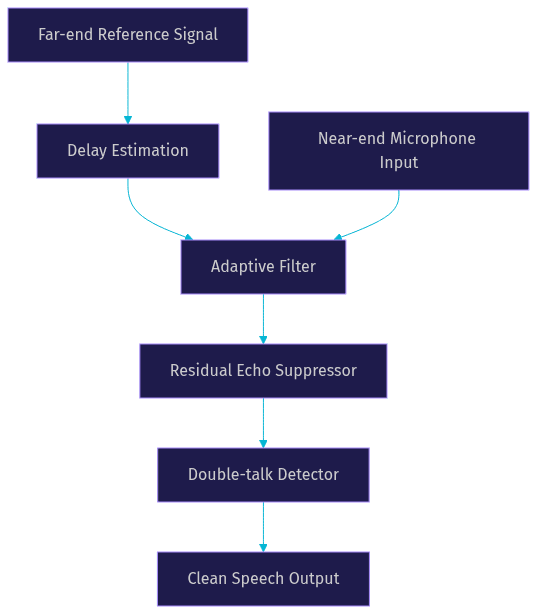
A robust echo canceller is not a single algorithm but a pipeline of specialized components working together. Understanding this pipeline is essential for debugging audio issues in your voice bot.
The first component is reference signal capture. The echo canceller needs a copy of the exact audio being sent to the speaker. Any latency or mismatch between this reference and the actual playback will ruin the cancellation.
Next is adaptive delay estimation. The time it takes for audio to leave the speaker and reach the microphone varies based on hardware, buffer sizes, and network conditions. The system must constantly estimate this delay to align the reference signal with the microphone input.
Once aligned, the echo filter adaptation begins. The adaptive filter models the acoustic path and subtracts the estimated echo from the microphone signal.
After subtraction, residual echo suppression removes any remaining echo that the filter missed. This stage often acts like a fast-acting noise gate, ducking the audio when the bot is speaking but the user is not.
Finally, double-talk detection monitors the input to see if the user is speaking while the bot is also speaking. If double-talk is detected, the system temporarily freezes filter adaptation to prevent the filter from unlearning the acoustic path.
Designing for Low Latency (<500 ms)
Latency is the silent killer of voice bot applications. If the round-trip time from user speech to bot response exceeds 500 ms, the conversation starts to feel like a satellite phone call. Echo cancellation plays a critical role in this latency budget.
Frame size is your first major decision. Smaller audio frames mean lower latency but higher CPU overhead because the algorithm runs more frequently. A frame size of 10 ms is a common starting point for real-time audio processing. This leaves enough room in the budget for network transmission, ASR processing, LLM inference, and text-to-speech generation.
CPU considerations are paramount if you are running on-device inference. A complex neural AEC model running on a 10 ms frame budget can easily max out a mobile device's CPU, causing thermal throttling and audio glitches. You must profile your chosen AEC method on your target hardware.
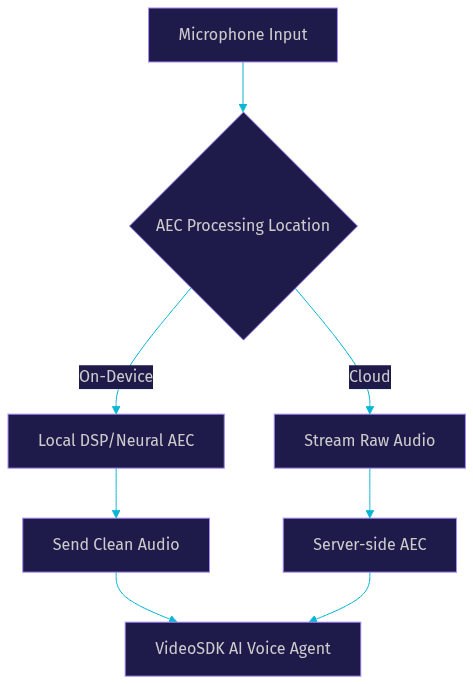
The trade-off between on-device and cloud processing also affects latency. On-device processing eliminates the network round-trip for raw audio, keeping the AEC latency strictly local. Cloud-based AEC requires sending the raw microphone audio and the reference signal to a server, processing it, and sending it back. This adds network jitter to the latency budget, which can be unpredictable.
Choosing the Right Architecture: On-Device vs Cloud
Deciding where to run your echo cancellation depends on your specific application constraints. There is no one-size-fits-all answer.
On-device processing is the best choice for privacy-sensitive applications. If the raw audio never leaves the user's device, you avoid potential compliance issues with regulations like GDPR or HIPAA. It also saves bandwidth, as you only transmit the clean speech to your VideoSDK room. However, on-device processing requires you to support a wide range of hardware capabilities. Your AEC model must run efficiently on both a high-end desktop and a low-end smartphone.
Cloud-based AEC centralizes your processing power. You can run a massive, highly accurate neural model on a GPU server without worrying about the user's device battery life. This architecture simplifies updates, as you can deploy a new model instantly without waiting for app store approvals. The downside is the bandwidth requirement and the added network latency. You also have to handle the privacy implications of streaming raw audio to your servers.
Evaluation Metrics and Benchmarks
You cannot improve what you cannot measure. Evaluating echo cancellation requires specific metrics and standardized datasets to ensure your voice bot performs well in real-world conditions.
Echo Return Loss Enhancement (ERLE) is the standard metric for measuring how much echo a system removes. It is the ratio of the echo power before cancellation to the echo power after cancellation, expressed in decibels. A higher ERLE means better cancellation. However, ERLE alone is insufficient because it does not account for speech distortion.
To measure speech quality, developers use Perceptual Evaluation of Speech Quality (PESQ) or Mean Opinion Score (MOS). These metrics evaluate how natural and clear the near-end speech sounds after the echo has been removed. A system can achieve a high ERLE by aggressively gating the microphone, but this will result in a terrible PESQ score because the user's speech will be clipped and distorted.
Real-time factor (RTF) measures computational efficiency. An RTF of 1.0 means the system processes audio at the same speed it arrives. For real-time voice bots, your AEC system must have an RTF significantly less than 1.0 to leave headroom for other processing tasks.
For benchmarking, the Microsoft AEC Challenge dataset is a widely used resource. It provides thousands of real-world audio samples with varying echo paths, noise levels, and double-talk scenarios. When reporting results, always test across multiple devices and network conditions to get a true picture of robustness.
Common Pitfalls and How to Avoid Them
Building echo cancellation is fraught with edge cases. Avoiding these common pitfalls will save you hours of debugging.
Non-linear echo paths are the most frequent culprit behind poor performance. When users turn their device volume to maximum, the speaker amplifier saturates, creating a distorted signal that linear filters cannot model. To avoid this, use a hybrid DSP-neural approach where the neural network is trained specifically on saturated speaker samples.
Variable acoustic delay is another major issue. Bluetooth headsets and Wi-Fi speakers introduce fluctuating buffer sizes, meaning the delay between the reference signal and the microphone input changes constantly. If your delay estimation algorithm cannot track these changes quickly, the adaptive filter will misalign and fail. Implement a robust cross-correlation delay estimator that can handle jitter.
Insufficient double-talk handling leads to a bot that never lets the user interrupt. If your system cannot distinguish between the bot's echo and the user's actual speech, it will suppress both. Tune your double-talk detector to be sensitive enough to catch low-volume interruptions but not so sensitive that it triggers on echo residuals.
Over-aggressive suppression causes speech distortion. If your residual echo suppressor acts like a brick-wall gate, it will clip the beginning and end of the user's words. Use a smooth suppression curve that fades out the audio rather than cutting it abruptly.
Future Trends in Echo Cancellation for Voice Bots
The field of echo cancellation is evolving rapidly alongside advancements in AI hardware and models. In 2026, several trends are shaping the future of voice bot audio processing.
Model-based AEC is moving from research papers into production. These models use deep learning not just for residual suppression but for the entire cancellation pipeline, offering superior performance in complex acoustic environments. As inference frameworks become more efficient, these full-neural pipelines will become viable on mobile devices.
Multi-modal pipelines are also gaining traction. By combining audio signals with visual data from a camera, a system can use lip movement to detect double-talk with near-perfect accuracy. This is particularly useful for smart display devices where the user is facing the screen.
On-chip neural accelerators, like the Apple Neural Engine or dedicated NPUs on Android devices, are making it possible to run complex AEC models with minimal battery drain. This hardware evolution will push more processing to the edge, reducing reliance on cloud-based AEC.
Finally, adaptive hybrid DSP-neural solutions are becoming smarter. Instead of a static split between DSP and neural processing, future systems will dynamically allocate resources based on the acoustic environment, switching to a heavier neural model only when non-linear distortion is detected.
Implementation Checklist
Before you launch your AI voice bot, verify these critical steps to ensure your echo cancellation is production-ready.
- Verify that the reference signal is captured from the exact point before it reaches the hardware audio driver.
- Test the delay estimation algorithm with various Bluetooth and Wi-Fi devices to ensure it handles jitter.
- Measure the ERLE and PESQ scores on a diverse set of real-world audio samples.
- Confirm that the double-talk detector allows users to interrupt the bot naturally.
- Profile the CPU usage on your lowest-supported target device to prevent thermal throttling.
- Ensure the total round-trip latency, including AEC processing, stays below 500 ms.
- Validate that the residual echo suppressor does not clip the user's speech at the beginning or end of phrases.
Definitions Glossary
Acoustic Echo Cancellation (AEC): The process of removing audio played through a speaker from the signal captured by a microphone to prevent a voice bot from hearing itself.
Double-Talk Detection: A mechanism that identifies when both the far-end (the bot) and the near-end (the user) are speaking simultaneously, preventing the adaptive filter from diverging.
ERLE (Echo Return Loss Enhancement): A metric measuring the reduction in echo power after cancellation, expressed in decibels. Higher values indicate better performance.
Residual Echo Suppression: The stage in an AEC pipeline that removes any remaining echo left over after the main adaptive filter has done its job, often acting like a dynamic noise gate.
VideoSDK AI Voice Agent: A Python-based agent framework that connects LLMs, STT, and TTS providers to real-time audio rooms, requiring robust AEC to function properly in speakerphone scenarios.
Key Takeaways
- AI voice bot echo cancellation is essential for preventing conversational loops and ensuring accurate speech recognition.
- Traditional DSP filters are fast but struggle with non-linear distortions, while neural models handle complex audio but require more computational power.
- A robust echo canceller requires a pipeline including delay estimation, adaptive filtering, residual suppression, and double-talk detection.
- Designing for sub-500 ms latency requires careful frame size selection and CPU profiling, especially if processing on-device.
- Evaluation should balance ERLE for echo removal with PESQ or MOS for speech quality to avoid over-aggressive suppression.
Conclusion
Building a voice bot that can hold a natural conversation means solving the echo problem first. Whether you rely on traditional DSP, a neural network, or a hybrid approach, the goal is the same: clean audio in, clean audio out. By understanding the components of an echo canceller, designing for low latency, and avoiding common pitfalls, you can build a robust voice agent that users actually enjoy talking to. Ready to build your own real-time voice bot? Explore the VideoSDK AI Voice Agents documentation to get started, and join the VideoSDK Discord community to share your progress. What are you building with VideoSDK? Drop a comment below.
FAQ