


AI voice agents for tele medicine are conversational AI systems that handle patient interactions over voice, automating triage, scheduling, and follow-ups. They combine speech-to-text, large language models, and text-to-speech to deliver 24/7 access and reduce clinician workload. Platforms like VideoSDK provide the necessary real-time infrastructure to deploy these agents securely over WebRTC or SIP.
The demand for instant, hands-free patient interaction in telemedicine is rising rapidly. Patients expect the same frictionless experience from healthcare as they get from consumer apps. AI voice agents for tele medicine promise to bridge this gap by offering 24/7 access, reducing wait times, and scaling clinician capacity without overwhelming staff. These agents can triage symptoms, schedule appointments, and follow up post-visit, all through natural voice conversations. By integrating real-time speech-to-text in telemedicine with intelligent language models, providers can automate routine tasks while maintaining a human-like, empathetic tone. This article explores how to build, deploy, and measure the success of these AI-powered telehealth solutions.
What Are AI Voice Agents for Tele Medicine?
AI voice agents for tele medicine are defined as conversational AI systems specifically designed to handle healthcare-related patient interactions over voice channels. They work by capturing spoken audio, transcribing it to text, processing the text through a large language model (LLM) to determine intent and generate a response, and then synthesizing that response back into spoken audio. Unlike generic voice bots that rely on rigid decision trees and pre-recorded responses, medical voice assistants use dynamic natural language understanding to adapt to patient phrasing, handle interruptions, and manage complex medical workflows. VideoSDK provides the real-time media infrastructure that allows these agents to operate with sub-second latency, ensuring natural conversational flow.
Core Technology Stack
The core technology stack for a medical voice assistant workflow includes four primary components. First, a speech-to-text (STT) engine captures the patient's spoken audio and transcribes it in real time. Second, a large language model (LLM) processes the transcript, referencing clinical guidelines and patient history to formulate an appropriate response. Third, a text-to-speech (TTS) engine converts the LLM's text response back into natural-sounding speech. Finally, an integration layer connects these components to the telephony or WebRTC infrastructure and external systems like Electronic Health Records (EHR). VideoSDK's AI Agent SDK acts as this unifying layer, orchestrating the pipeline and managing the real-time media stream.
Why Telemedicine Needs Voice Agents
Telemedicine needs voice agents because they solve critical bottlenecks in remote care delivery. They reduce wait times by instantly answering common questions and handling routine tasks without human intervention. They provide 24/7 access, allowing patients to get help outside of normal clinic hours. They ensure telemedicine compliance by following deterministic conversation flows and logging every interaction for audit purposes. Most importantly, they scale clinician capacity by offloading administrative work, letting healthcare providers focus on complex clinical care rather than scheduling or basic triage.
Key Benefits for Healthcare Providers
AI voice agents for tele medicine offer significant benefits for healthcare providers. Faster triage is a primary advantage, as AI symptom assessment can quickly categorize patient urgency and route cases appropriately. Appointment automation through AI-driven appointment scheduling reduces the administrative burden on staff and minimizes scheduling errors. Reduced no-shows are achieved through automated AI follow-up calls and reminders, which can confirm attendance and reschedule if necessary. Improved patient satisfaction results from instant, frictionless interactions that respect the patient's time. Finally, data capture for analytics is a major benefit, as every voice interaction generates a transcript that can be analyzed for population health trends, patient sentiment, and operational efficiency. By leveraging conversational AI for remote care, providers can achieve a higher AI voice agent ROI while maintaining high standards of care.
Building an AI Voice Agent for Telemedicine
Building an AI voice agent for telemedicine requires a structured approach. First, define clinical use-cases, such as post-op follow-up or medication refill, to scope the agent's capabilities. Second, choose compliant STT and TTS providers that offer HIPAA-compliant voice agents and can sign a Business Associate Agreement (BAA). Third, design the conversation flow using deterministic steps for safety-critical actions, ensuring the agent always escalates to human staff when necessary. Fourth, connect the agent to your EHR or scheduling system to enable real-time data retrieval and updates. Fifth, deploy the agent via SIP for traditional phone calls or WebRTC for in-app voice interactions. VideoSDK simplifies this process by providing an AI Agent SDK that handles the real-time media transport, allowing you to focus on the clinical logic rather than the underlying WebRTC or SIP telephony infrastructure.
Designing Clinical Conversation Flows
Designing clinical conversation flows requires a balance of flexibility and safety. Use deterministic steps for critical actions like medication dosage confirmation or emergency triage. The agent should follow a strict path for these interactions, using the LLM only for natural language understanding, not for clinical decision-making. Implement safety checks at every node, such as verifying patient identity and checking for red-flag symptoms. Always include an escalation path to human staff, allowing the patient to say "speak to a nurse" at any time to be transferred immediately. VideoSDK's Conversational Graph is an excellent tool for this, as it lets you define a deterministic state machine for the conversation while using the LLM for natural language generation.
Ensuring HIPAA & Security Compliance
Ensuring HIPAA and security compliance is non-negotiable for AI voice agents in healthcare. All data must be encrypted in transit and at rest. Implement audit logging for every interaction, capturing timestamps, participant IDs, and transcripts for compliance review. Consider data residency requirements, ensuring that all STT, LLM, and TTS processing occurs within approved geographic regions. Most importantly, ensure that all vendors in your stack, from the STT provider to the telephony gateway, are willing to sign a BAA. VideoSDK supports these requirements by providing secure, encrypted media transport and allowing you to choose your own AI providers, giving you control over where patient data is processed.
Integrating with Existing Telehealth Platforms
Integrating AI voice agents with existing telehealth platforms enhances the overall patient experience. AI voice agents complement video calling SDKs by handling pre-visit tasks like patient intake and insurance verification, post-visit tasks like follow-up calls and satisfaction surveys, and even in-visit tasks like real-time medical transcription. For example, a patient might receive an AI voice call the day before a video visit to confirm their appointment and collect pre-visit symptoms. During the video visit, the same AI infrastructure can provide real-time transcription. After the visit, the AI agent can call to check on the patient's recovery. VideoSDK's unified platform supports both video calling and AI voice agents, making it easy to build a seamless, multi-modal telehealth experience.
Real-World Use Cases
AI voice agents for tele medicine are transforming healthcare delivery across several real-world use cases. Pre-procedure preparation is streamlined by AI agents calling patients to provide fasting instructions and confirm transportation. Post-op follow-up is automated, with agents checking on pain levels and wound healing. Medication refill requests are handled entirely by AI, from verifying the prescription to notifying the pharmacy. Chronic-condition check-ins are managed by AI agents that ask standardized questions about symptoms and lifestyle factors. No-show recovery is improved by AI agents calling patients who missed appointments to reschedule immediately. These use cases demonstrate how conversational AI for remote care can improve operational efficiency and patient outcomes.
Case Study: Reducing Colonoscopy No-Shows
Consider a gastroenterology clinic struggling with a 25% no-show rate for colonoscopy procedures. By deploying an AI voice agent to call patients 48 hours before the procedure, the clinic automated the confirmation and instruction process. The agent verified the patient's identity, confirmed the appointment, delivered bowel prep instructions, and answered common questions. If a patient indicated they could not attend, the agent immediately offered alternative dates. This workflow resulted in a 30% reduction in no-shows, freeing up valuable clinical time and improving revenue. The AI voice agent latency was low enough that the conversation felt natural, and patients reported high satisfaction with the reminder process.
Case Study: 24/7 Symptom Triage
A large telemedicine provider implemented a 24/7 AI symptom triage line to handle after-hours calls. When a patient called, the AI voice agent collected their symptoms, medical history, and current medications. The agent used a deterministic triage protocol to categorize the urgency of the case. For non-urgent cases, the agent scheduled a routine telehealth video visit for the next day. For urgent cases, the agent initiated a warm transfer to the on-call clinician, passing along the collected information. This system reduced after-hours clinician workload by 40% and ensured that urgent cases were prioritized effectively, demonstrating the value of AI call routing in healthcare.
Choosing the Right Vendor Stack
Choosing the right vendor stack is critical for building effective AI voice agents for tele medicine. For STT, providers like AssemblyAI and Deepgram offer high-accuracy, real-time transcription. For LLMs, OpenAI and Anthropic provide powerful reasoning capabilities. For TTS, ElevenLabs and Google Cloud TTS offer natural, human-like voices. For telephony gateways, Twilio SIP and Vonage provide reliable phone connectivity. However, integrating these disparate services can be complex. VideoSDK's AI Agent SDK acts as a unifying layer, providing the real-time media infrastructure and agent orchestration to connect your chosen STT, LLM, and TTS providers. This approach gives you the flexibility to choose the best AI models while ensuring low-latency, compliant delivery.
Decision Framework
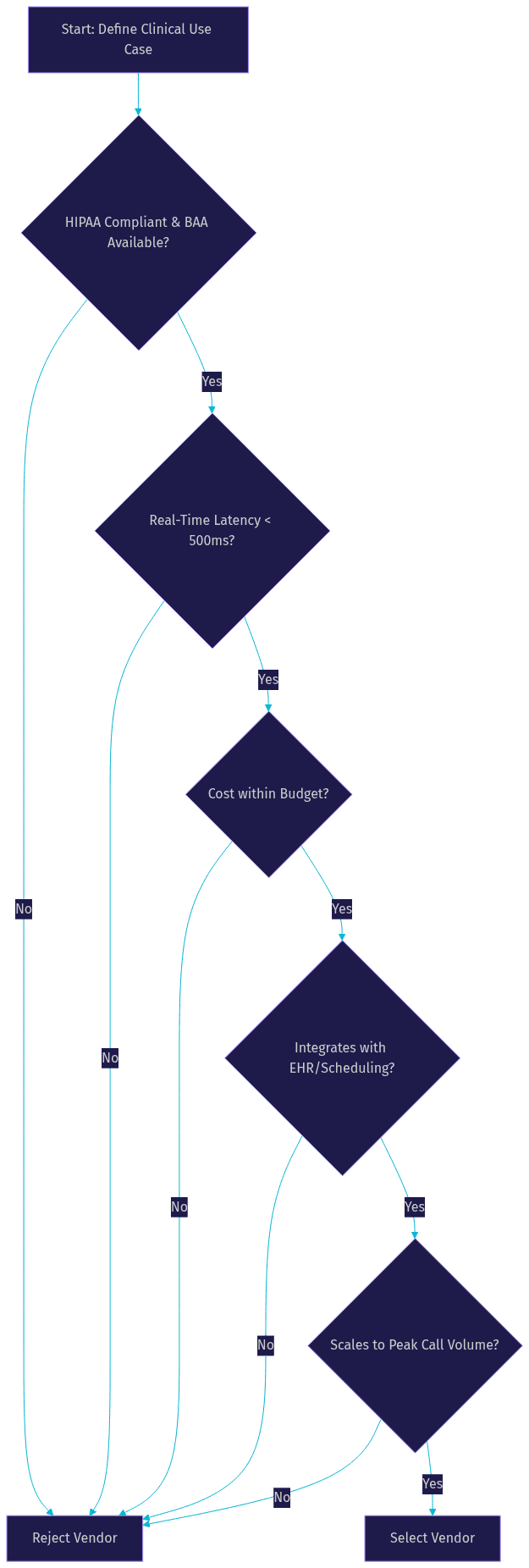
Choosing the right components requires a structured decision framework. The following diagram illustrates the criteria for selecting your AI voice agent stack, prioritizing compliance, latency, cost, integration, and scalability.
Measuring Success and ROI
Measuring the success of AI voice agents for tele medicine requires tracking specific key metrics. Call answer rate measures how often the agent successfully picks up and initiates the conversation. Average handling time tracks the duration of the interaction, helping identify inefficiencies. Appointment conversion rate measures how often the agent successfully schedules or reschedules an appointment. Cost per interaction calculates the total cost of the AI stack divided by the number of calls, which should be significantly lower than a human agent. Patient satisfaction scores, gathered through post-call surveys, provide qualitative feedback on the agent's performance. By monitoring these metrics, providers can calculate their AI voice agent ROI and optimize their conversational AI for remote care.
Common Pitfalls and How to Avoid Them
Several common pitfalls can undermine the effectiveness of AI voice agents in telemedicine. Mis-aligned prompts can cause the LLM to generate irrelevant or unsafe responses, so always test prompts thoroughly with clinical scenarios. Token expiry can interrupt long conversations, so implement token refresh logic in your integration layer. Poor audio quality from the patient's device can confuse the STT engine, so use noise suppression and ask the patient to repeat if confidence is low. Over-automation is a risk, as patients may become frustrated if they cannot reach a human, so always provide an easy escalation path. Finally, handling edge cases like non-English speakers or patients with speech impairments requires fallback mechanisms, such as routing to a human agent or offering a text-based chat interface.
Future Trends in AI Voice for Telemedicine
The future of AI voice for telemedicine is bright, with several emerging trends. Multimodal agents will combine voice with video and text, allowing patients to show the agent a rash while describing it verbally. Real-time translation will enable providers to serve diverse populations without language barriers. Personalized health coaching will use patient data to provide tailored advice on diet, exercise, and medication adherence. Regulatory evolution will likely create clearer pathways for AI-assisted clinical decision-making, expanding the scope of what these agents can do. As these trends mature, platforms like VideoSDK will continue to provide the real-time infrastructure needed to deliver these advanced capabilities securely and reliably.
Definitions Glossary
AI Voice Agent: A conversational AI system that interacts with users over voice channels, using STT, LLM, and TTS to understand and respond to spoken language.
Speech-to-Text (STT): The process of converting spoken audio into text, enabling the AI agent to understand the patient's words.
Large Language Model (LLM): An AI model that processes text to determine intent, generate responses, and manage conversation flow.
Text-to-Speech (TTS): The process of converting text generated by the LLM back into natural-sounding spoken audio.
Conversational Graph: A deterministic flow engine that defines the structure of a conversation, ensuring safety and compliance in clinical interactions.
Business Associate Agreement (BAA): A legal contract required by HIPAA between a healthcare provider and a vendor that handles protected health information.
Key Takeaways
- AI voice agents for tele medicine automate routine tasks like triage, scheduling, and follow-ups, freeing up clinician capacity.
- A successful medical voice assistant workflow requires a compliant stack of STT, LLM, and TTS providers, unified by a real-time platform like VideoSDK.
- Designing clinical conversation flows requires deterministic steps, safety checks, and easy escalation to human staff.
- Measuring success involves tracking call answer rates, handling times, and patient satisfaction to calculate AI voice agent ROI.
- Future trends include multimodal agents, real-time translation, and personalized health coaching, all built on secure real-time infrastructure.
Conclusion
AI voice agents for tele medicine are transforming healthcare delivery by providing 24/7 access, automating routine tasks, and scaling clinician capacity. By combining real-time speech-to-text, intelligent language models, and natural text-to-speech, providers can build HIPAA-compliant voice agents that improve patient satisfaction and operational efficiency. VideoSDK's AI Agent SDK provides the unified real-time infrastructure needed to deploy these agents securely over WebRTC or SIP. Ready to transform your telehealth platform? Explore VideoSDK's AI Voice Agent platform and start your pilot today. What are you building with VideoSDK? Drop a comment, I'd love to hear what kind of telemedicine use case you're working on.
FAQ