


AI voice agent transcription accuracy measures how correctly a speech-to-text system converts spoken language into text within a voice agent pipeline. It is typically evaluated using Word Error Rate (WER), concatenated minimum-permutation WER (cpWER), and Missed Entity Rate (MER), with lower scores indicating better performance. VideoSDK's AI Voice Agent SDK integrates with leading STT providers to help developers build voice agents with high transcription fidelity.
When a user calls an AI voice agent to book a flight, every word matters. If the speech-to-text engine mishears "flight to Boston" as "flight to Austin," the entire conversation derails. Transcription accuracy is the foundation upon which every downstream AI decision rests, and even a single percentage point improvement in Word Error Rate can mean the difference between a successful interaction and a failed one.
AI voice agents combine real-time speech recognition, large language model reasoning, and text-to-speech generation into a conversational pipeline. The transcription layer sits at the very front of that pipeline, converting raw audio into the text that the LLM processes. If the text is wrong, the reasoning is wrong, and the response is wrong.
This guide breaks down the core metrics that define transcription accuracy, the factors that influence it, how leading STT providers compare in 2026 benchmarks, and practical steps you can take to maximize accuracy in your own voice agent deployments.
What is AI Voice Agent Transcription Accuracy?
AI voice agent transcription accuracy is defined as the degree to which a speech-to-text system correctly converts spoken audio into written text within a real-time conversational AI pipeline. It goes beyond simple word matching because voice agents operate in live, unpredictable conditions with varying accents, background noise, and domain-specific vocabulary.
The most widely cited metric is Word Error Rate (WER), which measures the percentage of words incorrectly transcribed compared to a reference transcript. However, WER alone can be misleading for voice agent use cases. A transcript with 5% WER might still miss the one critical entity (a phone number, a medication name, a dollar amount) that determines whether the agent can complete its task. That is why practitioners increasingly rely on complementary metrics like cpWER and Missed Entity Rate to capture the full picture of transcription quality.
Core Accuracy Metrics for Voice Agents
Word Error Rate (WER)
Word Error Rate is calculated by taking the sum of insertions, deletions, and substitutions in a transcript, dividing that by the total number of words in the reference text, and expressing the result as a percentage. A WER of 10% means roughly one in ten words is wrong.
For voice agents, WER has a significant limitation: it treats all errors equally. Substituting "the" for "a" counts the same as substituting "fifty" for "fifteen" in a payment amount. According to Artificial Analysis's Speech Arena benchmark, leading STT models now achieve WER rates between 5% and 12% on conversational audio, but those averages obscure the impact of high-value errors on downstream agent logic.
cpWER: Speaker-Aware Accuracy
Concatenated minimum-permutation WER (cpWER) combines transcription accuracy with speaker diarization accuracy into a single metric. It evaluates how well the system both transcribes what was said and attributes each segment to the correct speaker.
In multi-turn voice agent conversations, knowing who said what is essential. If the STT system attributes the agent's own synthesized speech back to the user, the LLM may loop or respond to its own output. cpWER penalizes these attribution errors alongside word-level mistakes, making it a more realistic measure for conversational AI than standalone WER.
Missed Entity Rate (MER)
Missed Entity Rate tracks how often a transcription system fails to correctly capture named entities such as people, places, organizations, numbers, dates, and domain-specific terms. For voice agents handling tasks like appointment scheduling, order placement, or insurance claims, entity accuracy often matters more than overall WER.
A system with 8% WER but 2% MER is far more useful for a booking agent than one with 6% WER but 15% MER. MER forces developers to focus on the words that actually drive business logic, not just aggregate correctness.
Factors That Influence Transcription Accuracy
Audio Quality and Environment
The quality of audio reaching the STT engine is the single biggest predictor of transcription accuracy. Clean speech captured at 16kHz or higher with a decent microphone produces dramatically better results than compressed phone audio at 8kHz. Background noise, echo, and reverberation all degrade accuracy, particularly for models trained primarily on studio-quality data.
VideoSDK addresses this at the infrastructure level with built-in noise suppression and network-adaptive streaming, which help maintain audio fidelity even on unstable connections. For voice agents, the audio pipeline should include pre-processing steps like echo cancellation and voice activity detection before audio reaches the STT service.
Accent, Dialect, and Language Diversity
Most STT benchmarks evaluate performance on standard American English, which does not reflect the diversity of real users. Non-native speakers, regional dialects, and multilingual code-switching all introduce significant accuracy drops. According to published evaluations from providers like Deepgram and AssemblyAI, WER for non-native English speakers can be 2 to 3 times higher than for native speakers.
For voice agents serving global audiences, accent robustness should be a primary selection criterion. Some providers, including Deepgram Nova and Google's transcription models, have made notable improvements in accent coverage, but no provider has solved this problem completely.
Speaker Overlap and Crosstalk
In scenarios where a voice agent interacts with multiple speakers or operates in environments with crosstalk (contact centers, conference calls), speaker overlap creates major transcription challenges. When two people speak simultaneously, the STT system must separate and correctly attribute each stream. Diarization errors compound quickly in these settings, and cpWER scores typically degrade faster than standalone WER.
Domain Vocabulary and Keyword Biasing
Every industry has terms that general-purpose STT models struggle with: medication names in healthcare, financial instruments in fintech, product SKUs in retail. Custom vocabulary biasing lets developers supply a list of domain-specific terms that the model should prefer during recognition.
This technique can dramatically reduce MER for entity-heavy conversations. The trade-off is maintenance: domain vocabularies must be updated as new products, terms, or entities are introduced, and over-biasing can cause the model to hallucinate biased terms in contexts where they do not belong.
Real-Time vs Batch Processing
Streaming transcription processes audio in real-time as it arrives, which is essential for voice agents that need to respond within sub-second latency windows. Batch transcription processes complete audio files after recording, allowing the model to use future context for better accuracy. Voice agents must use streaming, which means accepting a small accuracy penalty in exchange for latency. The gap between streaming and batch accuracy has narrowed significantly in 2026, but it has not closed entirely.
Benchmark Landscape: How Leading Providers Compare
Independent benchmarks provide the most reliable basis for comparing STT providers, but the landscape shifts rapidly as models update. As of mid-2026, several benchmarks offer useful signal for voice agent developers.
Artificial Analysis runs the Speech Arena benchmark, which evaluates STT models on conversational audio using WER and cpWER. The ConnexAI contact-center benchmark focuses on real-world call center audio with heavy background noise and crosstalk. MeetingStack evaluates multi-speaker meeting transcription. These benchmarks collectively cover the range of conditions voice agents encounter.
The table below summarizes how leading providers compare across the metrics that matter most for voice agent deployments. All figures are approximate and should be verified against current benchmark releases before making production decisions.
| Provider | Model | WER (conversational) | cpWER | MER | Streaming Latency | Best For |
|---|---|---|---|---|---|---|
| Deepgram | Nova-3 | ~8% | ~11% | Low | ~200ms | Real-time voice agents with custom vocab |
| AssemblyAI | Universal-2 | ~9% | ~12% | Medium | ~300ms | Batch processing, entity detection |
| OpenAI | Whisper Large v3 | ~10% | ~14% | Medium | ~400ms | Multilingual coverage |
| Gemini 3.5 Transcribe | ~7% | ~10% | Low | ~250ms | Multi-speaker, accent robustness | |
| Microsoft | MAI-Transcribe | ~8% | ~11% | Low | ~300ms | Enterprise integration |
Google's Gemini 3.5 Transcribe currently leads on raw WER and cpWER in several benchmarks, making it a strong choice for multi-speaker scenarios. Deepgram Nova-3 excels in low-latency streaming with custom vocabulary support, which is critical for real-time voice agents. AssemblyAI's Universal-2 model performs well on entity detection in batch scenarios. Microsoft's MAI-Transcribe integrates tightly with Azure enterprise stacks.
For voice agent developers, the choice depends on the specific use case. A real-time outbound calling agent needs sub-300ms streaming latency, pointing toward Deepgram or Gemini. A post-call analytics pipeline that processes recorded conversations can prioritize accuracy over latency, making batch models from AssemblyAI or OpenAI more attractive.
VideoSDK's AI Voice Agent SDK supports multiple STT providers through its pipeline architecture, letting developers swap or combine providers without rebuilding the agent. This flexibility matters because no single provider wins on every metric.
Improving Transcription Accuracy for Your AI Voice Agent
Choose the Right Model for Your Use-Case
Start by mapping your requirements. If your voice agent operates in real-time (phone calls, live chat, interactive assistants), you need a streaming STT model with latency under 300ms. If you process recorded audio after the fact (voicemail transcription, post-call analytics), batch models offer higher accuracy. Match the model to the latency budget before optimizing anything else.
Leverage Custom Vocabulary and Entity Biasing
Create a domain vocabulary list containing the specific entities your voice agent must capture accurately: product names, person names, technical terms, account numbers, and industry jargon. Most leading STT providers support custom vocabulary biasing through their API configuration. Maintain this list as a living document, updating it when new products launch or new entities enter your system. Test the impact of biasing on both WER and MER to ensure it improves entity capture without introducing false positives.
Optimize Audio Capture
Audio quality is the cheapest accuracy lever available. Use a sample rate of at least 16kHz, since telephony-grade 8kHz costs several percentage points of WER. Position microphones to minimize echo and background noise. Apply pre-processing filters like noise suppression and automatic gain control before audio reaches the STT service. VideoSDK includes built-in noise suppression and de-noise capabilities in its agent pipeline, which helps maintain transcription quality across varied network conditions.
Post-Processing Techniques
After the STT engine returns text, apply post-processing to catch and correct common errors. Spell-checking against a domain dictionary can fix obvious transcription mistakes. Entity validation against a database (does this customer ID exist? is this zip code valid?) can flag and retry failed captures. Confidence score filtering lets you route low-confidence transcriptions to a fallback handler or ask the user to repeat, rather than passing garbage text to the LLM.
Architecture Overview: The AI Voice Agent Transcription Pipeline
A voice agent pipeline moves audio through several stages, each of which can affect transcription accuracy. Understanding this flow helps developers identify where accuracy degrades and where to intervene.
The pipeline begins with audio capture from the user's device. That audio passes through a pre-processing stage that handles noise suppression, echo cancellation, and voice activity detection. The cleaned audio then reaches the STT service, which converts it to text in real-time. The transcript passes through post-processing for entity validation and confidence filtering, then reaches the LLM or agent logic layer. The LLM generates a response, which is converted back to speech by a text-to-speech engine and returned to the user.
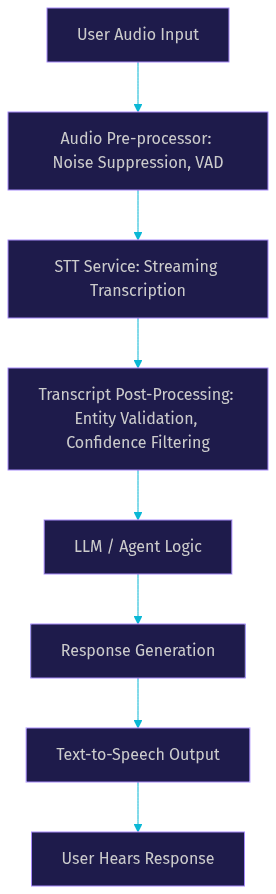
VideoSDK's agent architecture follows this exact pattern, with the Agent Worker managing the session lifecycle and the pipeline handling the STT-to-LLM-to-TTS flow. Developers can plug in different STT providers, configure custom vocabulary, and add post-processing hooks without modifying the core agent logic.
For teams building structured conversations (loan applications, appointment booking, insurance intake), VideoSDK's Conversational Graph adds a deterministic flow layer on top of the pipeline. This ensures that even when transcription introduces minor errors, the conversation stays on track because the graph controls branching, not the LLM.
Practical Evaluation Checklist for STT Providers
When evaluating STT providers for a voice agent project, follow this checklist to ensure you test under realistic conditions:
- Test with real audio from your target environment, not clean studio recordings
- Measure WER, cpWER, and MER separately to understand where errors concentrate
- Include non-native speakers and diverse accents in your test set
- Test streaming latency end-to-end, including network round-trip time
- Evaluate custom vocabulary biasing with your actual domain terms
- Run tests with background noise levels typical of your use case
- Compare cost per minute across providers, not just accuracy
- Test error recovery: what happens when the STT returns low-confidence output
- Validate entity capture against your business database, not just against a reference transcript
- Re-run evaluations quarterly, as models update frequently
This checklist helps you avoid the common trap of selecting a provider based on marketing benchmarks that do not reflect your actual deployment conditions.
Future Trends in Voice-Agent Transcription
The transcription landscape is evolving rapidly. Several trends are shaping where accuracy improvements will come from in the next 12 to 18 months.
Multimodal models that process audio and text jointly are emerging as the next frontier. Google's Gemini models already demonstrate this capability, and OpenAI's Realtime API integrates transcription and reasoning in a single model call. This reduces the latency and error compounding that comes from chaining separate STT and LLM systems.
On-device inference is gaining traction for privacy-sensitive applications. Running STT models locally on mobile devices eliminates network latency and keeps audio data on-device, though current on-device models trail cloud-based accuracy by several percentage points.
Adaptive biasing, where the STT system dynamically adjusts its vocabulary based on conversation context, is another emerging capability. Instead of static custom vocabulary lists, the model learns from the ongoing conversation to prioritize relevant entities.
Benchmark standards are also maturing. The shift from WER-only evaluations to cpWER and MER reflects a growing understanding that voice agent accuracy requires multi-dimensional measurement. Expect new benchmarks specifically designed for conversational AI workloads to emerge throughout 2026 and beyond.
Definitions Glossary
Word Error Rate (WER): The percentage of words incorrectly transcribed compared to a reference transcript, calculated as the sum of insertions, deletions, and substitutions divided by total reference words. WER treats all errors equally, which limits its usefulness for voice agents where entity errors matter more than filler word mistakes.
cpWER (Concatenated Minimum-Permutation WER): A combined metric that evaluates both transcription accuracy and speaker diarization accuracy in a single score. It penalizes the system when words are correctly transcribed but attributed to the wrong speaker, making it more representative of real voice agent performance.
Missed Entity Rate (MER): The frequency with which a transcription system fails to correctly capture named entities such as names, numbers, dates, and domain-specific terms. MER is often the most business-relevant metric for voice agents because entity errors directly cause task failures.
Speaker Diarization: The process of segmenting audio by speaker identity, determining who spoke when. In voice agent pipelines, diarization prevents the system from confusing user speech with agent-generated speech.
Agent Worker: The Python process in VideoSDK's AI Voice Agent architecture that manages the session lifecycle, coordinates the STT-to-LLM-to-TTS pipeline, and handles session events within a VideoSDK room.
Key Takeaways
- Transcription accuracy is the single most important factor in AI voice agent reliability because every downstream LLM decision depends on the text the STT engine produces.
- WER alone is insufficient for evaluating voice agent transcription; cpWER and Missed Entity Rate provide a more complete picture of real-world performance.
- Leading STT providers including Deepgram Nova-3, Google Gemini 3.5 Transcribe, and AssemblyAI Universal-2 each excel in different conditions, and no single provider dominates across all metrics.
- Custom vocabulary biasing, audio pre-processing, and post-processing techniques can improve transcription accuracy by several percentage points without changing the underlying model.
- VideoSDK's AI Voice Agent SDK supports multiple STT providers through its pipeline architecture, letting developers optimize for accuracy, latency, or cost without rebuilding their agent.
Conclusion
Accurate transcription is the cornerstone of every successful AI voice agent. Without reliable speech-to-text conversion, the LLM cannot reason correctly, the agent cannot complete tasks, and users lose trust in the system. By understanding the metrics that matter (WER, cpWER, and MER), evaluating providers under realistic conditions, and applying targeted optimizations like custom vocabulary biasing and audio pre-processing, developers can build voice agents that perform reliably in production.
If you are building a voice agent, start by evaluating STT providers using the checklist above, then integrate your chosen provider through VideoSDK's AI Voice Agent SDK for a production-ready pipeline with built-in noise suppression, session management, and multi-provider support. You can sign up free at app.videosdk.live/login and explore the code samples to get started.
What are you building with VideoSDK? Drop a comment below. I would love to hear what kind of voice agent use case you are working on and which STT provider you chose for it.
FAQ