


An AI voice agent SIP connection failure occurs when the signaling or media path between a SIP trunk and the agent's voice pipeline breaks down. VideoSDK's SIP integration bridges traditional telephony with WebRTC rooms, and most failures trace back to authentication mismatches, NAT traversal gaps, or codec incompatibilities. Start by isolating whether the SIP signaling layer or the RTP media layer is failing, then work through credentials, network reachability, and SDP negotiation.
You deployed your AI voice agent. The Python worker is running, the LLM pipeline is primed, and the TTS provider is ready. Then a call comes in and the SIP gateway returns a 503 Service Unavailable. The caller hears silence. Your agent never picks up.
This scenario is frustratingly common. When an AI voice agent SIP connection fails, the problem rarely lives in the AI layer itself. It almost always sits in the telephony bridge where SIP signaling meets WebRTC media. Developers building voice agents with platforms like VideoSDK often spend hours debugging SIP issues that boil down to a missing firewall rule or an expired credential.
The good news is that SIP connection failures follow predictable patterns. Every failure leaves a trail in SIP response codes, SDP negotiation logs, and RTP media statistics. By the end of this guide, you will have a systematic troubleshooting process that takes you from symptom to root cause in minutes, not hours. We will cover the signaling-versus-media distinction, common failure scenarios, diagnostic techniques using VideoSDK's monitoring tools, and a step-by-step fix checklist.
Why AI Voice Agent SIP Connection Fails
SIP connection failures in AI voice agent deployments stem from four distinct layers: signaling, authentication, media transport, and agent session health. When an AI voice agent SIP connection fails, the error typically originates in one of these layers and cascades into a dropped call or one-way audio.
VideoSDK's SIP integration bridges traditional telephony infrastructure with WebRTC-based AI agent rooms. This bridge introduces multiple handoff points where things can go wrong. The SIP trunk provider must authenticate successfully, the signaling must reach the VideoSDK SIP gateway, the media path must traverse NAT and firewalls, and the AI agent worker must be ready to process the incoming audio stream.
Understanding which layer failed is the first step toward fixing it. Most developers jump straight to checking their agent code when the real issue is a SIP 403 Forbidden from the trunk provider or a NAT traversal failure blocking RTP packets.
SIP Signaling vs Media
SIP operates on two parallel paths that developers must distinguish during troubleshooting. The signaling path carries SIP messages that set up, modify, and tear down calls. The media path carries the actual audio as RTP packets.
A call can have perfect signaling with broken media, meaning the SIP INVITE succeeds but the caller hears silence because RTP packets never reach the agent. Conversely, media can flow fine while signaling errors prevent proper call setup. According to the IETF RFC 3261 specification, SIP signaling and RTP media are independent transport layers that can fail independently.
This distinction matters because fixing a signaling problem will not resolve a media problem, and vice versa. Always determine which path is broken before changing configuration.
Common SIP Response Codes
SIP response codes follow a three-digit format where the first digit indicates the class. 1xx codes are provisional responses, 2xx codes indicate success, 3xx codes handle redirection, 4xx codes signal client errors, 5xx codes indicate server errors, and 6xx codes represent global failures.
The most common codes you will encounter when an AI voice agent SIP connection fails include 404 Not Found, which typically means the destination number or extension does not exist on the target registrar. A 486 Busy Here indicates the endpoint is occupied. A 500 Server Internal Error points to a problem on the provider's side. A 503 Service Unavailable often means the gateway or trunk is temporarily unreachable. A 403 Forbidden usually signals an authentication or permissions issue.
Each code narrows your troubleshooting scope significantly. A 4xx code tells you to look at your request parameters and credentials. A 5xx code tells you to check the upstream provider's status.
Typical Failure Scenarios
Real-world SIP connection failures in AI voice agent deployments follow recognizable patterns. Understanding these patterns helps you skip straight to the likely root cause instead of testing every possible failure point.
Signaling Failures
Signaling failures occur when SIP messages cannot reach their destination or are rejected by the receiving party. The most common signaling failure is a rejected INVITE, where the SIP trunk provider returns a 4xx or 5xx response before any media negotiation begins.
This often happens when the destination number is incorrectly formatted, the SIP trunk is not properly registered with the provider, or the provider's IP access list does not include your VideoSDK SIP gateway's IP address. Registration failures are equally common, especially when the SIP trunk requires periodic re-registration and the credentials have expired or changed.
Media Path Issues
Media path issues manifest as one-way audio, no audio at all, or garbled audio. The SIP signaling completed successfully, but RTP packets carrying the actual voice audio cannot traverse the network between the caller and the AI agent.
NAT traversal is the leading cause. When the VideoSDK SIP gateway sits behind a NAT device, the IP addresses advertised in the SDP body may be private and unreachable from the trunk provider's network. Codec mismatch is another frequent culprit. If the SIP trunk negotiates G.711 PCMU but the agent's WebRTC pipeline expects Opus, the media bridge must transcode, and misconfigured transcoding leads to silence.
Authentication and Credential Problems
Authentication failures typically produce 401 Unauthorized or 403 Forbidden SIP responses. These occur when the username, password, or realm configured in the SIP trunk settings do not match what the provider expects.
A surprisingly common issue is TLS certificate mismatch. If the SIP trunk requires TLS transport and the certificate presented by the gateway does not match the expected domain or has expired, the TLS handshake fails before SIP signaling even begins. Developers also frequently encounter issues with SIP digest authentication where the nonce calculation is incorrect due to clock drift between the gateway and the provider's server.
Diagnosing SIP Connection Failures
Diagnosing a SIP connection failure requires a systematic approach that isolates the failing layer. Start with log collection, move to SIP response code analysis, then examine the SDP negotiation, and finally check the media path and agent health.
Collecting SIP Logs and Call IDs
Every SIP call has a unique Call-ID header that identifies all messages belonging to that specific call session. When an AI voice agent SIP connection fails, your first action should be locating the Call-ID from the failed call.
VideoSDK's telephony dashboard exposes SIP signaling logs that include the Call-ID, timestamps, SIP response codes, and SDP payloads for each call attempt. Filter the logs by the approximate time of the failure and locate the Call-ID associated with the failed call. Once you have the Call-ID, you can trace the complete message sequence from the initial INVITE through to the final response, identifying exactly where the call broke down.
Interpreting SDP Offer and Answer
The Session Description Protocol payload inside a SIP INVITE describes the media capabilities the caller is offering, including audio codecs, RTP port numbers, and IP addresses. The SDP answer in the 200 OK response describes what the receiver accepts.
A healthy SDP negotiation shows matching codecs between the offer and answer, reachable IP addresses, and valid RTP port numbers. A broken SDP negotiation often shows mismatched codecs where no common audio format exists, private IP addresses in the connection line that are unreachable from the public internet, or port numbers that are blocked by firewall rules.
When examining SDP, look for the media line which lists codecs, the connection line which specifies the IP address for RTP, and the attribute lines which describe specific codec parameters. If the offer includes only G.722 but the answer includes only PCMU, the media path will fail because no common codec was negotiated.
Using VideoSDK Monitoring Tools
VideoSDK provides built-in monitoring capabilities that surface SIP connection issues in real time. The AI agents dashboard shows agent session status, pipeline health, and call-level metrics including latency and packet loss.
When a SIP connection fails, the dashboard displays the SIP response code, the failure point in the call flow, and any media path warnings. You can configure alerts to notify you when the failure rate exceeds a threshold, when specific SIP error codes appear repeatedly, or when agent sessions drop unexpectedly.
The following diagram illustrates the call flow from a caller through the SIP trunk to the VideoSDK SIP gateway and AI voice agent, showing where each layer can fail:
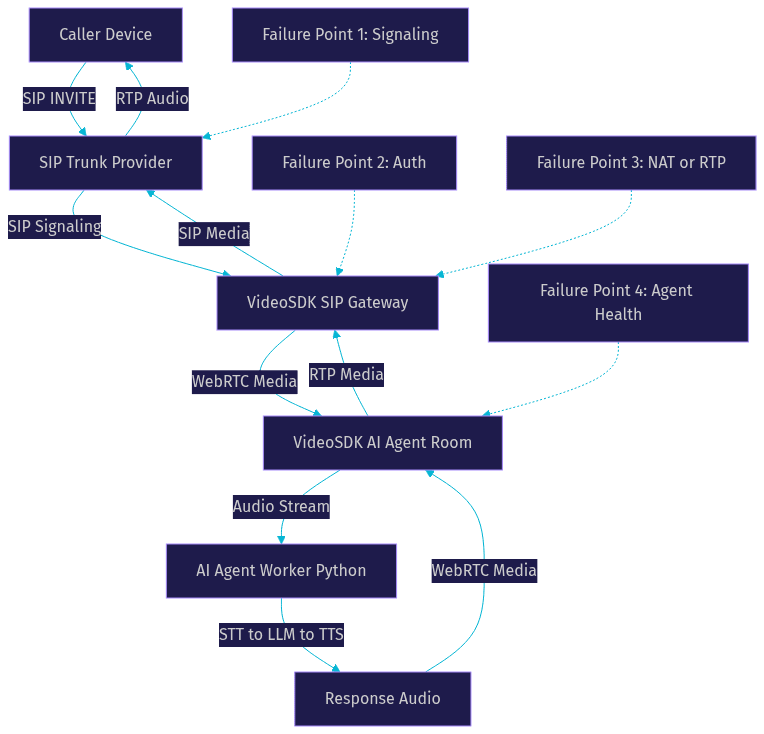
This flow shows four distinct failure points. Each requires a different diagnostic approach and fix.
Step-by-Step Troubleshooting Guide
When your AI voice agent SIP connection fails, work through these steps in order. Each step isolates a specific layer and builds on the previous one.
Verify Network Reachability
Start by confirming that the VideoSDK SIP gateway can reach the SIP trunk provider's signaling and media ports. SIP signaling typically uses UDP port 5060, TCP port 5060, or TLS port 5061. RTP media uses a range of UDP ports, commonly 10000 through 20000.
Check that your firewall rules allow outbound traffic to the trunk provider's IP addresses on these ports. If the VideoSDK SIP gateway is hosted in a cloud environment, verify that the security group or network ACL permits this traffic. Also confirm that the trunk provider's firewall allows inbound traffic from the VideoSDK gateway's public IP address. A simple connectivity test using network diagnostic tools can confirm whether the signaling port is reachable before you investigate deeper issues.
Check SIP Credentials and Registration
Verify that the SIP trunk credentials configured in your VideoSDK telephony settings match exactly what the provider issued. Check the username, password, authentication realm, and proxy address for any typos or trailing whitespace.
If the trunk requires registration, confirm that the registration is active and has not expired. Some providers require re-registration every 60 seconds, and if the gateway misses a registration window, incoming calls will fail with a 404 or 503. Check the registration status in the VideoSDK telephony dashboard and look for any 401 Unauthorized responses during registration attempts. If you see repeated authentication failures, reset the credentials with your provider and update them in the VideoSDK console.
Validate SDP Codec Compatibility
Codec mismatch is one of the most overlooked causes of SIP connection failures in AI voice agent deployments. The SIP trunk provider may offer a specific set of audio codecs, and the VideoSDK WebRTC pipeline may expect a different set.
Common codecs in SIP trunking include G.711 PCMU, G.711 PCMA, and G.729. WebRTC typically uses Opus. The VideoSDK SIP gateway handles transcoding between these codecs, but only if both sides advertise at least one compatible codec or the gateway is configured to transcode. Review the SDP offer from the trunk provider and the SDP answer from the gateway. If no common codec exists, configure the trunk to offer a codec the gateway supports, or enable transcoding in the gateway settings.
Resolve NAT and RTP Issues
NAT traversal problems cause one-way audio and silent calls more than any other issue. When the VideoSDK SIP gateway advertises a private IP address in the SDP connection line, the trunk provider sends RTP packets to that private address, which is unreachable from the public internet.
Ensure that the gateway advertises its public IP address in the SDP. Enable ICE (Interactive Connectivity Establishment) with STUN and TURN servers to handle NAT traversal automatically. Symmetric RTP, where the gateway sends RTP from the same IP and port it expects to receive on, helps with NAT firewalls that block unsolicited inbound packets. If you are using a cloud-hosted VideoSDK SIP gateway, confirm that the public IP is correctly configured and that the RTP port range is open on the firewall.
Confirm Agent Session Health
Sometimes the SIP connection succeeds but the AI voice agent fails to process the call. The caller connects to the VideoSDK room but hears silence because the agent worker is not running or has crashed.
Check the agent worker status in the VideoSDK dashboard. Verify that the agent session token is valid and has not expired. Confirm that the STT provider is operational and that the TTS provider is responding within expected latency. Check the pipeline observability metrics for any errors in the speech-to-text, LLM, or text-to-speech stages. If the agent uses Conversational Graph for deterministic flow control, verify that the graph state is initialized correctly and that the entry node is reachable.
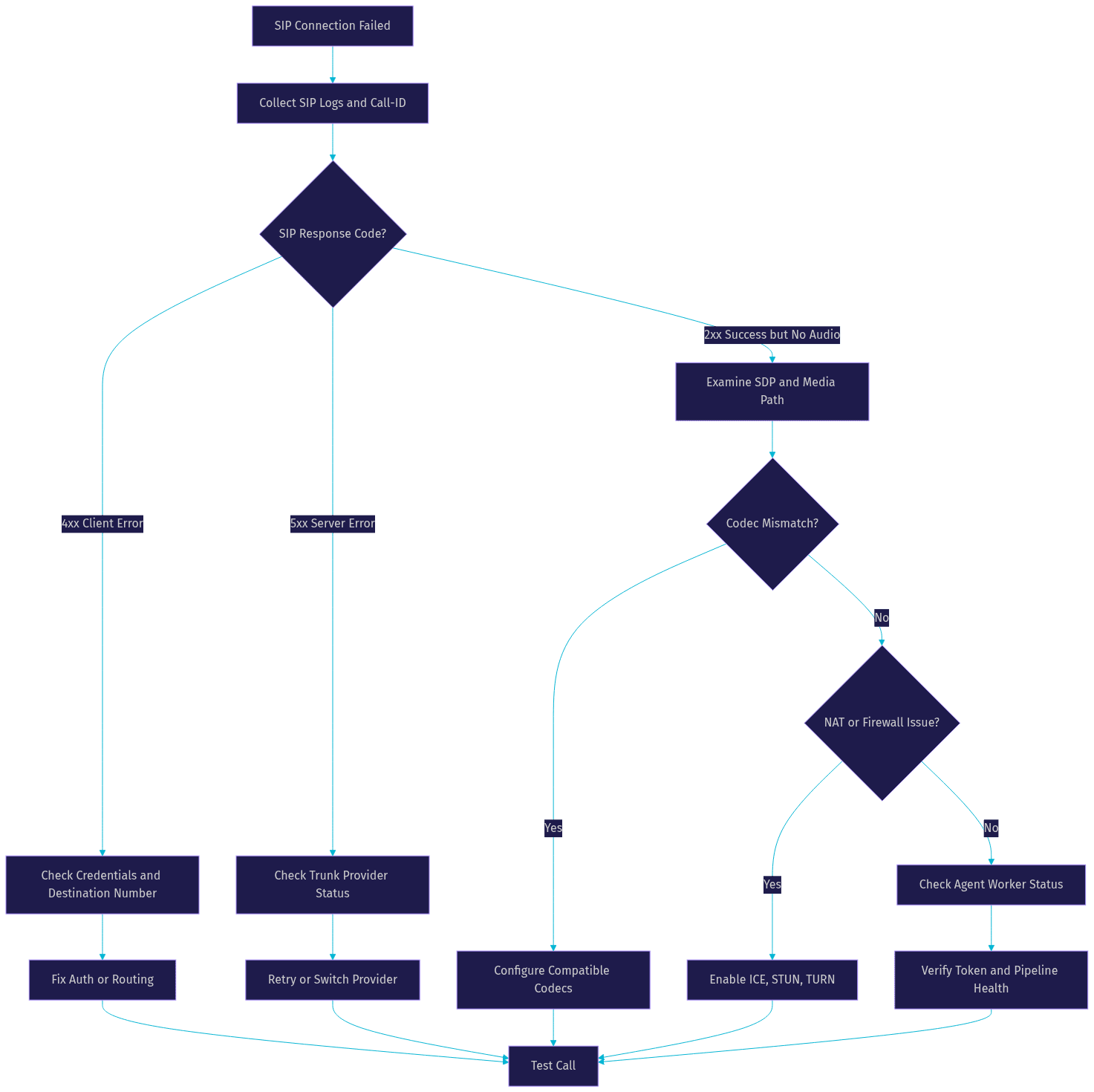
The following diagnostic flow chart shows the recommended troubleshooting sequence:
Preventive Best Practices
Preventing SIP connection failures is significantly easier than debugging them at 2 AM during a production incident. These practices address the most common failure points before they affect callers.
Enable ICE, STUN, and TURN
ICE with STUN and TURN servers is the most effective defense against NAT traversal issues. STUN servers help the gateway discover its public IP address and port as seen by the remote party. TURN servers act as relay points when direct media paths are blocked by restrictive firewalls.
Configure the VideoSDK SIP gateway to use ICE with both STUN and TURN servers. Test the configuration from behind different NAT types, including symmetric NAT, which is the most restrictive and requires TURN. Without TURN as a fallback, calls to or from networks behind symmetric NAT will consistently fail with one-way audio.
Use Secure SIP with TLS and Strong Authentication
Transport Layer Security for SIP signaling protects against credential interception and man-in-the-middle attacks. Many SIP trunk providers now require TLS, and those that do not will likely require it soon.
Use TLS for SIP signaling whenever the provider supports it. Ensure the TLS certificate on the gateway is valid and not expired. Use strong, unique passwords for SIP trunk authentication and rotate them periodically. Enable IP whitelisting on the trunk provider's side so that only the VideoSDK SIP gateway's IP address can authenticate with the trunk.
Monitor with VideoSDK Alerts
VideoSDK's monitoring tools can alert you to SIP connection failures before users report them. Configure alerts for elevated failure rates, repeated 5xx responses, and agent session drops. Set thresholds based on your normal call volume and failure rate so you receive alerts only for anomalous behavior.
Review the telephony dashboard regularly for trends. If you notice a gradual increase in 5xx responses over days or weeks, it may indicate a degrading trunk provider or an approaching credential expiration. Proactive monitoring turns sudden outages into manageable trends.
Real-World Example: Fixing a Failed SIP Connection
Scenario Overview
A fintech startup deployed an AI voice agent using VideoSDK's AI agent SDK with a Twilio SIP trunk for outbound calls. The agent successfully dialed numbers for two weeks, then suddenly every call failed with a 503 Service Unavailable. The agent worker was running, the LLM pipeline was healthy, and no configuration changes had been made.
Resolution Steps
The team started by collecting the SIP logs from the VideoSDK telephony dashboard. They filtered by the time window of the failures and found that every INVITE was returning 503 from the Twilio SIP trunk. The 5xx response indicated the problem was on the trunk provider's side, not in the VideoSDK gateway or agent.
They checked the Twilio console and discovered that the SIP trunk's IP access list had been reset during a routine maintenance window, removing the VideoSDK SIP gateway's IP address. The trunk was rejecting all incoming traffic from the gateway because the source IP was no longer whitelisted.
The fix was straightforward. They re-added the VideoSDK SIP gateway's public IP address to the Twilio SIP trunk's IP access list. Within seconds, calls began connecting again. The entire diagnosis took under 15 minutes because the team followed the systematic approach of checking the SIP response code first, which immediately pointed to the trunk provider rather than the agent or gateway.
This example illustrates a key principle: when an AI voice agent SIP connection fails, the SIP response code is your most valuable diagnostic signal. A 5xx code almost always means the issue is upstream, not in your agent code.
Quick Reference Checklist
When your AI voice agent SIP connection fails, verify these items in order:
- Locate the Call-ID in the VideoSDK telephony logs for the failed call
- Identify the SIP response code and classify it as signaling, auth, or media
- Confirm the SIP trunk credentials match the provider's records exactly
- Verify the SIP trunk registration is active and not expired
- Check that the VideoSDK SIP gateway's IP is whitelisted by the trunk provider
- Ensure firewall rules allow SIP signaling ports (5060, 5061) and RTP media ports
- Review the SDP offer and answer for codec compatibility
- Confirm the gateway advertises a public IP address, not a private one
- Verify ICE, STUN, and TURN are enabled for NAT traversal
- Check the AI agent worker status, token validity, and pipeline health in the dashboard
Definitions Glossary
SIP (Session Initiation Protocol): A signaling protocol used to establish, modify, and terminate real-time communication sessions, including voice calls. In VideoSDK's architecture, SIP bridges traditional telephony with WebRTC-based AI agent rooms.RTP (Real-time Transport Protocol): A network protocol that delivers audio and video media over IP networks. RTP carries the actual voice audio between the caller and the AI agent, separate from SIP signaling.SDP (Session Description Protocol): A format for describing streaming media parameters, including codecs, port numbers, and IP addresses. SDP payloads inside SIP messages negotiate the media capabilities between the caller and the gateway.Call-ID: A unique identifier in the SIP header that tags all messages belonging to a single call session. It is the primary key for correlating SIP logs during troubleshooting.NAT Traversal: The process of enabling media packets to cross Network Address Translation boundaries. Techniques include ICE, STUN, and TURN, which VideoSDK's SIP gateway supports natively.
Key Takeaways
- When an AI voice agent SIP connection fails, isolate the failure to signaling, authentication, media, or agent health before changing any configuration.
- SIP response codes are your fastest diagnostic signal: 4xx codes point to client-side issues, 5xx codes point to provider-side issues, and 2xx with no audio points to media path problems.
- NAT traversal is the leading cause of one-way audio in SIP-to-WebRTC bridges, and enabling ICE with STUN and TURN resolves the majority of these cases.
- Codec mismatch between SIP trunks and WebRTC pipelines causes silent calls even when signaling succeeds, so always verify SDP offer and answer compatibility.
- VideoSDK's telephony dashboard and AI agent monitoring tools provide the SIP logs, Call-ID correlation, and pipeline health metrics needed to diagnose failures in minutes.
Conclusion
SIP connection failures in AI voice agent deployments are almost always traceable to one of four layers: signaling, authentication, media transport, or agent session health. By following the systematic troubleshooting approach outlined here, you can move from a failed call to a root cause in minutes instead of hours. The key is starting with the SIP response code, then working through credentials, network reachability, SDP negotiation, and agent health in sequence.
VideoSDK's SIP integration and AI agent monitoring give you the logs and dashboards needed to diagnose issues quickly. Configure alerts, keep your credentials current, and run through the quick reference checklist before reaching for deeper debugging tools.
What are you building with VideoSDK? Drop a comment below and let me know what kind of AI voice agent use case you are working on. You can also join the VideoSDK Discord community to connect with other developers building real-time voice AI applications. Sign up free at app.videosdk.live/login to start building.
Free $20 Balance for AI Voice Agents & Video Calls
FAQ