


An AI voice agent SDK is a developer toolkit that embeds real-time, conversational voice AI into applications by orchestrating speech-to-text, large language models, and text-to-speech components. VideoSDK provides a flexible AI voice agent SDK with built-in telephony integration, sub-second latency, and support for leading AI providers like OpenAI and Deepgram. To get started, developers can connect an agent worker to a VideoSDK room and configure the pipeline through the Python SDK.
Real-time conversational AI has shifted from a novelty to a production requirement for modern applications. Developers building customer support portals, telemedicine platforms, and interactive voice response systems need more than just a basic API endpoint to a large language model. They need a dedicated AI voice agent SDK that handles the intricate complexities of real-time audio streaming, bidirectional communication, turn detection, and low-latency model orchestration. Building this infrastructure from scratch using raw WebRTC and disparate AI APIs introduces immense latency, reliability challenges, and a steep maintenance burden. A purpose-built SDK abstracts these layers, allowing developers to focus on conversation logic rather than audio processing mechanics. This article breaks down what an AI voice agent SDK is, explores the core architectural components, compares leading SDKs in 2026, and walks through a production-ready integration process. By the end, you will understand how to evaluate and implement the right voice AI toolkit for your application using VideoSDK.
What Is an AI Voice Agent SDK?
An AI voice agent SDK is defined as a software development kit that abstracts the complexity of real-time voice interactions between humans and artificial intelligence models. Unlike a simple REST API that processes static text, an SDK works by managing a persistent, low-latency audio session. It captures audio from a user's microphone, streams it to a speech-to-text engine, passes the transcribed text to a large language model, and converts the generated response back into speech using a text-to-speech engine. Core capabilities include real-time audio processing, voice activity detection (VAD), turn detection to manage conversational flow, and agent lifecycle management. VideoSDK provides an AI voice agent SDK through its Python-based Agent SDK, enabling developers to connect LLMs, STT, and TTS providers directly to real-time communication rooms. This approach ensures that the AI agent can participate in a conversation just like a human, reacting to interruptions and natural speech patterns.
Core Architectural Components
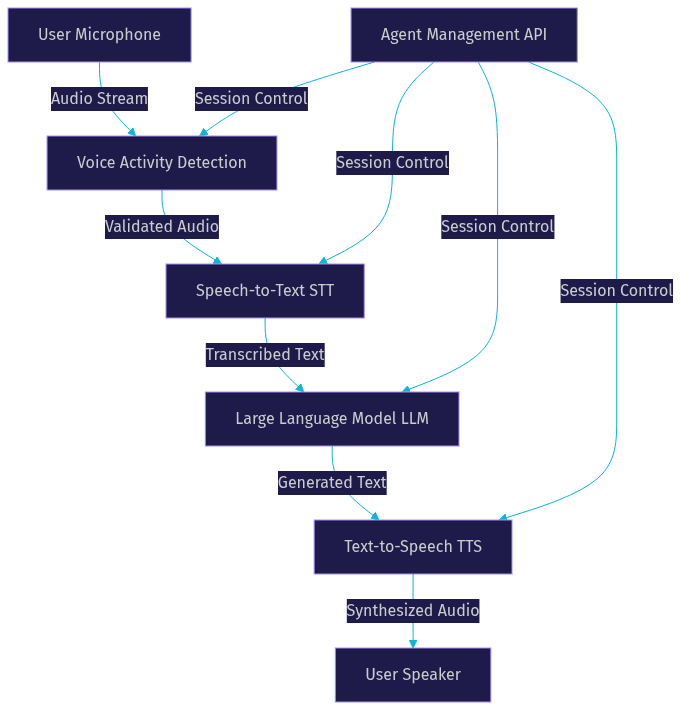
A production-grade AI voice agent SDK relies on a sophisticated pipeline architecture. Audio flows from the user's microphone through a series of processing layers before returning as synthesized speech. Understanding these components is essential for debugging latency issues and optimizing conversation quality.
The pipeline begins with the STT layer, which converts incoming audio streams into text in real time. This layer must handle various accents, background noise, and partial words. The transcribed text is then passed to the LLM layer. Here, a large language model generates a natural-language response based on the conversation history, system prompts, and any integrated tools or retrieval-augmented generation systems. The LLM must respond quickly to maintain conversational flow.
Once the LLM generates text, the TTS layer takes over, synthesizing the text into audible speech. Modern TTS providers offer natural-sounding voices with emotional inflection, making the interaction feel human. Turn detection and VAD are critical layers that manage the speaking turns. VAD distinguishes speech from silence, while turn detection decides when the user has finished a thought and the agent should respond, handling interruptions gracefully.
Agent management and session control handle the underlying infrastructure. This includes token authentication, room joining, media routing, and disconnect logic. VideoSDK manages this through its robust real-time communication infrastructure.
Developers can configure this pipeline in two primary modes: cascade and realtime. Cascade mode chains discrete models together, allowing developers to swap components and use complex tool calling. Realtime mode uses a single multimodal model that processes audio input and generates audio output directly, reducing latency significantly but limiting the ability to insert custom logic between stages.
Leading AI Voice Agent SDKs in 2026
The landscape of AI voice agent SDKs has matured significantly by 2026. Several platforms offer distinct advantages based on language support, deployment models, and integration capabilities. Evaluating these options requires looking at both the developer experience and the production readiness of the platform.
VideoSDK AI Agents (Python) stands out for its flexible pipeline architecture and built-in SIP/telephony integration. It supports hybrid cascade and realtime modes, allowing developers to optimize for either cost or latency. VideoSDK supports leading AI providers like OpenAI, Deepgram, ElevenLabs, and AWS Nova Sonic. The platform also offers a Conversational Graph for deterministic conversation flows. You can explore the full capabilities in the VideoSDK AI Agents documentation.
LiveKit Agents SDK offers an open-source framework with multi-model support and custom tool hooks, available in both Python and TypeScript. It is well-suited for developers already embedded in the LiveKit ecosystem and provides robust WebRTC handling. However, it lacks the deep, native telephony integrations that server-side Python SDKs like VideoSDK offer out of the box.
Pipecat is another notable open-source Python framework that provides robust support for real-time voice AI. It focuses on flexible pipeline construction and integration with various AI model providers. Pipecat is excellent for prototyping but may require additional infrastructure work for enterprise-grade telephony scaling.
For mobile-first development, Flutter AI Agent SDKs provide pure-Dart implementations with built-in STT and TTS. While convenient for mobile apps, they often lack the server-side processing power and telephony bridging capabilities found in Python-based SDKs.
| SDK | Primary Language | Latency Mode | SIP/Telephony Support | Unique Differentiator |
|---|---|---|---|---|
| VideoSDK AI Agents | Python | Cascade & Realtime | Yes | Built-in SIP integration, Conversational Graph |
| LiveKit Agents | Python, TypeScript | Cascade & Realtime | Limited | Open-source, deep WebRTC ecosystem |
| Pipecat | Python | Cascade & Realtime | No | Highly modular open-source pipeline |
| Flutter Voice SDK | Dart | Cascade | No | Mobile-native, pure-Dart implementation |
[LINKABLE ASSET — comparison table]
VideoSDK provides the most comprehensive toolkit for developers needing to bridge traditional telephony with cutting-edge real-time AI models. The inclusion of SIP integration and the Conversational Graph sets it apart from purely WebRTC-focused solutions.
Choosing the Right SDK for Your Project
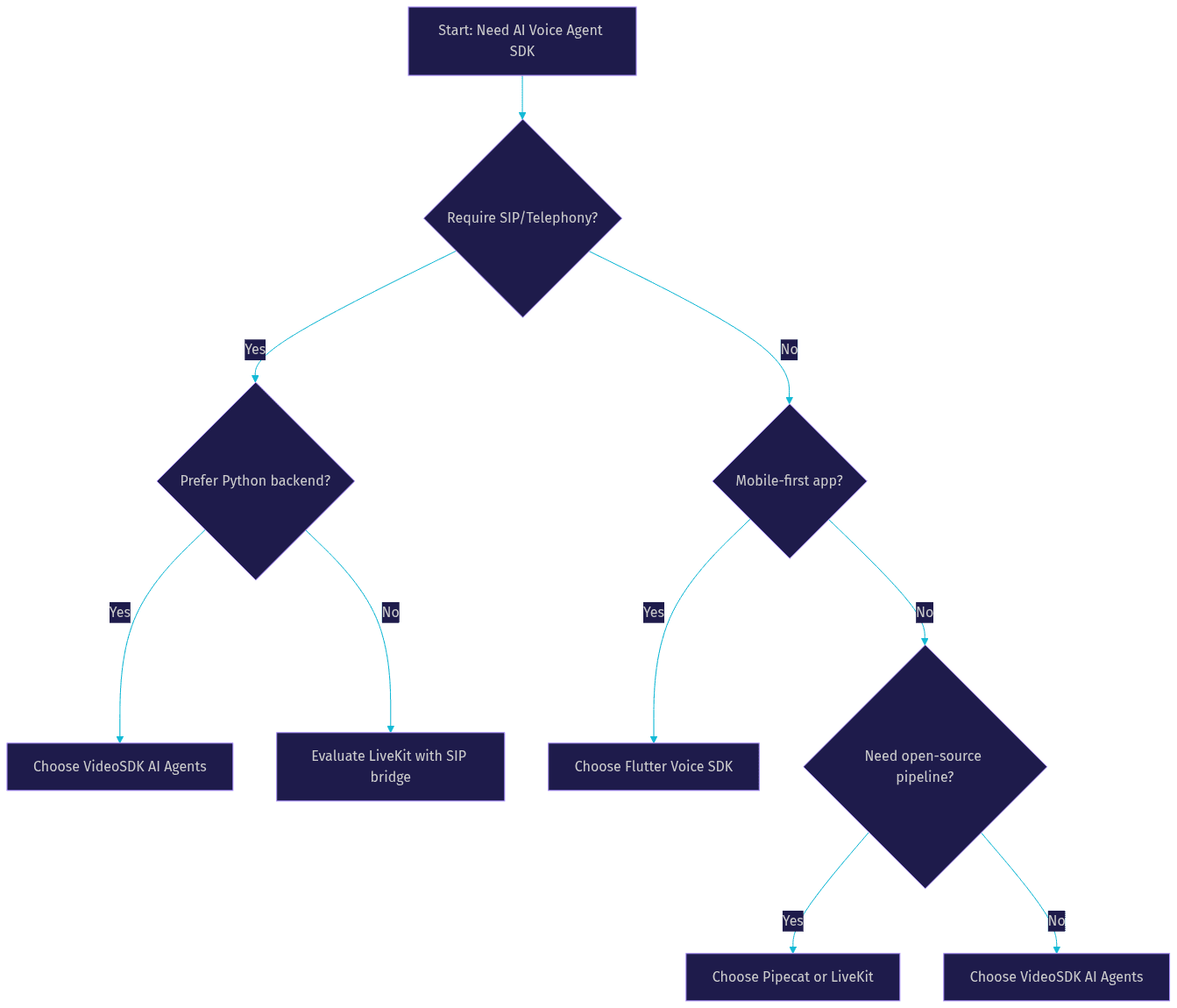
Selecting the right AI voice agent SDK depends on several technical and operational criteria. The decision process should filter options based on your specific application requirements rather than general popularity.
Language preference is the first filter. Python dominates server-side AI workloads due to its rich ecosystem of machine learning libraries and AI provider SDKs. TypeScript and Dart are preferred for web and mobile frontends, but running the agent pipeline on the backend is almost always the recommended architecture for latency and security reasons.
Latency requirements dictate whether you need a cascade pipeline or a realtime multimodal model. If your application requires sub-500ms response times, you should look for SDKs that support realtime models like OpenAI Realtime or AWS Nova Sonic. For more complex logic requiring tool calls or RAG, a cascade mode might be necessary.
Telephony needs are critical. If your application requires inbound or outbound phone calls, you need an SDK with built-in SIP integration. Building a custom SIP bridge to a WebRTC room is complex and error-prone. VideoSDK handles this natively.
Deployment model preferences also play a role. Some teams require self-hosted solutions for data compliance, while others prefer the scalability of a cloud-hosted agent worker. Finally, consider ecosystem integrations, compliance certifications, and cost structures.
End-to-End Integration Walkthrough (without code)
Integrating an AI voice agent SDK involves connecting your backend infrastructure, the SDK's agent worker, and the client application. This process requires careful attention to authentication, session management, and event handling.
Step 1: Set up authentication
VideoSDK uses token-based authentication to secure all communication. You need to generate a secure token on your backend using your API key and secret. Never expose your API secret on the frontend client. Pass this token to the SDK to authenticate the agent worker and any human participants joining the room. You can learn more about this process in the VideoSDK authentication guide.
Step 2: Create a session or room
Once authenticated, use the VideoSDK REST API to create a room. The API responds with a unique room ID that serves as the communication hub. The agent worker and the user's client application will both join this room to exchange real-time audio streams. This room-based architecture ensures isolated, secure sessions for every conversation.
Step 3: Connect microphone and enable VAD
The client application requests microphone permissions from the user and connects the audio stream to the VideoSDK room. The SDK handles voice activity detection automatically. VAD distinguishes between speech and silence, optimizing processing efficiency and preventing the AI from responding to background noise. The SDK continuously monitors the audio stream for conversational cues.
Step 4: Configure the pipeline
On the backend, configure the agent's pipeline by selecting your preferred STT, LLM, and TTS providers. VideoSDK supports a wide array of providers, including Deepgram for STT, OpenAI or Anthropic for LLMs, and ElevenLabs for TTS. You can choose a cascade mode for maximum flexibility and tool integration, or a realtime mode for the lowest possible latency using multimodal models. When the LLM decides it needs external data, it emits a tool call request. The agent worker executes the function and returns the result to the LLM, which then generates the final spoken response. This is crucial for applications like booking systems.
Step 5: Handle events
The SDK emits various events during the session. Your application should listen for transcription updates to display real-time captions, agent state changes to update the UI, and error events to manage exceptions. Handling these events correctly ensures a smooth user experience. For instance, if the user interrupts the AI, the SDK fires an event that allows your agent to stop speaking and listen.
Step 6: Deploy to production
Moving from localhost to production requires several adjustments. You must enforce HTTPS for secure microphone access in browsers. Configure TURN server fallbacks to ensure connectivity across restrictive corporate firewalls. VideoSDK also offers geo-fencing and cloud proxy features to ensure compliance and bypass network restrictions in regions with strict firewalls. Scale your agent workers horizontally based on concurrent session demand. Finally, set up monitoring analytics to track latency, token usage, and session success rates.
Production-Ready Best Practices
Deploying an AI voice agent SDK at scale requires attention to security, reliability, and cost optimization. These best practices ensure your application remains stable under load.
For security, implement strict token scoping with short expiry times. Enforce CORS policies on your backend APIs to prevent unauthorized access. Utilize end-to-end encryption where supported to protect sensitive voice data, especially in telemedicine or financial applications.
Reliability depends on robust reconnection logic. Network conditions fluctuate, especially on mobile devices. The SDK should handle temporary network drops and resume the session without losing the conversational context. Implement graceful shutdown procedures for your agent workers to avoid orphaned processes. Regular health checks ensure your agent workers are ready to accept new sessions.
Observability is critical for maintaining quality. Maintain detailed logs of all pipeline stages to identify latency bottlenecks. Monitor real-time analytics to track agent performance and user engagement. Store call recordings for quality assurance and model fine-tuning.
Finally, optimize costs by leveraging usage-based pricing models. Implement idle-room cleanup to avoid paying for unused sessions. Scale down agent workers during off-peak hours to reduce infrastructure overhead.
Real-World Use Cases
AI voice agent SDKs power a variety of production applications across industries. Customer support voice bots use them to handle tier-one inquiries, reducing wait times and freeing human agents for complex issues. These bots can authenticate users, look up order statuses, and process returns using tool calls.
Telemedicine virtual assistants collect patient symptoms, schedule appointments, and provide medication reminders via voice. The low-latency interaction makes it feel like a conversation with a nurse, improving patient compliance.
Interactive voice shopping experiences allow customers to browse and purchase products hands-free. The AI can recommend products based on spoken preferences and complete the checkout process securely.
Automated outbound call centers use AI agents for appointment reminders, surveys, and debt collection. These systems leverage the SDK's SIP integration to dial traditional phone numbers directly, scaling to thousands of concurrent calls without human intervention.
Future Trends for AI Voice Agent SDKs
The AI voice agent landscape is evolving rapidly toward more immersive and deterministic experiences. Emerging multimodal models are blending audio and video processing, allowing agents to react to visual cues from a camera stream. This capability will enable virtual assistants that can interpret physical objects or user expressions.
Edge-native inference is pushing latency below 100 milliseconds by processing audio closer to the user. This reduces the round-trip time to centralized cloud servers, making conversations feel instantaneous.
Standardized agent orchestration layers are making complex, multi-turn voice flows deterministic and easier to debug. VideoSDK's Conversational Graph allows developers to define conversation flows as a directed graph, ensuring business rules control branching rather than relying on the LLM's judgment.
Definitions Glossary
Agent Worker: The Python process that runs a VideoSDK AI agent and manages its session lifecycle inside a real-time communication room.
Pipeline: The sequential processing chain that handles speech input and generates AI responses, typically consisting of STT, LLM, and TTS components.
Turn Detection: The mechanism an AI voice agent uses to decide when a user has finished speaking and when the agent should begin responding.
Voice Activity Detection (VAD): An audio processing technique that distinguishes human speech from background noise or silence.
SIP Integration: The bridge that connects traditional telephony networks to WebRTC-based real-time communication rooms.
Key Takeaways
- An AI voice agent SDK abstracts the complexity of real-time audio streaming, STT, LLM, and TTS orchestration.
- VideoSDK provides a robust Python-based AI voice agent SDK with built-in SIP and telephony integration.
- Choosing the right SDK depends on language preference, latency requirements, and the need for telephony support.
- Production deployments require strict authentication, TURN server fallbacks, and comprehensive observability.
- Future trends point toward multimodal models, edge-native inference, and deterministic orchestration via Conversational Graphs.
Conclusion
Building a real-time conversational AI application requires an AI voice agent SDK that can handle low-latency audio, complex model pipelines, and production-scale reliability. VideoSDK offers a comprehensive solution with its Python Agent SDK, supporting both cascade and realtime modes alongside deep telephony integration. Whether you are building a customer support bot or an automated call center, VideoSDK provides the tools you need. Try it out by signing up at app.videosdk.live/login, join the VideoSDK Discord community to connect with other developers, and explore the VideoSDK documentation to start building. What are you building with VideoSDK? Drop a comment below.
Free $20 Balance for AI Voice Agents & Video Calls
FAQ