


An AI voice agent in Python is a real-time conversational system that captures speech, transcribes it, processes meaning through a large language model, and responds with synthesized voice, all orchestrated within a Python pipeline. VideoSDK provides an open-source Python Agent SDK that connects STT, LLM, and TTS providers to live rooms with sub-second latency. To get started, explore the VideoSDK AI Agents documentation and follow the quickstart guide.
Real-time voice AI has crossed a critical threshold. Developers can now build conversational agents that respond in under 500 milliseconds, fast enough that the interaction feels natural rather than robotic. Python sits at the center of this shift because its ecosystem spans every layer of the pipeline, from streaming speech-to-text to large language model orchestration to neural text-to-speech.
If you are a Python developer looking to build a voice agent, the landscape can feel fragmented. You need to understand audio capture, streaming protocols, turn detection, context management, and deployment. This article walks through the full architecture of a Python AI voice agent, helps you choose the right libraries, explains how to assemble the pipeline, and covers production concerns like edge deployment and latency monitoring.
What Is an AI Voice Agent in Python?
An AI voice agent is defined as a software system that conducts real-time voice conversations with users by transcribing spoken input, reasoning about it, and generating spoken output. Unlike a chatbot that exchanges text messages, a voice agent operates on continuous audio streams and must manage timing, interruption, and natural conversation flow.
A Python AI voice agent works by chaining four core components into a single pipeline. First, a Speech-to-Text (STT) engine converts incoming microphone audio into text. Second, an orchestration layer manages conversation context, intent, and tool calls. Third, a Large Language Model (LLM) generates a natural-language response. Fourth, a Text-to-Speech (TTS) engine converts that response back into audio for the user to hear.
Python fits this pipeline naturally because it offers mature bindings for every major STT, LLM, and TTS provider, along with robust async frameworks for handling streaming audio. The VideoSDK Agent SDK, for example, is Python-native and manages the entire session lifecycle inside a VideoSDK room, letting you focus on conversation logic rather than transport plumbing.
Core Architecture of a Python AI Voice Agent
The architecture of a Python AI voice agent follows a linear but bidirectional data flow, where audio streams in from the user, gets processed through the pipeline, and audio streams back out as the agent's response.
The data flow begins at the microphone, where raw audio frames are captured and chunked into small segments, typically 20 to 40 milliseconds each. These chunks flow through Voice Activity Detection (VAD) to determine whether the user is actually speaking. When speech is detected, the audio is sent to the STT service, which streams partial transcripts back to the orchestrator. The orchestrator passes the transcript to the LLM, which may call external tools or databases to gather information. The LLM's text response is then sent to the TTS engine, which generates audio that plays through the speaker.
WebSocket or gRPC connections carry the streaming audio between the client device and the Python agent worker. WebSockets are common for browser-based clients, while gRPC is often used for server-to-server communication where lower overhead matters. The VideoSDK Agent SDK handles this transport layer automatically, managing the connection between the user's device and the Python agent process running in the cloud or on an edge device.
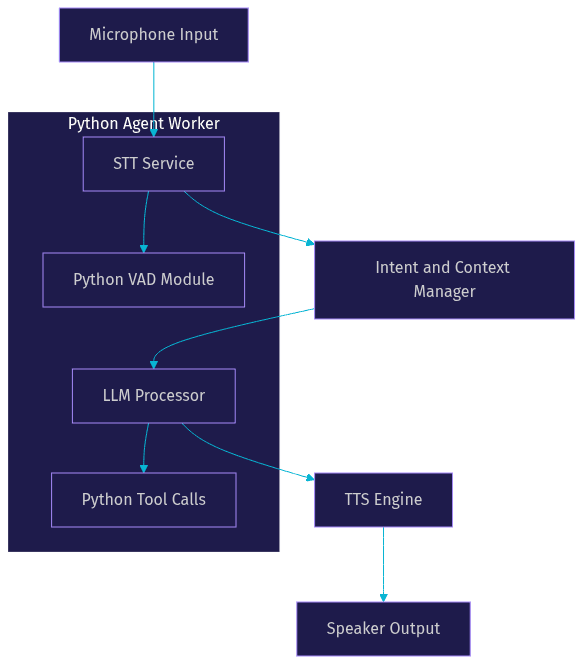
The diagram above shows how each component sits within the Python agent worker process. The VAD module runs alongside the STT service to gate audio input, while tool calls execute as Python functions when the LLM determines that external data is needed.
Choosing the Right Python Libraries
Selecting the right libraries for each pipeline stage determines your agent's latency, accuracy, and cost profile. Python gives you access to both commercial APIs and open-source models, and most production agents blend the two.
Speech-to-Text Options
For streaming STT, Deepgram is widely used for its low latency and strong word-error-rate on conversational audio. According to Artificial Analysis's Speech Arena benchmark, Deepgram's Nova models consistently rank among the fastest commercial STT options. OpenAI Whisper remains a strong open-source choice for offline transcription or edge deployment, though its streaming latency is higher than dedicated streaming APIs. Google Cloud Speech-to-Text and OpenAI Realtime Audio also offer streaming transcription with Python SDKs.
LLM Options
For the reasoning layer, OpenAI GPT-4o and Anthropic Claude are the most common commercial choices, offering strong conversational reasoning and function-calling support. Google Gemini provides multimodal capabilities that can process audio and images alongside text. For developers who need to run models locally or on edge devices, Ollama wraps open-weight models like Meta's Llama family in a Python-friendly API, eliminating network latency entirely at the cost of requiring local GPU resources.
Text-to-Speech Options
For TTS, ElevenLabs leads in voice quality and natural prosody, making it the default choice for customer-facing agents. Cartesia Sonic has gained traction for its ultra-low latency generation, which matters when you are trying to hit sub-500-millisecond end-to-end response times. AWS Polly and OpenAI TTS are solid alternatives with broad language support and predictable pricing.
Why Developers Mix Open-Source and Commercial
In practice, teams often combine open-source and commercial providers. A common pattern is using Whisper for an initial offline transcription pass or fallback, while relying on Deepgram for real-time streaming. Similarly, developers might use a local Llama model for simple intent classification and route complex reasoning to GPT-4o. This hybrid approach balances cost, latency, and accuracy.
Building the Pipeline Without Writing Code
You do not need to build every component from scratch. VideoSDK's AI Voice Agent SDK and frameworks like Pipecat offer pre-built pipelines that handle the plumbing, letting you configure providers and launch an agent through declarative setup rather than manual wiring.
The process works as follows. First, you provision a token server that authenticates your VideoSDK account and generates meeting tokens for participants. This server runs on your backend and uses your VideoSDK API key and secret to mint JWTs. Never expose your API secret on the client side. You can follow the VideoSDK authentication guide for the exact token generation flow.
Second, you select your STT, LLM, and TTS providers from the supported plugin list. VideoSDK's Agent SDK supports Deepgram, OpenAI Whisper, Google STT, and ElevenLabs Scribe for transcription, OpenAI, Anthropic, Google Gemini, and Cerebras for LLM reasoning, and ElevenLabs, Cartesia, OpenAI TTS, AWS Polly, and others for speech synthesis.
Third, you configure environment variables for each provider's API key, model name, voice selection, and language settings. These variables are read by the agent worker at startup.
Fourth, you launch the agent service. On VideoSDK Agent Cloud, this is a managed deployment where VideoSDK hosts the Python worker process. For self-hosted deployments, you run the agent worker in a Docker container on your own infrastructure.
Fifth, you test the agent through a web UI. VideoSDK provides a prebuilt web interface where you can join a room and talk to the agent directly, verifying that audio flows correctly and the agent responds within your target latency window.
Handling Turn Detection and Barge-In
Turn detection is the mechanism that decides when a user has finished speaking and the agent should respond. Get this wrong and your agent either interrupts the user mid-sentence or waits in awkward silence after they finish.
Voice Activity Detection (VAD) is the foundation of turn detection. A VAD module analyzes incoming audio frames and classifies each one as speech or silence. When the VAD detects a transition from speech to silence that lasts beyond a configured threshold, typically 300 to 700 milliseconds, it signals that the user's turn has ended.
Barge-in handling allows a user to interrupt the agent while it is speaking. Without barge-in, the agent finishes its full response even if the user started talking halfway through, which feels unnatural. With barge-in, the VAD detects the user's speech, the orchestrator immediately stops the TTS audio playback, and the new utterance is sent to the STT engine.
In Python, tuning these thresholds is a practical exercise. If your silence threshold is too short, the agent responds before the user finishes a pause, cutting them off. If it is too long, the agent feels sluggish. A starting point of 500 milliseconds works for most English conversations, but languages with longer pauses between sentences may need 700 milliseconds or more. Streaming LLM tokens as they are generated, rather than waiting for the full response, also reduces perceived latency because the TTS engine can start synthesizing the first sentence while the LLM is still generating the second.
Managing Context and Memory
A voice agent needs to remember what was said to maintain coherent multi-turn conversations. The approach you choose for context management directly affects both response quality and token cost.
The simplest approach is a FIFO conversation history, where you store the last N turns in a Python data structure like a list of dictionaries. Each turn contains the role (user or assistant) and the content. This history gets passed to the LLM on every new request. The advantage is simplicity and predictability. The disadvantage is that long conversations eventually exceed the LLM's context window, and you must truncate older turns, potentially losing important context.
For agents that need to reference information beyond the immediate conversation, retrieval-augmented generation (RAG) is the standard pattern. You store documents or past conversation summaries in a vector database, and when the user asks a question, you embed their query, retrieve the most relevant chunks, and inject them into the LLM prompt. Python's ecosystem supports this well through libraries that wrap vector stores like Pinecone, Weaviate, or local options like FAISS.
Short-term context, meaning the current conversation's last few turns, should live in memory within the agent worker process. Long-term context, meaning user preferences, past session summaries, or knowledge base documents, should persist in a database. The boundary between the two depends on your use case. An appointment booking agent might only need the current session's context. A customer support agent that handles returning users should persist summaries across sessions.
VideoSDK's Conversational Graph feature offers a structured alternative to ad-hoc context management. Instead of relying on the LLM to track conversation state, you define a directed graph where each node represents a conversation step, and the graph itself maintains state through a Pydantic data model. This is particularly useful for compliance-driven flows like loan applications or insurance claims where every step must happen in order. Learn more in the VideoSDK Conversational Graph documentation.
Deploying to Edge Devices vs. Cloud
Where you run your Python agent worker affects latency, cost, and complexity. The choice between edge and cloud deployment depends on your use case, budget, and latency requirements.
Edge Deployment Considerations
Running an AI voice agent on an edge device means the Python worker process executes on local hardware, potentially alongside a local LLM through Ollama and a local STT model like Whisper. This eliminates network round-trips for inference, which can shave 100 to 200 milliseconds off response time. The trade-off is hardware cost. A capable edge device needs a GPU with at least 4 GB of VRAM to run a small LLM and STT model concurrently. CPU-only edge deployment is possible for lightweight agents that use cloud-based LLMs but local STT and VAD.
Cloud Deployment Considerations
Cloud deployment is the default for most production agents. You run the Python agent worker on a cloud server, and all STT, LLM, and TTS calls go to commercial APIs over the network. The advantage is elasticity. You can autoscale the number of agent worker processes based on concurrent call volume. The disadvantage is that every network hop adds latency, and you depend on the uptime of multiple external APIs.
Containerization Steps
For either deployment target, containerization is the standard approach. You create a Docker image that bundles your Python agent worker, its dependencies, and your configuration. The container reads provider API keys from environment variables at startup. For cloud deployment, you push the image to a registry and deploy it on Kubernetes or a managed container service with autoscaling rules. For edge deployment, you pull the image onto the device and run it as a local service. VideoSDK supports both managed cloud deployment through Agent Cloud and self-hosted deployment through Docker or Kubernetes.
Monitoring Production Agents
Once deployed, you need visibility into latency and error rates. VideoSDK provides session analytics through its REST API, where you can pull metrics on individual sessions, including time-to-first-audio, STT latency, LLM latency, and TTS latency. Monitoring these metrics in production helps you identify which pipeline stage is bottlenecking when your end-to-end latency drifts above your target.
Common Pitfalls and How to Avoid Them
Even with a solid architecture, production voice agents hit predictable problems. Knowing these in advance saves debugging time.
Token expiration is the most common failure. VideoSDK meeting tokens have a finite lifespan, and if a call runs longer than the token's validity, the participant gets disconnected. Generate tokens with an expiry that comfortably exceeds your maximum expected session duration, and implement a refresh mechanism for long-running calls.
Microphone permission issues occur when the browser or mobile OS blocks audio access. Always handle the permission denied case in your client UI with a clear message, and test on both desktop and mobile browsers since permission flows differ.
Mismatched audio sample rates between your STT service and your audio capture pipeline cause garbled transcription or complete failure. Most STT services expect 16 kHz mono audio. If your microphone captures at 48 kHz, you must resample before sending to the STT engine.
Network firewalls block WebSocket or gRPC connections, particularly in corporate environments. VideoSDK provides cloud proxy and geo-fencing features to help traverse restrictive networks. Test your agent behind a corporate firewall before declaring it production-ready.
Real-World Example: A Python Voice Agent for Appointment Booking
Consider a healthcare startup building an appointment booking assistant. Patients call a phone number, and an AI voice agent answers, collects their information, checks availability, and books the slot.
The development team chose VideoSDK's AI Voice Agent SDK as the orchestration layer. For STT, they selected Deepgram for its streaming latency and medical vocabulary support. For the LLM, they used OpenAI GPT-4o with function calling enabled, allowing the agent to query the scheduling database through Python tool functions. For TTS, they chose ElevenLabs for its natural voice quality, which mattered because patients needed to feel they were talking to a helpful assistant rather than a robot.
The end-to-end flow works as follows. A patient dials in through a SIP trunk connected to VideoSDK's telephony gateway. The inbound call creates a VideoSDK room, and the Python agent worker joins as a participant. The patient speaks, and the audio streams to Deepgram, which returns a transcript within 150 milliseconds. The transcript goes to GPT-4o, which determines the intent, calls the scheduling tool to check availability, and generates a response. The response text goes to ElevenLabs, which synthesizes audio in roughly 200 milliseconds. The audio plays back to the patient through the SIP connection.
The team measured end-to-end response time at approximately 450 milliseconds from the end of the patient's speech to the start of the agent's audio response. This falls within the sub-500-millisecond window that conversational AI researchers consider the threshold for natural-feeling interaction. The team deployed the agent on VideoSDK Agent Cloud with autoscaling configured for peak call volumes during morning appointment booking hours.
For the booking flow itself, the team used VideoSDK's Conversational Graph to enforce a deterministic sequence: verify identity, ask for preferred date, check availability, confirm booking, send confirmation. This ensured that no step was skipped, even if the patient asked off-topic questions mid-flow. The LLM handled the natural language, but the graph controlled the business logic.
Definitions Glossary
Agent Worker: The Python process that runs a VideoSDK AI agent and manages its session lifecycle inside a VideoSDK room, handling the STT, LLM, and TTS pipeline.
Voice Activity Detection (VAD): A module that analyzes incoming audio frames and classifies each as speech or silence, enabling the agent to detect when a user starts and stops talking.
Turn Detection: The mechanism that decides when a user has finished speaking and the AI agent should begin responding, typically based on VAD silence thresholds.
Barge-In: The ability for a user to interrupt the AI agent while it is speaking, causing the agent to stop its TTS playback and process the new user input.
Conversational Graph: VideoSDK's deterministic flow engine for structured multi-turn voice conversations, where developers define conversation steps as nodes in a directed graph while the LLM handles natural language generation.
Pipeline: The chained sequence of STT, LLM, and TTS components that processes user speech and generates the agent's spoken response.
Key Takeaways
- A Python AI voice agent chains Speech-to-Text, LLM reasoning, and Text-to-Speech into a real-time pipeline that can achieve sub-500-millisecond response times with the right provider combination.
- VideoSDK's open-source Python Agent SDK handles the transport layer, session management, and provider integrations, letting developers focus on conversation logic rather than WebSocket plumbing.
- Turn detection and barge-in handling are critical for natural conversation flow, and tuning VAD silence thresholds is a practical exercise that varies by language and use case.
- Context management ranges from simple FIFO history for short conversations to vector-based RAG for knowledge-heavy agents, with VideoSDK's Conversational Graph offering deterministic state management for compliance-driven flows.
- Production deployment requires attention to token expiration, audio sample rate matching, firewall traversal, and ongoing latency monitoring through session analytics.
Conclusion
Python remains the strongest ecosystem for building AI voice agents because it combines mature async frameworks, native bindings for every major STT and TTS provider, and a thriving open-source community. Whether you are building a simple appointment booking assistant or a complex multi-agent customer support system, the architecture patterns in this article give you a reliable foundation. VideoSDK's Python Agent SDK, Conversational Graph, and telephony integration provide the infrastructure layer so you can focus on conversation quality and business logic. Start building your AI voice agent today by exploring the VideoSDK AI Agents documentation, join the VideoSDK Discord community to connect with 3,000-plus developers, and sign up for a free account at app.videosdk.live/login to get your first credits. What are you building with VideoSDK? Drop a comment below, I would love to hear what kind of AI voice agent use case you are working on.
FAQ