


AI voice agents feel slow when the turn-taking gap, the time from when a user stops speaking to when the agent's first audio plays, exceeds roughly 1 second. Most of that delay comes from endpoint detection and the LLM's time-to-first-token. Trim those stages, overlap STT and TTS where possible, and tune network buffers to bring perceived latency under 800 milliseconds.
Human conversation has a natural rhythm. When we speak, we expect a response within about 200 to 800 milliseconds. If the gap stretches beyond a second, the silence feels unnatural, and users start to wonder if the system heard them. They might repeat themselves, causing the agent to interrupt, or they might simply hang up. For AI voice agents, missing this conversational window is more than a minor annoyance. It degrades user trust, lowers task completion rates, and in telephony applications, leads to abandoned calls and lost revenue. Solving AI voice agent latency issues requires a fundamental shift in perspective. You are not just optimizing a single machine learning model for speed. You are tuning a complex, real-time pipeline where every millisecond compounds sequentially. A fast LLM means nothing if the speech-to-text layer blocks the thread. By understanding the full latency budget, instrumenting your pipeline, and applying targeted optimizations at each stage, you can build voice agents that feel genuinely conversational and responsive.
What Are AI Voice Agent Latency Issues?
AI voice agent latency issues refer to the cumulative delays that occur during a real-time voice interaction between a human and an AI system. The most critical metric is perceived latency, specifically the turn-taking gap. This is the time between the user finishing their sentence and the AI agent beginning to speak. Raw model inference speed is only one piece of the puzzle. A system can have a blazingly fast LLM running on optimized GPUs but still feel sluggish if the speech-to-text service takes too long to finalize a transcript or if the audio playback buffer is too large. Latency issues usually stem from a combination of sequential processing, network transport delays, and conservative endpoint detection. Every stage in the voice pipeline adds latency. The problem is often architectural. Many developers build voice agents by chaining batch APIs together. A batch API waits for the complete input, processes it, and returns the full output. In a real-time voice context, this batch processing introduces massive delays. Identifying where those milliseconds are lost is the first step toward building a responsive agent.
The Turn-Taking Latency Budget
To fix latency, you need a budget. The total turn-taking latency budget is the sum of all processing stages from the moment the user stops speaking to the moment the first audio byte reaches their speaker. In a well-optimized system, this budget should stay under 800 milliseconds. Breaking down this budget reveals where the biggest delays hide. Understanding the typical millisecond ranges for each stage helps you prioritize optimization efforts effectively.
| Pipeline Stage | Typical Latency (ms) | Optimization Potential |
|---|---|---|
| Endpoint Detection | 300 - 500 | High |
| Speech-to-Text | 100 - 300 | Medium |
| LLM Inference | 200 - 800 | High |
| Text-to-Speech | 150 - 400 | Medium |
| Network & Transport | 50 - 150 | Low |
Endpoint Detection
Endpoint detection, or end-of-utterance detection, decides when the user has finished speaking. Voice Activity Detection (VAD) triggers this process. The trade-off is between cutting off a user who pauses to think and waiting too long in dead silence. A conservative threshold adds hundreds of milliseconds of dead air to every turn, making the agent feel slow.
Speech-to-Text
Speech-to-text (STT) latency is the time from audio arrival to transcript output. Streaming STT provides partial transcripts immediately, but the final transcript often waits for acoustic context. Relying on the final transcript instead of partial results adds unnecessary delay to the pipeline and blocks the LLM from starting.
LLM Inference
LLM inference is usually the largest contributor to latency. The key metric is time-to-first-token (TTFT). This is how long the model takes to generate the first word after receiving the prompt. A large context window, a cold model, or a slow inference server can push TTFT past a second, dominating the latency budget.
Text-to-Speech
Text-to-speech (TTS) latency is measured as time-to-first-audio. If the TTS provider waits to synthesize the entire sentence before returning audio, the delay is massive. Chunked synthesis, where the provider streams audio as soon as the first few words are ready, is essential for keeping the budget intact.
Network & Transport
Network latency includes the round-trip time from the user's device to your servers and back. It also includes jitter buffers on the client side that smooth out packet arrival times. While you cannot eliminate the speed of light, poor routing and oversized buffers can easily add 100 to 200 milliseconds of unnecessary delay.
Diagnosing Latency Issues
You cannot optimize what you cannot measure. Diagnosing AI voice agent latency issues requires end-to-end visibility into the entire pipeline. Guessing where the bottleneck lives wastes engineering time and often leads to optimizing the wrong component. A data-driven approach pinpoints the exact stage consuming your latency budget.
Instrumentation with Tracing
Implement distributed tracing across your voice pipeline. Every stage, from VAD triggering to the final audio packet, should emit a timestamp. Tools like Langfuse or VideoSDK's built-in session analytics allow you to stitch these timestamps together into a single, coherent trace. When a user reports a slow interaction, you can pull the exact trace and see the millisecond breakdown. This instrumentation should capture queue times, processing times, and network transit times for every component. Without this level of granularity, you are flying blind.
Measuring Perceived Latency
Focus on user-centric metrics rather than just server-side processing times. Measure the P50 and P95 turn-taking latency across all sessions. P50 tells you the median experience, while P95 reveals the worst-case scenarios that frustrate users. Collect these metrics by comparing the timestamp of the user's last audio frame with the timestamp of the agent's first audio frame. Track these distributions over time to catch regressions introduced by model updates, infrastructure changes, or increased load.
Identifying Bottlenecks
When you read a trace, look for outliers and unexpected gaps. If the STT stage usually takes 150 milliseconds but occasionally spikes to 800 milliseconds, you have a queueing or networking issue. If the LLM TTFT is consistently high, you might need a faster model, a different inference provider, or a shorter system prompt. Prioritize fixes based on their impact on the P95 latency. Fixing a rare 2-second spike is often more valuable than shaving 50 milliseconds off the median response time, as the spike is what causes users to abandon the call.
Reducing Endpoint Detection Delay
Endpoint detection is the silent killer of conversational flow. Traditional VAD relies on a fixed silence threshold. If the user pauses for, say, 700 milliseconds, the system declares the turn over. But human speech is messy. People pause to think, breathe, or emphasize a point. Setting the threshold too low causes the agent to interrupt, which is jarring. Setting it too high adds dead air to every interaction, making the agent feel sluggish.
To reduce this delay, implement adaptive silence thresholds. Instead of a fixed timeout, adjust the patience based on the conversation context. If the user is providing a short answer like "yes" or "no", a shorter threshold is safe. If the user is telling a long story or explaining a complex issue, extend the threshold dynamically to avoid cutting them off.
Another technique is early-exit heuristics. Use a lightweight intent classifier on the partial STT transcript. If the transcript clearly forms a complete question or command, trigger the LLM before the VAD silence threshold expires. This requires careful tuning to avoid false positives, but it can save 200 to 300 milliseconds of waiting for dead air. VideoSDK's AI Agent SDK provides configurable turn detection mechanisms that support these adaptive patterns, allowing you to balance interruption risk against response speed effectively.
Optimizing STT and Overlap
Speech-to-text does not have to be a blocking operation. The biggest optimization is shifting from batch transcription to streaming transcription. In a batch setup, the system waits for the user to finish speaking, sends the complete audio file to the STT provider, and waits for the full transcript. This adds significant latency to the turn-taking budget.
With streaming STT, the provider sends partial transcripts as the user speaks. You can use these partial transcripts to start preparing the LLM prompt. Some advanced pipelines even begin LLM inference on the partial transcript, canceling the request if the user continues speaking. This speculative execution is complex but can effectively hide the STT latency entirely.
A simpler approach is to start LLM inference the moment endpoint detection triggers, using the final partial transcript. Do not wait for the STT provider to send a "final" transcript marker. The difference between the best partial transcript and the final transcript is often just punctuation and casing, which most LLMs can handle without issue. Overlapping the STT finalization with LLM startup shaves critical milliseconds off the turn-taking budget and keeps the conversation flowing naturally.
Shrinking LLM Time-to-First-Token
LLM inference is usually the heaviest part of the latency budget. The time-to-first-token (TTFT) depends on model size, context length, and inference infrastructure. Choosing a smaller, faster model is the most obvious fix. Models with 7 to 8 billion parameters often provide sufficient conversational ability while offering sub-200 millisecond TTFT on optimized hardware. You do not always need a 70 billion parameter model for a voice agent.
Quantization is another powerful tool. Running a model in 8-bit or 4-bit precision reduces memory bandwidth requirements, which speeds up token generation. However, quantization can sometimes increase TTFT if the model loading and conversion overhead is high. Test this trade-off carefully with your specific inference provider.
Warm-up caches can also help. If your agent uses a long system prompt or retrieval-augmented generation (RAG) context, pre-compute the key-value (KV) cache for the static portion of the prompt. When the user speaks, you only need to process the new tokens, drastically reducing TTFT. Finally, consider request-level batching. If your inference server supports continuous batching, queueing requests can improve throughput. But monitor your P95 latency closely, as high queue depths will hurt individual response times and degrade the user experience.
TTS Fast-Start Techniques
Text-to-speech is the final hurdle before the user hears a response. Traditional TTS providers synthesize an entire sentence before returning any audio. If the LLM generates a 20-word sentence, the user waits in silence while the TTS engine processes all 20 words. This batch processing approach is unacceptable for real-time voice agents.
The solution is chunked synthesis. Configure your TTS provider to stream audio as soon as the first few words or the first sentence clause is ready. The LLM streams tokens to the TTS provider, and the TTS provider streams audio frames back immediately. This creates a pipeline where the user hears the beginning of the response while the LLM is still generating the end.
Low-latency audio codecs also play a role. Standard codecs like MP3 add encoding delay. Use codecs designed for real-time communication, such as Opus, which have minimal algorithmic delay. Pre-buffering strategies on the client side must be minimal. A large jitter buffer smooths playback but adds latency. For AI voice agents, a buffer of 40 to 60 milliseconds is usually sufficient to prevent underruns without introducing noticeable delay. VideoSDK handles this transport layer efficiently, ensuring that audio frames are routed to the user's device with minimal overhead.
Network and Playback Tweaks
Network transport is the background noise of your latency budget. You cannot eliminate it, but you can minimize it. Deploy your voice pipeline infrastructure close to your users. If you use a cloud STT or LLM provider, ensure your agent worker is in the same region as the provider's endpoint. Cross-region calls add significant round-trip time.
For transport between the user and the agent, prefer UDP over TCP. TCP's head-of-line blocking can cause significant delays if a single packet is dropped, as the protocol waits to retransmit. WebRTC, which VideoSDK uses for its real-time communication, handles UDP transport and packet loss gracefully. Finally, tune your jitter buffer. A dynamic jitter buffer that shrinks when network conditions are good and grows when they are bad is ideal. Static, oversized buffers are a common source of hidden latency in voice applications.
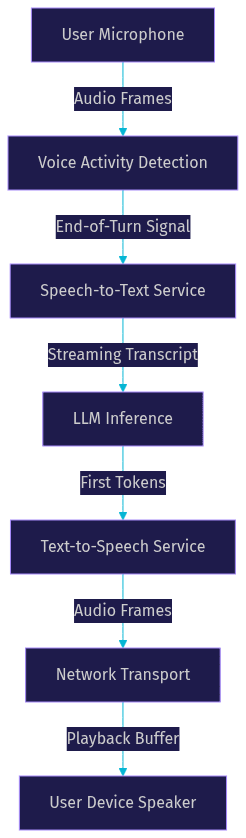
Architecture Diagram
Visualizing the pipeline helps clarify where latency accumulates. The following diagram shows the end-to-end flow of a voice agent interaction, highlighting the sequential stages that contribute to the total turn-taking latency.
Production Checklist
Before deploying your AI voice agent to production, verify these latency-critical items:
- Set up real-time monitoring for P50 and P95 turn-taking latency.
- Configure alert thresholds for when latency exceeds 1 second.
- Establish regional latency baselines for your primary user geographies.
- Implement graceful cancellation if the user starts speaking while the agent is generating a response.
- Prepare fallback prompts or a simpler model if the primary LLM provider experiences degraded performance.
- Verify that your TTS provider supports chunked synthesis and streaming audio.
- Test the agent on various network conditions, including 3G and high-latency Wi-Fi.
- Ensure your endpoint detection thresholds are tuned for your specific use case to minimize dead air.
Definitions Glossary
Turn-Taking Latency: The time between the user finishing their speech and the AI agent beginning its audio response. This is the primary metric for perceived responsiveness.
Time-to-First-Token (TTFT): The delay between sending a prompt to an LLM and receiving the first generated token. It is heavily influenced by model size and context length.
Voice Activity Detection (VAD): An algorithm that detects the presence or absence of human speech. It is used to trigger endpoint detection and manage audio streams.
Endpoint Detection: The process of determining when a user has finished speaking their turn. Also known as end-of-utterance detection.
Chunked Synthesis: A TTS technique where audio is generated and streamed in small fragments rather than waiting for the entire text input to be processed.
Key Takeaways
- AI voice agent latency issues are primarily caused by the turn-taking gap, which should stay under 800 milliseconds for a natural conversation.
- Endpoint detection and LLM time-to-first-token are the biggest consumers of the latency budget and offer the highest optimization potential.
- Overlapping pipeline stages, such as starting LLM inference on partial STT transcripts, hides processing delays from the user.
- Streaming TTS with chunked synthesis is essential to ensure the user hears the agent's response while it is still being generated.
- VideoSDK's AI Agent SDK provides the real-time transport and configurable turn detection needed to build and tune low-latency voice pipelines.
Conclusion
Solving AI voice agent latency issues is an exercise in budget management. You cannot eliminate processing time, but you can control how milliseconds accumulate across the pipeline. By aggressively tuning endpoint detection, overlapping STT and LLM operations, and demanding streaming audio from your TTS provider, you can build agents that feel instantaneous. The difference between a frustrating bot and a helpful assistant often comes down to 200 milliseconds of silence. If you are ready to build responsive, production-grade voice agents, explore the VideoSDK AI Agent SDK and start optimizing your real-time pipelines today. What are you building with VideoSDK? Drop a comment below to share your voice agent use case.
Free $20 Balance for AI Voice Agents & Video Calls
FAQ