


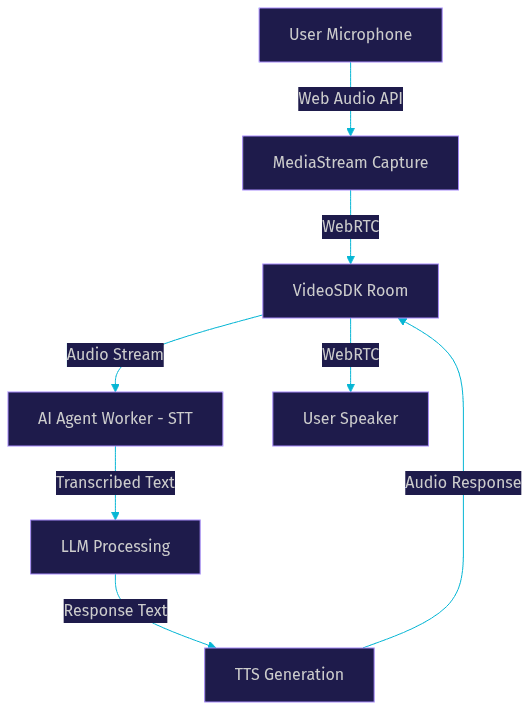
An AI voice agent in JavaScript captures microphone input, converts speech to text, processes it through a large language model, and returns spoken responses via text-to-speech. VideoSDK provides the WebRTC infrastructure and AI agent pipeline that connects JavaScript clients to real-time voice AI sessions with sub-second latency. Start by connecting the VideoSDK JavaScript SDK to a room where an AI agent joins as a participant.
Imagine a customer support scenario where a user opens a web app, clicks a button, and starts talking to an AI assistant that understands their question, checks order status in real time, and responds with a natural voice. No phone tree, no hold music, no friction. That is the promise of an AI voice agent built with JavaScript, and as of 2026, the browser has become a first-class platform for real-time voice AI.
This article walks through the full architecture of a JavaScript-based AI voice agent, from microphone capture to spoken response. You will learn how to choose the right SDK, build the STT-LLM-TTS pipeline, manage turn detection and interruptions, deploy securely, and avoid the latency and audio quality pitfalls that break production voice experiences.
Understanding AI Voice Agents in JavaScript
An AI voice agent in JavaScript is a browser-based system that enables real-time, spoken conversation between a human and an AI model. Unlike traditional chatbots that rely on text input and output, a voice agent handles the full duplex cycle of listening, thinking, and speaking, all within the browser or connected via WebRTC to a server-side pipeline.
VideoSDK provides the real-time communication layer that makes this possible. The VideoSDK JavaScript SDK handles the WebRTC connection, audio streaming, and room management, while the AI agent pipeline runs server-side to process speech and generate responses.
Core Components of a Voice Agent
Every AI voice agent built with JavaScript relies on four core pillars working in sequence. The microphone captures raw audio from the user's browser. A Speech-to-Text (STT) engine transcribes that audio into text in real time. A Large Language Model (LLM) processes the transcribed text, applies conversation context, and generates a response. A Text-to-Speech (TTS) engine converts that response back into audio and plays it to the user.
The critical challenge is latency. For a conversation to feel natural, the entire round trip from user speech to AI response must complete in under one second. VideoSDK's architecture addresses this by running the AI agent as a participant in a VideoSDK room, where audio streams flow over WebRTC with sub-300ms transport latency, and the STT-LLM-TTS pipeline is optimized for streaming inference.
How Browsers Handle Audio Streams
The browser provides two key APIs for voice agent development. The Web Audio API gives developers fine-grained control over audio processing, including noise suppression, echo cancellation, and gain control. The MediaStream interface represents the actual audio stream from the microphone, which can be captured, processed, and transmitted over WebRTC.
Permission flow is a critical step. Browsers require explicit user consent before accessing the microphone, and this permission must be requested via a user gesture such as a button click. Once granted, the audio stream can be passed to the VideoSDK JavaScript SDK, which handles the WebRTC negotiation and sends the audio to the VideoSDK room where the AI agent is listening.
Choosing the Right JavaScript SDK for Voice AI
Selecting the right SDK for your AI voice agent determines your latency ceiling, deployment flexibility, and integration complexity. The JavaScript ecosystem offers several paths, each with distinct tradeoffs.
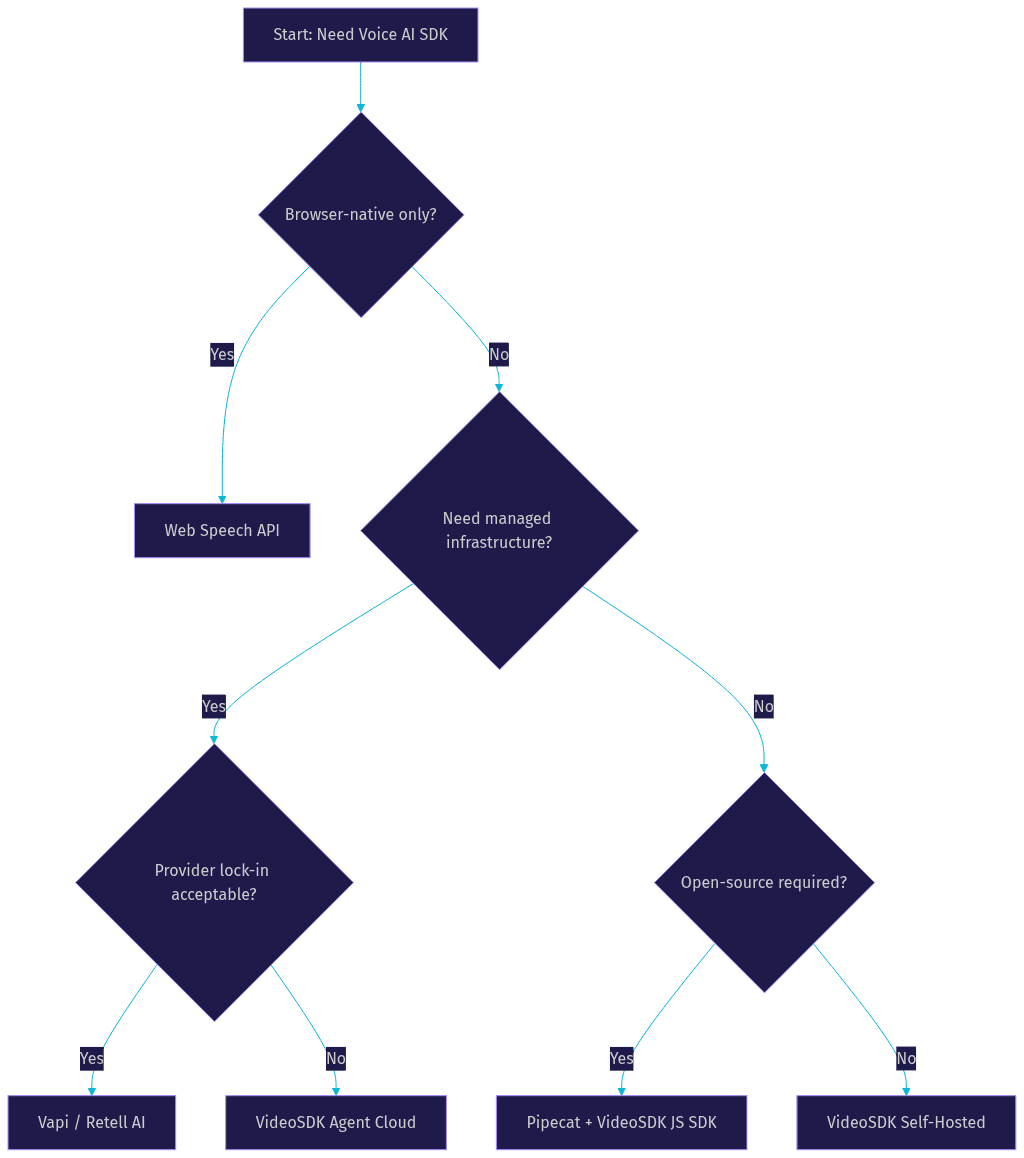
The browser-native Web Speech API provides built-in STT and TTS without any external dependencies, but it suffers from inconsistent browser support, limited language coverage, and no streaming LLM integration. For production voice agents, most developers turn to dedicated SDKs that wrap the full pipeline.
VideoSDK stands out because it combines the WebRTC transport layer with the AI agent pipeline in a single integrated system. Instead of stitching together a WebRTC library, an STT service, an LLM client, and a TTS engine, VideoSDK handles the room connection, audio routing, and agent lifecycle as a unified surface. The JavaScript SDK on the client connects to a VideoSDK room, and the AI agent joins that same room as a participant, receiving audio and sending responses over the same WebRTC channel.
Overview of Popular SDKs
Several SDKs and frameworks support voice AI development in JavaScript. The browser's built-in Web Speech API offers zero-dependency STT and TTS but lacks streaming capabilities and cross-browser consistency. Open-source projects like Pipecat provide a framework for building voice agent pipelines with pluggable STT, LLM, and TTS providers, though they require more integration work. Commercial platforms like Vapi and Retell AI offer managed voice agent infrastructure with JavaScript client SDKs, but they lock you into their specific provider ecosystem.
VideoSDK differentiates by offering an open-source AI agent SDK that supports pluggable providers across STT (Deepgram, OpenAI Whisper, AssemblyAI), LLM (OpenAI, Anthropic Claude, Google Gemini), and TTS (ElevenLabs, OpenAI TTS, Cartesia, AWS Polly). The JavaScript client SDK handles the browser-side WebRTC connection, while the Python-based agent worker runs the pipeline server-side. This separation gives you the flexibility of a custom pipeline with the reliability of managed WebRTC infrastructure.
Selection Criteria
When evaluating SDKs for your JavaScript voice agent, weigh these factors in order of priority. Latency is paramount: look for SDKs that support streaming STT and chunked TTS, not batch processing. Provider flexibility matters if you want to swap models as the AI landscape evolves. Documentation quality and community support determine how fast you can ship and debug. Pricing structure affects scaling: per-minute pricing adds up fast for high-volume voice applications. Open-source status gives you auditability and self-hosting options. Platform support ensures your SDK works across Chrome, Safari, Firefox, and mobile browsers.
Building the Voice Agent Pipeline
The voice agent pipeline is the sequential flow of audio data through four processing stages. Each stage has specific integration points in a JavaScript application, and the way you connect them determines your end-to-end latency and conversation quality.
Capturing Microphone Input
Microphone capture in JavaScript starts with requesting user permission through the browser's media devices API. Best practice is to trigger this request from an explicit user action, such as clicking a "Start Conversation" button, because browsers block automatic permission prompts for security reasons.
Audio quality settings directly affect STT accuracy and latency. Use a sample rate of 16kHz or 48kHz depending on your STT provider's requirements. Enable the browser's built-in echo cancellation and noise suppression to clean up the audio before it reaches the network. Handle mute and unmute states by toggling the audio track on the MediaStream, and always provide visual feedback to the user when the microphone is active.
When using the VideoSDK JavaScript SDK, the microphone capture and WebRTC negotiation are handled automatically. You initialize the SDK with a token, join a room, and the SDK manages the audio track lifecycle, including reconnection if the network drops.
Converting Speech to Text (STT)
Speech-to-Text is the first processing stage in the AI agent pipeline, and it sets the latency floor for the entire conversation. Three primary options exist for JavaScript voice agents.
Real-time Whisper via OpenAI's API provides high accuracy across 50+ languages but adds network round-trip latency. Deepgram's Nova-3 model offers streaming STT with word-level timestamps and sub-300ms latency, making it a strong choice for real-time voice agents. The browser's built-in SpeechRecognition API works without any server-side component but has inconsistent quality and no streaming support.
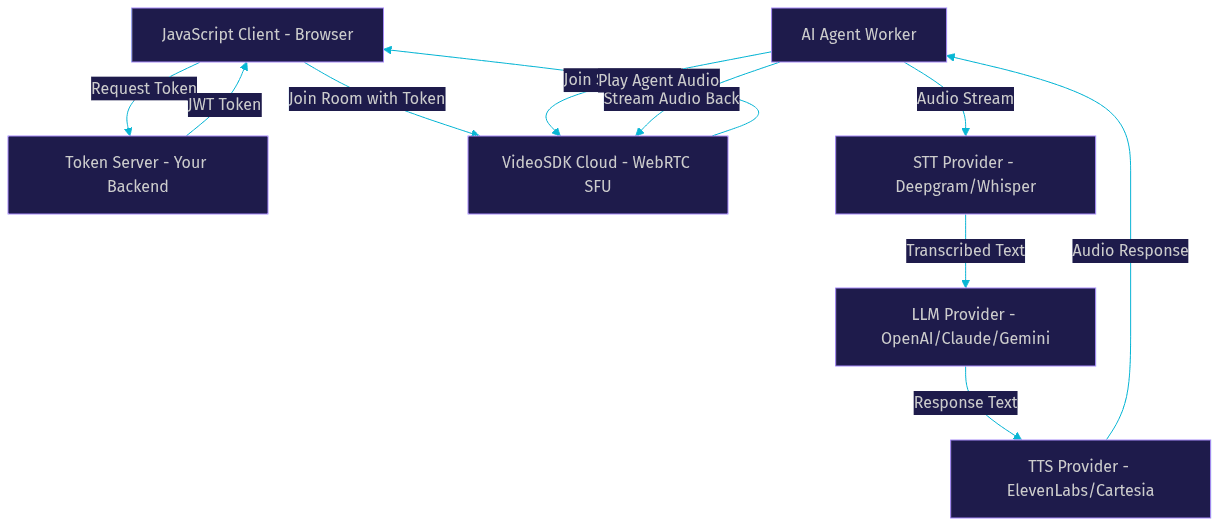
VideoSDK's AI agent pipeline integrates with all three providers. The agent worker receives the audio stream from the VideoSDK room, passes it to the configured STT provider, and emits transcribed text to the next stage. This happens server-side, so the JavaScript client never needs to manage STT connections directly.
Processing with an LLM
Once the user's speech is transcribed, the text is sent to a Large Language Model for processing. The LLM applies conversation context, system prompts, and any function tools or retrieval-augmented generation (RAG) to generate a response.
From a JavaScript perspective, the LLM call happens server-side within the VideoSDK agent worker. The JavaScript client does not call the LLM directly. This architecture is important for two reasons. First, it keeps your API keys secure on the server. Second, it allows the agent to maintain conversation state, memory, and context across turns without exposing that logic to the client.
VideoSDK supports OpenAI, Anthropic Claude, Google Gemini, and other LLM providers. For structured conversations where the flow must follow specific steps (such as loan applications or appointment booking), VideoSDK's Conversational Graph provides a deterministic flow engine that controls branching while the LLM handles natural language generation.
Generating Spoken Responses (TTS)
Text-to-Speech converts the LLM's text response into audio that the user hears. The quality and latency of TTS directly shape how natural the conversation feels.
ElevenLabs provides some of the most natural-sounding voices available in 2026, with streaming support that starts audio playback before the full response is generated. OpenAI TTS offers a simpler integration with good quality and lower cost. Google Cloud TTS provides wide language coverage and reliable infrastructure. Cartesia's Sonic model is emerging as a strong option for low-latency streaming TTS.
In the VideoSDK pipeline, the TTS output is streamed back into the VideoSDK room as an audio track. The JavaScript client receives this track through the standard WebRTC media flow and plays it through the user's speakers. The SDK handles buffering and playback timing to minimize gaps between the LLM finishing its response and the user hearing the audio.
Managing Real-Time Interaction and State
A voice agent is not a simple request-response system. It is a stateful, real-time conversation where timing, interruptions, and context management determine whether the experience feels natural or frustrating.
Turn Detection and Voice Activity Detection (VAD)
Turn detection is the mechanism that decides when a user has finished speaking and the AI agent should begin processing a response. This is one of the hardest problems in voice AI because humans pause mid-sentence, hesitate, and overlap with the AI's speech.
Voice Activity Detection (VAD) algorithms analyze the audio stream to distinguish speech from silence. Simple VAD uses energy thresholds, but production voice agents need more sophisticated approaches that handle background noise, short pauses, and filler words like "um" and "uh." VideoSDK's agent pipeline includes built-in VAD with configurable sensitivity and silence thresholds. You can tune the end-of-speech detection window to match your use case: shorter windows feel more responsive but may cut off hesitant speakers, while longer windows feel more natural but add latency.
The JavaScript client does not need to implement VAD itself. The agent worker handles all voice activity detection and triggers the LLM only when it determines the user has completed their turn.
Handling Interruptions and Fallbacks
Interruptions are a natural part of human conversation that voice agents must handle gracefully. If the AI is speaking and the user starts talking, the agent should stop its current response, process the new input, and respond accordingly.
VideoSDK's agent pipeline supports preemptive response, which means the agent can be interrupted mid-speech. When the VAD detects user speech while the TTS is playing, the agent cancels the current TTS output, stops the audio stream, and begins processing the new input. The JavaScript client receives this as a track update, automatically stopping playback of the agent's audio.
Fallback strategies are essential for production reliability. If the STT provider times out, the agent should inform the user and ask them to repeat. If the LLM fails, a cached or rule-based response should prevent dead air. If the TTS service is unavailable, the agent can fall back to a text response displayed in the UI. VideoSDK's pipeline includes a Fallback Adapter that handles these scenarios automatically, switching to alternative providers or cached responses when primary services fail.
Deploying Securely and Scaling
Security and deployment architecture determine whether your voice agent works reliably for ten users or ten thousand. The JavaScript client is just one part of a system that includes token servers, AI provider APIs, and potentially self-hosted inference infrastructure.
Token Generation and Authentication
VideoSDK uses token-based authentication to secure access to rooms and AI agent sessions. The token is a JWT (JSON Web Token) that encodes permissions, room scopes, and participant identity. Never generate this token in the browser, because your API secret would be exposed to the client.
The correct architecture is a lightweight token server running on your backend. When the JavaScript client wants to start a voice agent session, it calls your token server, which generates a VideoSDK token using your API key and secret. The client then passes this token to the VideoSDK JavaScript SDK to join the room. The AI agent worker also authenticates with its own token and joins the same room.
Scope limiting is critical. Each token should grant only the permissions needed for that session: join a specific room, publish audio, subscribe to the agent's audio. Avoid generating tokens with broad permissions. Set short expiry times to limit the window of exposure if a token is compromised. The VideoSDK authentication guide covers the full token generation process for each SDK.
Cloud vs Self-Hosted Deployment
VideoSDK offers two deployment options for AI voice agents, each with distinct tradeoffs.
VideoSDK Agent Cloud is a managed deployment where VideoSDK hosts the agent worker, handles scaling, and manages the STT-LLM-TTS provider connections. This is the fastest path to production: you configure your agent pipeline, deploy it to Agent Cloud, and the JavaScript client connects to the managed endpoint. You get automatic scaling, monitoring, and observability without managing infrastructure.
Self-hosted deployment gives you full control over the agent worker. You run the Python agent process on your own infrastructure using Docker or Kubernetes, connect your own STT, LLM, and TTS providers, and manage scaling yourself. This is the right choice when you need data residency guarantees, custom model hosting, or cost optimization at high volume.
For the JavaScript client, the deployment choice is transparent. The client connects to a VideoSDK room regardless of whether the agent runs on Agent Cloud or your own servers. The VideoSDK REST APIs handle room creation and agent session management in both cases.
Practical Use Cases and Best Practices
AI voice agents built with JavaScript solve real problems across industries. The following use cases illustrate how the pipeline architecture maps to specific business requirements.
Customer Support Voice Bots
Customer support is the most common production use case for AI voice agents. A user visits a support page, clicks a "Talk to Assistant" button, and describes their problem in natural language. The agent transcribes the speech, queries the support knowledge base using RAG, and responds with a spoken answer or escalates to a human agent.
Key metrics for support voice bots include first-response time (target: under 1.5 seconds), resolution rate (percentage of queries handled without human escalation), and user satisfaction score. VideoSDK's Conversational Graph is particularly valuable here because it lets you define deterministic flows for common support paths (refund requests, order tracking, password resets) while letting the LLM handle the natural language surface.
Interactive Voice Commerce
Voice commerce extends the shopping experience beyond text search and click-to-buy. A user can ask about product availability, compare options, and complete a checkout flow entirely by voice. The agent pipeline needs function tools that query your product catalog, check inventory, and process payments.
The JavaScript client plays a key role here by displaying visual context alongside the voice conversation. As the agent describes a product, the client can render product images, pricing, and a checkout button. The voice interaction handles the conversation while the visual UI handles the transaction confirmation, creating a multimodal experience that pure voice cannot achieve alone.
Accessibility and Compliance
Voice agents have significant accessibility implications. For users with motor impairments who cannot type easily, voice interaction can be transformative. For users with visual impairments, a well-designed voice agent can replace complex visual navigation with simple spoken commands.
WCAG compliance requires that voice agents provide text alternatives for spoken content, support keyboard navigation as a fallback, and clearly communicate when the microphone is active. Data privacy is equally critical: voice agents process sensitive biometric data (voice recordings), so you must comply with regulations like GDPR, CCPA, and HIPAA where applicable. VideoSDK supports end-to-end encryption for media streams, and the VideoSDK JavaScript SDK includes features for managing recording consent and data retention policies.
Common Pitfalls and Troubleshooting
Even with a solid architecture, voice agents encounter predictable problems in production. Knowing how to diagnose and fix these issues separates a demo from a production system.
Audio Quality Issues
The most common audio problems are background noise, echo, and incorrect microphone selection. Background noise degrades STT accuracy and makes the conversation feel unprofessional. Enable the browser's noise suppression and echo cancellation settings when capturing audio, and consider a server-side de-noise stage in the agent pipeline for environments with persistent noise.
Echo occurs when the agent's audio output is captured by the user's microphone, creating a feedback loop. This is especially common when users do not wear headphones. VideoSDK's WebRTC implementation includes echo cancellation at the transport level, but you should also advise users to use headphones in your UI.
Incorrect microphone selection happens when a user has multiple audio input devices and the browser selects the wrong one. Always let users choose their microphone in a pre-call device setup screen, and persist their choice for future sessions.
Latency Bottlenecks
Latency in a voice agent pipeline comes from three sources: network transport, model inference, and audio buffering. Network latency is minimized by using WebRTC with a geographically distributed SFU, which VideoSDK provides by default. Model inference latency depends on your STT, LLM, and TTS providers: streaming STT and chunked TTS are essential for keeping the round trip under one second.
Audio buffering is a hidden latency source that many developers overlook. If the JavaScript client buffers too much audio before playing it, the user perceives a delay even if the pipeline is fast. Configure the audio playback buffer to the minimum size that avoids underruns, and use the VideoSDK SDK's built-in jitter buffer management rather than implementing your own.
Future Trends for AI Voice Agents in JavaScript
The voice AI landscape is evolving rapidly. Three trends will shape JavaScript voice agent development through 2026 and beyond.
Multimodal agents are emerging as the next frontier. Instead of voice-only interaction, agents will process voice, video, and screen content simultaneously. A user could show their broken appliance to the camera while describing the problem, and the agent would analyze both the visual and audio input. VideoSDK's agent pipeline already supports vision and multi-modality, and the JavaScript SDK can transmit video tracks alongside audio.
Edge inference is bringing STT and LLM processing closer to the user. Browser-based inference using WebGPU and WebAssembly is maturing, potentially eliminating the network round trip for smaller models. This could reduce latency to under 200ms for simple queries, though large models will still require server-side processing.
New web standards are expanding what browsers can do with audio. The Web Audio API continues to gain features for real-time audio processing, and proposed standards for audio worklets and spatial audio will give developers more control over the voice experience. The W3C WebRTC specification continues to evolve, with improvements to adaptive bitrate and congestion control that directly benefit voice agent quality.
Definitions Glossary
Voice Activity Detection (VAD): An algorithm that analyzes audio streams to distinguish speech from silence, enabling the agent to detect when a user has finished speaking. VideoSDK's agent pipeline includes configurable VAD with adjustable silence thresholds.Agent Worker: The Python process that runs a VideoSDK AI agent and manages its session lifecycle, including STT processing, LLM calls, and TTS generation within a VideoSDK room.Pipeline: The sequential STT to LLM to TTS chain that processes user speech and generates AI responses. In VideoSDK, the pipeline runs server-side while the JavaScript client handles audio capture and playback over WebRTC.Turn Detection: The mechanism that decides when a user has finished speaking and the AI agent should respond. VideoSDK combines VAD with configurable timing windows to balance responsiveness and natural conversation flow.Conversational Graph: VideoSDK's deterministic flow engine for structured multi-turn voice conversations, where business rules control branching while the LLM handles natural language generation.
Key Takeaways
- An AI voice agent in JavaScript requires four pipeline stages: microphone capture, STT, LLM processing, and TTS, all connected over a low-latency WebRTC transport.
- VideoSDK's JavaScript SDK handles the client-side WebRTC connection and audio streaming, while the Python-based agent worker runs the STT-LLM-TTS pipeline server-side.
- Token authentication must happen server-side to protect your API secret, and tokens should be scoped to specific rooms with short expiry times.
- Turn detection and VAD are the hardest problems in voice AI, and VideoSDK's built-in VAD with preemptive response support handles interruptions gracefully.
- VideoSDK's open-source agent SDK supports pluggable providers across STT, LLM, and TTS, giving you flexibility to swap models as the AI landscape evolves.
Conclusion
Building an AI voice agent with JavaScript in 2026 is no longer a research project. The architecture is well understood: capture audio in the browser, stream it over WebRTC to a server-side pipeline, run STT-LLM-TTS, and stream the response back. VideoSDK provides the integrated infrastructure that makes this architecture production-ready, from the JavaScript SDK that handles WebRTC and audio management to the AI agent pipeline that supports the leading STT, LLM, and TTS providers.
The hardest parts are not the individual components but the integration: keeping latency under one second, handling interruptions naturally, securing tokens, and scaling to thousands of concurrent conversations. VideoSDK's AI agent documentation covers each of these challenges in depth, with code samples and quickstart guides for web, mobile, and telephony deployments.
Start building your voice agent today by signing up at app.videosdk.live/login and exploring the JavaScript SDK quickstart. What are you building with VideoSDK? Drop a comment below, I would love to hear what kind of voice agent use case you are working on.
FAQ