


An AI voice agent for travel is a conversational AI system that understands spoken queries, accesses real-time travel data, and completes bookings or support tasks over voice channels. It combines speech-to-text, large language models, and text-to-speech to automate reservations and customer support. You can build and deploy one rapidly using platforms like VideoSDK's AI Agent SDK.
Voice-first experiences are reshaping how travelers plan, book, and manage their trips. Businesses are increasingly looking for an AI voice agent for travel to handle everything from flight changes to hotel inquiries. According to industry reports, AI-driven voice automation can reduce call center operational costs by up to 40 percent while improving response times. As consumer expectations for instant, hands-free assistance grow, travel brands face pressure to deliver real-time, conversational support that scales without inflating headcount. Whether a traveler is rebooking a canceled flight at the airport or asking for late checkout from their hotel room, voice agents provide an immediate, frictionless interface. The shift from text-based chatbots to natural voice conversations represents a massive leap in accessibility and user experience. Travelers no longer need to navigate tiny screens or type out complex booking references. They can simply speak their needs and let the AI handle the rest. This article explores the architecture, implementation roadmap, and best practices for building a production-ready travel voice assistant that can handle real-world complexity.
The Problem with Traditional Travel Support
Traditional travel support is plagued by fragmented booking flows, after-hours service gaps, and high operational costs. Travelers often navigate complex phone menus, endure long hold times, and struggle to reach human agents during peak disruptions like weather delays. Even when web chat is available, it frequently fails to handle complex, multi-leg itineraries or real-time schedule changes effectively. The result is frustrated customers and overwhelmed support staff. Call centers require significant overhead, from training to infrastructure, and they cannot scale instantly during a mass cancellation event. Furthermore, human agents are prone to errors when manually searching across multiple Global Distribution Systems (GDS) and Property Management Systems (PMS). An AI voice agent for travel addresses these gaps by providing instant, 24/7 conversational support that can access booking systems, process changes, and resolve inquiries without human intervention. This allows human agents to focus on high-value, emotionally complex cases rather than routine booking modifications.
What Is an AI Voice Agent for Travel?
An AI voice agent for travel is defined as a conversational AI application that understands spoken natural language, accesses live travel data, and executes tasks like booking, modifications, or support over a voice interface. It works by capturing user speech, transcribing it to text, reasoning over the request using a large language model, querying external travel APIs, and synthesizing a spoken response. Unlike basic interactive voice response systems that rely on rigid phone menus, a travel voice AI understands intent dynamically. VideoSDK provides the infrastructure to build these agents through its AI Agent SDK, enabling real-time voice interactions that connect to your travel data sources. This allows travel brands to offer an AI travel concierge that handles complex workflows, from booking a multi-city flight to reserving a table at a destination restaurant. The key differentiator is the ability to maintain context over a multi-turn conversation, remembering user preferences and previous statements without requiring repetition.
Core Technical Components
Building a production-grade voice assistant requires orchestrating several specialized technologies into a seamless pipeline.
Speech-to-Text (STT) Engine
The STT engine transcribes spoken audio into text in real time. For travel applications, latency targets must stay under 300 milliseconds to maintain a natural conversation flow. Providers like OpenAI Whisper and Deepgram offer high-accuracy transcription models that handle diverse accents and noisy environments, such as airports or busy streets. The STT component must also manage endpointing, which is detecting when a user has finished speaking, so the agent can begin processing the request without awkward pauses. Advanced STT models can also filter out background noise and handle domain-specific vocabulary, such as airport codes or complex hotel names, with high precision.
Natural Language Understanding (NLU) & LLM Integration
Once transcribed, the text is passed to a large language model (LLM) for intent detection and reasoning. The LLM understands the user's goal, whether it is booking a flight, changing a hotel reservation, or asking about visa requirements. Context management is critical here, as travel planning often involves multi-turn conversations where the user references previous statements. Multi-agent orchestration can further enhance this layer by routing specific intents to specialized models. The LLM must also be constrained to prevent hallucinations, ensuring it only suggests flights or hotels that actually exist in the returned API data.
Text-to-Speech (TTS) Synthesis
The TTS component converts the agent's text response back into natural-sounding speech. Modern TTS providers like ElevenLabs and Google TTS deliver human-like prosody, intonation, and voice customization. For a travel concierge, the voice persona should sound welcoming and professional. TTS latency also impacts the user experience, so choosing a provider with fast audio synthesis is essential for maintaining conversational rhythm. Some platforms allow you to clone a specific voice or use a pre-built brand voice to maintain consistency across all customer touchpoints.
Travel Data Integration Layer
An AI voice agent for travel is only as useful as the data it can access. The integration layer connects the agent to Global Distribution Systems (GDS), Property Management Systems (PMS), Customer Relationship Management (CRM) platforms, and payment gateways. This layer handles authentication, rate limiting, and data normalization, allowing the LLM to fetch live flight availability, check hotel room inventory, or process a payment token securely. Building robust function tools that the LLM can call is the key to making the agent actionable rather than just conversational.
Architecture Overview
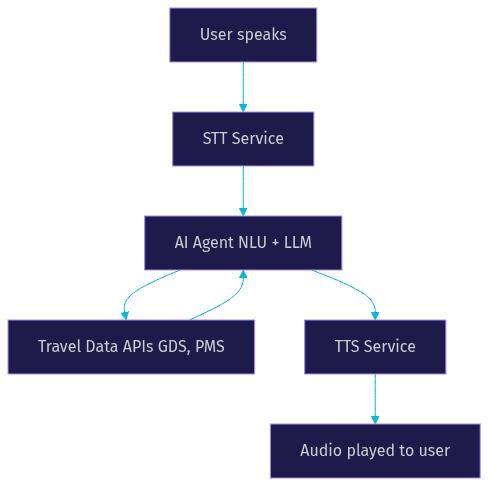
The architecture of a travel voice AI follows a continuous loop of listening, thinking, and speaking. When a user speaks, the audio stream is captured and sent to the STT service. The resulting text is passed to the AI agent, which uses an LLM to determine intent and extract necessary parameters like dates, destinations, and passenger names. The agent then queries the relevant travel data APIs, such as a GDS or PMS, to retrieve real-time availability or booking details. Once the data is retrieved, the LLM formulates a response, which the TTS service converts back into audio and plays to the user. This entire cycle must happen within seconds to feel conversational. VideoSDK's architecture manages the real-time media transport, ensuring audio streams flow efficiently between the user device and the agent worker.
Multi-Agent Approach vs. Monolithic LLM
A monolithic LLM attempts to handle every travel scenario in a single prompt, which often leads to hallucinations and poor reasoning on complex tasks. A multi-agent approach breaks the system into specialized agents, such as a flight agent, a hotel agent, an itinerary agent, and an emergency support agent. When a user asks to book a flight and a hotel, a router agent directs the flight parameters to the flight agent and the hotel preferences to the hotel agent. This separation provides clearer reasoning boundaries, as each agent only needs context relevant to its domain. It also makes debugging easier, since you can isolate which agent failed by examining specific logs. Modular upgrades become simpler, allowing you to swap out the hotel agent's model without retraining the entire system. For example, you could upgrade the flight agent to a more powerful reasoning model while keeping the itinerary agent on a faster, lighter model to save on inference costs.
Implementation Roadmap (no-code focus)
Building an AI voice agent for travel involves careful planning and configuration across several layers.
1. Define Agent Roles
Start by outlining the specific responsibilities for each specialized agent. A flight agent might handle searches, bookings, and seat upgrades. A hotel agent manages room availability, reservations, and loyalty program redemptions. An itinerary agent could suggest daily activities, restaurants, and transportation. Clearly defining these roles prevents overlapping logic and ensures each agent has a focused system prompt. This step is crucial for maintaining high accuracy and preventing the AI from attempting tasks it is not equipped to handle.
2. Set Up a Token-Based Backend
Your backend must securely manage API keys and generate tokens for authenticating users and agents. Never expose your primary API secrets on the client side. Instead, use a server-side process to generate short-lived tokens that the voice agent uses to join a session. VideoSDK uses token-based authentication to secure these real-time media streams, ensuring that only authorized agents and users can participate in a call. You will need to store your VideoSDK API key and secret securely in your environment variables and create an endpoint that issues tokens on demand.
3. Connect STT/TTS Providers
Register and configure your chosen STT and TTS providers through your agent platform's dashboard. You will need to input your provider API keys and select the specific models, such as a low-latency STT model for real-time transcription and a custom voice profile for TTS. Test the audio quality and latency of these providers within the dashboard before moving to full integration. Ensure the TTS voice aligns with your brand persona, whether that is a calm, reassuring tone for support or an energetic tone for booking excitement.
4. Map Travel Data Sources
Link your agent to your GDS, OTA, or PMS APIs via REST connections. Focus on authentication methods, such as OAuth or API keys, and be mindful of rate limits imposed by travel providers. Your agent needs function tools that trigger these API calls, allowing the LLM to fetch live data like flight schedules or hotel room rates dynamically during the conversation. Map out the exact data payloads your APIs return so you can instruct the LLM on how to interpret and present that information to the user.
5. Test Voice Interaction Loop
Validate the end-to-end flow using a sandbox phone number or a web-based microphone interface. Test common scenarios, such as booking a flight, changing a reservation, and handling ambiguous requests. Pay attention to the latency between the user finishing a sentence and the agent beginning its response. Use this testing phase to refine endpointing sensitivity and fallback behaviors. Simulate poor network conditions to ensure the agent degrades gracefully rather than dropping the call entirely.
Best Practices & Common Pitfalls
Latency tuning is critical. If your agent takes too long to respond, users will assume it failed. Optimize your STT and TTS providers for speed, and use streaming responses where possible. When handling ambiguous utterances, program the agent to ask clarifying questions rather than guessing. For example, if a user says "book a trip to Paris," the agent should ask whether they mean Paris, France or Paris, Texas. Always include a fallback to human agents for complex or emotionally sensitive situations, such as a missed flight due to a medical emergency. Ensure your data handling is GDPR-compliant, especially when processing passport numbers, payment details, and personal identifiers. Mask sensitive data in logs and encrypt it in transit. A common pitfall is overloading the agent with too many function tools, which can confuse the LLM and degrade routing accuracy. Keep the toolset focused and modular.
Real-World Case Studies
A boutique online travel agency implemented an AI voice agent for travel to handle after-hours flight changes and hotel bookings. Within three months, they cut support tickets by 30 percent and reduced average handle time by 45 seconds. The agent successfully resolved 65 percent of incoming calls without human intervention, primarily handling rebookings due to weather delays. In another example, a mid-sized hotel chain deployed a voice concierge for in-room requests and direct booking modifications. The voice agent handled late checkout requests, room service orders, and local recommendations, which increased direct bookings by 25 percent by capturing guests who preferred speaking over using an app. The hotel chain also noted a significant improvement in guest satisfaction scores due to the instant response times.
Future Trends in Travel Voice AI
The next generation of travel voice AI will lean heavily into multimodal experiences. Travelers will interact with agents using voice while viewing generative itinerary graphics on their screens, such as visual maps of a planned route or images of hotel rooms. Edge-deployed models will bring ultra-low latency to in-flight or remote travel scenarios where connectivity is poor. We will also see deeper personalization, where agents proactively suggest rebooking options based on real-time flight delay data without the user needing to ask. Integration with wearable devices could allow agents to provide proactive guidance, such as notifying a traveler when their gate changes and providing walking directions via an earpiece.
Definitions Glossary
AI Voice Agent for Travel: A conversational AI system that understands spoken language, accesses live travel data, and completes bookings or support tasks over a voice interface.
Speech-to-Text (STT): The technology that transcribes spoken audio into text in real time, enabling the AI agent to process user requests.
Text-to-Speech (TTS): The synthesis of text into natural-sounding spoken audio, allowing the AI agent to respond verbally to the user.
Global Distribution System (GDS): A network platform that enables automated transactions between travel service providers and travel agencies, providing real-time inventory and booking data.
Multi-Agent Orchestration: An architecture where multiple specialized AI agents handle distinct tasks, such as flights or hotels, rather than relying on a single monolithic model.
Key Takeaways
- An AI voice agent for travel automates complex booking and support workflows using STT, LLMs, and TTS.
- A multi-agent architecture provides clearer reasoning, easier debugging, and modular upgrades compared to a monolithic LLM.
- Latency tuning and secure token-based authentication are critical for a production-ready voice assistant.
- Integrating live travel data sources like GDS and PMS APIs is essential for accurate, real-time booking capabilities.
- VideoSDK's AI Agent SDK provides the infrastructure to build and deploy these real-time voice interactions rapidly.
Conclusion
An AI voice agent for travel is a strategic differentiator for brands looking to scale support and capture bookings without inflating operational costs. By combining real-time speech processing with multi-agent LLM orchestration and live travel data, you can deliver a concierge experience that travelers actually prefer over hold music. Explore VideoSDK's AI Agent SDK to start prototyping your travel voice assistant today. What are you building with VideoSDK? Drop a comment below to share your travel AI use case.
Free $20 Balance for AI Voice Agents & Video Calls
FAQ