


An AI voice agent for recruitment is a voice-based AI system that automates candidate outreach, screening, scheduling, and follow-up calls using real-time speech processing. VideoSDK provides an open-source AI Agent SDK with built-in telephony integration, STT and TTS pipeline support, and deterministic conversation flows through Conversational Graph. Developers can deploy production-ready recruitment voice bots on VideoSDK Agent Cloud or self-host via Docker, connecting candidates through web, mobile, or traditional phone lines.
Every missed call in recruitment is a candidate who applied somewhere else. Research from staffing industry analysts consistently shows that top candidates are off the market within 10 days, yet the average recruiter takes 48 hours to make first contact after an application lands. That gap is where talent goes cold and hiring budgets burn.
An AI voice agent for recruitment closes that gap by making immediate, intelligent phone contact with every candidate the moment their profile enters your pipeline. Instead of a recruiter dialing 200 numbers a day, a voice AI agent handles outreach, conducts initial screening, answers candidate questions, and books interview slots, all in natural conversation.
This article walks through what recruitment voice agents are, how their architecture works, what features matter most, and how to implement one using modern AI agent infrastructure like the VideoSDK AI Agent SDK.
What Is an AI Voice Agent for Recruitment?
An AI voice agent for recruitment is defined as a software system that uses real-time speech recognition, natural language processing, and speech synthesis to conduct automated voice conversations with job candidates for hiring purposes. It works by listening to candidate speech, converting it to text, processing that text through a large language model to determine intent and generate a response, and then converting the response back to natural-sounding speech, all within a sub-second response window.
Unlike text-based recruiting chatbots that sit on a career page waiting for candidates to type questions, a voice agent initiates and conducts full duplex audio conversations. It can call candidates directly, handle inbound calls from interested applicants, and carry on a natural back-and-forth dialogue that feels closer to a human recruiter than to a traditional IVR menu.
The core capabilities of a recruitment voice agent span the entire early-stage hiring funnel. Outbound outreach lets the agent call passive candidates from a sourced list. Inbound handling answers calls from candidates responding to job postings. Screening functionality walks candidates through qualification questions and scores their responses. Scheduling integrates with calendar systems to book interview slots without human intervention. Analytics capture every interaction for downstream reporting and pipeline optimization.
VideoSDK provides the infrastructure to build these agents through its AI Agent SDK, which handles the real-time media transport, telephony bridging, and pipeline orchestration that recruitment voice applications require.
Why Recruiters Are Turning to Voice AI
The economics of traditional recruiting break down at scale. A single recruiter spending 15 minutes per screening call can handle roughly 25 candidates per day. For a staffing agency with 500 active candidates across multiple job orders, that means weeks of backlog and candidates who accept other offers while waiting.
Voice AI changes this math fundamentally. An AI voice agent for recruitment can handle hundreds of concurrent calls, each lasting 5 to 10 minutes, with consistent quality and zero fatigue. Organizations deploying voice AI in hiring report 40 to 60 percent reductions in time-to-fill and 3x improvements in recruiter productivity, because human recruiters shift from phone screening to relationship building and closing.
Candidate experience improves too. Candidates get immediate engagement instead of waiting days for a callback. The agent is available 24/7, which matters for shift workers, passive candidates who are employed during business hours, and international applicants in different time zones.
Compliance is another driver. A well-designed voice agent applies the same screening criteria to every candidate, reducing the variability that introduces unconscious bias. When paired with proper data handling practices, the system can maintain GDPR-compliant audit trails and SOC 2-aligned security controls that are harder to enforce when screening happens across dozens of individual recruiter phone calls.
How It Works: Architecture Overview
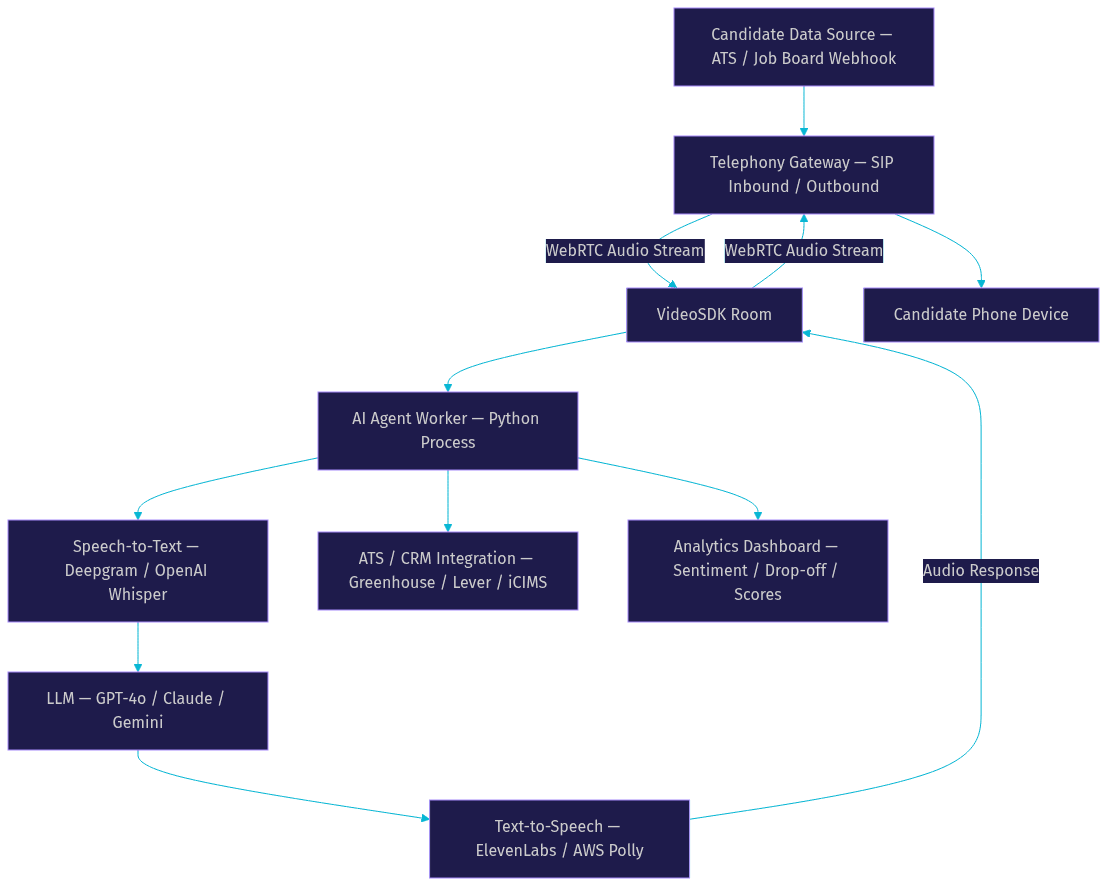
A recruitment voice agent system has three major layers: a candidate data source that feeds candidate information into the pipeline, a telephony gateway that bridges phone networks to the AI processing layer, and an AI agent worker that runs the speech-to-text, LLM, and text-to-speech pipeline. The output flows back to the candidate through the telephony layer and simultaneously to an ATS or CRM for record keeping.
The candidate data source is typically your applicant tracking system, a sourced candidate list, or a real-time webhook from a job board. When a new candidate enters the pipeline, the system triggers the voice agent to initiate an outbound call or prepares the agent to handle an inbound call from that candidate.
The telephony layer uses SIP integration to connect traditional phone networks to the AI processing environment. VideoSDK's telephony integration provides inbound and outbound gateways that bridge SIP trunk providers like Twilio, Telnyx, or Plivo to VideoSDK rooms running over WebRTC. This means a candidate on a regular phone line can have a real-time voice conversation with an AI agent running in the cloud.
The AI agent worker is the core processing engine. It runs as a Python process inside a VideoSDK room, managing the session lifecycle, turn detection, and the STT to LLM to TTS pipeline. The agent listens to the candidate's audio stream, transcribes it, sends the transcription to the LLM with context about the job role and screening criteria, receives the LLM's response, converts it to speech, and plays it back to the candidate.
Here is how the architecture flows from data source through the voice pipeline to ATS output:
Voice Pipeline Components
The speech-to-text component converts the candidate's spoken audio into text in real time. Providers like Deepgram and OpenAI Whisper are commonly used because they handle conversational speech well, including accents, filler words, and overlapping speech. The STT engine must deliver low-latency transcription, ideally under 200 milliseconds, so the agent can respond naturally without awkward pauses.
The large language model is the brain of the agent. It receives the transcribed candidate speech along with a system prompt that defines the screening criteria, job requirements, and conversation flow. Models like OpenAI GPT-4o, Anthropic Claude, and Google Gemini are popular choices. For recruitment use cases where the conversation must follow a specific screening script, VideoSDK's Conversational Graph can enforce a deterministic flow so the LLM handles language generation while business rules control branching.
The text-to-speech component converts the LLM's text response into natural-sounding audio. Providers like ElevenLabs, Cartesia, and AWS Polly offer voices that sound human enough for candidates to engage with comfortably. TTS latency is critical because any delay beyond 300 milliseconds makes the conversation feel unnatural.
Telephony Integration
Telephony integration is what makes a recruitment voice agent reachable by every candidate, not just those who install an app or visit a website. The SIP inbound gateway accepts calls from candidates who dial a posted phone number. The outbound gateway initiates calls to candidates from a sourced list. Both paths bridge traditional telephony to WebRTC-based VideoSDK rooms.
DTMF handling matters for recruitment because candidates may need to press keys to confirm scheduling options or navigate menu choices. Call transfer functionality, including warm transfer, lets the AI agent escalate a promising candidate to a human recruiter mid-conversation without dropping the call.
Security across the telephony layer includes encryption of audio streams in transit, role-based access control for who can initiate outbound calling campaigns, and GDPR-compliant data retention policies. VideoSDK supports geo-fencing and IP whitelisting to restrict where calls can be routed, which matters for organizations hiring across multiple jurisdictions with different data protection requirements.
Key Features to Look For
Not all AI voice agents are built for recruitment. When evaluating platforms or building your own, these are the features that separate a useful hiring assistant from a generic chatbot with a phone number.
Real-Time Candidate Screening with Custom Question Flows
The agent must be able to walk through a structured set of screening questions tailored to each job role. A developer hiring screen asks about years of experience, tech stack familiarity, and salary expectations. A nursing recruitment screen asks about licensure, shift availability, and clinical experience. The system should let you define these flows without rewriting the agent's core logic. VideoSDK's Conversational Graph handles this by letting you define nodes for each screening step with transitions that branch based on candidate responses.
Multi-Language Support
Recruitment is increasingly global. A voice agent that only speaks English excludes large segments of the candidate pool. Look for STT and TTS providers with strong multi-language coverage. Deepgram and Google Cloud STT support dozens of languages. ElevenLabs offers multilingual TTS models. The LLM should also handle code-switching gracefully when candidates switch between languages mid-conversation.
Dynamic Routing to Recruiters
When a candidate passes initial screening and is ready for a human conversation, the agent should transfer the call seamlessly. Warm transfer keeps the candidate on the line while connecting a recruiter, and the agent can provide context to the recruiter before they join. Cold transfer routes the call and drops off. Both modes should be available.
Analytics Dashboard
Every call generates valuable data. Response rates tell you which candidate segments are picking up. Drop-off points reveal where your screening script loses candidates. Sentiment analysis flags candidates who sounded frustrated or confused. Scoring outputs from the LLM give you a ranked list of qualified candidates. This data should flow into a dashboard and also be accessible via REST APIs for integration with your existing reporting stack.
Integration Hooks
The agent must connect to your ATS (Greenhouse, Lever, iCIMS, Workday), calendar system (Google Calendar, Microsoft Outlook), and CRM. Without these integrations, you are building a second data silo that recruiters have to check manually. Look for platforms that expose webhooks and REST endpoints for pushing call summaries, screening scores, and scheduling confirmations directly into your hiring system.
Scalability and Latency
For high-volume recruiting, the agent must handle concurrent calls without degradation. VideoSDK's Agent Cloud scales horizontally, spinning up agent workers on demand. Response latency, the time from when a candidate finishes speaking to when the agent begins responding, should stay under 300 milliseconds. Anything above that threshold makes the conversation feel broken.
Implementation Considerations
Building a production-grade AI voice agent for recruitment requires careful attention to authentication, SDK selection, environment configuration, data privacy, and monitoring.
Authentication and Session Security
VideoSDK uses token-based authentication. You generate a token server-side using your API key and secret, then pass it to the agent worker and any client-side participants. Never expose your API secret in client-side code. Each call session maps to a VideoSDK room with a unique identifier, and access is scoped via meeting tokens. This room-based architecture means each candidate call is an isolated, secure session. You can read more about this in the VideoSDK AI Agent documentation.
Choosing the Right SDK
Your product stack determines which SDK to use. If your recruitment platform is a web application, the JavaScript or React SDK handles the client side. If you are building a backend-only voice agent that candidates reach via phone, the Python SDK and AI Agent SDK are the primary tools. For mobile-first candidate experiences, React Native, Flutter, iOS, and Android SDKs are available. The VideoSDK code samples repository includes quickstart templates for each platform.
Production vs. Development Environment
In development, everything works on localhost with minimal configuration. Production is different. You need HTTPS for any web-based client components. TURN servers handle network traversal when candidates or recruiters are behind restrictive corporate firewalls. Your token server must be deployed on a reliable backend with proper error handling and retry logic. Firewall rules must allow outbound SIP traffic to your telephony provider.
Data Privacy and Compliance
Recruitment data is personal data. Candidate names, phone numbers, employment history, and screening responses all fall under GDPR, CCPA, and similar regulations. Choose infrastructure providers with SOC 2 Type II and ISO 27001 certifications. Implement data retention policies that automatically purge call recordings and transcripts after a defined period. VideoSDK supports end-to-end encryption for media streams, and its role-based access control limits who can access call data.
Monitoring and Error Handling
In production, things break. Turn detection can misfire when candidates pause mid-sentence. Voice activity detection can fail on noisy phone lines. TTS providers can have outages. Your agent needs fallback adapters that switch to a backup STT or TTS provider when the primary fails. VideoSDK's pipeline observability features let you monitor latency, error rates, and conversation quality in real time. Set up alerts for response latency spikes and call drop rates.
Real-World Case Study
Consider a mid-sized staffing agency specializing in healthcare placements. Before implementing a voice AI agent, their 12 recruiters spent roughly 60 percent of their day on initial phone screens, leaving little time for relationship building with hiring managers or closing placed candidates.
They deployed an AI voice agent for recruitment built on VideoSDK's Agent SDK, configured with a Conversational Graph that walked candidates through licensure verification, shift preference, and salary expectations. The agent called every new candidate within 5 minutes of their application being received, 24 hours a day.
The results were significant. Time-to-fill dropped by 45 percent, from an average of 22 days to 12 days. The agent achieved a 100 percent call attempt rate on every incoming candidate, compared to the previous 40 percent coverage human recruiters managed. Average response time from application to first contact fell to 30 seconds. Recruiter productivity tripled because the human team focused exclusively on final-round interviews and candidate closing.
The agency also saw an unexpected benefit: candidate satisfaction scores increased. Candidates reported that the immediate response made them feel valued, and the voice agent's consistent, unbiased screening questions created a fairer evaluation process.
Measuring ROI and Success
Building the agent is half the work. Measuring its impact is how you justify the investment and optimize over time.
Key Performance Indicators
Track these KPIs from day one. Time-to-fill measures the days from application to offer acceptance. Cost-per-hire divides total recruiting spend by number of hires. Candidate drop-off rate tracks the percentage of candidates who abandon the process after the first call. Recruiter hours saved quantifies the time reallocated from phone screening to higher-value activities. Call answer rate measures how many outbound calls result in a connected conversation. Screening accuracy compares the agent's qualification scores against human recruiter assessments.
ROI Calculation
A simple ROI formula: subtract the total cost of the voice agent platform (licensing, telephony, AI provider costs, development hours) from the monetary value of recruiter hours saved plus the revenue from faster placements. Divide that by the platform cost and multiply by 100 for a percentage.
For example, if your agency saves 200 recruiter hours per month at $50 per hour, and the platform costs $3,000 per month, your net savings are $7,000 monthly. Factor in the revenue impact of filling roles 10 days faster across 20 placements, and the ROI compounds quickly.
Benchmark Sources
For evaluating the AI components of your pipeline, independent benchmarks provide objective data. The Artificial Analysis Speech Arena ranks STT and TTS providers on conversational audio quality and latency. The LMSYS Chatbot Arena ranks LLMs on conversational ability. Use these sources when selecting your STT, LLM, and TTS providers rather than relying on vendor marketing claims.
Best Practices and Pitfalls to Avoid
Keep Screening Scripts Concise
Long screening calls feel like interrogations. Keep your initial screening to 5 to 7 questions. The Conversational Graph should move candidates through quickly and route qualified candidates to a human recruiter for depth.
Audit Bias in LLM Prompts Regularly
LLMs can introduce bias based on how screening questions are phrased. Review your system prompts monthly. Test the agent with diverse candidate profiles. If the agent scores candidates differently based on name patterns or accent, adjust the prompt and retest.
Test Multi-Language Accuracy
If your agent supports multiple languages, test each one with native speakers. STT accuracy varies significantly across languages and accents. A model that achieves 95 percent accuracy in English may drop to 80 percent in Hindi or Spanish, which affects screening quality.
Prepare Fallback Human Hand-Off
The agent will encounter edge cases it cannot handle. A candidate asks a complex question about benefits. A candidate becomes frustrated. A candidate has a disability that affects speech patterns. In every case, the agent should detect the limit and warm-transfer to a human recruiter rather than looping or hanging up.
Monitor Latency and Call Quality
Set up dashboards that track end-to-end response latency, call drop rates, and audio quality metrics. If latency creeps above 300 milliseconds, investigate which pipeline component is the bottleneck. According to WebRTC statistics from webrtcstats.com, audio quality issues are the leading cause of call abandonment in automated voice systems.
Future Trends in Recruitment Voice AI
The next generation of recruitment voice agents will be multimodal. VideoSDK's video calling SDKs already enable agents that can see candidates during video interviews, analyze facial expressions, and conduct voice plus video screening sessions. This is particularly relevant for roles where communication skills and presentation matter.
Retrieval-augmented generation, or RAG, will let agents pull from a company's entire knowledge base during calls. Instead of generic screening questions, the agent can reference specific job descriptions, company culture documents, and recent hiring outcomes to conduct more contextual conversations.
Deeper HRIS integration is coming. Agents will not just screen and schedule but also trigger background checks, generate offer letters, and update candidate records across Workday, BambooHR, and other HR systems in real time. The VideoSDK Python SDK is well-positioned for these backend integrations, connecting AI pipelines directly to HR data systems.
Definitions Glossary
AI Voice Agent for Recruitment: A software system that uses real-time speech recognition, LLM processing, and speech synthesis to conduct automated voice conversations with job candidates for screening, scheduling, and outreach purposes.
Conversational Graph: VideoSDK's deterministic flow engine that lets developers define conversation steps as a directed graph, ensuring screening questions follow business rules rather than LLM judgment.
Agent Worker: The Python process that runs a VideoSDK AI agent, managing the session lifecycle, pipeline execution, and telephony connection inside a VideoSDK room.
SIP Integration: The telephony bridge that connects traditional phone networks to VideoSDK WebRTC rooms, enabling candidates to reach AI agents via standard phone calls.
Turn Detection: The mechanism that determines when a candidate has finished speaking and the AI agent should begin responding, critical for natural conversation flow.
Warm Transfer: A call transfer mode where the AI agent connects a human recruiter to the ongoing candidate call and provides context before disconnecting, ensuring a seamless handoff.
Key Takeaways
- An AI voice agent for recruitment automates the most time-consuming part of hiring: initial candidate outreach, screening, and scheduling, reducing time-to-fill by up to 45 percent in documented case studies.
- VideoSDK's AI Agent SDK provides the real-time media transport, telephony integration via SIP, and pipeline orchestration needed to build production-grade recruitment voice bots.
- Conversational Graph ensures screening conversations follow deterministic business rules while the LLM handles natural language generation, which is critical for compliance and fairness in hiring.
- Production deployment requires attention to token-based authentication, TURN server configuration, GDPR and SOC 2 compliance, and fallback adapters for STT and TTS provider failures.
- Measuring success requires tracking time-to-fill, cost-per-hire, candidate drop-off, and recruiter hours saved, with ROI calculated against platform costs and revenue from faster placements.
Conclusion
An AI voice agent for recruitment is not a futuristic concept. It is a deployable system that addresses the most painful bottleneck in modern hiring: the gap between when a candidate applies and when a recruiter makes contact. By automating outreach, screening, and scheduling with natural voice conversations, recruitment teams can engage every candidate immediately, screen consistently, and free human recruiters for the work that actually requires human judgment.
VideoSDK's open-source AI Agent SDK, built-in telephony integration, and Conversational Graph for deterministic screening flows give developers the infrastructure to build these systems without stitching together half a dozen vendor APIs. Whether you deploy on Agent Cloud or self-host, the platform handles the hard parts of real-time media transport so you can focus on the recruitment logic.
Ready to build? Explore the VideoSDK AI Agent SDK documentation, browse the code samples, or join the VideoSDK Discord community to connect with other developers building voice AI applications. You can also sign up free at app.videosdk.live/login to start building today.
What are you building with VideoSDK? Drop a comment below. I would love to hear what kind of recruitment voice AI use case you are working on.
FAQ