


An AI voice agent for law firms is an automated voice assistant that answers inbound calls, qualifies potential clients, schedules consultations, and syncs captured data with practice-management systems. Built on a speech-to-text, large language model, and text-to-speech pipeline, it operates around the clock and maintains compliance standards like SOC 2 and GDPR. Law firms deploying this technology through platforms like VideoSDK's AI Voice Agent can capture after-hours leads without adding headcount.
Missing a single intake call can cost a law firm thousands in lost billable revenue. Personal injury practices, immigration attorneys, and family law offices all depend on fast, reliable phone intake to convert distressed callers into retained clients. Yet most firms lose 20 to 30 percent of inbound calls to after-hours timing, busy lines, or understaffed front desks. An AI voice agent for law firms directly addresses this revenue leak by answering every call instantly, conducting structured intake, and routing qualified leads into the firm's CRM.
This guide walks through what these agents are, how they work in a legal context, the benefits they deliver, and a practical implementation roadmap. By the end, you will understand how to evaluate, deploy, and measure the ROI of an AI voice agent tailored to a law practice.
What is an AI Voice Agent for Law Firms?
An AI voice agent for law firms is defined as a software system that conducts natural, real-time voice conversations with callers to perform legal intake, appointment scheduling, and lead qualification without human intervention. Unlike a traditional interactive voice response (IVR) system that forces callers through rigid menu trees, an AI voice agent understands natural speech, handles open-ended responses, and adapts its questions based on what the caller says.
The core components are threefold. A speech-to-text (STT) engine transcribes the caller's spoken words into text in real time. A large language model (LLM) processes that text, reasons about the caller's intent, and generates an appropriate response grounded in the firm's practice-area knowledge base. A text-to-speech (TTS) engine converts the LLM's response back into natural-sounding speech. The entire loop happens in under a second, creating a conversation that feels fluid rather than robotic.
VideoSDK provides the infrastructure to connect these components through its AI Agent SDK, which orchestrates the STT-to-LLM-to-TTS pipeline inside a VideoSDK room and manages the agent session lifecycle. This means a law firm can deploy a voice agent that connects to callers via web, mobile, or traditional phone lines through SIP telephony integration.
How AI Voice Agents Work in a Legal Context
When a potential client calls a law firm, the AI voice agent picks up immediately and begins a structured conversation. The agent asks qualifying questions, captures case details, performs conflict checks, and schedules a consultation. Every piece of information flows automatically into the firm's practice-management system.
The end-to-end architecture looks like this:
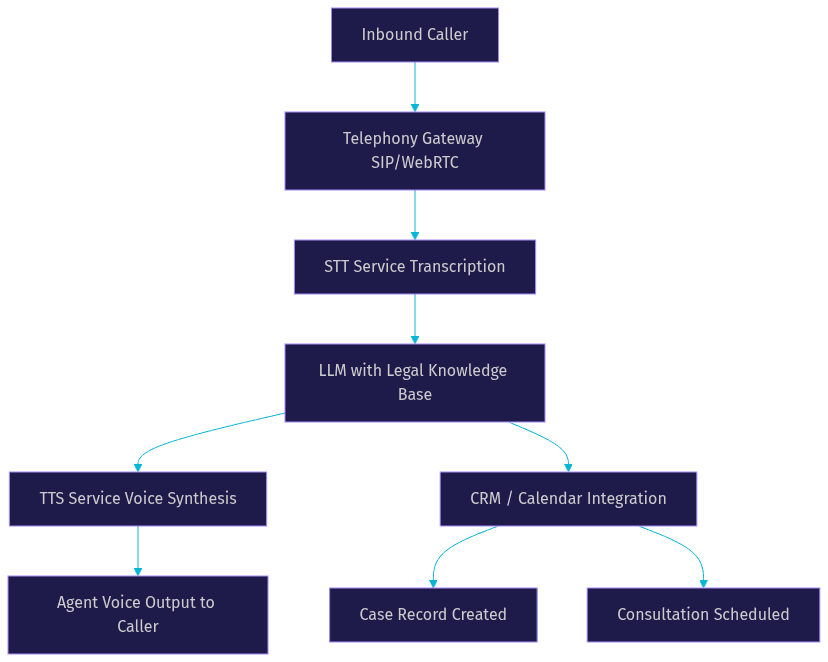
The telephony gateway bridges the traditional phone network to the AI agent's processing environment. VideoSDK's SIP telephony integration handles this bridge, supporting inbound calls from providers like Twilio, Telnyx, or Plivo. Once the call connects, the STT service transcribes the caller's speech in real time. The LLM, configured with the firm's intake script and practice-area knowledge, determines the next question or response. The TTS service synthesizes the agent's reply, and the caller hears a natural voice.
Simultaneously, the LLM extracts structured data from the conversation: caller name, case type, incident date, opposing party name for conflict checking. This data posts to the firm's CRM through API integrations, creating a case record and scheduling a consultation without any manual data entry.
Key Benefits
24/7 Availability
Law firms that deploy an AI voice agent never miss an after-hours lead. Calls that arrive at 11 PM, on weekends, or during holidays are answered instantly with the same intake quality as a business-hours call. This is critical for personal injury practices where callers often reach out immediately after an accident.
Faster Intake and Qualification
An AI voice agent conducts structured intake in real time, asking the right qualifying questions based on practice-area logic. It captures case details, performs preliminary conflict checks by cross-referencing opposing party names against the firm's database, and flags high-value leads for immediate attorney follow-up. The agent can also use VideoSDK's Conversational Graph to enforce a deterministic intake flow, ensuring every required question is asked in the correct order.
Compliance and Security
Legal practices handle sensitive client information, making compliance non-negotiable. AI voice agent platforms designed for legal use support SOC 2 Type II compliance, GDPR data handling requirements, and HIPAA safeguards for firms handling medical records in personal injury or workers' compensation cases. VideoSDK provides end-to-end encryption for all media streams and supports geo-fencing to keep data within specific jurisdictions.
Cost Efficiency
A full-time receptionist costs a law firm between $40,000 and $55,000 annually in salary alone, before benefits and overhead. An AI voice agent handles unlimited concurrent calls for a fraction of that cost. For firms receiving 50 or more calls per day, the savings compound rapidly while call coverage actually improves.
Multilingual Support
Law firms serving diverse communities benefit from AI voice agents that converse fluently in multiple languages. A personal injury firm in Los Angeles can configure its agent to handle calls in English and Spanish seamlessly. Immigration practices can serve clients in Mandarin, Portuguese, or Arabic. The LLM handles language switching naturally, and modern TTS providers like ElevenLabs and Cartesia deliver high-quality multilingual voice synthesis.
Implementation Considerations
Choosing the Right Platform
Selecting the right AI voice agent platform requires evaluating three factors: STT and TTS quality, conversational latency, and pricing structure. For STT, Deepgram's Nova-3 model and OpenAI Whisper both deliver strong accuracy on conversational audio, but Deepgram typically achieves lower latency. For TTS, ElevenLabs and Cartesia Sonic produce the most natural-sounding voices, which matters significantly for legal intake where caller trust is essential. VideoSDK's agent pipeline supports all of these providers, letting firms mix and match based on their priorities.
Integration with Practice-Management Systems
The AI voice agent must connect to the firm's existing CRM and calendar systems to deliver real value. Leading practice-management platforms like Clio, MyCase, and Lawmatics offer REST APIs that accept inbound case data. The agent's backend orchestrates API calls to create new matters, populate intake fields, and schedule consultations against attorney availability. VideoSDK's REST APIs handle the room management and session orchestration layer, while the firm's server-side code bridges agent output to the CRM.
Data Privacy and Encryption
Every component of the AI voice agent pipeline must protect client data. This means end-to-end encryption for all audio streams, token-based authentication for every API call, and strict access controls on stored recordings and transcripts. VideoSDK uses JWT-based token authentication generated server-side, ensuring that API secrets never reach the frontend. Firms with strict data-residency requirements can deploy the agent worker in a virtual private cloud or specific geographic region. Transcripts and call recordings should be encrypted at rest and retained according to the firm's records-retention policy.
Training the Agent on Firm-Specific Knowledge
The AI voice agent needs a knowledge base that reflects the firm's practice areas, intake criteria, and tone. This involves creating a structured document covering practice-area descriptions, qualifying questions, consultation scheduling logic, and firm policies. The LLM uses this knowledge base as context during conversations, ensuring responses are accurate and consistent with the firm's brand.
Scaling and Performance
As call volume grows, the agent must handle concurrent calls without degradation. VideoSDK's agent architecture supports horizontal scaling through worker processes that can be load-balanced across multiple instances.
Measuring ROI and Impact
Quantifying the return on investment for an AI voice agent requires three inputs: average case value, current missed-call rate, and reception staff cost. A personal injury firm with an average settlement value of $15,000 that misses 25 percent of 200 monthly calls is losing approximately 50 potential leads per month. If even 10 percent of those missed calls would have converted to retained cases, the firm loses $75,000 in monthly revenue.
Deploying an AI voice agent that captures 80 percent of previously missed calls adds 40 more leads per month. At a 10 percent conversion rate, that is four additional retained cases, generating $60,000 in new monthly revenue. Combine that with the $45,000 annual salary savings from reducing or reallocating reception staff, and the total annual ROI easily exceeds $700,000 for a mid-sized practice. Even accounting for platform costs, which typically range from a few hundred to a few thousand dollars monthly depending on call volume, the return is substantial.
Real-World Case Studies
Personal Injury Firm in Texas
A mid-sized personal injury practice in Houston was losing an estimated 30 percent of inbound calls to after-hours timing and busy lines during peak periods. The firm deployed an AI voice agent configured with a Conversational Graph that enforced a structured intake flow: accident date, injury description, medical treatment status, insurance information, and opposing party details for conflict checking.
The agent answered every call within one ring, conducted the full intake conversation, and posted case records directly to the firm's Clio Manage instance. Within the first three months, the firm reported a 22 percent increase in retained cases, attributing the gain entirely to after-hours and overflow call capture. The agent handled calls in both English and Spanish, which was critical for the firm's client demographic. Call recordings and transcripts were stored with end-to-end encryption, satisfying the firm's compliance requirements.
Immigration Law Practice in California
An immigration attorney in Los Angeles faced a different challenge: high call volume from potential clients speaking multiple languages, with intake questions that varied significantly based on visa type. The firm deployed an AI voice agent using a multilingual LLM and configured practice-area-specific intake flows for family-based petitions, employment visas, and asylum cases.
The agent qualified callers by asking visa-type-specific questions, determined whether the case fit the firm's practice areas, and scheduled consultations with the appropriate attorney. Integration with Lawmatics automated the entire intake-to-consultation pipeline. The firm saw a 40 percent reduction in time spent on manual intake, and attorneys received pre-qualified case summaries before each consultation. The agent also handled routine questions about office hours, consultation fees, and required documents, freeing staff for higher-value work.
Potential Challenges and Mitigations
Voice Realism Concerns
Callers may perceive a synthetic voice as impersonal, which is particularly sensitive in legal contexts where clients are often distressed. Modern TTS providers like ElevenLabs and Cartesia Sonic produce voices that are nearly indistinguishable from human speech, but firms should test the selected voice with real callers and gather feedback. Configuring the agent to disclose its AI nature upfront, while maintaining a warm and professional tone, builds trust rather than eroding it.
Data Residency Regulations
Law firms operating in the European Union must comply with GDPR data-residency requirements, and firms handling health-related case information in the United States must consider HIPAA. VideoSDK supports geo-fencing and regional deployment, allowing firms to keep all data within specific jurisdictions. Firms should verify that their STT, LLM, and TTS providers also maintain data-residency compliance, as the entire pipeline must be consistent.
Handling Complex Legal Questions
An AI voice agent should never provide legal advice. Its role is intake, qualification, and scheduling. When a caller asks a substantive legal question, the agent should acknowledge the question, explain that an attorney will address it during the consultation, and capture the question in the case record. This boundary protects the firm from unauthorized practice of law concerns and ensures the caller receives proper legal guidance from a licensed attorney.
Fallback to Human Agents
Some calls require human judgment: emotionally distressed callers, complex multi-party cases, or callers who simply prefer speaking with a person. The AI voice agent should detect these scenarios and offer a warm transfer to a human receptionist or attorney. VideoSDK's telephony integration supports call transfers, including warm transfers where the agent briefs the human recipient before connecting the caller.
Future Trends for AI Voice Agents in Law
The next 18 months will bring three significant advances to AI voice agents in the legal sector. First, real-time LLM updates will allow agents to access live case-law changes and regulatory updates during conversations, making intake qualification more accurate for evolving practice areas like immigration law.
Second, multimodal assistants will combine voice with document processing. A caller will be able to describe their situation verbally while the agent simultaneously analyzes a uploaded accident report or visa application, providing richer intake data than voice alone.
Third, tighter integration with e-discovery and case-management platforms will create a seamless pipeline from first call to case resolution. The agent's intake transcript will automatically populate discovery templates, conflict-check databases, and matter-management workflows. Firms that adopt AI voice agents now will be positioned to leverage these advances as they mature.
Definitions Glossary
AI Voice Agent: A software system that conducts real-time voice conversations using a speech-to-text, large language model, and text-to-speech pipeline to perform tasks like intake, scheduling, and lead qualification.
STT (Speech-to-Text): The component that transcribes a caller's spoken words into text in real time, enabling the language model to process and respond to the input.
LLM (Large Language Model): The reasoning engine that processes transcribed text, determines the appropriate response based on a firm-specific knowledge base, and generates natural-language replies.
TTS (Text-to-Speech): The component that converts the language model's text response into natural-sounding spoken audio delivered back to the caller.
Conversational Graph: VideoSDK's deterministic flow engine that enforces a structured conversation path, ensuring every required intake question is asked in the correct order regardless of how the caller responds.
SIP Telephony Integration: The bridge between traditional phone networks and VideoSDK's WebRTC rooms, enabling AI voice agents to answer inbound calls from standard phone lines.
Key Takeaways
- An AI voice agent for law firms captures missed after-hours calls, conducts structured intake, and syncs data directly to practice-management systems, directly addressing the revenue loss from unanswered phones.
- The STT-to-LLM-to-TTS pipeline powers natural, real-time conversations that feel far closer to speaking with a human receptionist than navigating a traditional IVR menu.
- Compliance safeguards including end-to-end encryption, token-based authentication, and geo-fencing are essential when deploying voice AI in a legal context where client confidentiality is paramount.
- ROI calculations based on average case value, missed-call rate, and staff savings typically show payback within the first month for mid-sized practices receiving 50 or more daily calls.
- VideoSDK's AI Agent SDK, Conversational Graph, and SIP telephony integration provide the infrastructure to deploy, scale, and secure a legal voice agent across web, mobile, and phone channels.
Conclusion
An AI voice agent for law firms is no longer an experimental technology. It is a practical, deployable solution that captures lost revenue, reduces operational costs, and improves client experience from the very first phone call. The combination of natural voice quality, structured intake flows, CRM integration, and compliance-grade security makes it a strategic investment for any practice that depends on phone-based lead intake. If your firm is losing calls, losing leads, or losing revenue to after-hours gaps, the time to evaluate an AI voice agent is now. Start by exploring VideoSDK's AI Voice Agent documentation and join the VideoSDK Discord community to connect with developers building legal voice AI. What are you building with VideoSDK? Drop a comment below, I would love to hear what kind of legal intake use case you are working on.
FAQ