


An AI voice agent for aviation is a real-time conversational system that processes speech, understands intent, and delivers spoken responses tailored to flight operations and passenger service. Unlike traditional IVR, it uses advanced speech-to-text, large language models, and text-to-speech to handle dynamic queries. Developers can build and deploy these agents using platforms like the VideoSDK AI Voice Agent SDK.
Aviation demands precision. When a pilot is executing a checklist during turbulence or a ground agent is rebooking a flight for 200 stranded passengers, speed and accuracy are non-negotiable. The growing demand for an AI voice agent for aviation stems from the need to automate routine communication while maintaining strict safety standards.
Airlines and aviation software providers are moving beyond legacy touch-tone systems. They want conversational interfaces that understand noisy cockpit environments, switch languages mid-sentence, and pull live flight data instantly. By integrating real-time voice AI, developers can build systems that reduce pilot workload, enhance cabin crew efficiency, and streamline passenger service. This guide breaks down the architecture, deployment models, and implementation considerations for building aviation-grade voice agents.
What Is an AI Voice Agent for Aviation?
An AI voice agent for aviation is defined as a software system that enables real-time, natural language voice interaction between humans and aviation applications. It works by capturing audio input, transcribing it to text, determining intent through a language model, generating a response, and synthesizing that response back into spoken audio.
Traditional Interactive Voice Response (IVR) systems rely on rigid menu trees and dual-tone multi-frequency signaling. They cannot handle open-ended queries or contextual follow-ups. Similarly, legacy cockpit voice recorders capture audio but do not process or respond to it. An AI voice agent bridges this gap. It understands natural speech, integrates with live flight data, and provides actionable answers.
VideoSDK provides the infrastructure to connect these voice agents to real-time communication channels. Through the VideoSDK Python SDK, developers can wire AI pipelines directly into WebRTC rooms, enabling sub-second voice interactions across web, mobile, and telephony networks.
Core Components of an Aviation-Focused AI Voice Agent
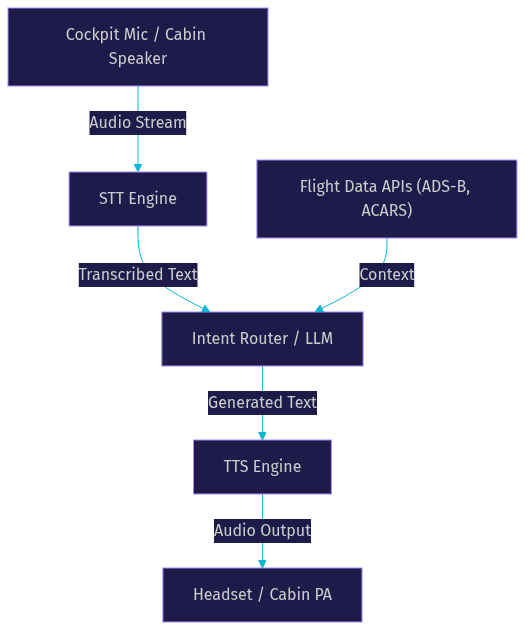
Building a reliable aviation voice assistant requires orchestrating several high-performance components. Each piece must be optimized for the unique acoustic and operational challenges of flight.
Speech-to-Text (STT) Engine
The STT engine converts spoken audio into text. In aviation, this is notoriously difficult due to cockpit noise, engine hum, and oxygen mask interference. Real-time transcription needs specialized acoustic models trained on aviation audio datasets. Providers like Deepgram and AssemblyAI offer low-latency transcription, but developers must apply aggressive noise suppression. VideoSDK includes built-in de-noise capabilities to clean audio streams before they reach the STT provider.
Large Language Model (LLM) / Intent Router
Not all queries should go to a generative model. Safety-critical commands require deterministic routing. An intent router first classifies the utterance. If a pilot asks for the landing gear status, the router fetches telemetry directly. If a passenger asks about baggage policy, the request goes to an LLM for a conversational response. This hybrid approach prevents hallucination in safety scenarios.
Text-to-Speech (TTS) Engine
The TTS engine converts text responses back into natural-sounding audio. Aviation environments require clear, authoritative voices that cut through background noise. Multilingual support is also critical. A cabin crew assistant might need to announce safety procedures in English, then immediately switch to Spanish for a connecting flight. Providers like ElevenLabs and Cartesia offer high-fidelity, low-latency voice synthesis suitable for these applications.
Flight Data Integration Layer
An AI voice agent is only as smart as the data it accesses. The integration layer connects the agent to live ADS-B feeds, ACARS messages, and airline reservation APIs. When a pilot asks for weather at the destination, the agent queries the flight data layer, formats the response, and reads it back. This layer acts as the ground truth, ensuring the LLM does not invent critical information.
Deployment Options: Cloud vs Edge
Choosing where to host the AI voice agent architecture is a critical decision. It dictates latency, offline capability, and regulatory compliance.
Fully-hosted cloud agents run in data centers. They offer unlimited compute power, allowing developers to use large language models and high-quality TTS voices. Cloud deployment is ideal for ground operations, passenger rebooking, and call center automation. However, it relies on constant internet connectivity. If a plane loses satellite link, the voice agent goes silent.
On-board edge devices solve the connectivity problem. Developers can deploy smaller, quantized models on hardware like NVIDIA Jetson or ARM-based single-board computers installed in the avionics bay. Edge deployment guarantees the AI co-pilot remains functional even over oceanic routes with no data link. The tradeoff is model size and power consumption. Edge devices have memory constraints that limit the LLM parameter count.
VideoSDK supports both deployment models. You can run the Agent Worker process in the cloud or self-host it on edge hardware using Docker. This flexibility lets developers use a single SDK surface for both connected and disconnected scenarios.
High-Impact Use Cases
The versatility of an AI voice agent for aviation unlocks value across the entire flight lifecycle.
AI Co-Pilot Assistance
Pilots manage intense cognitive loads. An AI co-pilot acts as a hands-free assistant. It can read out checklist items, verify Automatic Terminal Information Service (ATIS) reports, and confirm ATC clearances. When a pilot hears a complex taxi instruction, they can ask the agent to repeat or simplify it. The agent cross-references the instruction with the airport diagram database.
Cabin Crew Voice Assistant
Cabin crews manage passenger service and safety. A voice agent can automate dynamic announcements. Instead of reading a static script, the agent generates announcements based on real-time flight progress. If turbulence is detected, the agent prompts the crew to suggest returning to seats. It also handles passenger service requests. A flight attendant can ask the agent for a passenger's meal preference or connecting gate information without navigating a tablet.
Ground Operations Voice Bot
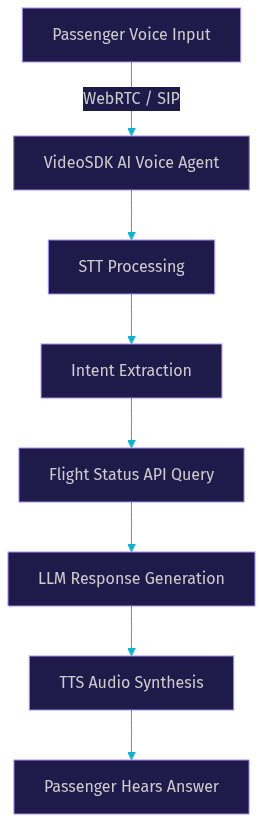
When flights cancel, gate agents face overwhelming queues. A ground operations voice bot handles voice calls and kiosk interactions. It processes rebooking requests, answers baggage inquiries, and provides flight-status updates. By connecting to the airline reservation system via REST APIs, the bot can rebook passengers and issue hotel vouchers autonomously.
Emergency and Safety Briefings
In an emergency, clear communication saves lives. An AI voice agent can deliver instant, context-aware safety instructions. If a depressurization event occurs, the agent can guide passengers through oxygen mask usage in their native language. It adapts the briefing based on sensor data, telling passengers exactly what is happening and what to do next.
Implementation Considerations
Deploying an AI voice agent for aviation requires navigating strict technical and regulatory hurdles.
Latency and Real-Time Requirements
Conversational latency kills usability. For cockpit use, developers must target a sub-500-millisecond round-trip time from end of speech to start of audio response. This requires streaming audio chunks to the STT engine, using fast inference endpoints for the LLM, and streaming TTS audio back. VideoSDK's real-time architecture is designed for this, using WebRTC to minimize packet delay and jitter.
Offline and On-Device Processing
For edge deployments, memory constraints and power consumption are the primary enemies. Developers must choose smaller language models or specialized aviation fine-tunes that fit within the device RAM. Power consumption is critical; the agent cannot drain the aircraft's backup battery. Model quantization and efficient audio processing pipelines are necessary to keep the edge device responsive.
Regulatory and Safety Compliance
Aviation software is heavily regulated. Any system used for flight operations must comply with FAA and ICAO guidelines. DO-178C certification is required for software that could affect flight safety. Developers must implement strict logging, traceability, and testing protocols. Data privacy is also governed by GDPR and local aviation authorities. Voice streams containing passenger data must be encrypted and retained according to policy.
Security and Authentication
Voice agents must not allow unauthorized access to flight systems. Token-based access control is mandatory. VideoSDK uses Meeting Tokens generated server-side to authenticate participants joining a room. Voice streams should be encrypted end-to-end. Developers must ensure that the agent cannot execute physical aircraft commands without explicit human confirmation.
Monitoring and Analytics
Once deployed, the agent needs continuous monitoring. Developers should track call-level metrics like latency, word error rate, and intent classification accuracy. Error logging helps identify when the STT engine fails due to noise or when the LLM hallucinates. VideoSDK provides session analytics and pipeline observability tools to monitor agent performance in real time.
Challenges and Best-Practice Recommendations
Building an AI voice agent for aviation is not without friction. The acoustic environment is the first major challenge. Cockpit noise decibels can overwhelm standard microphones. Best practice is to use dedicated aviation headsets with active noise cancellation and route the audio through VideoSDK's de-noise filter before STT processing.
False-positive intent detection is another risk. If a pilot says "descend" in a casual conversation, the agent must not execute a descent command. Developers should implement a wake-word or push-to-talk mechanism for safety-critical actions. The intent router should require high confidence scores before triggering deterministic flight commands.
Model drift occurs when the LLM's performance degrades over time due to changing contexts. Airlines update baggage policies and route structures frequently. Developers must regularly update the RAG (Retrieval-Augmented Generation) knowledge base to keep the agent's answers accurate.
Finally, integration testing is paramount. The voice agent must be tested against live flight data feeds, not just synthetic data. Simulate edge cases like network handoffs between satellite and ground stations to ensure the audio stream does not drop.
Future Trends in Aviation Voice AI
The intersection of AI and aviation is evolving rapidly. Edge-AI advancements are making it possible to run larger, more capable models on aircraft hardware without compromising power budgets. This will lead to more sophisticated AI co-pilots that can handle complex emergency checklists entirely offline.
Multimodal interfaces are on the horizon. Future agents will combine voice with visual cues. A pilot could ask, "What is that on the left wing?" while a camera feed provides visual context to a vision-language model. Autonomous decision-making is also expanding. While humans will remain in the loop for safety, agents will increasingly handle routine ATC communications autonomously, freeing pilots for strategic flight management. Industry standards for AI in aviation are maturing, with bodies like RTCA developing guidelines specifically for machine learning systems in aircraft.
Definitions Glossary
AI Voice Agent: A software system that processes human speech, understands intent, and generates spoken responses in real time.
STT (Speech-to-Text): The process of converting spoken audio into text, critical for understanding user input in noisy environments.
Intent Router: A system that classifies user utterances to decide whether to use a deterministic rule or a generative language model for the response.
Edge Deployment: Hosting the AI agent on local hardware (like an onboard computer) rather than in the cloud, ensuring functionality without internet access.
ACARS: Aircraft Communications Addressing and Reporting System, a digital datalink system for transmitting messages between aircraft and ground stations.
Key Takeaways
- An AI voice agent for aviation enhances safety and efficiency by enabling hands-free communication for pilots, cabin crew, and ground operations.
- A hybrid architecture using deterministic routing for safety commands and LLMs for conversational queries prevents critical errors.
- Edge deployment on aircraft hardware is necessary for over-ocean flights where cloud connectivity is lost, requiring careful memory and power management.
- Regulatory compliance with FAA, ICAO, and DO-178C standards is mandatory for any system touching flight operations.
- VideoSDK provides the real-time WebRTC infrastructure and Python SDK needed to build and deploy low-latency aviation voice agents.
Conclusion
Adopting an AI voice agent for aviation offers a strategic advantage in an industry where safety, speed, and passenger experience are paramount. By combining real-time speech processing with live flight data, developers can build systems that reduce pilot workload and streamline ground operations. The technical hurdles are significant, from noisy environments to strict regulatory compliance, but the architecture patterns are proven. If you are ready to prototype a voice agent, explore the VideoSDK AI Voice Agent SDK and join our Discord community to connect with other developers building real-time AI applications. What are you building with VideoSDK? Drop a comment below.
FAQ