


An AI voice agent authentication error occurs when the token validating your agent's connection to a speech-to-text, LLM, or text-to-speech provider is missing, expired, or lacks the required scopes. VideoSDK's AI Agent SDK surfaces these failures through structured error codes in the -60000 range, letting you detect, refresh, and retry without dropping the call. The fix is almost always a combination of server-side token generation, automatic refresh logic, and correct header attachment on every WebSocket or HTTP request.
You deploy your AI voice agent, test it locally, and everything works. Then production hits. Users connect, the agent goes silent, and your logs fill with 401s and expired token messages. Authentication errors are the single most common reason AI voice agents fail in production, and they are notoriously hard to debug because the failure happens mid-stream, not at startup.
The ecosystem has grown fast. Developers are building agents with VideoSDK AI voice agents, Microsoft 365 Agents SDK, LiveKit, Claude voice dictation, Google STT, and xAI OAuth flows. Each provider handles authentication differently, and each surfaces errors in its own way. A token that works for one provider may be rejected by another. A JWT that was valid five minutes ago may already be expired.
This guide walks you through the full diagnostic and fix workflow. You will learn how authentication works in voice pipelines, how to identify the specific error pattern, how to fix it, and how to prevent it from recurring.
Understanding AI Voice Agent Authentication
What is an AI Voice Agent?
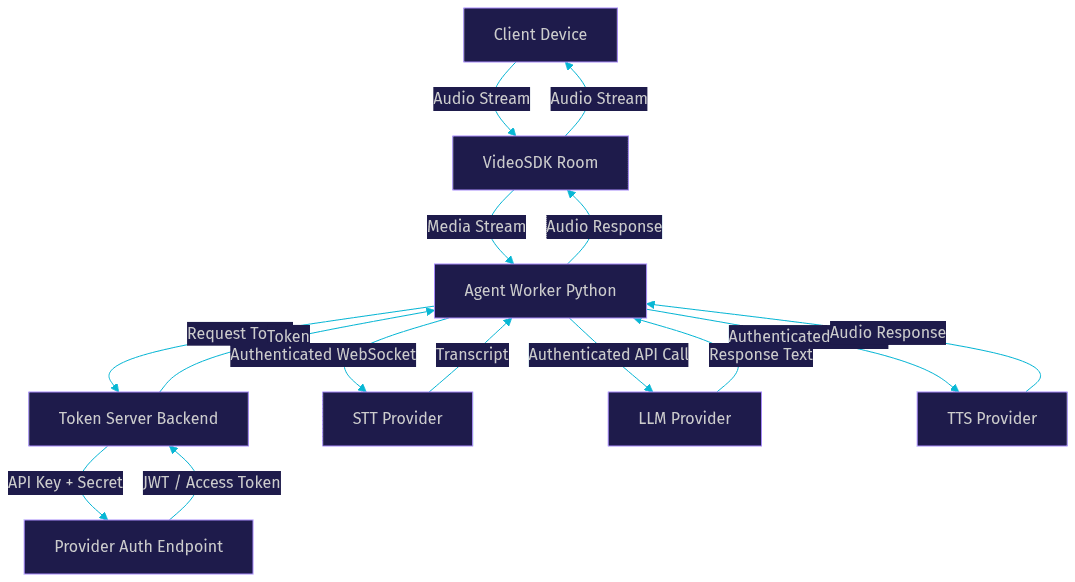
An AI voice agent is a real-time conversational system that listens to human speech, processes it through a language model, and responds with synthesized voice. The core components are a speech-to-text engine that transcribes incoming audio, an LLM that generates the response, a text-to-speech engine that converts the response back to audio, and a token provider that authenticates each leg of the pipeline.
VideoSDK provides an AI Agent SDK that orchestrates all of these components inside a VideoSDK room. The agent worker, a Python process, connects to the room and manages the full STT-to-LLM-to-TTS pipeline. Every component in that pipeline requires its own authentication, which means a single agent may need three or more valid tokens simultaneously.
How Authentication Works in Voice Pipelines
Most AI voice agent providers use OAuth 2.0 or JWT-based authentication. Your backend service requests a token from the provider's authentication endpoint using your API key and secret. The provider returns a short-lived JWT or access token. Your agent then attaches that token to every WebSocket connection or HTTP request it makes to the provider's API.
The token has an expiration time, typically between 60 seconds and 60 minutes depending on the provider. When the token expires, the provider rejects subsequent requests with a 401 status. Your agent must detect this rejection, request a new token, and retry the failed request. This refresh cycle is the heartbeat of any production voice agent system.
Common Authentication Error Patterns
Invalid JWT or Expired Token
The most frequent authentication failure is an expired or malformed JWT. When your agent sends a token that has passed its expiration timestamp, the provider responds with a 401 status code and a message such as invalid jwt or token expired. Some providers return a structured JSON error payload with a specific error code, while others return a plain text message.
The tricky part is that tokens often expire while a call is in progress. Your agent authenticated successfully at the start of the session, but 30 minutes later the token is stale. The provider drops the connection or stops responding, and the agent goes silent. Developers often misdiagnose this as a network issue when it is actually a token lifecycle problem.
403 Unauthorized or Agent Revoked
A 403 error means your token is valid but you are not allowed to perform the requested action. This happens when the token lacks the required scopes, when the agent has been revoked or deactivated in the provider's dashboard, or when your account has hit a permission boundary.
Provider-specific messages vary widely. Microsoft 365 Agents SDK may return a message about missing application permissions. LiveKit may indicate that the agent token does not include the required room join scope. Google STT may return a 403 when the service account lacks the speech recognize permission. The fix is always to check the scopes attached to your token and compare them against the provider's documented requirements.
Missing Authorization Header
Sometimes the WebSocket connection opens successfully but the provider rejects it immediately because no Authorization header was attached. This is common when developers initialize the WebSocket connection separately from the authentication step, or when the SDK requires the token to be passed as a query parameter rather than a header.
Claude voice dictation is a notable example. The voice WebSocket requires the OAuth token to be included in the initial connection request. If your code opens the WebSocket first and tries to authenticate after, the connection is rejected. The token must be present at connection time, not added later.
Diagnosing the Error
Step 1: Capture the Full Error Payload
When an authentication error occurs, your first move is to capture the complete error response. Do not rely on the SDK's summarized error message. Log the raw JSON payload, the HTTP status code, the response headers, and the timestamp. Many providers include an error code field, a request ID field, and a trace ID field in the error body. These identifiers are essential if you need to contact provider support.
In practice, developers who skip this step end up guessing at the cause. They see "authentication failed" in their logs and assume the API key is wrong, when the actual issue is an expired token or a missing scope. The raw payload tells you exactly what the provider rejected and why.
Step 2: Identify the Source Provider
Your voice agent pipeline likely involves multiple providers. A single call may authenticate with VideoSDK for the room, Deepgram for STT, OpenAI for the LLM, and ElevenLabs for TTS. Each provider has its own error format. You need to map the error code to the correct provider before you can diagnose it.
VideoSDK AI voice agent errors typically appear in the -60000 range. Microsoft 365 Agents SDK errors follow Microsoft Graph error conventions. LiveKit uses Twirp error codes. Google STT returns Google Cloud error codes. xAI OAuth errors follow standard OAuth 2.0 error responses. Knowing which provider returned the error narrows your troubleshooting path immediately.
Step 3: Verify Token Generation Path
Once you know which provider rejected the request, trace the token generation path for that provider. Check that your backend service is generating tokens server-side, not client-side. Verify that the environment variables for the API key and secret are set correctly in your production environment, not just in your local development environment.
A common failure pattern is that the token generation works locally because the environment variables are set in a local file, but production uses a different configuration system. The agent starts, connects to the room, but fails when it tries to call the STT provider because the STT API key was never injected into the production container.
Step 4: Inspect Network Traffic
If the token generation path looks correct, inspect the actual network traffic. Use browser developer tools for web-based agents, or use a network proxy for mobile and backend agents. Confirm that the Authorization header is present on every request to the provider. Check that the token value matches what your token server generated.
For WebSocket connections, the Authorization header may be sent as part of the initial handshake or as a subprotocol header. Some providers accept the token as a query parameter instead. If your SDK is sending the token in the header but the provider expects it in the query string, the request will fail even though the token is valid.
Fixing Authentication Errors
Refreshing Expired Tokens Automatically
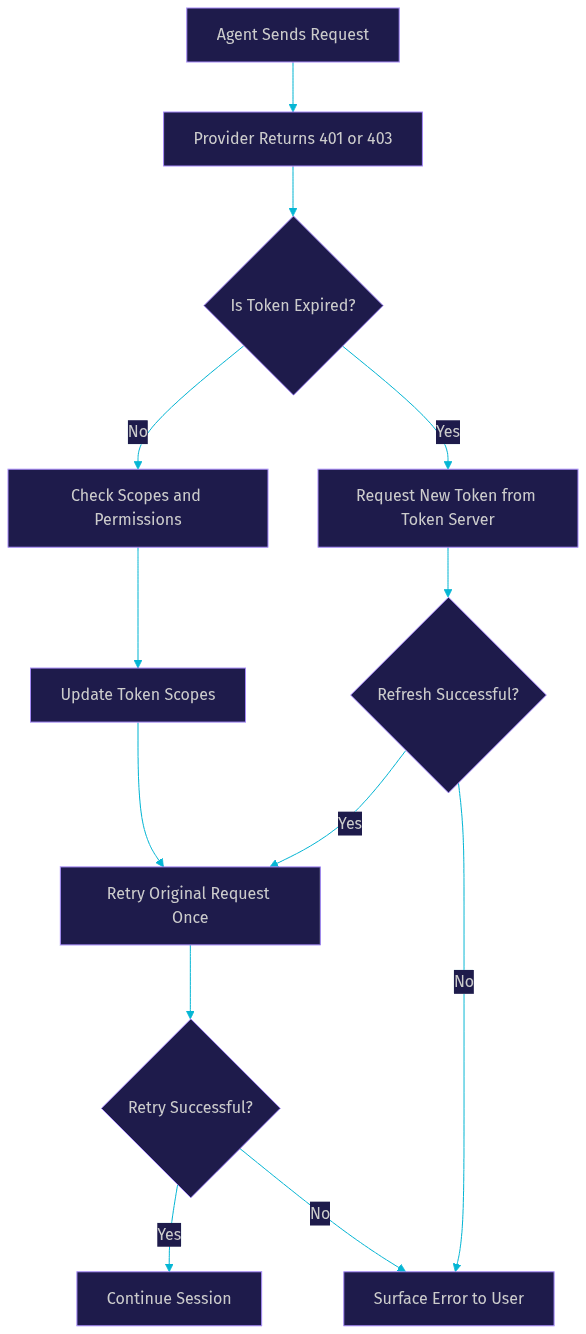
The standard pattern for handling expired tokens is a detect-refresh-retry loop. When your agent receives a 401 or a token expiration error from any provider, it should immediately request a new token from your token server, then retry the failed request exactly once. If the retry also fails, the agent should surface the error to the user or fall back to a graceful degradation mode.
This loop must be built into your agent's HTTP and WebSocket client layer, not handled at the application level. Every provider call should pass through a wrapper that intercepts 401 responses, triggers the refresh, and retries transparently. Without this wrapper, you will have token expiration bugs scattered throughout your codebase.
VideoSDK's Agent SDK handles much of this internally. When a VideoSDK token expires, the SDK automatically attempts a refresh before surfacing the error to your code. For external providers like OpenAI or Deepgram, you need to implement this pattern yourself or use a library that provides it.
Correcting Provider-Specific Header Issues
Each provider has quirks in how it expects authentication to be delivered. Claude voice dictation requires the OAuth token to be present in the WebSocket connection request itself, not sent as a follow-up message. If your code opens the WebSocket and then sends the token as a JSON message, Claude rejects the connection before the message is even read.
LiveKit noise cancellation for cloud sessions requires an authentication flag to be set when the agent joins the room. If the flag is missing, the noise cancellation feature is disabled or the connection is rejected depending on the configuration. The token must include the correct room permissions for the agent role.
Google STT requires the service account key to be converted to a JWT before making API calls. The JWT must include the correct audience claim for the STT endpoint. If the audience is wrong, Google returns a 403 even though the service account has the right permissions.
xAI OAuth flows require a specific grant type and scope combination. If the scope string is formatted incorrectly or includes a scope that does not exist for your application, the token request itself fails with a 400 error before you ever get a token to use.
Aligning Scopes and Permissions
Authentication tokens carry scopes that define what the token holder can do. A token without the voice scope cannot connect to a voice WebSocket. A token without the stt scope cannot call the speech-to-text API. A token without the tts scope cannot call the text-to-speech API.
When you request a token from your provider, you must specify every scope your agent will need for the entire session. If you request only the stt scope and later try to call the TTS endpoint with the same token, the call fails with a 403. The fix is to audit your token request and ensure it includes all required scopes upfront.
VideoSDK tokens follow a similar pattern. The token you generate for an AI agent must include the permissions for the room, the recording feature if you use it, and any other capabilities the agent needs. The VideoSDK authentication guide covers the full scope list.
Secure Storage of Secrets
Never hard-code API keys or secrets in your application code, environment files committed to version control, or client-side bundles. Use a dedicated secret manager such as AWS Secrets Manager, Google Secret Manager, HashiCorp Vault, or Doppler. Your token server should retrieve secrets from the secret manager at startup or on each token generation request.
For VideoSDK, your API key and secret should live in your backend environment only. The frontend receives a short-lived token generated by your backend, never the raw secret. This pattern prevents credential leakage even if your frontend code is inspected or decompiled.
If you are deploying agents on VideoSDK Agent Cloud, the platform manages secret storage for you. For self-hosted deployments using Docker or Kubernetes, mount secrets as environment variables from your secret manager rather than baking them into the container image.
Preventive Best Practices
Centralize all token handling in a single backend service. This service should be the only component that knows your API keys and secrets. Every agent, every frontend client, and every external integration requests tokens from this service. Centralization prevents credential sprawl and makes it easy to rotate keys when needed.
Implement exponential backoff for rate-limit responses. When a provider returns a 429 status, your agent should wait and retry with increasing delays. A typical backoff sequence is 1 second, 2 seconds, 4 seconds, 8 seconds, up to a maximum of 60 seconds. Without backoff, a burst of token refresh requests after a provider outage can trigger rate limiting and cascade into a longer outage.
Monitor token expiry proactively. Do not wait for a 401 to trigger a refresh. If your token has a 60-minute lifetime, start the refresh at 55 minutes. This gives you a buffer to handle refresh failures without dropping the active call. Log every token issuance and expiry event so you can audit the token lifecycle.
Rotate your API keys regularly. Most providers allow you to create a new key while keeping the old one active during a transition period. Generate the new key, update your token server, verify that new tokens work, then deactivate the old key. This zero-downtime rotation pattern prevents authentication outages during key changes.
Log all authentication attempts with masked tokens. Store the first 8 and last 4 characters of the token for identification purposes, but never the full token. Include the provider, the scope, the timestamp, and the result. These logs are invaluable when debugging intermittent authentication failures across a fleet of agents.
VideoSDK AI Voice Agent Specific Guidance
VideoSDK's Agent SDK surfaces authentication errors through a structured error code system. Errors in the -60000 range indicate authentication and connection failures. Error code -60012 specifically relates to token validation failures, where the token provided to the SDK is either expired, malformed, or lacks the required permissions for the requested operation.
When you build a VideoSDK AI voice agent, the SDK handles the VideoSDK room token internally. You generate a token on your backend using your VideoSDK API key and secret, pass it to the agent worker, and the SDK manages the room connection lifecycle. If the token expires mid-session, the SDK attempts an automatic refresh before surfacing the error.
For external providers connected through the agent pipeline, such as OpenAI for the LLM or Deepgram for STT, you need to manage those tokens separately. The VideoSDK AI Agents documentation describes how to configure each provider's authentication. The recommended pattern is to store each provider's API key in your backend environment, generate provider tokens on demand, and pass them to the agent worker through the pipeline configuration.
VideoSDK also supports linking agents with external OAuth providers. If your agent needs to access a user's Microsoft 365 data or Google Calendar as part of the conversation, you implement the OAuth flow on your backend, store the user's refresh token securely, and exchange it for access tokens as needed during the agent session. The Conversational Graph feature can pause the conversation while waiting for an OAuth callback, then resume once the token is available.
Quick Reference: Error Code Cheat Sheet
[LINKABLE ASSET — error code reference table]
| Error Code or Status | Provider | Meaning | Typical Fix |
|---|---|---|---|
| 401 Unauthorized | All providers | Token is expired or malformed | Refresh token and retry the request once |
| 403 Forbidden | All providers | Token is valid but lacks required scopes | Add missing scopes to the token request |
| 401 with invalid jwt | VideoSDK, Google | JWT signature or claims are invalid | Verify API secret and token generation logic |
| -60012 | VideoSDK Agent SDK | Token validation failed in the agent worker | Regenerate token server-side and reconnect |
| -60000 range | VideoSDK Agent SDK | General authentication or connection failure | Check token, network, and SDK configuration |
| 429 Too Many Requests | All providers | Rate limit exceeded on token or API requests | Implement exponential backoff and retry |
| Missing Authorization header | Claude, LiveKit | WebSocket opened without auth header or token | Attach token at connection time, not after |
| 400 Bad Request on token request | xAI OAuth | Invalid scope or grant type in token request | Verify OAuth scope string and grant type |
| 403 with permission error | Google STT | Service account lacks speech recognize permission | Add required role to the service account |
| Connection dropped mid-call | All providers | Token expired during active session | Implement proactive refresh before expiry |
The most important row is the 401 Unauthorized pattern. It accounts for the majority of authentication failures across all providers, and the fix is always the same: refresh the token and retry once. If you build this pattern into your agent's client layer, you eliminate most production auth outages before they reach your users.
Definitions Glossary
JWT (JSON Web Token): A compact, signed token that carries claims about the authenticated party, including an expiration timestamp. VideoSDK uses JWTs to authenticate participants and agents joining a room.
OAuth 2.0: An authorization framework that lets a backend service obtain access tokens from a provider on behalf of an agent or user. Used by Microsoft 365, Google, and xAI for voice agent authentication.
Token Scope: A string that defines what actions a token authorizes. Scopes such as voice, stt, and tts determine which provider endpoints the agent can access.
Agent Worker: The Python process that runs a VideoSDK AI agent and manages its session lifecycle, including the STT-to-LLM-to-TTS pipeline and all provider authentication.
Token Refresh: The process of requesting a new access token after the previous one expires, typically triggered by a 401 response or a proactive timer.
Exponential Backoff: A retry strategy where the wait time between retries doubles after each failure, preventing cascading rate-limit errors during provider outages.
Key Takeaways
- AI voice agent authentication errors almost always fall into three categories: expired tokens, missing scopes, and missing authorization headers, each with a distinct diagnostic path.
- The detect-refresh-retry pattern is the single most important fix: intercept 401 responses, request a new token, and retry the failed request exactly once.
- VideoSDK's Agent SDK handles room token refresh internally and surfaces external provider errors through structured codes in the -60000 range, giving you a clear starting point for debugging.
- Centralizing token generation in a backend service and storing secrets in a dedicated secret manager prevents the most common production authentication failures.
- Proactive token refresh before expiration, combined with exponential backoff for rate limits, eliminates the majority of mid-call authentication drops.
Conclusion
Authentication errors in AI voice agents are predictable and fixable once you understand the token lifecycle. The diagnostic flow is straightforward: capture the full error payload, identify the source provider, verify the token generation path, and inspect the network traffic. The fix is almost always a combination of automatic token refresh, correct scope alignment, and proper header attachment at connection time.
For VideoSDK developers, the Agent SDK simplifies much of this by handling room token refresh internally and providing structured error codes for external provider failures. The VideoSDK AI Agents documentation and the code samples library provide complete integration guidance for each supported provider.
If you are building an AI voice agent, start with VideoSDK's prebuilt agent starter and follow the authentication checklist from this guide. You can sign up for free at app.videosdk.live/login and join the VideoSDK Discord community to ask questions and share what you are building. What kind of voice agent are you working on? Drop a comment below, I would love to hear about your use case and any authentication challenges you have run into.
FAQ