


AI call center software is a platform that combines voice AI agents, telephony integration, and real-time analytics to automate inbound and outbound phone interactions. VideoSDK provides the underlying infrastructure through its AI Voice Agent SDK, SIP telephony bridge, and Conversational Graph engine, enabling developers to build deterministic, compliant call center pipelines without managing WebRTC or media servers. The result is sub-second conversational latency, 24/7 availability, and significant cost reduction compared to traditional human-staffed centers.
Traditional call centers are expensive, slow, and hard to scale. Staffing alone accounts for 60 to 70 percent of contact center operating costs, and that figure does not include training, turnover, infrastructure, and real estate. When call volumes spike during product launches, billing cycles, or holiday seasons, wait times balloon and customer satisfaction drops.
AI call center software addresses this problem by replacing or augmenting human agents with voice AI agents that can handle natural conversations at scale. These platforms bridge traditional telephony (SIP, PSTN) with real-time AI pipelines running speech-to-text, large language models, and text-to-speech. For developers and solution architects, the question is no longer whether to adopt this technology but how to architect it, which vendor to choose, and how to deploy it in production without sacrificing compliance or call quality.
This guide covers the architecture, benefits, use cases, vendor selection criteria, pricing models, implementation roadmap, and future trends you need to evaluate and build AI call center software in 2026.
What Is AI Call Center Software?
AI call center software is defined as a platform that automates telephone-based customer interactions using voice AI agents, telephony bridging, and real-time analytics. Unlike legacy PBX systems or traditional IVR menus that force callers through rigid touch-tone trees, AI call center software enables natural-language conversations where callers speak freely and the AI agent understands, responds, and takes action.
The core components include a voice AI agent (the conversational brain), a telephony bridge (connecting PSTN or SIP calls to the AI pipeline), an analytics dashboard (for call transcription, sentiment analysis, and performance metrics), and an orchestration layer that manages call routing, human handoff, and workflow automation.
AI call center software works by ingesting a caller's voice through a telephony gateway, converting speech to text in real time, processing that text through an LLM or rule-based engine to generate a response, converting the response back to speech, and playing it back to the caller within a sub-second window. If the AI agent cannot resolve the query, it can warm-transfer the call to a human agent with full context.
VideoSDK provides AI call center infrastructure through its AI Voice Agent SDK, which connects LLMs, STT, and TTS providers to VideoSDK rooms, and its SIP telephony integration, which bridges traditional phone networks to WebRTC-based AI agent sessions.
Core Architecture Overview
The architecture of modern AI call center software follows a pipeline pattern where each stage processes a piece of the conversational loop. The caller's voice enters through a telephony gateway, flows through speech recognition, language model reasoning, and speech synthesis, and returns as synthesized audio to the caller. Optional human handoff branches off when the AI agent detects an escalation trigger.
The typical stack consists of four primary layers: a telephony integration layer (SIP trunk, WebRTC gateway, or cloud carrier like Twilio or Telnyx), a speech-to-text layer for real-time transcription, a natural-language understanding layer powered by an LLM or a deterministic conversation graph, and a text-to-speech layer that generates natural-sounding responses. An orchestration layer sits above all of these, managing session state, call routing, context windows, and human handoff logic.
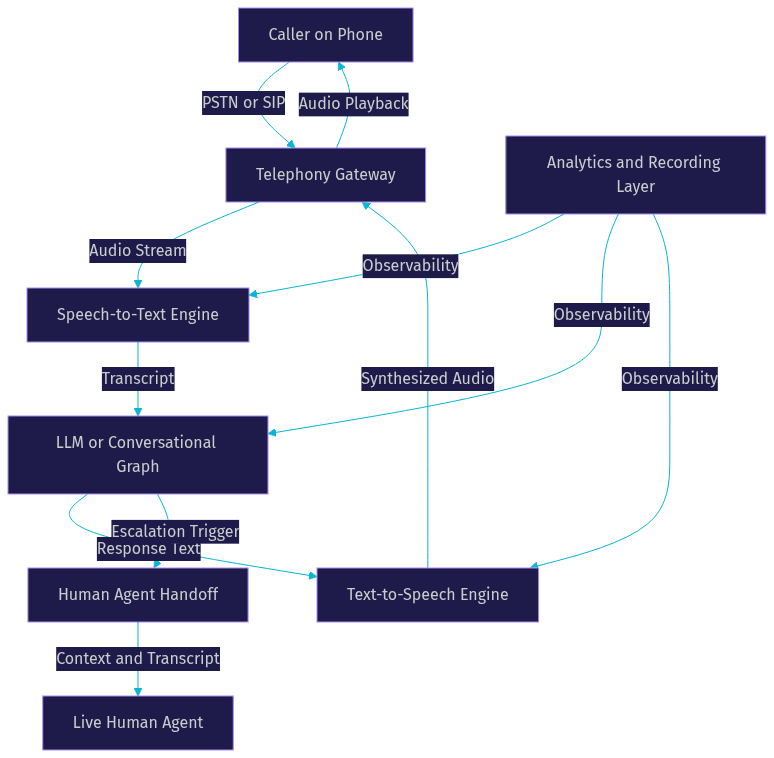
This diagram shows the full call processing pipeline from caller to AI agent and back, with the analytics layer observing every stage for transcription, sentiment, and performance tracking.
Key Technical Layers
Speech-to-Text (Real-Time STT): The STT layer converts incoming caller audio into text with minimal latency. Providers like Deepgram, OpenAI Whisper, and AssemblyAI offer streaming transcription optimized for conversational audio. Latency at this stage directly impacts the caller's perception of responsiveness.
Natural-Language Understanding (LLM or Rule-Based): This layer decides what the AI agent says next. It can be a general-purpose LLM (OpenAI GPT-4o, Google Gemini, Anthropic Claude) or a deterministic flow engine like VideoSDK's Conversational Graph, which enforces structured conversation paths for compliance-sensitive workflows such as loan applications or insurance claims.
Text-to-Speech (Neural TTS): The TTS layer converts the agent's response into natural-sounding speech. Providers like ElevenLabs, Cartesia, and AWS Polly deliver neural voices that approach human quality. TTS caching can significantly reduce latency for common responses like greetings and confirmations.
Telephony Integration (SIP, Twilio, Carrier-Grade): The telephony layer bridges PSTN or SIP calls to the WebRTC-based AI agent session. VideoSDK's telephony integration supports inbound and outbound call flows through providers like Twilio, Vonage, Telnyx, and Plivo, with DTMF event handling, call transfer, and geo-fencing built in.
Major Benefits of AI Call Center Software
AI call center software delivers measurable advantages over traditional human-staffed operations, and the benefits compound as call volumes increase.
Cost Reduction: The most immediate benefit is staffing cost reduction. An AI voice agent handles thousands of concurrent calls at a fraction of the cost of a human agent. There are no training periods, no turnover costs, no benefits, and no physical workspace requirements. Organizations typically see 40 to 70 percent reductions in per-call cost after deploying AI call center software for high-volume workflows.
24/7 Availability and Zero Wait Time: AI agents do not sleep, take breaks, or call in sick. Callers get immediate response regardless of time zone or call volume. This eliminates the queue, which is the single biggest driver of customer frustration in traditional call centers.
Scalability for Peak Volumes: Traditional call centers struggle with seasonal spikes. Hiring and training temporary agents takes weeks. AI call center software scales elastically. If call volume triples during a product recall or holiday sale, the platform handles it without provisioning additional human agents.
Multilingual Support: A single AI agent can switch languages mid-call or handle calls in dozens of languages without hiring bilingual staff. STT and TTS providers cover most major languages, and LLMs handle multilingual reasoning natively. This is particularly valuable for global e-commerce and multinational finance operations.
Real-Time Analytics and Sentiment Tracking: Every call is transcribed, analyzed, and scored in real time. Sentiment analysis detects frustrated callers and triggers escalation before the situation deteriorates. Call analytics dashboards provide insights into common issues, resolution rates, and agent performance that are impossible to collect manually at scale.
Compliance Automation: AI call center software can enforce compliance programmatically. Conversational Graph ensures every required disclosure is read in order. Sensitive data like credit card numbers can be handled through PCI-DSS-compliant payment flows. Healthcare deployments can leverage HIPAA-compliant infrastructure with encrypted transcription and storage. VideoSDK supports E2E encryption and geo-fencing for data residency requirements.
Common Use Cases
AI call center software applies across industries, but certain use cases deliver the highest ROI due to volume, repetitiveness, or compliance requirements.
Inbound Customer Support: The most common use case. Callers ask about account issues, product questions, billing disputes, or technical problems. The AI agent resolves routine queries and escalates complex cases to human agents with full conversation context attached.
Outbound Appointment Reminders and Lead Qualification: AI agents place outbound calls to remind patients of appointments, confirm reservations, or qualify leads before routing them to sales teams. Outbound campaigns that would take a human team days to complete can finish in hours.
Order Status and Payment Processing: "Where is my order?" (WISMO) calls are high-volume, repetitive, and perfectly suited for AI automation. The AI agent authenticates the caller, looks up order status, and processes payments through PCI-DSS-compliant flows without human intervention.
Survey and Feedback Collection: Post-interaction surveys conducted by AI agents achieve higher completion rates than human-conducted surveys because callers feel less judged and the AI agent can adapt questions based on previous answers.
High-Volume Industries: Healthcare uses AI call center software for appointment scheduling, prescription reminders, and triage screening. Finance deploys it for fraud alerts, payment verification, and loan application processing. E-commerce relies on it for order management, returns processing, and customer support during peak shopping events.
Choosing the Right AI Call Center Vendor
Selecting an AI call center vendor requires evaluating technical capabilities, integration flexibility, compliance posture, and total cost of ownership. The right choice depends on your call volume, use case complexity, regulatory requirements, and in-house engineering capacity.
Evaluation Criteria:
- Model Quality: Does the platform support best-in-class STT, LLM, and TTS providers? Can you swap providers without re-architecting your pipeline? VideoSDK's agent SDK supports multiple providers including OpenAI, Deepgram, ElevenLabs, Cartesia, and Google.
- Latency: What is the end-to-end conversational latency? Anything above 800ms feels unnatural. Look for platforms with sub-500ms median latency and TTS caching for common responses.
- Language Coverage: Does the STT and TTS provider cover all languages your callers speak? Verify accent and dialect support, not just language labels.
- Integration Ecosystem: Can the platform connect to your CRM, ticketing system, and knowledge base? Look for REST APIs, webhooks, and function tool support for external system calls.
- Pricing Model: Is pricing per-minute, per-call, or platform-plus-usage? Understand telephony fees, API call costs, and data storage charges in addition to the platform fee.
- Compliance Certifications: Does the platform offer HIPAA, PCI-DSS, and GDPR compliance? Is data residency configurable? Are recordings encrypted at rest and in transit?
Open-Source Agent SDK vs Managed SaaS: If your team needs full control over the conversation pipeline, custom integrations, or on-premise deployment, an open-source agent SDK like VideoSDK's (available on GitHub) gives you that flexibility. If you want to launch quickly without managing infrastructure, a managed SaaS platform may be faster to deploy but less customizable.
Vendor Comparison Matrix [LINKABLE ASSET — comparison table]
| Feature | VideoSDK | Vapi | Retell AI | Bland AI |
|---|---|---|---|---|
| Open-source SDK | Yes | No | No | No |
| SIP telephony built-in | Yes | Via Twilio | Via Twilio | Via Twilio |
| Conversational Graph | Yes | No | No | No |
| Multi-provider STT/TTS/LLM | Yes | Yes | Yes | Limited |
| Self-hosted option | Yes (Docker, K8s) | No | No | No |
| Warm transfer to human | Yes | Yes | Yes | Yes |
| Compliance (HIPAA, PCI) | Yes | Limited | Limited | Limited |
| Best for | Developers needing control and compliance | Quick deployment | Rapid prototyping | Simple outbound |
VideoSDK stands out for teams that need deterministic conversation flows, built-in telephony, and the option to self-host. Vapi and Retell AI are strong choices for fast deployment when you do not need custom infrastructure. Bland AI works for straightforward outbound campaigns.
Pricing Models Explained
AI call center vendors typically offer two pricing structures: subscription-based (flat monthly fee with included minutes) and usage-based (pay per minute of call time, per API call, and per feature used).
Subscription models provide cost predictability but can become expensive if you consistently exceed included minutes. Usage-based models scale naturally with call volume but introduce variable costs that can spike during unexpected volume surges.
Hidden costs to watch for include telephony fees (per-minute charges from SIP providers like Twilio or Telnyx), LLM API token costs (which scale with conversation length and model choice), STT and TTS per-minute charges, recording storage fees, and data transfer costs for cloud-hosted deployments.
A simple ROI calculation: if a human agent costs 25 dollars per hour and handles 10 calls per hour, the per-call labor cost is 2.50 dollars. If an AI agent handles the same call for 0.15 dollars in telephony and compute costs, the savings per call is 2.35 dollars. At 10,000 calls per month, that is 23,500 dollars in monthly savings, before accounting for 24/7 availability and eliminated wait times.
Implementation Roadmap
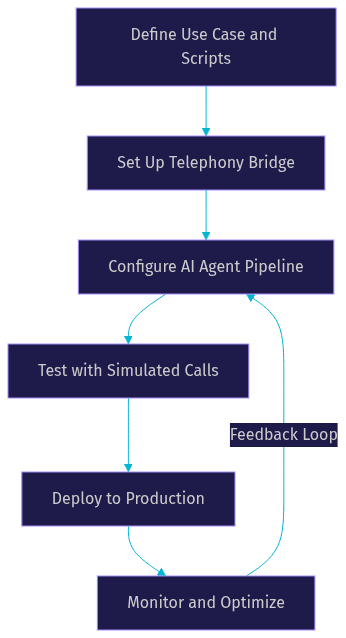
Building and deploying AI call center software requires a structured approach that moves from use case definition through production deployment with careful attention to telephony, testing, and monitoring.
Step 1: Define Use Case and Conversation Scripts — Start by mapping the specific call flows you want to automate. Document the caller's likely questions, the information the AI agent needs to collect, the actions it should take (look up order status, schedule appointment, process payment), and the escalation triggers that route to a human agent. For compliance-sensitive flows, use a deterministic graph structure rather than free-form LLM generation.
Step 2: Set Up the Telephony Bridge — Configure your SIP trunk or cloud telephony provider (Twilio, Telnyx, Vonage, Plivo) to route incoming calls to your AI agent platform. VideoSDK's telephony integration provides an inbound gateway, outbound gateway, and routing rules engine that connects SIP calls to WebRTC-based agent sessions. Configure DTMF handling for menu navigation and call transfer rules for human handoff.
Step 3: Train and Configure the AI Agent — Select your STT, LLM, and TTS providers based on language coverage, latency, and quality requirements. Configure the agent's system prompt or conversation graph with your business logic, knowledge base references, and function tools for external API calls (CRM lookups, payment processing, appointment scheduling). Set up TTS caching for common responses like greetings and confirmations to reduce latency.
Step 4: Test with Simulated Calls — Before going live, run simulated calls covering happy paths, edge cases, accent variations, background noise, and escalation scenarios. Verify that the agent handles interruptions, silence, and unexpected responses gracefully. Test DTMF input, call transfer, and voicemail detection. Measure end-to-end latency and adjust provider configurations if responses exceed 800ms.
Step 5: Deploy and Monitor — Deploy to production with monitoring on latency, call resolution rate, escalation rate, sentiment scores, and error rates. Set up alerts for STT failures, TTS timeouts, and telephony connectivity issues. Implement a feedback loop where escalated calls are reviewed and used to improve the agent's conversation graph or system prompt.
Production Considerations: In production, ensure your telephony gateway has failover to backup SIP trunks. Configure TURN servers for WebRTC connectivity through restrictive firewalls. Enforce HTTPS for all API endpoints. If you are self-hosting with Docker or Kubernetes, plan for horizontal scaling of agent workers based on concurrent call volume. For data residency requirements, use geo-fencing to restrict where call recordings and transcripts are stored. VideoSDK supports all of these configurations through its REST APIs and agent SDK deployment options.
Challenges and Mitigation Strategies
AI call center software is powerful but not without challenges. Understanding these issues before deployment saves teams from costly rework and customer experience failures.
Speech Recognition Errors and Accent Handling: STT engines struggle with strong accents, background noise, and domain-specific vocabulary. Mitigate this by selecting an STT provider trained on diverse accents (Deepgram and AssemblyAI perform well here), enabling custom vocabulary for industry terms, and implementing noise suppression at the telephony layer. VideoSDK includes built-in de-noise functionality to clean up caller audio before it reaches the STT engine.
Handling Complex Escalations: AI agents cannot resolve every query. The challenge is knowing when to escalate and doing so without losing context. Implement clear escalation triggers in your conversation graph (sentiment below threshold, repeated failed intent matching, explicit customer request). Use warm transfer to hand off the call to a human agent with the full transcript and extracted data attached, so the customer does not repeat themselves.
Data Privacy and Regulatory Compliance: Call recordings, transcripts, and extracted data contain sensitive information. Ensure your platform encrypts data at rest and in transit. Configure data retention policies to automatically delete recordings after the required period. For healthcare, verify HIPAA compliance. For payment processing, use PCI-DSS-compliant flows that isolate card data. For EU operations, ensure GDPR-compliant data residency through geo-fencing.
Continuous Model Improvement: AI agents degrade over time if not maintained. Implement a feedback loop where human agents review escalated calls, flag incorrect responses, and update the conversation graph or system prompt. Track sentiment trends and resolution rates over time. When STT or LLM providers release improved models, test them against your existing call recordings before switching.
Future Trends in AI Call Center Software
The AI call center landscape is evolving rapidly, and several trends will shape the next generation of platforms.
Real-Time Voice-to-Voice LLMs: Models like OpenAI Realtime API, Google Gemini Live, and AWS Nova Sonic process speech input and generate speech output directly, eliminating the STT-to-LLM-to-TTS pipeline. This reduces latency to under 300ms and produces more natural conversational rhythm. VideoSDK's agent SDK already supports these real-time multimodal models as pipeline providers.
Emotion-Aware Agents and Sentiment-Driven Routing: Next-generation AI agents will detect caller emotion in real time and adjust their tone, pacing, and response strategy accordingly. Frustrated callers get routed to human agents faster. Anxious callers get calmer, more reassuring responses. Sentiment-driven routing optimizes both customer satisfaction and human agent utilization.
Integration with RAG for Knowledge-Base Answers: Retrieval-augmented generation lets AI agents pull answers from your product documentation, CRM, and knowledge base in real time. Instead of scripting every response, the agent retrieves relevant information and generates a contextual answer. VideoSDK's agent SDK supports RAG integration through function tools and MCP (Model Context Protocol) connections.
Edge-Deployed Inference: For ultra-low latency requirements, edge deployment of STT and TTS models closer to the telephony gateway eliminates cloud round-trip delays. This is particularly relevant for high-volume call centers where every 100ms of latency reduction improves customer satisfaction scores.
Definitions Glossary
Voice AI Agent: A software agent that conducts natural-language voice conversations by processing caller speech through STT, LLM, and TTS components in real time.
SIP (Session Initiation Protocol): The signaling protocol that bridges traditional phone networks (PSTN) to WebRTC-based AI agent sessions, enabling inbound and outbound call flows.
Conversational Graph: A deterministic, graph-based conversation orchestration layer that enforces structured call flows using nodes, transitions, and state management, ensuring compliance-driven conversations follow required steps in order.
Warm Transfer: A call transfer method that hands off an active call from an AI agent to a human agent with full conversation context, transcript, and extracted data attached.
Turn Detection: The mechanism that determines when a caller has finished speaking and the AI agent should begin responding, using voice activity detection and silence threshold analysis.
TTS Caching: A performance optimization that stores pre-generated speech for common responses (greetings, confirmations, standard messages) to eliminate TTS processing latency for repeated phrases.
Key Takeaways
- AI call center software replaces or augments human agents with voice AI pipelines that handle natural conversations at scale, reducing per-call costs by 40 to 70 percent while enabling 24/7 availability.
- The core architecture follows a STT to LLM to TTS pipeline connected to a telephony gateway, with an orchestration layer managing call routing, human handoff, and analytics.
- VideoSDK's AI Voice Agent SDK, SIP telephony integration, and Conversational Graph provide developers with an open-source, self-hostable foundation for building compliant AI call centers with sub-second latency.
- Vendor selection should prioritize model quality, latency, language coverage, integration ecosystem, compliance certifications, and total cost of ownership including hidden telephony and API fees.
- Production deployment requires failover telephony, TURN server configuration, data residency controls, and a continuous feedback loop for model improvement.
Conclusion
AI call center software is a strategic investment for any organization handling high-volume phone interactions. The technology has matured to the point where voice AI agents can conduct natural, compliant, multilingual conversations at scale with sub-second latency. For developers and solution architects, the key decisions are choosing the right architecture (open-source SDK vs managed SaaS), selecting STT/LLM/TTS providers that match your language and latency requirements, and implementing deterministic conversation flows for compliance-sensitive use cases. VideoSDK's AI Voice Agent SDK, telephony integration, and Conversational Graph provide the infrastructure to build, test, and deploy production-grade AI call center software. Start with a free account at app.videosdk.live/login and join the VideoSDK Discord community to connect with other developers building voice AI applications. What AI call center challenge are you tackling? Drop a comment below.
FAQ