


An AI call center is a customer support system that uses voice AI agents to handle inbound and outbound phone calls autonomously, replacing or augmenting human agents with real-time speech processing. VideoSDK provides the telephony infrastructure, AI agent SDK, and conversational orchestration layer to build and deploy these systems. Start with the VideoSDK AI Agents documentation to integrate voice agents into your call center today.
Average contact-center labor costs have climbed steadily for five years straight, and customer wait times remain the top complaint in every industry survey. Meanwhile, large language models and real-time speech processing have matured to the point where AI voice agents can hold natural, multi-turn phone conversations at scale. The result is a shift from human-only call centers to AI-powered call centers that handle thousands of concurrent calls, reduce cost-per-call by 60 to 80 percent, and free human agents for complex escalations.
This guide walks through what an AI call center is, how its core components fit together, how to implement one, and what compliance and cost considerations matter most. By the end, you will understand the full architecture and have a clear path to building a pilot using VideoSDK's AI agent and telephony capabilities.
What Is an AI Call Center?
An AI call center is defined as a customer support operation where AI voice agents handle phone conversations autonomously using speech-to-text, large language models, and text-to-speech, with optional human handoff for complex cases. Unlike traditional IVR systems that rely on rigid menu trees and keyword matching, an AI call center processes natural language in real time, understands caller intent, and generates contextual responses.
Traditional IVR systems force callers into predefined paths: "Press 1 for billing, press 2 for technical support." An AI call center eliminates that friction. The caller speaks naturally, the AI agent transcribes the speech, interprets the intent using an LLM, and responds with synthesized voice that sounds human. If the conversation exceeds the agent's confidence threshold or involves emotional distress, the system transfers the call to a human agent with full context.
VideoSDK provides the real-time communication infrastructure for AI call centers through its AI Voice Agent SDK, which connects LLMs, STT providers, and TTS providers to phone lines via SIP and WebRTC. This means developers can build a complete AI call center without managing separate telephony, media processing, and AI orchestration stacks.
Core Components of an AI Call Center
Every production AI call center relies on six interconnected components that form a real-time voice processing pipeline. Each component must operate with sub-second latency to maintain conversational naturalness, and a failure or delay in any single stage degrades the entire caller experience.
Speech-to-Text (STT)
Speech-to-text is the entry point of the AI call center pipeline. When a caller speaks, the audio stream is captured and sent to an STT provider that transcribes the speech into text in real time. This transcription feeds directly into the LLM for intent detection and response generation. Providers like Deepgram, OpenAI Whisper, and AssemblyAI offer streaming transcription with word-error rates below 10 percent on conversational audio, according to Artificial Analysis's Speech Arena benchmark. Real-time transcription also powers live call logging, compliance recording, and sentiment analysis downstream.
Large Language Model (LLM) for Understanding
The LLM is the brain of the AI call center. It receives the transcribed text, interprets caller intent, extracts relevant entities like account numbers or dates, and decides what action to take. The LLM may answer a question directly, look up information from a knowledge base using retrieval-augmented generation, trigger a function tool to check order status, or initiate a human handoff. VideoSDK's AI Agent SDK supports multiple LLM providers including OpenAI, Anthropic Claude, Google Gemini, and Cerebras, giving developers flexibility to choose the model that best fits their latency and cost requirements.
Text-to-Speech (TTS)
Text-to-Speech converts the LLM's text response back into natural-sounding audio that the caller hears. Modern TTS providers like ElevenLabs, Cartesia, and OpenAI TTS produce voices with emotional tone control, natural pauses, and prosody that closely mimics human speech. TTS caching is critical for performance: pre-generating common responses like greetings and confirmations reduces latency and cost. VideoSDK's agent pipeline includes built-in TTS caching and de-noise processing to maintain audio quality on noisy phone lines.
Telephony and SIP Integration
Telephony integration bridges traditional phone networks to the AI agent pipeline. SIP trunks connect carrier phone numbers to VideoSDK rooms running over WebRTC, enabling both inbound and outbound call flows. VideoSDK's telephony integration supports providers like Twilio, Vonage, Telnyx, and Plivo, with DTMF event handling, call transfer, and geo-fencing built in. This layer handles the complexity of SIP signaling, codec negotiation, and media relay so developers can focus on conversation logic.
CRM and Workflow Integration
An AI call center is only as useful as the data it can access and the systems it can update. CRM integration connects the AI agent to platforms like Salesforce, HubSpot, and Zendesk through APIs and webhooks. When a caller asks about their order status, the agent queries the CRM, retrieves the information, and speaks it back. After the call ends, the agent pushes a summary, sentiment score, and extracted entities back into the CRM record. VideoSDK's function tools and MCP integration make it straightforward to wire these external data sources into the agent pipeline.
Real-time Analytics and Monitoring
Operations teams need visibility into every call as it happens. Real-time analytics dashboards show active call count, average handle time, sentiment trends, escalation rates, and error metrics. VideoSDK provides session analytics through its REST API, allowing developers to pull post-call transcripts, summary data, and quality metrics into custom dashboards or business intelligence tools.
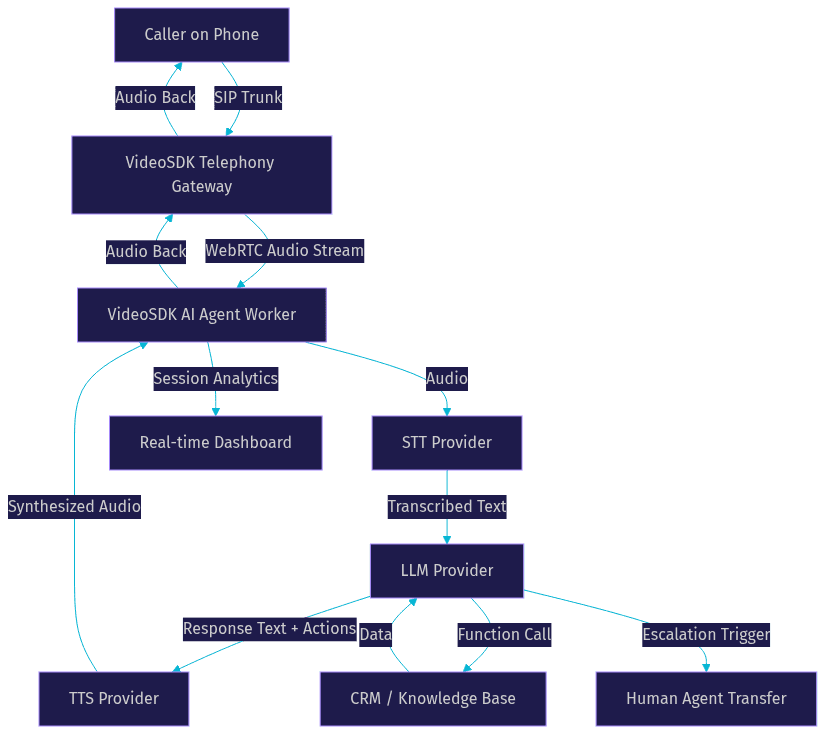
The following diagram shows how these components connect in a typical AI call center architecture:
How AI Call Centers Improve Customer Experience
Customer experience is the primary metric that determines whether an AI call center succeeds or fails. The technology exists to serve callers, not to replace humans for its own sake. When implemented well, AI voice agents improve experience across four dimensions that traditional call centers struggle with.
Reduced Wait Times
The most immediate win is zero-queue answering. An AI call center handles unlimited concurrent calls, meaning every caller connects instantly regardless of call volume. No hold music, no "your call is important to us" message, no abandoned calls. For businesses with seasonal spikes, this elastic concurrency eliminates the need to overstaff during peak periods and underutilize agents during slow ones.
Personalized Interactions
AI agents generate responses dynamically using customer data pulled from CRM records, previous call history, and account context. Instead of reading from a static script, the agent addresses the caller by name, references their recent purchases, and tailors troubleshooting steps to their specific device model. This level of personalization at scale is impossible with human agents who have limited time per call.
Multilingual Support
A multilingual AI call center detects the caller's language within the first few seconds of speech and switches the entire pipeline to that language. STT, LLM reasoning, and TTS all operate in the detected language without manual configuration. This capability lets a single AI call center serve global markets without hiring native speakers for every supported language. VideoSDK's agent SDK supports providers like Sarvam AI for Indic languages alongside mainstream English, Spanish, and Mandarin models.
Sentiment-aware Responses
Real-time sentiment analysis monitors the caller's emotional state throughout the conversation. If the system detects frustration, anger, or distress, it can adjust the TTS tone to be more empathetic, slow down the speaking rate, or trigger an immediate human handoff. This prevents the worst-case scenario of an AI agent frustrating an already upset caller. Sentiment scoring also feeds into post-call quality metrics, helping operations teams identify training opportunities and systemic issues.
Implementation Steps for Building an AI Call Center
Building a production AI call center requires careful planning across telephony, AI pipeline configuration, knowledge base integration, and testing. The following seven steps cover the complete path from platform selection to production deployment.
1. Choose an AI Call-Center Platform
Select a platform that offers model flexibility, telephony integration, and compliance certifications. The platform should let you swap STT, LLM, and TTS providers without rewriting your agent logic, because the AI provider landscape changes rapidly. VideoSDK's open-source AI Agent SDK gives you this flexibility while providing managed infrastructure through VideoSDK Agent Cloud. Evaluate pricing models carefully: per-minute billing scales with usage, while flat-rate plans offer cost predictability at high volumes.
2. Set Up Telephony Connectivity
Configure your SIP trunk or cloud-PBX to route inbound calls to your AI agent. This involves provisioning a phone number through a carrier like Twilio or Telnyx, pointing the SIP trunk at the VideoSDK inbound gateway, and defining routing rules that direct calls to the appropriate agent based on the dialed number, caller ID, or time of day. Verify both inbound and outbound call flows before proceeding. VideoSDK's telephony documentation covers the full SIP configuration process for each supported carrier.
3. Build the AI Agent Pipeline
Assemble your STT, LLM, and TTS providers into a coherent pipeline. Start by selecting a streaming STT provider with low latency, then choose an LLM that balances reasoning quality with response speed, and finish with a TTS provider that matches your desired voice characteristics. Define fallback logic at each stage: if the primary STT provider times out, fall back to a secondary provider. If the LLM returns a low-confidence response, trigger a human handoff. VideoSDK's pipeline architecture includes built-in fallback adapters and pipeline observability so you can monitor each stage independently.
4. Train with Your Knowledge Base
Upload your FAQs, product documentation, pricing sheets, return policies, and escalation rules into the agent's knowledge base. If you are using retrieval-augmented generation, index your documents so the LLM can pull relevant context during conversations. Define explicit escalation rules: what types of queries should never be handled by the AI agent, what confidence threshold triggers a handoff, and what information the human agent needs to receive during transfer.
5. Configure Handoff and Escalation
Human handoff is the safety net that makes an AI call center trustworthy. Define clear thresholds for when the AI agent must transfer a call: confidence score below a set percentage, negative sentiment detected for consecutive turns, caller explicitly requests a human, or a timeout on function tool responses. VideoSDK supports both cold transfer and warm transfer, where the AI agent briefs the human agent on the call context before connecting them. Configure the Conversational Graph if your escalation flows require deterministic, step-by-step branching rather than LLM-driven judgment.
6. Test in a Staging Environment
Before going live, run end-to-end test calls that cover your most common scenarios and edge cases. Monitor latency at each pipeline stage, audit transcripts for accuracy, and verify that CRM integrations push data correctly. Test with noisy audio, low-bandwidth conditions, and accented speech to ensure robustness. Check that DTMF tones from IVR menus are captured correctly and that call transfers complete without dropping the caller.
7. Deploy to Production and Monitor
Enable auto-scaling so the system can handle traffic spikes without manual intervention. Set alerts for error rates, latency thresholds, and escalation rates. Monitor sentiment trends across calls to identify systemic issues early. Review transcripts daily during the first weeks of operation and refine your knowledge base and agent prompts based on real conversations.
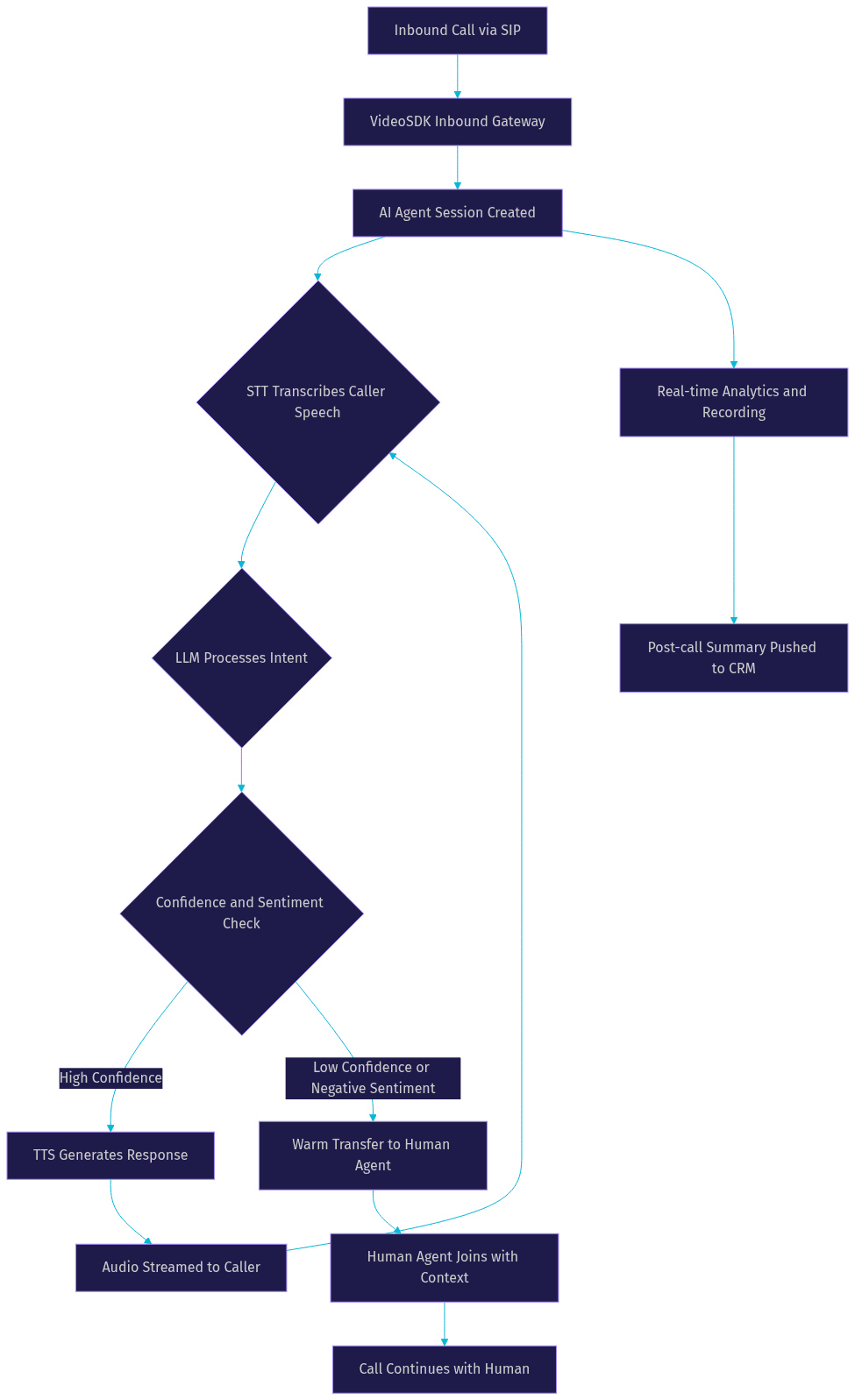
The following diagram illustrates the complete call flow from a caller through the AI agent, with optional human handoff and back-channel data synchronization:
Cost and ROI Considerations
The economics of an AI call center are compelling but require careful analysis. Traditional call centers spend roughly 25 to 50 dollars per agent per hour, including wages, benefits, infrastructure, and management overhead. At an average of 4 to 6 minutes per call, that translates to 1.50 to 5.00 dollars per call in labor alone.
AI call centers operate on per-minute pricing that typically ranges from 0.10 to 0.40 dollars per minute depending on the STT, LLM, and TTS providers selected. At the same 4 to 6 minute average, that is 0.40 to 2.40 dollars per call, representing a 60 to 80 percent reduction in variable cost per call. The savings compound at scale: a center handling 10,000 calls per day saves between 11,000 and 46,000 dollars daily compared to human-only operations.
Pay-as-you-go pricing works best for pilots and variable-volume operations. Flat-rate plans become more economical at consistent high volumes, typically above 50,000 minutes per month. Factor in the cost of human agents retained for escalations, CRM integration development, and ongoing knowledge base maintenance when calculating total cost of ownership.
Compliance and Security
AI call centers handle sensitive customer data, making compliance non-negotiable. For healthcare applications, the system must be HIPAA-ready, with end-to-end encryption for audio streams and transcripts, audit logging for all data access, and business associate agreements with every vendor in the processing chain. For financial services, PCI-DSS compliance requires that payment card data never touches unencrypted storage, and DTMF tone collection for card numbers must be isolated from the LLM context window.
GDPR compliance demands that EU customer data stays within approved jurisdictions, with clear consent mechanisms for call recording and data retention policies that honor right-to-erasure requests. VideoSDK supports geo-fencing to restrict data processing to specific regions, end-to-end encryption for all media streams, and token-based authentication that scopes each participant's access to only their session. The VideoSDK REST API provides room-level access control and session deactivation for immediate data isolation when needed.
Common Challenges and Best-Practice Tips
Building an AI call center is not without friction. The most common challenges fall into four categories, and each has proven mitigation strategies.
Background noise on phone lines degrades STT accuracy significantly. Use a provider with built-in noise suppression, and configure VideoSDK's de-noise processing in the agent pipeline. Test with real-world audio samples from mobile calls in noisy environments before deployment.
Low-bandwidth connections cause audio artifacts and dropped words. VideoSDK's network-adaptive streaming adjusts bitrate and codec selection based on real-time bandwidth detection, but you should also configure your STT provider to handle partial audio gracefully rather than waiting for complete sentences before processing.
Model hallucination is the risk of the LLM generating confident but incorrect information. Mitigate this with retrieval-augmented generation that grounds responses in your verified knowledge base, set temperature parameters low for factual queries, and define explicit guardrails that prevent the agent from discussing topics outside its scope. The Conversational Graph is particularly useful here because it constrains the LLM to deterministic conversation paths for compliance-sensitive flows.
Stale knowledge bases cause the agent to provide outdated information. Assign a team member to review and update the knowledge base weekly, and monitor post-call transcripts for questions the agent answered poorly. Use VideoSDK's code samples as reference implementations for knowledge base integration patterns.
Future Trends in AI Call Centers
The AI call center landscape is evolving rapidly. Three trends will shape the next 18 months.
Multimodal voice AI is emerging as real-time models like OpenAI Realtime API, Google Gemini Live, and AWS Nova Sonic add vision capabilities. An AI agent on a video call can see a caller's device screen, read a serial number from a label, or guide a customer through a visual troubleshooting step. VideoSDK's video calling SDK already supports real-time video alongside AI agents, making this transition straightforward for developers already on the platform.
Generative avatars are moving from novelty to production readiness. Providers like Anam AI create real-time animated faces that lip-sync to TTS output, adding a visual presence to video-based support calls. This is particularly relevant for industries where face-to-face interaction builds trust, such as healthcare consultations and financial advisory.
Self-optimizing conversational graphs represent the next evolution of deterministic conversation orchestration. Instead of manually defining every node and transition, the system analyzes successful call transcripts and suggests graph optimizations automatically. VideoSDK's Conversational Graph already supports checkpointing and state management, providing the foundation for this kind of adaptive flow optimization.
Definitions Glossary
AI Call Center: A customer support system where AI voice agents handle inbound and outbound phone calls using speech-to-text, LLMs, and text-to-speech, with optional human handoff for complex cases.
STT (Speech-to-Text): The process of converting spoken audio into text in real time, enabling the AI agent to understand caller input. VideoSDK supports Deepgram, OpenAI Whisper, AssemblyAI, and other streaming STT providers.
TTS (Text-to-Speech): The process of converting text responses into natural-sounding synthesized speech. Modern TTS providers like ElevenLabs and Cartesia support emotional tone control and prosody matching.
SIP Integration: The telephony layer that bridges traditional phone networks to WebRTC-based AI agent sessions. VideoSDK supports Twilio, Vonage, Telnyx, and Plivo as SIP trunk providers.
Conversational Graph: A deterministic, graph-based conversation orchestration layer that controls conversation flow through defined nodes and transitions, with the LLM handling only natural language generation. Available through VideoSDK's agent platform.
Warm Transfer: A call transfer method where the AI agent briefs the human agent on call context before connecting them to the caller, ensuring a seamless escalation experience.
Agent Worker: The Python process that runs a VideoSDK AI agent and manages its session lifecycle, including STT, LLM, TTS pipeline execution, and telephony connectivity.
Key Takeaways
- An AI call center replaces rigid IVR menus with natural language conversations powered by STT, LLM, and TTS pipelines, reducing cost-per-call by 60 to 80 percent while eliminating hold queues.
- VideoSDK provides the complete infrastructure for AI call centers, including telephony SIP integration, an open-source AI agent SDK, and Conversational Graph for deterministic conversation flows.
- Human handoff remains essential: configure confidence thresholds, sentiment triggers, and timeout rules to transfer complex or emotionally charged calls to human agents with full context.
- Compliance requirements like HIPAA, PCI-DSS, and GDPR demand end-to-end encryption, geo-fencing, and token-based authentication, all of which VideoSDK supports natively.
- The future of AI call centers points toward multimodal interactions with video and vision capabilities, generative avatars, and self-optimizing conversation graphs built on existing VideoSDK infrastructure.
Conclusion
An AI call center is no longer a futuristic concept. It is a deployable system that combines real-time speech processing, large language models, and telephony integration to handle customer calls at scale, reduce costs dramatically, and improve customer experience through zero-queue answering and personalized interactions. The technology stack is mature, the economics are proven, and platforms like VideoSDK provide the infrastructure to build one without assembling disparate telephony, media, and AI orchestration tools. If you are ready to pilot an AI call center, start with the VideoSDK AI Agents quickstart and join the VideoSDK Discord community to connect with other developers building voice AI systems. What are you building with VideoSDK? Drop a comment below, I would love to hear what kind of AI call center use case you are working on.
FAQ