


An AI call bot is software that uses speech-to-text, a large language model, and text-to-speech to conduct phone conversations autonomously, handling inbound and outbound calls without human intervention. VideoSDK provides an open-source AI Agent SDK that connects these components through a real-time pipeline, enabling developers to build production-grade voice agents with sub-second response times. To get started, explore the VideoSDK AI Agents documentation and follow the integration guide below.
Phone calls are one of the last unautomated channels in business operations. Receptionists book appointments, sales reps qualify leads, and support agents triage complaints, all through conversations that follow predictable patterns. An AI call bot replaces or augments those humans with a voice AI agent that can listen, reason, and respond in real time. The market for this technology has exploded, with businesses searching for ways to reduce call center costs while maintaining or improving customer experience.
By the end of this article, you will understand the core architecture of an AI call bot, how telephony integration works, which use cases deliver the highest ROI, how to evaluate vendors, and how to build one using VideoSDK's AI Agent SDK without writing a single line of code in this guide.
What Is an AI Call Bot?
An AI call bot is defined as software that conducts phone conversations autonomously by combining speech recognition, natural language understanding, and voice synthesis. Unlike traditional Interactive Voice Response (IVR) systems that force callers through rigid menu trees, an AI call bot understands open-ended speech and generates contextual responses.
An AI call bot works by capturing the caller's audio through a telephony gateway, transcribing it to text using a speech-to-text (STT) engine, passing that text to a large language model (LLM) for reasoning and response generation, and then converting the LLM's output back to speech using a text-to-speech (TTS) engine. This entire cycle happens in under a second to maintain natural conversation flow.
The core components are a telephony provider (SIP trunk or cloud telephony API), a real-time STT service, an LLM for conversation logic, a TTS service for voice output, and an orchestration layer that ties them together. VideoSDK provides this orchestration through its AI Agent SDK, which manages the pipeline, session lifecycle, and telephony integration in a single Python-based framework.
Traditional IVR systems can only route calls based on keypad inputs or limited keyword recognition. Simple voice assistants like early smart speakers handle single-turn commands but struggle with multi-turn conversations. An AI call bot sits in a different category: it maintains conversation state, handles interruptions, asks clarifying questions, and can transfer to a human when it reaches the limits of its training.
Core Architecture of an AI Call Bot
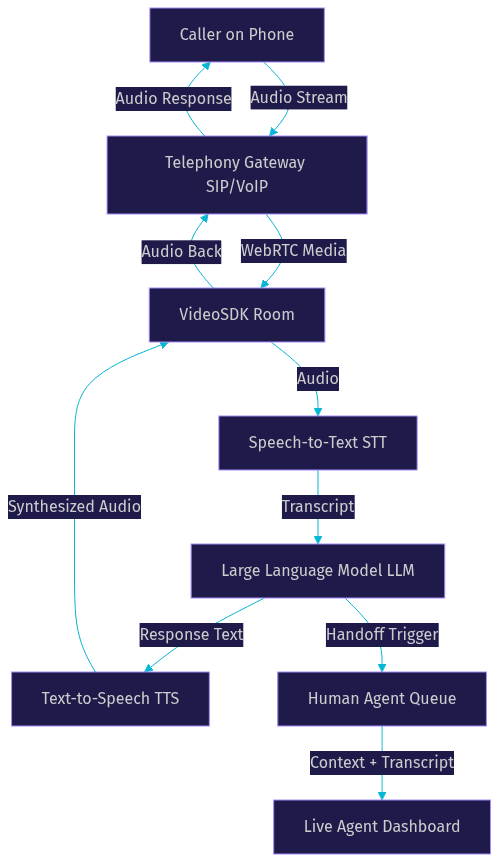
The architecture of an AI call bot follows a pipeline pattern where audio flows through discrete processing stages, each adding latency that must be minimized for natural conversation.
The caller's voice enters through a telephony gateway, which bridges traditional phone networks (SIP, PSTN) or VoIP services to the AI processing pipeline. VideoSDK's telephony integration handles this bridge through an inbound gateway, outbound gateway, and routing rules engine that connects SIP trunk providers like Twilio, Vonage, and Telnyx to VideoSDK rooms running over WebRTC.
Once the audio enters the pipeline, the STT layer transcribes it in real time. The transcription is fed to the LLM, which generates a response based on the system prompt, conversation history, and any retrieved context. The TTS layer then converts that response to natural-sounding speech, which is sent back through the telephony gateway to the caller.
Here is a visual representation of this architecture:
Latency is the single most critical metric. If the round-trip time from caller speech to AI response exceeds 800 milliseconds, the conversation feels unnatural and callers begin to talk over the bot. VideoSDK addresses this through pipeline optimization, TTS caching, and preemptive response generation, which starts synthesizing speech before the LLM has fully completed its output.
Scalability depends on how many concurrent calls the system can handle. Each call requires dedicated STT, LLM, and TTS processing. VideoSDK's Agent Worker architecture allows horizontal scaling, where each worker process manages a session inside a VideoSDK Room, and additional workers spin up as call volume increases.
Telephony Integration Options
Telephony integration is the foundation of any AI call bot, determining how calls enter and exit the system.
There are two primary approaches. The first uses SIP trunking, which connects traditional phone lines through a Session Initiation Protocol trunk to a WebRTC gateway. This approach works well for businesses with existing PBX infrastructure. The second uses cloud telephony APIs from providers like Twilio, Vonage, Telnyx, or Plivo, which expose programmatic interfaces for purchasing phone numbers, initiating outbound calls, and receiving inbound calls.
Inbound call flows route incoming calls to the AI agent, which answers and begins the conversation. Outbound call flows initiate calls from the AI agent to a recipient, commonly used for appointment reminders, lead follow-up, or survey collection. VideoSDK supports both flows through its SIP integration, with routing rules that direct calls to the appropriate agent based on phone number, time of day, or caller intent.
Real-Time Speech Pipeline
The speech pipeline determines how well the AI call bot understands and responds to callers.
For STT, developers can choose from providers including OpenAI Whisper, Deepgram, Google Cloud STT, AssemblyAI, and ElevenLabs Scribe. Low latency matters more than raw accuracy in conversational settings. Deepgram's Nova series and OpenAI's Whisper models are popular choices because they balance transcription accuracy with sub-200-millisecond processing times. According to Artificial Analysis's Speech Arena benchmark, leading STT models achieve word error rates below 10% on conversational audio.
For TTS, providers like ElevenLabs, Cartesia, OpenAI TTS, AWS Polly, Azure Speech, and Hume offer varying voice quality, latency, and pricing profiles. ElevenLabs is widely used for its natural prosody and voice cloning capabilities, while Cartesia's Sonic model targets ultra-low-latency synthesis. VideoSDK's AI Agent SDK integrates with all major TTS providers and includes built-in TTS caching to reduce repeated synthesis latency for common phrases.
Building an AI Call Bot Without Writing Code
No-code and low-code platforms have made AI call bots accessible to teams without dedicated engineering resources.
Several platforms offer pre-built conversation designers where you define intents, responses, and call flows through visual interfaces. These tools handle telephony provisioning, STT and TTS integration, and basic conversation logic without requiring you to write code. VideoSDK's Prebuilt UI Kit offers a similar zero-code approach for video and audio calling, embeddable through a single component.
The benefits are clear for rapid prototyping and small teams. You can launch a functional AI call bot in hours rather than weeks, test conversation flows with real callers, and iterate on scripts without deployment overhead. This approach works well for simple use cases like appointment reminders, basic FAQ handling, or call routing.
However, no-code builders have real limitations. Custom conversation logic, brand-specific voice tuning, compliance requirements, and deep integration with internal systems (CRMs, EHRs, billing platforms) typically require custom development. If your use case involves structured data collection, multi-step workflows with conditional branching, or regulatory compliance, you will likely need to move to a code-based approach using an SDK like VideoSDK's AI Agent SDK.
VideoSDK addresses this gap with its Conversational Graph, which lets developers define deterministic conversation flows as directed graphs. Instead of relying on the LLM to control conversation direction (which is non-deterministic), the graph enforces business rules while the LLM handles natural language generation. This is particularly valuable for loan applications, insurance claims, and appointment booking where every step must happen in order.
Custom Development: SDKs and APIs
Building a custom AI call bot with an SDK gives you full control over conversation logic, voice quality, telephony routing, and integration with internal systems.
VideoSDK's AI Agent SDK is a Python-based framework that connects LLMs, STT, and TTS providers to VideoSDK rooms. The Agent Worker, a Python process, manages sessions inside VideoSDK Rooms while users connect via web, mobile, or phone. This architecture supports deployment on VideoSDK Agent Cloud (managed) or self-hosted via Docker and Kubernetes.
The typical workflow for building an AI call bot with VideoSDK follows these steps:
Step 1: Generate Your VideoSDK Token
VideoSDK uses token-based authentication. You need to generate a token server-side using your API key and secret, then pass it to the SDK. Never expose your API secret on the frontend. Always generate tokens server-side. The token is a JWT that authenticates the agent's access to VideoSDK rooms. You can learn more in the VideoSDK authentication guide.
Step 2: Create a Room and Configure Telephony
Using the VideoSDK REST API, create a room that will host the AI agent session. For telephony-based calls, configure the SIP integration to bridge phone calls into the room. This involves setting up routing rules that map inbound phone numbers to specific agent configurations.
Step 3: Define the System Prompt and Agent Pipeline
Configure the STT provider, LLM provider, and TTS provider that form the agent's pipeline. Write a system prompt that defines the agent's persona, scope, and behavior rules. For structured workflows, define a Conversational Graph with nodes, transitions, and extractors that enforce the conversation flow.
Step 4: Launch the Agent and Monitor the Session
Deploy the agent worker, which joins the room and begins processing calls. Monitor the session through pipeline observability tools, which provide real-time metrics on STT accuracy, LLM response time, TTS latency, and overall conversation quality.
Key considerations during custom development include token expiry (tokens must be refreshed before they expire to avoid dropped calls), error handling (network interruptions, STT failures, LLM timeouts all need graceful fallbacks), and monitoring (real-time dashboards that track call quality and agent performance). VideoSDK provides built-in pipeline observability and fallback adapters to handle provider failures gracefully.
Handling Human Handoff
Every AI call bot needs a clear escalation path to a human agent.
The decision to transfer should be triggered by specific conditions: the caller explicitly requests a human, the agent detects high frustration through sentiment analysis, the conversation exceeds the agent's knowledge scope, or a compliance requirement mandates human review for certain transaction types.
When transferring, the AI call bot should pass the full conversation transcript, detected intent, extracted data (name, account number, issue category), and sentiment score to the human agent's dashboard. VideoSDK supports both cold transfers (immediate handoff) and warm transfers (the AI agent briefs the human agent before connecting the caller), through its built-in call transfer functionality.
Security and Compliance
AI call bots handle sensitive voice data, making security and compliance non-negotiable.
All audio streams and transcripts should be encrypted in transit and at rest. VideoSDK provides end-to-end encryption for media streams. For businesses operating in the EU, GDPR compliance requires explicit consent recording, data minimization (only collect what you need), and the ability to delete call recordings and transcripts on request.
For payment-related calls, PCI-DSS compliance is mandatory. This means the AI call bot must not store full card numbers, and payment processing should be handled through a PCI-compliant processor with DTMF tone masking to prevent the STT engine from capturing keypad inputs. VideoSDK supports DTMF event handling, which allows the agent to detect keypad inputs without exposing the raw audio to the speech pipeline.
Call recording auditing is essential for quality assurance and dispute resolution. VideoSDK provides both individual participant recording and composite recording, with recordings accessible through the REST API for post-call review and analytics.
Real-World Use Cases
AI call bots are deployed across industries where phone conversations follow predictable patterns and volume is high enough to justify automation.
Appointment Booking for Clinics and Salons
Healthcare clinics and salons receive hundreds of calls daily for appointment scheduling, rescheduling, and cancellations. An AI call bot handles these interactions end to end: it checks availability in the scheduling system, proposes time slots, confirms bookings, and sends confirmation messages. One healthcare startup using VideoSDK's AI Agent SDK reported a 30% increase in booked appointments because the bot could handle after-hours calls that previously went to voicemail.
Lead Qualification for Real Estate and SaaS Sales
Sales teams waste hours calling leads who are unqualified or uninterested. An AI call bot can conduct initial qualification calls, asking screening questions about budget, timeline, and needs, then routing qualified leads to human sales reps. A real estate platform deployed an AI outbound call bot that contacted new property inquiries within five minutes of submission, resulting in a 40% higher contact rate compared to human agents who typically followed up hours later.
Customer Support Triage for E-Commerce
E-commerce support centers handle repetitive questions about order status, return policies, and shipping times. An AI call bot resolves these tier-one issues autonomously and escalates complex complaints to human agents with full context. An online retailer reported that their AI call bot resolved 65% of inbound support calls without human intervention, reducing average wait time from four minutes to under 30 seconds.
Outbound Outreach for Collections and Campaigns
Debt collection agencies and political campaigns use AI call bots for high-volume outbound calling. The bot delivers scripted messages, handles responses, and records outcomes. A collections agency using an AI call bot achieved 3x more daily contact attempts than their human team, with compliance controls ensuring all calls followed regulatory disclosure requirements.
Evaluating AI Call Bot Vendors
Choosing the right AI call bot platform requires evaluating vendors across dimensions that directly impact production performance and cost.
The key criteria are language coverage (does it support the languages your callers speak), concurrent call capacity (how many simultaneous calls it handles without degradation), end-to-end latency (the round-trip time from caller speech to bot response), pricing model (per-minute, per-call, or platform-based), integration ecosystem (which STT, LLM, and TTS providers are supported), voice quality (naturalness and expressiveness of TTS output), and analytics dashboard (real-time and post-call metrics for quality monitoring).
Here is a comparison of representative vendors against VideoSDK as a reference point:
| Criterion | VideoSDK AI Agent SDK | Vapi | Retell AI | Bland AI |
|---|---|---|---|---|
| Telephony Integration | Built-in SIP, Twilio, Vonage, Telnyx, Plivo | Twilio, Vonage | Twilio, Telnyx | Twilio |
| STT Providers | OpenAI Whisper, Deepgram, Google, AssemblyAI, ElevenLabs Scribe | Deepgram, OpenAI | Deepgram, AssemblyAI | Deepgram |
| TTS Providers | ElevenLabs, Cartesia, OpenAI, AWS Polly, Azure, Hume, Rime | ElevenLabs, Cartesia | ElevenLabs, Cartesia | ElevenLabs |
| LLM Providers | OpenAI, Anthropic, Google Gemini, Cerebras, Sarvam | OpenAI, Anthropic | OpenAI, Anthropic | OpenAI |
| Deterministic Flow | Conversational Graph built in | No | No | No |
| Deployment | Managed cloud or self-hosted (Docker, K8s) | Managed only | Managed only | Managed only |
| Open Source | Yes (GitHub) | No | No | No |
| Best For | Teams needing full control, custom flows, and self-hosting | Rapid prototyping with managed infra | Production voice agents with managed infra | Simple outbound call automation |
[LINKABLE ASSET: comparison table]
VideoSDK stands out for teams that need deterministic conversation flows, self-hosting options, and an open-source codebase. Vapi and Retell AI are strong choices for teams that want managed infrastructure and fast time-to-market. Bland AI works well for straightforward outbound call automation where custom logic is minimal.
Best Practices for Deploying AI Call Bots
Successful AI call bot deployments follow iterative patterns that start narrow and expand based on real call data.
Start with a narrow conversation script that handles one specific use case well, such as appointment booking or order status lookup. Once the bot handles that flow reliably, expand its capabilities using retrieval-augmented generation (RAG) to access broader knowledge bases without retraining the LLM. VideoSDK's AI Agent SDK supports RAG integration, allowing the agent to pull context from internal documents during the call.
Monitor call quality metrics continuously. The three metrics that matter most are ASR accuracy (what percentage of words are transcribed correctly), TTS latency (how long it takes to synthesize a response), and drop rate (what percentage of calls end prematurely). Set thresholds for each metric and alert when they are exceeded. VideoSDK's pipeline observability provides real-time visibility into these metrics.
Implement fallback prompts for when the agent does not understand the caller. A simple acknowledgment followed by a clarifying question prevents the conversation from stalling. For repeated failures, trigger human handoff rather than looping the caller through the same failed interaction.
Practice continuous learning. A/B test different system prompts to see which produces higher task completion rates. Update the knowledge base regularly with new product information, pricing changes, and policy updates. If using a fine-tuned model, retrain periodically with anonymized call transcripts to improve domain-specific accuracy.
Future Trends in AI-Driven Telephony
AI call bots are evolving toward multimodal, emotionally aware, and deeply integrated communication systems.
Multimodal agents that combine voice with visual elements are emerging. VideoSDK's AI Agent SDK already supports vision and multi-modality, allowing agents to process images alongside voice input. This enables scenarios where a caller can share a photo of a damaged product while describing the issue verbally.
Real-time sentiment analysis is becoming standard, allowing agents to detect frustration, confusion, or satisfaction during the call and adjust their tone accordingly. Integration with AR and VR contact centers is on the horizon for technical support scenarios where visual guidance enhances verbal instructions.
Regulatory developments are accelerating. The EU AI Act and similar legislation in other regions are establishing requirements for AI voice agent transparency, including mandatory disclosure that the caller is speaking with an AI. Developers building AI call bots should monitor these regulations and build disclosure mechanisms into their conversation scripts from day one.
Definitions Glossary
AI Call Bot: Software that conducts phone conversations autonomously using speech-to-text, a large language model, and text-to-speech. VideoSDK enables this through its AI Agent SDK, which orchestrates the full pipeline.
Agent Worker: The Python process that runs a VideoSDK AI agent and manages its session lifecycle inside a VideoSDK Room, handling the STT, LLM, and TTS pipeline for each call.
Conversational Graph: VideoSDK's deterministic flow engine that defines multi-turn voice conversations as a directed graph with nodes, transitions, and state, ensuring business rules control branching rather than LLM judgment.
SIP (Session Initiation Protocol): The signaling protocol that bridges traditional phone networks to VideoSDK WebRTC rooms, enabling inbound and outbound calls through providers like Twilio, Vonage, and Telnyx.
Pipeline: The STT to LLM to TTS chain that processes caller speech and generates responses in a VideoSDK AI agent, with each stage contributing to overall conversation latency.
Turn Detection: The mechanism that decides when a caller has finished speaking and the AI agent should begin responding, critical for maintaining natural conversation flow.
Key Takeaways
- An AI call bot combines telephony integration, real-time STT, LLM reasoning, and TTS to conduct phone conversations autonomously, replacing or augmenting human agents for high-volume, predictable call patterns.
- VideoSDK's AI Agent SDK provides an open-source, Python-based framework with built-in telephony integration, multi-provider STT and TTS support, and deterministic conversation flows through Conversational Graph.
- Latency is the most critical performance metric, with sub-second round-trip times required for natural conversation. TTS caching, preemptive response generation, and pipeline optimization are essential techniques.
- Human handoff should be triggered by explicit requests, sentiment analysis thresholds, or scope limitations, with full conversation context passed to the receiving agent.
- Start with a narrow use case, monitor ASR accuracy and drop rates continuously, and expand capabilities iteratively using RAG and A/B tested prompts.
Conclusion
An AI call bot is a strategic asset for any business that handles high-volume phone interactions. The technology has matured to the point where sub-second response times, natural voice quality, and deterministic conversation flows are achievable in production. VideoSDK's AI Agent SDK gives developers the tools to build these systems with full control over telephony integration, provider selection, and deployment infrastructure, whether managed or self-hosted. To get started, explore the VideoSDK AI Agents documentation, browse the open-source agents SDK on GitHub, or sign up for a free account at app.videosdk.live/login. What are you building with VideoSDK? Drop a comment below, I would love to hear what kind of AI call bot use case you are working on.
FAQ