


An AI based call center uses speech-to-text, large language models, and text-to-speech to automate customer interactions over phone and digital channels. VideoSDK provides the telephony infrastructure, AI voice agent SDK, and conversational orchestration layer to build and deploy these systems. Start with the VideoSDK AI Agents documentation to architect your pipeline.
Introduction
Customer support call volumes are rising while agent availability shrinks. Traditional call centers built on PBX hardware and static IVR menus cannot scale to meet 24/7 demand across multiple languages. AI based call centers solve this by replacing or augmenting human agents with voice AI pipelines that handle calls in real time.
The shift is already underway. According to a Gartner report on conversational AI, AI will reduce contact center labor costs significantly by 2026. The technology stack has matured enough that a single developer can build a production-grade AI voice agent using off-the-shelf STT, LLM, and TTS providers connected through a real-time communication platform.
This article walks through what an AI based call center is, its core architecture, measurable benefits, and a practical implementation roadmap. You will also find best practices, common pitfalls, and future trends that shape deployment decisions. VideoSDK's AI Voice Agent SDK and SIP telephony integration provide the infrastructure layer that connects AI pipelines to real phone networks.
What Is an AI Based Call Center?
An AI based call center is defined as a customer service operation where AI voice agents handle inbound and outbound calls using real-time speech processing, natural language understanding, and synthesized voice responses. Instead of pressing through IVR menus, callers speak naturally and the AI understands intent, retrieves information, and responds conversationally.
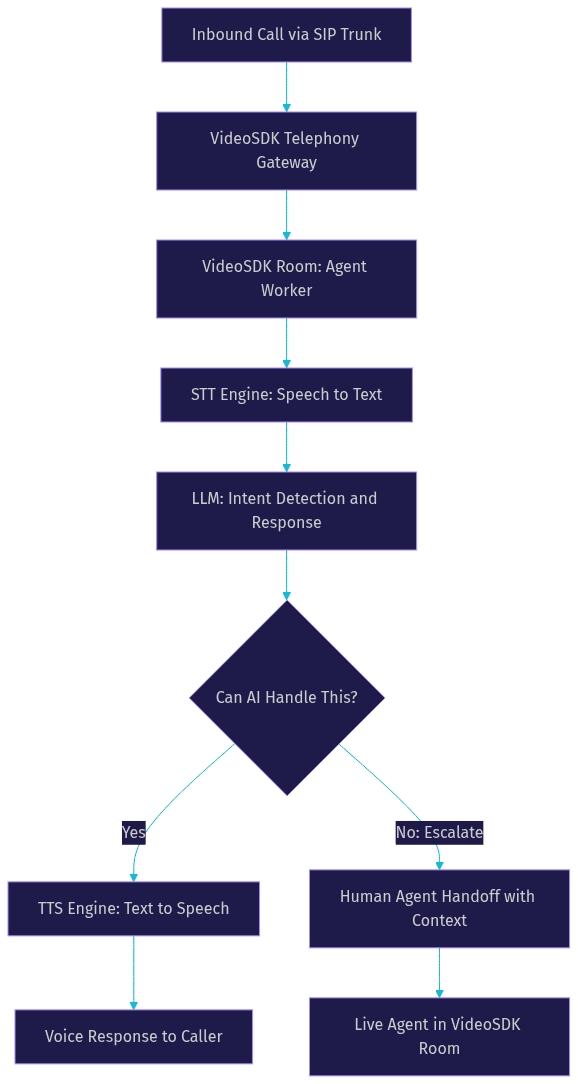
An AI based call center works by capturing the caller's voice through a telephony gateway, converting speech to text using a speech-to-text engine, passing that text to a large language model for intent detection and response generation, and converting the response back to speech through a text-to-speech engine. This entire pipeline executes in under a second to maintain conversational flow.
VideoSDK provides the real-time communication layer for AI based call centers through its AI Voice Agent SDK. The Agent Worker, a Python process, manages sessions inside VideoSDK Rooms where users connect via web, mobile, or traditional phone lines through SIP integration. The pipeline connects your chosen STT, LLM, and TTS providers while VideoSDK handles media transport, session management, and call control.
For structured workflows like loan applications or insurance claims where every step must follow a specific order, VideoSDK's Conversational Graph adds a deterministic flow engine on top of the LLM pipeline. This ensures business rules, not LLM judgment, control conversation branching.
Core Benefits of an AI Based Call Center
AI based call centers deliver measurable improvements across cost, coverage, and quality metrics. Here are the primary advantages:
- Cost reduction: AI voice agents handle thousands of concurrent calls at a fraction of human agent cost. Organizations typically see 50 to 70 percent reduction in per-call cost for routine inquiries.
- 24/7 coverage: AI agents do not sleep, take breaks, or require shift scheduling. They provide consistent service quality at 3 AM on a holiday.
- Faster average handling time: AI agents retrieve information instantly from connected knowledge bases. No hold music, no transfers, no looking up account details while the caller waits.
- Multilingual support: A single AI agent can switch between languages mid-call using multilingual STT and TTS providers. This eliminates the need for separate language queues.
- Data-driven insights: Every call is transcribed, summarized, and scored automatically. Sentiment analysis runs in real time, giving supervisors visibility into customer satisfaction trends without manual call review.
- Scalability: Adding capacity means provisioning more agent workers, not hiring and training staff. Call spikes during product launches or seasonal peaks are handled without queue abandonment.
Key Architectural Components
AI Speech-to-Text (STT) Engine
The STT engine converts caller speech into text in real time. Accuracy and latency are the two critical metrics. According to Artificial Analysis's Speech Arena benchmark, leading STT providers achieve word error rates below 10 percent on conversational audio with median latency under 300 milliseconds. VideoSDK supports multiple STT providers including OpenAI Whisper, Deepgram, Google Cloud STT, AssemblyAI, and ElevenLabs Scribe, letting you choose based on your accuracy and latency requirements.
Large Language Model (LLM) for Intent and Dialogue
The LLM processes transcribed text, detects caller intent, maintains conversation context, and generates natural language responses. Provider choice affects response quality, latency, and cost. VideoSDK integrates with OpenAI, Google Gemini, Anthropic Claude, Cerebras, and Sarvam AI among others. For real-time interactions, OpenAI Realtime, Google Gemini Live, and AWS Nova Sonic offer multimodal models that process audio directly, reducing pipeline latency by eliminating the STT-to-LLM handoff.
Text-to-Speech (TTS) Voice Engine
The TTS engine converts LLM responses into natural-sounding speech. Modern TTS providers like ElevenLabs, Cartesia Sonic, and Hume AI produce voices that are difficult to distinguish from human speech. Voice cloning capabilities allow organizations to create consistent brand voices. VideoSDK supports TTS caching, which pre-generates common responses to reduce latency for frequent queries like business hours or return policies.
Real-Time Routing and Skill-Based Queues
Intent detection at the start of a call determines whether the AI agent can handle it or whether it needs human escalation. VideoSDK's telephony routing rules engine routes inbound calls based on caller ID, DTMF input, or initial intent classification. Calls that require human expertise transfer to live agents with full conversation context passed along, so the caller never repeats themselves.
Analytics and Quality Monitoring
Every AI-handled call generates a transcript, summary, and sentiment score. VideoSDK's REST APIs expose session analytics, recording management, and participant data for post-call analysis. Real-time dashboards track call volume, resolution rate, average handling time, and escalation rate. Compliance monitoring flags calls that involve payment card information or regulated disclosures for review.
Implementation Roadmap
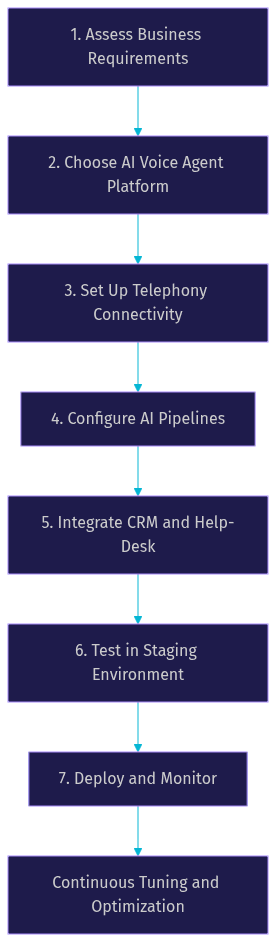
Building an AI based call center requires careful planning across telephony, AI pipeline configuration, and business system integration. Here is a practical seven-step roadmap.
1. Assess Business Requirements
Start by mapping your current call center operations. Document average daily call volume, peak concurrency, languages spoken, average handling time, and top call reasons. Identify compliance requirements such as PCI-DSS for payment processing or HIPAA for healthcare interactions. List every system the AI agent needs to query: CRM, knowledge base, inventory system, appointment scheduler.
2. Choose an AI Voice Agent Platform
Evaluate platforms on five criteria: supported STT and TTS providers, LLM integration flexibility, telephony connectivity options, latency performance, and data residency controls. VideoSDK's open-source AI Agent SDK lets you mix and match providers, deploy on VideoSDK Agent Cloud or self-host via Docker and Kubernetes, and maintain full control over your data pipeline.
3. Set Up Telephony Connectivity
Connect your existing phone infrastructure to VideoSDK using SIP trunk integration. VideoSDK's telephony gateway supports inbound and outbound call flows through providers like Twilio, Vonage, Telnyx, and Plivo. Configure routing rules to direct calls to the appropriate AI agent worker based on phone number, time of day, or caller identity. DTMF event handling lets callers navigate menu options if needed.
4. Configure AI Pipelines
Select your STT, LLM, and TTS providers based on your assessment. Map common caller intents to specific actions: account lookup, appointment booking, order status, refund processing. For deterministic workflows where every step must happen in order, use VideoSDK's Conversational Graph to define nodes, transitions, and state as a directed graph. The LLM handles natural language generation while the graph controls conversation flow. Configure turn detection and voice activity detection parameters to match your callers' speech patterns.
5. Integrate with Existing CRM and Help-Desk Systems
The AI agent needs access to customer data to provide personalized service. Connect your CRM through REST API calls triggered by the agent's function tools. Pass customer context from the CRM into the conversation at call start. After the call, automatically generate a summary and post it to your help-desk system. VideoSDK's post-call transcription and summary features feed directly into these workflows.
6. Test in a Staging Environment
Never deploy an AI voice agent directly to production. Set up a staging environment with test phone numbers. Run load tests to verify concurrency limits. Measure end-to-end latency from caller speech to AI response. Test fail-over scenarios: what happens when the STT provider has an outage? VideoSDK's fallback adapter mechanism switches to backup providers automatically. Test human handoff flows to ensure context transfers cleanly.
7. Deploy and Monitor
Roll out in phases. Start with a small percentage of inbound calls routed to the AI agent. Monitor resolution rate, escalation rate, and customer satisfaction scores. Use VideoSDK's session analytics to identify calls where the AI struggled and tune your intent mapping or LLM prompts accordingly. Set up alerts for latency spikes, failed calls, and provider errors.
Best Practices and Common Pitfalls
Building an AI based call center that customers actually tolerate requires attention to edge cases that vendor demos never show.
Handle low-bandwidth callers gracefully. Mobile callers on weak connections produce garbled audio that STT engines struggle with. VideoSDK's built-in noise suppression and network-adaptive streaming help, but you should also configure your STT provider with appropriate noise robustness settings. Test with real mobile calls, not studio-quality recordings.
Ensure compliance from day one. If you handle payment card information, configure your pipeline to detect and redact card numbers from transcripts. For healthcare, ensure your STT and LLM providers are HIPAA-eligible. VideoSDK supports geo-fencing to keep data within specific regions, which helps with GDPR compliance for European callers.
Manage voice cloning ethics. If you clone a specific person's voice for your AI agent, obtain explicit consent and document it. Avoid cloning celebrity or public figures' voices. Clearly disclose to callers that they are speaking with an AI system where regulations require it.
Three common errors and how to fix them:
- Mis-aligned intents: The AI misclassifies what the caller wants, leading to wrong responses. Fix this by expanding your training examples for ambiguous intents and adding confirmation questions when confidence is low.
- Latency spikes: The caller experiences awkward silences. Identify which pipeline stage causes the delay. TTS caching for common responses, faster LLM providers like Cerebras, or real-time multimodal models can cut response time significantly.
- Poor handoff context: When a call escalates to a human agent, the caller has to repeat everything. Fix this by passing the full conversation transcript and extracted customer data to the human agent's dashboard before the transfer completes.
Future Trends for AI Based Call Centers
The AI call center landscape is evolving rapidly. Several emerging capabilities will reshape what is possible within the next 12 to 18 months.
Emotion-aware AI uses prosodic analysis to detect caller frustration, confusion, or satisfaction from voice tone, not just words. This enables dynamic response adjustment: a frustrated caller gets shorter, more direct answers instead of verbose explanations.
Real-time language switching allows a single AI agent to detect the caller's language mid-sentence and switch STT, LLM, and TTS providers accordingly. This eliminates the need for separate language queues and language selection menus entirely.
Generative voice avatars combine AI voice with visual representation for video-based support channels. VideoSDK's vision and multi-modality support, along with avatar provider integrations like Anam AI, enable face-to-face AI interactions for video calling use cases.
Retrieval-augmented generation (RAG) integration lets AI agents query your knowledge base in real time during the call. Instead of pre-loading context, the agent searches for relevant documents as the caller asks questions. VideoSDK's RAG support and memory features make this practical for production deployments.
Definitions Glossary
Agent Worker: The Python process that runs a VideoSDK AI agent and manages its session lifecycle inside a VideoSDK Room.
Conversational Graph: VideoSDK's deterministic flow engine for structured multi-turn voice conversations where business rules control branching instead of LLM judgment.
Pipeline: The STT to LLM to TTS chain that processes caller speech and generates AI responses in a VideoSDK AI voice agent.
SIP (Session Initiation Protocol): The signaling protocol that bridges traditional phone networks to VideoSDK WebRTC rooms, enabling AI agents to receive and make real phone calls.
Turn Detection: The mechanism that decides when a caller has finished speaking and the AI agent should respond, critical for natural conversational flow.
Voice Activity Detection (VAD): The audio processing technique that distinguishes speech from silence or background noise, enabling the pipeline to start and stop processing at the right moments.
Key Takeaways
- An AI based call center replaces or augments human agents with real-time voice AI pipelines combining STT, LLM, and TTS components connected through a telephony gateway.
- VideoSDK provides the telephony infrastructure, AI Voice Agent SDK, and Conversational Graph engine needed to build and deploy AI call centers that handle real phone calls.
- Core benefits include 50 to 70 percent cost reduction for routine calls, 24/7 coverage, multilingual support, and automatic transcription with sentiment analysis for every interaction.
- A seven-step implementation roadmap covers business assessment, platform selection, telephony setup, pipeline configuration, CRM integration, staging tests, and phased deployment.
- Common pitfalls like mis-aligned intents, latency spikes, and poor handoff context are avoidable with proper testing, TTS caching, and context-passing protocols.
Conclusion
An AI based call center is no longer a futuristic concept. The building blocks exist today: accurate STT engines, capable LLMs, natural TTS voices, and telephony platforms that bridge AI pipelines to real phone networks. VideoSDK's AI Voice Agent SDK, SIP telephony integration, and Conversational Graph provide the infrastructure to assemble these components into a production system. Start building your AI based call center by signing up at app.videosdk.live/login and exploring the code samples in the documentation. What are you building with VideoSDK? Drop a comment below, I would love to hear what kind of AI call center use case you are working on.
FAQ