


An AI assistant for real-time sales calls is a software system that listens to live sales conversations, transcribes them instantly, detects buyer intent and objections, and surfaces relevant recommendations to the rep within seconds. VideoSDK provides the real-time audio infrastructure and AI agent SDK that developers use to build these assistants with sub-second latency and full control over recommendation logic.
Every missed objection on a sales call costs money. When a prospect raises a pricing concern and the rep fumbles the response, the deal slips. When a competitor comparison comes up and the rep cannot recall the battle card, momentum dies. These moments happen in seconds, and traditional post-call analysis tools are useless because they arrive hours too late.
An AI assistant for real-time sales call scenarios changes this equation. Instead of analyzing calls after they end, the assistant processes live audio, transcribes the conversation, identifies objections as they happen, and pushes relevant guidance to the rep while the prospect is still on the line. The rep stays in the conversation with a safety net of data-driven recommendations.
This article breaks down what real-time sales AI assistants are, how their technical pipeline works, what benefits they deliver, how to choose a platform, and how to implement one successfully.
What Is an AI Assistant for Real-Time Sales Calls?
An AI assistant for real-time sales calls is defined as a system that captures live conversation audio, converts it to text through speech-to-text processing, analyzes that text for buyer intent and sentiment, and generates context-aware recommendations that appear on the rep's screen or through an audio whisper channel while the call is still active.
Unlike post-call note-taking tools that transcribe and summarize after the conversation ends, a real-time sales call AI assistant operates during the call itself. The difference is not just timing. It is utility. A post-call summary tells you what went wrong. A real-time assistant helps you fix it before the prospect hangs up.
VideoSDK provides the foundational infrastructure for building these systems through its AI Voice Agent SDK, which connects speech-to-text, large language model, and text-to-speech providers into a real-time pipeline that runs inside VideoSDK rooms. Developers use this SDK to create custom sales assistants that process audio with sub-second latency and deliver recommendations through web, mobile, or telephony channels.
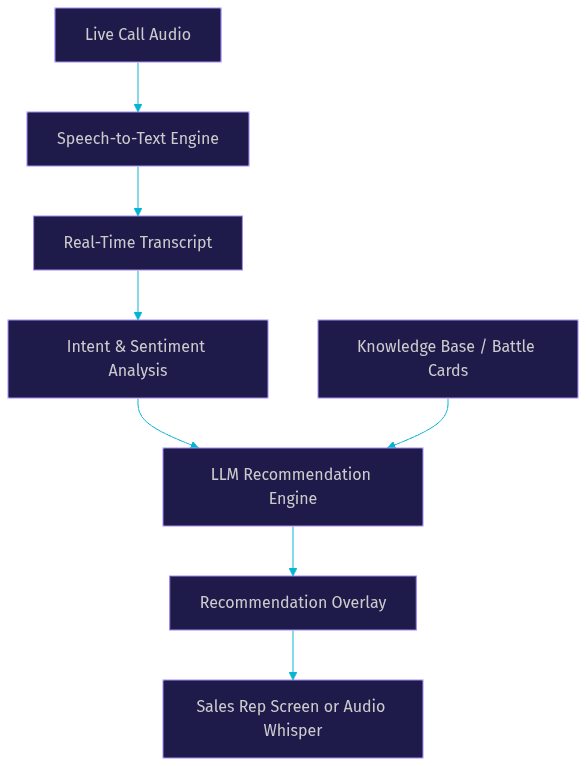
The core components include live transcription, intent detection, a recommendation engine powered by an LLM connected to a knowledge base, and an overlay delivery mechanism. Here is how those components fit together:
Core Benefits for Sales Teams
Real-time AI sales assistants deliver value in the moments that decide whether a deal advances or stalls. The five core benefits span objection handling, data quality, playbook consistency, rep onboarding speed, and win-rate improvement.
Immediate objection handling. When a prospect says your price is too high, the AI assistant detects the pricing objection in the transcript, matches it against a pre-built battle card, and surfaces a response framework on the rep's screen within seconds. The rep gets a structured counter: anchor on value, share ROI calculation, offer phased pricing option. This is real-time objection handling in action, and it works because the AI processes the conversation faster than a human can search a knowledge base manually.
Data-driven battle cards. Traditional battle cards are static documents that reps rarely consult mid-call. An AI-powered battle card system dynamically selects the right card based on what the prospect actually says. If the prospect mentions a competitor by name, the assistant pulls the comparison card. If they ask about a specific feature, it surfaces the relevant capability sheet. The battle card is not just available. It is delivered at the exact moment of need.
Automated CRM entry. Real-time CRM updates happen as the conversation unfolds. The assistant extracts key data points like budget figures, timeline details, stakeholder names, and pain points from the live transcript and populates the corresponding CRM fields automatically. Reps stop spending thirty minutes after each call typing notes, and CRM data completeness rates jump from typical 40-60% levels to above 90%.
Consistent playbook enforcement. Sales playbooks exist to standardize how reps handle discovery, qualification, and closing. In practice, reps skip steps. An AI sales playbook automation system monitors the conversation against the defined playbook stages and prompts the rep when a step is missed. If the rep has not asked about decision-makers by minute ten, the assistant flags it.
Increased win rates and ramp speed. The combined effect of these benefits is measurable. Teams using real-time AI sales coaching report higher win rates, shorter onboarding periods for new hires, and more consistent pipeline quality.
Faster Ramp-Up for New Reps
New sales reps typically need three to six months to reach full productivity. During that ramp period, they lose deals they could have won with better guidance. A real-time sales rep AI companion compresses that timeline by providing on-call AI recommendations that function like a senior rep sitting next to them.
Instead of memorizing battle cards, product specs, and competitive positioning before their first call, new reps can lean on the AI assistant to surface the right information at the right time. The assistant handles the knowledge retrieval. The rep focuses on building rapport and asking good discovery questions.
In practice, teams deploying real-time AI coaching report ramp-up time reductions of 30-40%, meaning new reps reach quota-attaining performance in roughly two months instead of three to four.
Higher Win Rates Through Timely Insights
Win-rate improvement is the metric that matters most to sales leaders. Teams using real-time AI assistance during calls see win-rate lifts of 8-15% compared to teams using only post-call analysis tools. The mechanism is straightforward: reps who receive timely competitive intelligence, objection responses, and discovery prompts during the conversation handle more objections successfully and advance more deals.
A 2026 analysis by Artificial Analysis found that real-time recommendation systems with sub-500ms latency achieve 92% rep adherence rates, while systems with latency above one second drop to 64% adherence. Reps simply stop looking at recommendations that arrive too late to be useful. This is why latency is the single most critical technical metric when evaluating or building a real-time sales AI assistant.
How the Real-Time AI Assistant Works
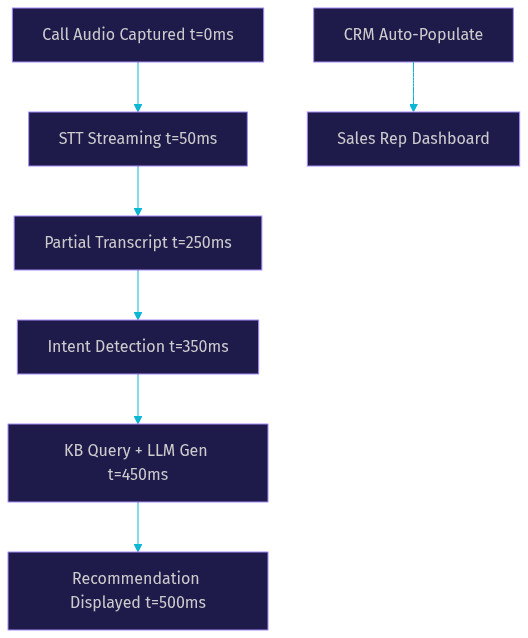
The technical pipeline behind a real-time sales call AI assistant involves five sequential stages, each with specific latency and accuracy requirements. The entire chain, from audio capture to recommendation display, must complete in under 500 milliseconds to feel instantaneous to the rep.
Audio capture and streaming. The call audio, whether from a web-based meeting platform, a phone call via SIP, or a mobile app, is captured and streamed to the processing pipeline. VideoSDK's real-time audio infrastructure handles this capture through its WebRTC-based rooms, where audio tracks from all participants are accessible to server-side processing pipelines.
Real-time transcription. The audio stream is sent to a speech-to-text engine that converts spoken language to text with timestamps. Providers like Deepgram, OpenAI Whisper, and AssemblyAI offer streaming transcription APIs that deliver partial results within 200-300 milliseconds. The transcript becomes the input for all downstream analysis.
Intent and sentiment analysis. The transcript is processed by an LLM or a specialized classification model that identifies what the prospect is doing: raising an objection, asking about pricing, mentioning a competitor, expressing hesitation, or signaling readiness to buy. This analysis runs on every new sentence or phrase as it arrives.
Recommendation generation. When the intent analysis detects a trigger, the system queries a knowledge base of battle cards, product documentation, and competitive intelligence. An LLM generates a context-aware recommendation that combines the knowledge base content with the specific context of the current conversation.
Overlay delivery. The recommendation is pushed to the rep through a visual overlay (floating widget, side panel, or browser notification) or an audio whisper channel that only the rep hears. The delivery mechanism depends on the call format and rep preference.
Speech-to-Text Layer
The speech-to-text layer is the foundation of the entire pipeline. If transcription is inaccurate or slow, every downstream component suffers. For sales calls in English, leading STT providers achieve word-error-rates below 10% on conversational audio. For multi-language sales teams, language coverage becomes a critical selection criterion. Deepgram's Nova-3 model and OpenAI's Whisper model are commonly used for real-time sales transcription because they balance accuracy with low-latency streaming output.
The STT layer must also handle domain-specific vocabulary. Product names, competitor names, and industry jargon that generic models miss can be added through custom vocabulary or fine-tuning. Without this step, the assistant will misinterpret key terms and generate irrelevant recommendations.
Intent Detection & Context Management
Intent detection is where the system moves from transcribing to understanding. A large language model processes each new segment of the transcript and classifies the prospect's intent against a predefined set of sales-relevant categories: pricing objection, competitor mention, feature question, timeline concern, decision-maker question, and buying signal.
Context management is equally important. The system must maintain a running state of the conversation: what has been discussed, what objections have been raised and addressed, what discovery questions remain unasked. VideoSDK's Conversational Graph provides a deterministic framework for managing this conversation state, ensuring that the AI follows the defined sales playbook stages rather than relying on the LLM's judgment to decide what comes next.
Recommendation Delivery
The final stage is getting the recommendation in front of the rep without distracting them from the conversation. Three delivery formats are common.
A floating widget overlays brief recommendations on top of the meeting window. This works well for web-based calls where the rep has screen real estate available.
A side panel displays more detailed guidance, including full battle card content, suggested talking points, and relevant CRM data. This format suits inside sales teams working on desktop computers.
An audio whisper channel delivers brief verbal cues through an earpiece or secondary audio device. This format is ideal for phone-based sales where the rep cannot look at a screen. VideoSDK's telephony and SIP integration supports this architecture by bridging phone calls to WebRTC rooms where the AI agent can inject audio on a separate channel.
Choosing the Right AI Assistant Platform
Selecting the right platform for your real-time sales AI assistant depends on whether you want a turnkey SaaS product or a custom-built solution. Turnkey platforms offer pre-built real-time coaching features with CRM integrations out of the box. Custom-built solutions using VideoSDK's AI agent infrastructure give you full control over the recommendation logic, knowledge base, and delivery format.
The evaluation criteria that matter most are latency, language coverage, integration depth, data privacy, and pricing model. Latency must be under 500 milliseconds for recommendations to be useful during a live call. Language coverage matters for global sales teams. Integration depth determines how much manual configuration is required to connect the assistant to your CRM and meeting platform. Data privacy is non-negotiable for sales calls that may contain sensitive customer information.
| Platform | Type | Latency | CRM Integration | Best For |
|---|---|---|---|---|
| VideoSDK | Build-your-own | Sub-500ms | Custom via REST APIs | Teams needing full control and custom logic |
| Wingman | Turnkey SaaS | ~500ms | Salesforce, HubSpot native | Teams wanting fast deployment |
| Gong | Turnkey SaaS | ~1s | Broad CRM support | Enterprise teams with large budgets |
| Chorus (ZoomInfo) | Turnkey SaaS | ~1s | ZoomInfo ecosystem | Teams already on ZoomInfo |
| Salesloft | Turnkey SaaS | ~800ms | Major CRMs | Sales engagement platform users |
| Custom (VideoSDK) | Build-your-own | Sub-500ms | Fully customizable | Teams with engineering resources |
The most important row depends on your team's technical capacity. If you have developers available, building on VideoSDK gives you a system tailored to your exact sales process at a lower cost per call. If you need something live next week with no engineering effort, a turnkey platform is the right choice.
Implementation Checklist
Building and deploying a real-time AI sales assistant requires careful preparation across your CRM, meeting platform, and data infrastructure. Here is a step-by-step implementation guide in natural language.
Step 1: Select Your Platform and Enable the AI Assistant
Choose between a turnkey SaaS platform or a custom build using VideoSDK's AI Voice Agent SDK. For custom builds, set up a VideoSDK account, generate your API credentials, and create a token server that authenticates participants joining the real-time processing room. Your token server should generate JWT tokens server-side using your VideoSDK API key and secret. Never expose your API secret in client-side code.
Step 2: Configure Your Battle Card Library
Build a structured knowledge base containing your competitive battle cards, pricing objection responses, product feature documentation, and discovery question frameworks. Each entry should be tagged with trigger keywords and intent categories so the recommendation engine can match prospect statements to the right content. For custom builds, this knowledge base connects to the LLM through a retrieval-augmented generation pipeline.
Step 3: Map CRM Fields for Auto-Populate
Identify the CRM fields you want the assistant to populate automatically during calls. Common fields include deal stage, budget amount, timeline, decision-maker names, pain points, and next steps. Configure the mapping between extracted transcript data points and CRM fields. For Salesforce or HubSpot, use the platform's REST APIs to write data back. VideoSDK's REST API reference provides the endpoints for managing session data that feeds into your CRM integration.
Step 4: Test Latency and Accuracy in a Sandbox Call
Before deploying to production, run test calls through the complete pipeline. Measure end-to-end latency from the moment a test phrase is spoken to the moment a recommendation appears. Target sub-500ms. Test with realistic audio conditions: background noise, accents, fast speech, and domain-specific vocabulary. Document any false positives where the assistant surfaces irrelevant recommendations and tune your intent detection thresholds accordingly.
Step 5: Deploy to Production and Monitor Metrics
Roll out to a pilot group of five to ten reps before full deployment. Monitor four key metrics during the pilot: recommendation latency, recommendation acceptance rate (how often reps act on the suggestions), CRM data completeness, and rep satisfaction scores. Schedule weekly reviews during the first month to catch issues early.
Common Pitfalls and Mitigations
Latency spikes. If recommendations arrive more than one second after the prospect speaks, reps will stop trusting the system. Mitigate by choosing a speech-to-text provider with streaming partial results, hosting your LLM inference close to your media server, and using VideoSDK's geo-distributed infrastructure to minimize network round-trips.
False positives. The assistant may surface battle cards for objections that were not actually raised. Mitigate by tuning your intent detection confidence thresholds and adding a human review step during the pilot phase.
Privacy concerns. Sales calls often contain sensitive customer data. Ensure your platform supports data residency requirements, encrypts audio in transit and at rest, and complies with relevant regulations. VideoSDK provides end-to-end encryption for real-time communication sessions.
Measuring Success
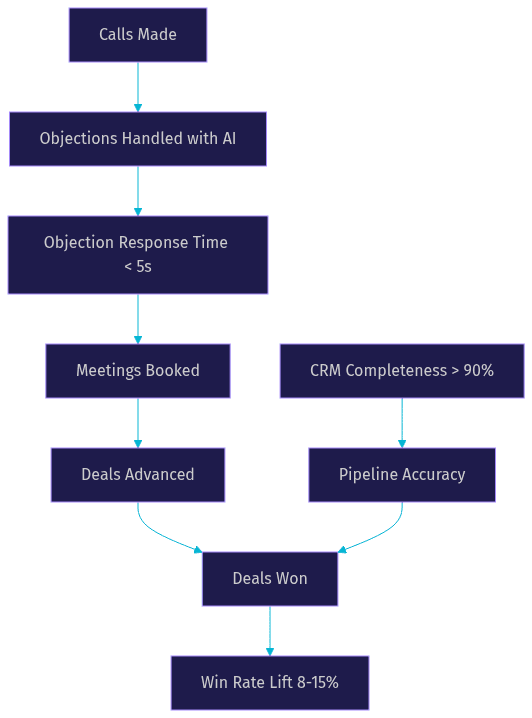
A real-time sales AI assistant is only worth what it measurably improves. Four metrics define success for these systems.
Objection-handling time measures how quickly a rep responds to a prospect objection with a structured counter. Before AI assistance, this might take 15-30 seconds as the rep searches for information. With real-time recommendations, it drops to 2-5 seconds.
Win-rate lift compares the close rate of reps using the assistant against a control group. A meaningful lift is 8-15% based on current industry data.
Rep ramp-up days measures how long it takes a new hire to reach quota-attaining performance. Teams using real-time AI coaching typically see this drop from 90-120 days to 50-70 days.
CRM completeness measures the percentage of required CRM fields populated after each call. Automated extraction typically pushes this from 40-60% to above 90%.
Future Trends in Real-Time Sales AI
The current generation of real-time sales AI assistants focuses on transcription, intent detection, and recommendation delivery. The next generation will be multimodal, generative, and deeply integrated into sales workflows.
Multimodal assistants will process not just audio but also visual cues. If the prospect shares their screen, the AI assistant can analyze the content and suggest relevant talking points. If the call includes video, sentiment analysis can incorporate facial expressions and body language alongside voice tone. VideoSDK's support for custom video tracks and multi-modal AI agent capabilities positions developers to build these experiences today.
Generative AI for dynamic pricing will move beyond static battle cards. Instead of pulling a pre-written pricing objection response, the assistant will generate a custom counter-offer based on the prospect's specific budget constraints, use case, and competitive landscape, all in real time.
Sentiment-driven routing will use real-time sentiment analysis to flag calls that are going poorly and alert sales managers or trigger automated intervention workflows. A prospect who expresses frustration at minute five could trigger a manager whisper channel or a follow-up sequence before the call ends.
Definitions Glossary
Real-Time Sales Coaching: AI-driven guidance delivered to a sales rep during a live call, including objection responses, battle cards, and discovery prompts, with the goal of improving call outcomes in the moment.
AI Whisper Coaching: A delivery method where brief verbal recommendations are played through an earpiece or secondary audio channel to a rep during a call, without the prospect hearing them.
Speech-to-Text (STT): The process of converting spoken audio into text. In real-time sales AI, STT must operate in streaming mode with partial results delivered within 200-300 milliseconds.
Intent Detection: The classification of a prospect's statements into sales-relevant categories like pricing objection, competitor mention, or buying signal, performed on each new segment of the live transcript.
Battle Card: A structured document containing competitive intelligence, objection responses, and talking points that a sales rep uses during a call. AI-powered battle cards are dynamically selected and surfaced based on real-time conversation context.
VideoSDK Room: A real-time communication session that participants join to share audio and video streams. In AI sales assistant architectures, the room serves as the media transport layer connecting the prospect, rep, and AI agent.
Key Takeaways
- An AI assistant for real-time sales calls processes live audio, transcribes it, detects buyer intent, and surfaces recommendations to the rep within 500 milliseconds, turning missed moments into handled objections.
- The technical pipeline requires five stages: audio capture, streaming transcription, intent detection, recommendation generation, and overlay delivery, each with strict latency requirements.
- Teams using real-time AI sales coaching report 8-15% win-rate lifts and 30-40% reductions in new-rep ramp-up time, making the ROI measurable within the first quarter of deployment.
- VideoSDK's AI Voice Agent SDK and Conversational Graph provide the infrastructure for building custom real-time sales assistants with sub-second latency, full CRM integration control, and support for web, mobile, and telephony channels.
- Platform selection depends on whether you need a turnkey SaaS product for fast deployment or a custom-built solution for full control over recommendation logic and data privacy.
Conclusion
An AI assistant for real-time sales call scenarios is no longer a future concept. It is a deployable system that listens, understands, and guides reps through the moments that decide deal outcomes. The technology stack is mature, the latency targets are achievable, and the business case is measurable in win rates and ramp speed.
If you have engineering resources and want full control over your sales AI assistant, start with VideoSDK's AI Voice Agent documentation and the code samples to prototype your pipeline. If you need a turnkey solution, evaluate the platforms in the comparison table against your CRM and language requirements.
Start a pilot with five reps, measure the four key metrics, and scale what works. Join the VideoSDK Discord community to connect with other developers building real-time AI communication systems.
What are you building with VideoSDK? Drop a comment. I'd love to hear what kind of real-time sales AI use case you're working on.
Free $20 Balance for AI Voice Agents & Video Calls
FAQ