



A white-label telehealth platform is virtual care software another company builds and runs, which patients see under your brand. Two questions pick the model: do you supply your own clinicians, and do you already own the patient app or portal? Then compare platforms on how reliably patients can join a visit, because when a call fails, patients see your brand.
When a video visit fails, patients don't see which company runs the video. They see your name on the screen, so they call your support line, and the missed appointment costs your service its trust. That's why this guide compares white-label options on the visit itself: whether patients can join, how deep the branding goes, who signs the Business Associate Agreement (BAA), what each visit costs, and what you keep if you switch.
What is a white-label telehealth platform?
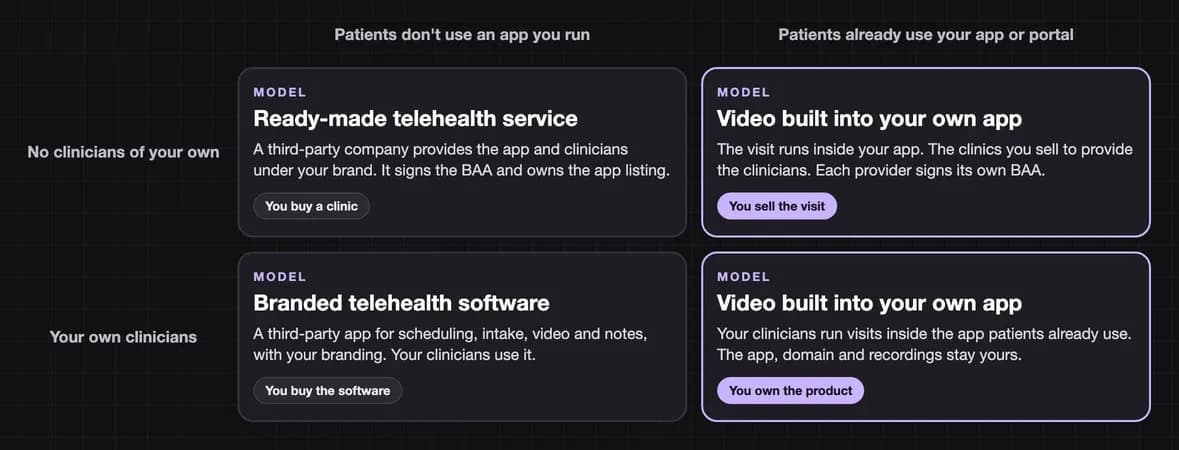
A white-label telehealth platform is software another company builds and operates, presented to patients under your name, logo and domain. White label telehealth comes in three models. The difference between them is who provides the clinicians and whose app the patient opens.
| Who you are | Model | What it is | Who provides the clinicians | Which app patients use |
|---|---|---|---|---|
| A brand with patients or members but no clinical team, such as an employer, pharmacy, insurer or wellness brand | Ready-made telehealth service | A third-party company runs a complete virtual clinic (app, clinicians, often pharmacy) under your brand | The third-party company | The third-party app, with your logo |
| A clinic, practice or provider group with clinicians but no product team | Branded telehealth software | A third-party app for scheduling, intake, video and notes, set up with your branding | You | The third-party app, with your logo |
| A digital health company or care platform that already runs a patient app or portal, or sells software to clinics | Video built into your own app | A video layer such as VideoSDK, built into the app or portal you already run | You, or the clinics you sell to | Your own app |
Going down the table, you control more of what patients see and own more of the build, from the app listing to each BAA.
Which white-label model fits your team?
Two questions decide the white label telehealth model before you compare any platform.
- Do you have your own licensed clinicians?
- Do patients already log in to an app or portal you run?
| Your answers | Model that fits | Why |
|---|---|---|
| No clinicians, no app | Ready-made telehealth service | You need the clinicians and the app, so you are buying a clinic, not software. |
| Clinicians, no app | Branded telehealth software | You supply the care; the software gives you a branded way in without building one. |
| You run an app or portal (with or without your own clinicians) | Video built into your own app | Patients already know your app, so the visit should happen inside it. |
If you are still deciding whether to build, buy or embed your whole product, our telemedicine app development guide covers that decision in depth. The rest of this guide is written for teams in the second and third rows.
Where do white-label visits break?
White-label visits break at a handful of predictable steps, and at each one the patient sees your brand. Keep the features below in scope with any platform you choose.

| Step | What fails | Feature to keep in scope | How it works on VideoSDK |
|---|---|---|---|
| Invite and device check | Camera or microphone blocked, browser unsupported | A pre-call test patients run before the visit | Pre-call device, permission and network checks, set out in our telehealth guide |
| Lobby | Patient waits with no sign anyone is coming | Clinician admission, with a waiting screen in your brand | The clinician admits the patient from the waiting lobby |
| Joining from a clinic network | Hospital firewall blocks media | A fallback route when the firewall blocks UDP | Firewall guidance in the telehealth guide; Cloud Proxy routes media over TCP on the Enterprise plan |
| In call | Network drops on mobile data | Automatic reconnection, shown on both screens | Quality adapts to bandwidth, and your app shows a reconnecting state on both screens |
| After a failure | Nobody can say why it failed | Per-participant diagnostics: join time, device, browser and network quality | Participant details per session |
Before you sign with any platform, VideoSDK included, ask what diagnostic data it provides when a visit goes wrong. At minimum, for each participant: join time, device, browser and operating system, and network quality across the call (jitter, round-trip time and packet loss). With that, your support team can tell a patient whether to switch browser, move off clinic Wi-Fi or update the app, instead of saying "please try again". On VideoSDK, participant details show all of these, plus video freeze counts and device CPU use.
Examedi eliminated a 50% call failure rate on VideoSDK. Curable, a telemedicine platform, had limited visibility into call performance, which slowed root-cause analysis of call issues. With our call quality analytics, its team identifies call quality issues faster and responds to incidents more quickly, across 300,000+ sessions and 600,000+ doctors and patients. For the screens and states patients see during a visit, see our guide to building a telehealth video platform.
How deep does the branding go?
A white label telemedicine platform is only as branded as its least branded screen, and that is usually the error page. Check every layer the patient touches, including the ones that only appear when something goes wrong. The fastest test takes five minutes in any demo room: deny camera access, then turn off Wi-Fi mid-call. Whatever appears on screen is what your patients will see.
| Layer | What full white label means | What to check |
|---|---|---|
| Video room | Your colours, logo and layout | Can you change the layout, or only the logo? |
| "Powered by" text | Removed | Is removal included, or a paid tier? |
| URL | Your domain | Do patients ever see the platform's domain? |
| Mobile app | Listed under your developer account | Who owns the app store listing? |
| Invites | Email and SMS from your sender | Can you send from your own domain and number? |
| Error and reconnecting screens | Your words and support details | Can you edit these screens? |
| Recordings | Stored in your storage | Where are recordings kept, and who can read them? |
On VideoSDK, you choose how deep to go. Prebuilt takes your logo and name, and "Powered by videosdk.live" can be switched off (branding docs). With our SDKs, every screen, including the error and reconnecting states, is built inside your own app, on your domain, under your app store listing.
Who signs the BAA, and what does it cover?
Under HIPAA, every third-party company that creates, receives, maintains or transmits protected health information (PHI) for you needs a BAA. With a ready-made service, the BAA chain runs through that company. When you build video into your own app, each provider that handles PHI needs its own.
| Component | Handles PHI? | BAA from whom |
|---|---|---|
| Video and audio | Yes, during the call | Your video provider |
| Recording storage | Yes, if visits are recorded | Your storage provider (and the video provider if it touches files) |
| Transcription and AI notes | Yes | Each provider that processes the audio or text |
| Messaging and reminders | Often, if they mention the visit | Your messaging provider |
Before your security review, tick each row you will use and write the BAA that covers it next to it. A blank row is a gap. The common one is a BAA that covers the video call but not the recording storage or transcription added later.
On VideoSDK, HIPAA features and a BAA are available as an add-on on Pay-As-You-Go and Enterprise plans (HIPAA docs). Media is encrypted in transit with TLS and SRTP. We don't store audio, video or screen-sharing data unless you turn on a feature such as recording, and when you connect your own cloud storage, recordings go straight to your bucket. HIPAA compliance is still shared: your app handles consent, access control and retention. If you plan transcription or AI notes on patient data, talk to our team to plan the setup for your compliance requirements.
For your security review, we run SOC 2 Type II aligned controls, and support with audit documentation, control mapping and security questionnaires is available as an add-on (SOC 2 docs). Our HIPAA-compliant video conferencing API guide covers the BAA and encryption checks in more detail.
What does a white-label telehealth visit cost?
Compare white label telehealth software on cost per visit, not monthly fee. A monthly fee hides how cost moves with volume, and your margin is set per visit.
| Pricing model | How it's priced | What moves the total |
|---|---|---|
| Per provider | A fee per clinician seat per month | Headcount, not visit volume |
| Per consultation | A fee per completed visit | Visit volume and no-shows |
| Flat monthly plus setup | A platform fee, often with a one-time setup fee | Fixed until you outgrow a tier |
| Per participant-minute | Usage: minutes multiplied by participants | Visit length, participants and video quality |
Published price ranges for third-party platforms (checked November 2026) run from about $100 to over $10,000 a month, with setup fees up to $15,000. To compare a flat fee per visit, divide it by your visit volume. Take a hypothetical $1,000 monthly fee across 2,000 visits: that is $0.50 a visit before any per-consult fees.
Video on VideoSDK is billed per participant-minute and starts from $0.004 per participant-minute for HD, as of 18 November 2026; see our pricing page and pricing FAQ for detailed pricing. Participant-minutes are the visit length multiplied by the number of participants. Each participant's tier is set by the total resolution of the video they receive, screen shares included; their own camera doesn't count.
| Scenario | Conditions | Video cost |
|---|---|---|
| One-to-one visit | 2 participants, 20 minutes, each receives one 720p stream (HD tier) | 40 participant-minutes, about $0.16 |
| One-to-one visit with a screen share | 2 participants, 20 minutes. The clinician shares a 1080p screen for 5 minutes, so for those minutes the patient receives a 720p camera plus the 1080p share, above 1440 (2K+ tier, $0.036 per participant-minute). The rest is HD. | Patient about $0.24, clinician about $0.08: about $0.32 |
| Visit with an interpreter | 3 participants, 20 minutes, each receives two 720p streams (2K tier, $0.016 per participant-minute) | 60 participant-minutes, about $0.96 |
All three examples use rates as of 18 November 2026, and the figure changes if the conditions change: a longer share, more participants or higher resolution moves it up. Recording is billed separately. Enterprise pricing is quoted by volume, so talk to our team for your number.
One cost no price list shows is the failed visit: the rebooked slot, the clinician's idle time and the support call. Add it at your own rates when you compare platforms. Take a hypothetical 2,000 visits a month: a 5% failure rate is 100 failed visits. At $20 each in lost time and support, that is $2,000 a month, more than the video cost of all the successful one-to-one HD visits above. Join reliability outweighs per-minute price.
Selling a white-label telehealth product to clinics
Telehealth software companies that resell to clinics need three things from the video layer: each clinic sees its own brand, you see each clinic's visits, and you can pass video cost on predictably.
On VideoSDK, the rooms API maps to that model:
- Your appointment ID becomes the room ID. Reusing a custom room ID returns the same room, so rooms line up with records in your database.
- Each room can send its events to its own webhook URL, so each clinic's visit events reach the right place.
- A room can be pinned to a region and limited to named participants, so only the people on the appointment can join.
- Each clinic's branding lives in your app, or in the branding options you pass to Prebuilt for that clinic's visits.
Two things to do before your first clinic signs. Set clinic pricing per visit from the billing method in the cost section above, with your margin on top, so a long, shared-screen or multi-party visit doesn't come out of your margin. And write the BAA chain (clinic to you, you to each provider) into your clinic contract.
What do you own if you leave?
Exit terms decide whether switching platforms is a project or a crisis, so agree them before launch. Check each of these in the contract:
- patient records, and the format you can export them in
- recordings, and whether they sit in your storage or the platform's
- the app store listing and its reviews
- the domain patients use
- the patient contact list
- notice period and exit fees
Ask for a sample export of patient records and recordings during the pilot, not at exit. If the file can't be opened by your team or loaded into another system, the export clause doesn't protect you.
Building video into your own app keeps the app, the domain and the recordings yours by design, so the exit question shrinks to the video layer alone.
A white-label platform scorecard and two-week pilot
A scorecard turns the checks above into a decision you can defend to procurement. Weight join reliability highest, because it is the failure patients see first.
| Criterion | Weight | What good looks like | Evidence to request |
|---|---|---|---|
| Join reliability | High | Pre-call test, lobby, reconnection, per-session diagnostics | The diagnostic data provided when a visit goes wrong |
| Model fit | High | Matches your two answers | Who provides clinicians and whose app patients use |
| BAA scope | High | BAA covers every component that handles PHI | The BAA and its component list |
| Branding depth | Medium | Your brand on every screen, including errors | Screenshots of error and reconnecting states |
| Cost per visit | Medium | A per-visit figure with its conditions | A worked example at your visit length |
| Resale controls | Medium (resellers: high) | Per-clinic branding, events and reporting | Admin view across clinics |
| Exit terms | Medium | Export format and ownership in writing | Contract clauses |
To score, give each row 0 (no evidence), 1 (partial) or 2 (shown with evidence), double the High rows, and total out of 20 (22 for resellers). Any High row at 0 rules the platform out.
Then run a two-week pilot with real clinicians, a small patient group and pass marks set before you start. Measure join success rate, drop and reconnect rate, time from lobby to admission, support response time, and complaints that mention your brand. Script four tests: hospital Wi-Fi, an older phone, a blocked camera, and a network loss mid-call.
Selling outside the US
Outside the US, the compliance questions change. For the EU, our GDPR add-on includes a Data Processing Agreement and data residency options, and geo-fencing routes every participant to servers in a chosen region. In the UK, check NHS DTAC requirements, and in Canada, provincial procurement rules, before you quote.
For your engineering team: embedding white-label video with VideoSDK
Your engineering team embeds a white-label telehealth visit in seven steps:
- Create one room per appointment, using the appointment ID as the custom room ID.
- Generate access tokens on your server, with permissions set by role (clinician or patient).
- Put patients in the waiting lobby so the clinician admits them.
- Run the pre-call device and network checks from the telehealth guide.
- Use branded Prebuilt, or build a fully custom UI with our SDKs.
- Send each room's events to a webhook, and connect your cloud storage so recordings go to your own bucket.
- Give support access to participant details for every session.
To launch the visit from the patient's chart, see our telehealth EHR integration guide.
Key takeaways
- Two questions pick the white-label model: whether you have your own clinicians, and whether patients already use your app.
- Ask what diagnostic data a platform provides when a visit goes wrong, not only how a working demo looks.
- Check branding down to the error and reconnecting screens.
- Get a BAA from every provider that handles PHI, and compare cost per visit with its conditions stated.
- Agree export and ownership terms before launch, not at exit.
If your app is where patients already go and the visit is what you sell, building video into it keeps every screen under your brand. Book a demo to see a branded telehealth visit on VideoSDK.
Frequently asked questions
What does white label mean in healthcare?
In healthcare, white label means software or services built by one company and offered under another provider's brand. Patients see the provider's name, logo and domain, while the third-party company runs the technology and, in ready-made services, may also supply clinicians or pharmacy services.
Is a white-label telehealth platform HIPAA compliant by default?
No platform makes you compliant by default. You need a BAA from each third-party company that handles PHI for you, and your own app still has to manage consent, access control and retention. Ask which components each BAA covers before you sign.
Can patients join a white-label video visit without downloading an app?
Yes, if the video runs in the browser. Browser visits remove the download step for patients. A pre-call device check still matters, because a blocked camera or microphone stops the patient joining even in the browser.
How long does it take to launch white-label telehealth video?
It depends on the model. Ready-made services and branded telehealth software are set up rather than built, so launch time depends mostly on contracts and configuration. Building video into your own app depends on your team and scope; our team can help you plan it.
Does a white-label telehealth platform work with my EHR?
Ready-made services and branded telehealth software each support a fixed list of EHR integrations, so check yours is on it. When you build video into your own app, the visit launches from your existing EHR connection, and the integration stays yours.