


A white-label LMS is a learning management system that one company builds and many clients run under their own brand, domain and login. A vendor selling to many clients also needs it to be multi-tenant, so each client's courses, users, live classes and recordings stay separate from every other client's.
Most white-label platforms brand everything except the live class, which still opens in someone else's meeting app. This guide covers what a white-label LMS includes and how to run branded, isolated live classes for every tenant.
What is a white-label learning management system?
A white-label learning management system is an LMS that one company builds and maintains, and that clients use under their own name, logo and web address.
White label and multi-tenant answer different questions. White label is about whose brand the learner sees. A multi tenant LMS is one platform serving many clients, called tenants, while keeping each tenant's data, users and settings apart. A vendor selling to many clients needs both.
This guide follows four phases:
| Phase | What it produces | Owner |
|---|---|---|
| Decide | Product scope and target tenants | Product lead |
| Design for tenants | Tenant model, roles, branding, LMS connections | CTO |
| Choose and build | The live-class layer | Engineering |
| Run, bill and comply | Recordings, billing, data contracts | Product lead and CTO |
SaaS LMS vs White-label LMS
SaaS describes how an LMS is delivered: the vendor hosts it and clients subscribe. White label describes whose brand it carries. Most white-label LMSs are sold as SaaS, so the real choice is between a white-label LMS under your own brand and a standard SaaS LMS under a third-party brand.
| Standard SaaS LMS | White-label LMS | |
|---|---|---|
| Brand learners see | A third-party name, logo and web address | Your own name, logo and web address |
| App, emails and certificates | Carry the third-party brand | Carry your own brand |
| Live classes | A third-party meeting-app link | A meeting-app link, or classes built in under your own brand |
| Setup before launch | Sign up and add courses | Also connect your domain, branding and email sender |
| If you change platforms later | Learners move to a new brand and web address | Your brand and web address stay; only the platform behind them changes |
| Best for | Internal training, or testing demand for online courses | Institutions and training businesses that teach or sell under their own name |
Two kinds of white-label LMS
- Rebrand only (not customizable): the client changes the logo, colours, domain and emails, and every feature comes from the vendor's roadmap. It is fast and inexpensive; live classes are usually a meeting link.
- Customizable: APIs, plugins or source access let you add features of your own, such as branded live classes built on a video SDK. It takes more engineering, and the product and its data are yours.
Live classes on 3rd party meeting apps vs a VideoSDK
Many LMSs run live classes by pasting a Zoom or Google Meet link into the course. The learner leaves the platform, sees the meeting app's brand and joins with whatever name or account they use there. Zoom's paid plans are priced per user per month (as of 12 November 2026), so cost grows with the number of teachers who host. A video SDK puts the class inside your LMS page, on the tenant's domain, priced per minute of use.
Tracking is where the difference shows most:
| What you track | Zoom or Google Meet | VideoSDK inside your LMS |
|---|---|---|
| Who attended | Name or email used in the meeting app | LMS user ID, set as the participant ID |
| Where data lives | Zoom usage reports for licensed hosts; Google Meet reports emailed to the organiser on eligible Workspace editions | Your database, through webhooks and session APIs |
| Split by tenant | Only by host account | By the tenant each room belongs to |
| Course progress | Exported by hand | Written to the course automatically |
On ROI, meeting-app licences grow with the number of hosts, while per-minute pricing follows class time used; an SDK adds engineering time. In return, live classes become a feature you bill tenants for by usage (worked example below), branded from login to replay, with attendance feeding completion reports.
Rebrand-only platforms with meeting links suit small tenants starting out; a customizable platform with SDK-based classes suits you when live classes are central and paid for.
What to decide: whether live classes are a core paid feature of your platform, or a link teachers paste in.
Phase 1: Decide. What a white-label platform has to include, and who it is for.
What a white-label LMS usually includes
A white label LMS platform usually covers three layers:
- Branding: logo, colours, custom domain, email templates, certificates and often a branded mobile app.
- Learning: courses, tests, progress tracking, payments and reports.
- Administration: tenant setup, user roles and single sign-on.
Live classes are the usual gap: many platforms offer them only as a meeting-app integration.
Use cases of a white-label LMS
White-label LMS use cases differ most in how central live classes are:
| Tenant | What they brand | Role of live classes |
|---|---|---|
| Coaching and test-prep chains | App, domain, batches per centre | Central: daily batches, doubt sessions |
| School groups | A portal per school | Regular: classes, parent meetings |
| Corporate training companies | An academy per client | Common: instructor-led sessions |
| SaaS customer academies | An academy under the SaaS brand | Occasional: onboarding, webinars |
| Franchise training | A portal per franchisee | Regular: onboarding, refreshers |
White-label online learning platform vs course marketplaces
A white label elearning platform gives the client its own branded storefront; a course marketplace lists the client's courses next to everyone else's. On a white-label platform the client owns the brand and learner relationship and sets prices. A marketplace owns the learner relationship, takes a share of each sale and supplies the audience. Marketplaces suit individual instructors; white-label platforms suit institutions that already have learners.
Phase 2: Design for tenants. Live classes must respect tenant boundaries like the rest of the platform.
What tenants expect from live classes
Tenants expect live classes in a white-label LMS to behave like the rest of the platform: their brand, their learners, their data. A meeting link breaks all three.
Tenants ask for seven things, which become the criteria for choosing how to build:
- Their branding on their own domain.
- Isolation of rooms, tokens and recordings.
- Roles and teacher controls matching the course.
- A connection to their LMS and login (LTI 1.3 or SSO).
- Billable usage, measured per tenant.
- Classes that work on weak connections, common on mobile data.
- Clear responsibility for student data in the contract.
Choosing your tenant model for live video
The tenant model for live video decides how one tenant's rooms, recordings and usage are kept apart from another's. On VideoSDK there are two common models:
| One API key per tenant | One shared key, rooms tagged by tenant | |
|---|---|---|
| Recording storage | Each key has its own storage setting, so a bucket per tenant | One bucket, a folder per tenant set on each recording |
| Usage reports | Separate per key | Built from your room-to-tenant mapping |
| Isolation | At the key level | Enforced by your backend |
| Operations | More keys and secrets to rotate | One key to manage |
Give large or regulated tenants, such as school groups and enterprises, a key of their own, and run many small tenants on a shared key.
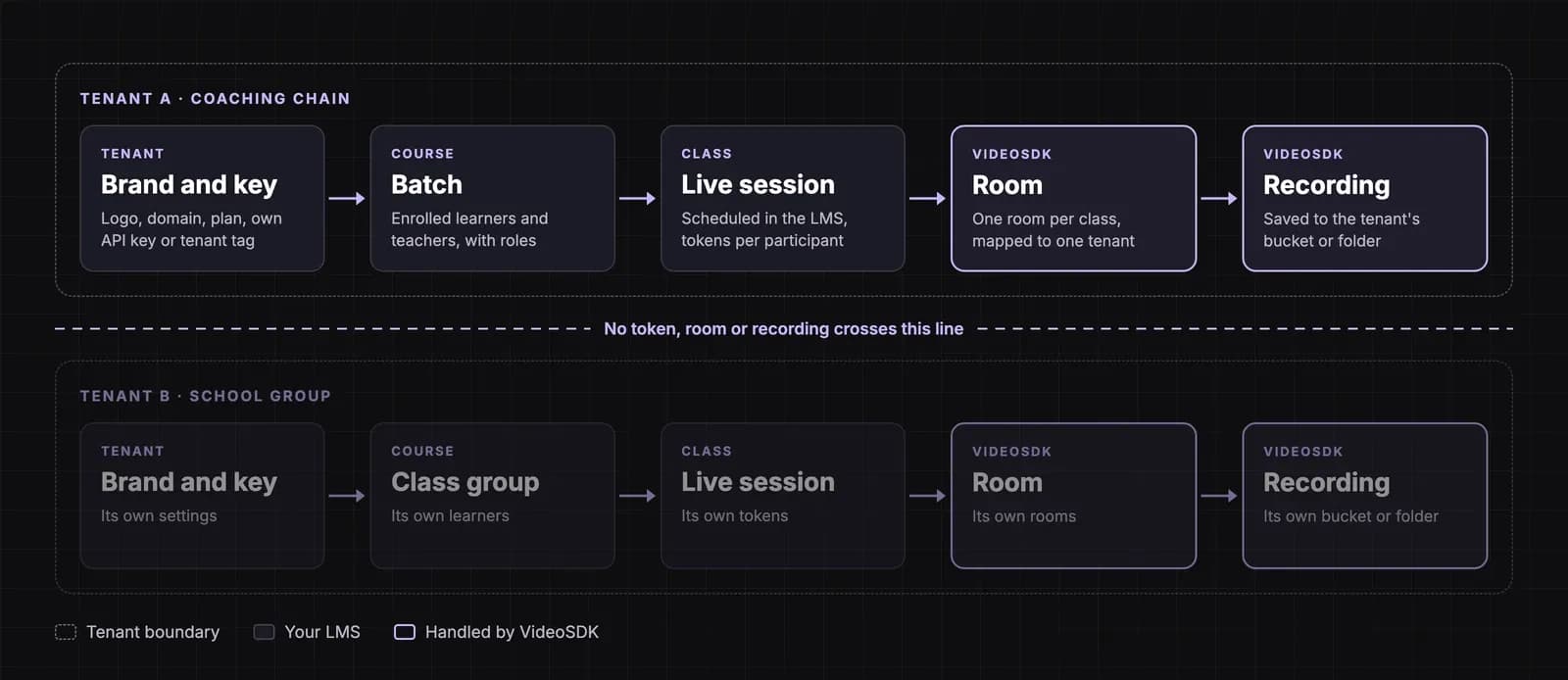
What to decide: which tenant model each tenant tier gets.
Who can join, and what they can do: tokens, roles and teacher controls
Access to a live class is decided by the token your backend issues. VideoSDK access tokens can be scoped to one room and one participant, so a forwarded link gets a tenant B user nowhere. Your backend checks enrolment before issuing a short-lived token, and the API secret stays on the server.
Map LMS roles to class roles:
- Teacher and teaching assistant: join with the moderator permission and run the class.
- Student: joins directly, or waits in a lobby until a teacher admits them.
- Observer (parent, auditor or tenant admin): joins to watch, without sending audio or video.
Moderators can turn a student's microphone or camera off, ask a student to turn theirs on, remove a participant, admit students from the lobby and respond to raised hands. Our remote participant controls guide covers each one.
Token permissions cover joining and moderation; rules on who may send video, share a screen or record live in your application, per role and tenant plan.
What to decide: the role list, and what each role may do in class.
Connecting to each tenant's LMS and login: LTI 1.3 and SSO
Tenants that run their own LMS can add your live classes through Learning Tools Interoperability (LTI) 1.3, the 1EdTech standard for connecting external tools. Each tenant registers your tool once, and the registration tells your platform which tenant each launch comes from. The launch carries the user's identity and course role into the class, and Assignment and Grade Services returns scores to the gradebook.
Tenants on your LMS directly need single sign-on (SSO) with their own identity provider instead.
Branding live classes for each tenant
Branding a live class for each tenant covers the logo and name, colours, a join page on the tenant's domain, and invitations sent from the tenant's address, stored as tenant settings.
How far branding goes depends on the interface. The VideoSDK Prebuilt classroom takes a logo and brand name for each class, and the "Powered by videosdk.live" credit can be turned off. A custom interface built on our SDKs is your own code, so every screen carries the tenant's design.
Phase 3: Choose and build. Three ways to add live classes, judged on the seven requirements.
Three ways to add live classes to a white-label LMS
There are three ways to add live classes to a white-label LMS: meeting-app links, a prebuilt classroom embedded in your page (fast to launch, limited interface control), and a custom interface on a video SDK (full branding, more engineering).
| Requirement | Meeting-app link | Prebuilt classroom | Custom on a video SDK |
|---|---|---|---|
| Branding on tenant's domain | The app's brand | Logo and name | Full |
| Isolation | Per host account | Token and room per class | Token, room and storage per tenant |
| LMS and login | Link pasted in | Embedded in your page | Embedded, with LTI 1.3 and SSO |
| Billable usage | Licence per host | Per minute | Per minute, per tenant |
| Weak connections | The app's settings | Built in | Adaptive quality and audio-only, tuned by you |
Start every tenant on the prebuilt classroom, then move high-value tenants to a custom interface. Both use the same rooms, tokens and recordings, so your backend stays the same.
Building branded live classes with VideoSDK
VideoSDK is a real-time video and audio platform with calling and interactive live streaming SDKs and APIs. We already run live classes for EdTech and LMS clients with use cases like this one: branded classes for many client institutions, at large monthly volumes. For a white-label LMS, as of 12 November 2026, VideoSDK provides:
- Class formats: two-way classes for small batches, interactive live streaming for large ones, and HLS for audiences that mainly watch, with a typical delay of 15 to 30 seconds. See our virtual lectures guide.
- Access control: tokens scoped to a room and participant, with permissions to join, ask to join or moderate.
- Classroom tools: whiteboard, polls, Q&A, breakout rooms, raise hand and screen share.
- Recording: cloud recording to your own AWS S3, Azure Blob or Google Cloud Storage bucket, configured per API key, with a folder path set each time a recording starts.
- Events and data: webhooks for session, participant and recording events, and APIs that return each session's participants with join and leave times.
Your team builds the tenant mapping, permission rules beyond the token, the LTI tool and SSO, and billing. For how classroom roles fit together, see how a virtual classroom API works.
Phase 4: Run, bill and comply. Recordings, usage and data, kept per tenant.
Recordings, analytics and support for each tenant
Recordings are where tenant isolation most often slips, because files outlive the class. Keep each tenant's in its own bucket or folder, then set:
- Retention per tenant, agreed in its contract.
- Access for enrolled learners only: check enrolment before returning a playback link, and make links expire.
- Deletion when a tenant leaves: delete or hand over its bucket or folder, as the contract says.
Build tenant dashboards (attendance, minutes, class quality) from webhooks and session data for their rooms. Our lecture capture guide covers publishing replays. For weak connections, use adaptive video quality, offer audio-only mode and move large batches to HLS. Support finds a class by room ID, within that tenant's sessions only.
What to decide: each tenant's retention period, and who can watch recordings.
Metering and billing live classes for each tenant
Metering live classes for each tenant takes three steps: tag every room with its tenant when you create it, pull participant minutes for each session (the participants API returns every join and leave time), and total them per tenant for the billing period.
Worked example (hypothetical): a coaching tenant runs 10 batches a day of 30 students and a teacher, 60 minutes each, over 24 teaching days, all recorded. VideoSDK pay-as-you-go rates as of 12 November 2026: HD video $0.004 per participant minute, HD recording $0.015 per minute, storage $0.003 per minute per month.
| Item | Calculation | Monthly cost |
|---|---|---|
| Live classes | 240 classes × 31 people × 60 min × $0.004 | $1,785.60 |
| Recording | 240 classes × 60 min × $0.015 | $216.00 |
| Storage | 14,400 min × $0.003 | $43.20 |
| VideoSDK cost | $2,044.80 |
That is about $0.28 per student hour. Charge this tenant $0.40 per student hour and its 7,200 student hours bill at $2,880.00, leaving $835.20 (29%) for engineering, support and margin. See pricing for volume rates. Set limits per tenant plan too: recording, class size and retention.
What to decide: whether live classes are bundled into each tenant's plan or billed by usage.
Privacy, consent and data rules
Building for learners in India
- Roles: under the Digital Personal Data Protection (DPDP) Act, 2023, the tenant is usually the data fiduciary and you are its data processor. A fiduciary may use a processor only under a valid contract (Section 8(2)) and stays responsible for compliance (Section 8(1)), so expect each tenant to ask for a processing contract.
- Children: anyone under 18 is a child. Processing their data needs verifiable parental consent, and tracking, behavioural monitoring and targeted ads aimed at them are barred (Section 9). The DPDP Rules give educational institutions a narrow exemption.
- Recordings: a class recording is personal data. Give notice before recording and keep recordings only while the purpose needs them (Section 8(7)); processing logs are kept at least a year (Rule 8(3)). The Rules were notified on 13 November 2025; their notice, security, breach and children's consent obligations apply from May 2027.
Selling to learners abroad
- European Union: GDPR Article 28 requires a written contract between each controller (the tenant) and its processor (you). Children's services need parental consent below 16 (13 in some member states).
- United States: under FERPA, a class recording can be an education record, which vendors generally receive as "school officials". COPPA covers services directed at children under 13, including their photos, video and voice.
- Accessibility: under the ADA Title II rule, larger public schools and universities must meet WCAG 2.1 AA, including live captions, from 26 April 2027.
This is a planning summary, not legal advice.
Common mistakes, an isolation test and an evaluation checklist
Common mistakes in white-label live classes:
- A shared API key with no record of which tenant owns which room.
- Every tenant's recordings in one folder.
- No metering per tenant, so live classes go unbilled.
The tenant-isolation test. Before launch, sign in as tenant A and try to join a tenant B class, open a tenant B recording and find tenant B sessions in tenant A's dashboard. Every attempt should fail.
| Area | What to check |
|---|---|
| Branding | Tenant's logo, domain and emails on every class screen |
| Multi-tenancy | Every room, recording and usage record maps to one tenant |
| Live classes | Small batches to large lectures, with teacher controls |
| Recording | Bucket or folder per tenant, retention, enrolment checks |
| LTI and SSO | Registration and sign-in per tenant |
| Metering | Participant minutes per tenant per billing period |
| Compliance | Processing contract, parental consent, captions |
| Support | Sessions found by tenant, without cross-tenant access |
Key takeaways
- A white-label LMS sold to many clients must also be multi-tenant.
- Zoom or Google Meet links take learners off the platform's brand and keep attendance outside the LMS.
- Give large tenants their own API key and run small ones on a shared key with tagged rooms.
- Scope tokens per room and participant, and store recordings and meter minutes per tenant.
- In the worked example, live classes cost about $0.28 per student hour, a base for pricing tenants.
To map your tenant model and live-class setup with our team, book a demo.
Frequently asked questions
What is a white-label LMS?
A white-label LMS is a learning management system that one company builds and its clients run under their own brand, domain and login. Learners see only the client's brand, while the vendor maintains the software, hosting and upgrades, usually for a subscription.
What is the difference between a white-label and a multi-tenant LMS?
White label is about whose brand the learner sees; multi-tenant is about how the platform is built. A multi-tenant LMS serves many clients from one platform while keeping each client's users, courses and data separate. A vendor selling a branded LMS to many clients needs both.
Can I add live classes to a white-label LMS without building video?
Yes. A prebuilt classroom gives you branded live classes with teacher controls, embedded in your LMS page. Your backend still creates a room per class, issues tokens and records attendance. Move to a custom interface on a video SDK when tenants need full design control.
How do I bill tenants for live classes?
Tag every room with its tenant, pull participant minutes for each session and total them per tenant for the billing period. Then bundle a monthly allowance into each plan or charge per student hour. Per-minute video pricing makes your cost per tenant traceable.
Who is responsible for student data in a white-label LMS?
In India, the tenant is usually the data fiduciary under the DPDP Act and the LMS vendor its data processor. The fiduciary stays responsible for compliance and may use a processor only under a valid contract, so each tenant should sign a processing agreement with you.