


A video call API is defined as a hosted service that runs the signaling, media servers, and global network behind a live video call, so your app only handles the interface. You reach it through REST endpoints on your server and client SDKs in your app. VideoSDK prices it at $0.004 per participant minute for HD video.
Video calling looks like a solved problem until you price it out. Two engineers, three months, and a working demo, then the first 50-person call falls over because nobody budgeted for a media server.
A video call API removes that entire layer. What it does not remove is the decision: which one, at what cost, with which limits.
This guide covers what a video call API actually is, how a call flows through one, what five named providers charge per participant minute, and a ten-point checklist for picking one. Pricing is current as of September 8, 2026 and sourced per vendor.
What is a video call API?
A video call API is the infrastructure layer of a live call, delivered as a service you call rather than servers you run.
A video call API is defined as a set of server-side REST endpoints and client SDKs that create meeting rooms, authenticate participants, route audio and video between them, and expose recording, streaming, and transcription as programmable operations. It works by placing a media server between participants, so each device uploads its stream once and the server forwards it to everyone else.
The media server is the reason the category exists at all. Without a media server, every participant sends a separate copy of their video to every other participant, and upload bandwidth becomes the ceiling. With one, upload stays flat as the room grows.
An API for video calling gives you four things a from-scratch build does not: a signaling service that survives reconnection, a global network of media servers close to your users, TURN relays for the networks that block direct connections, and a support contract when a call fails at 2am.
VideoSDK provides this as a rooms-based API. You create a Room over REST API, mint a Meeting Token scoped to that room, and join from a client SDK on React, JavaScript, React Native, Android, iOS, Flutter, Unity, C++, IoT, or Python. Recording, interactive live streaming, transcription, and SIP telephony run against the same room.
Every video call API in the market ships the same six capabilities, and a vendor missing one is a vendor you will outgrow:
- Room and session management, to create, list, close, and audit calls from your server.
- Token-based authentication, so a participant is scoped to one room with a short-lived credential rather than a shared key.
- Media routing through an SFU, which is what makes rooms larger than four people practical.
- Client SDKs per platform, covering web and mobile so one backend serves every client you ship.
- Recording, streaming, and transcription, exposed as server-side operations rather than client buttons.
- A global edge network with TURN relays, so calls connect from restrictive networks and from users far from your servers.
Video call API vs Video SDK vs WebRTC
The three terms describe three different amounts of work, not three competing products. WebRTC is the protocol, a Video SDK is the client library, and a video call API is the hosted service behind both.
| Layer | What you get | What you still build | When to choose it |
|---|---|---|---|
| WebRTC | The browser and mobile APIs for capturing media, encrypting it, and connecting two peers directly. Free, standardised by the W3C and IETF, supported everywhere. | A signaling server, a media server for anything past a few participants, STUN and TURN infrastructure, reconnection logic, recording, and a support rota. | You have a media engineering team, a hard data residency rule that forbids third-party servers, or a research use case where the protocol itself is the product. |
| Video SDK | A client library for one or more platforms that wraps WebRTC, plus rendering helpers, device management, and events for participants and tracks. | The backend. Room lifecycle, token issuance, and the servers that route media, unless the SDK ships with a hosted service behind it. | You want control of the client but already have, or are buying, the server side. In practice a standalone video calling SDK is half of a product. |
| Video call API | The full hosted stack: signaling, a global SFU network, TURN relays, room and token management, recording, streaming, and transcription, reachable over REST plus client SDKs. | Your interface, your business rules, your auth, and the token route that connects them. | You are shipping a product where calling is a feature rather than the product, and you would rather spend the next quarter on your domain than on media servers. |
The middle row is the one that confuses buyers. Vendors market the client package as the headline, so "video SDK" and "video call API" often name the same product from two directions. The test is simple: ask where the media server runs. If the vendor runs it, you are buying an API and the SDK comes with it. If you run it, you are buying or adopting a library.
For the layer underneath, VideoSDK's explainers on WebRTC and on SFU versus MCU architectures cover why the media server choice sets both your cost curve and your maximum room size.
How a video call API works
Every call on a video call API follows the same six-step sequence, and the first two happen on your server before the user sees anything.
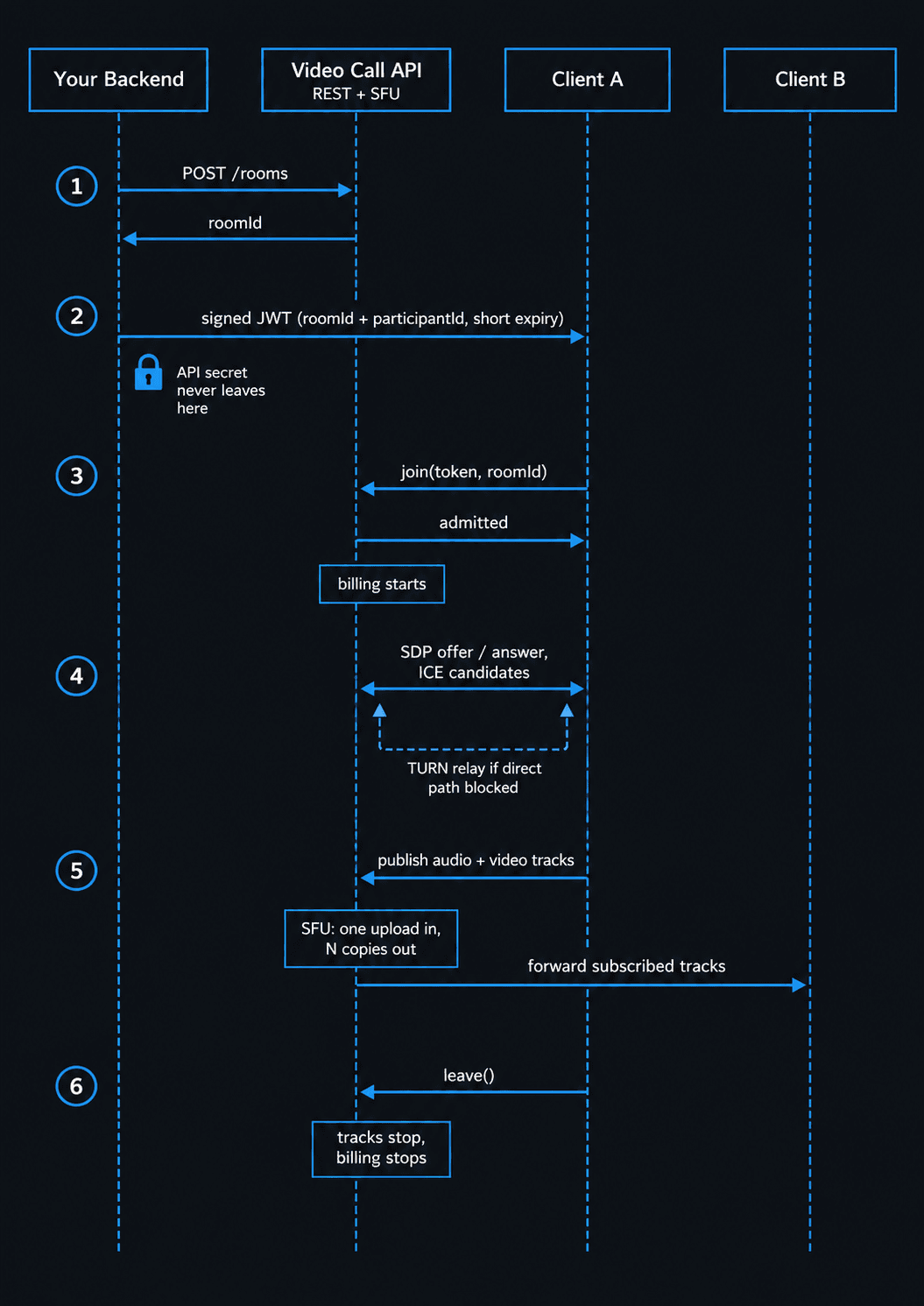
- Create the room. Your backend posts to the rooms endpoint and receives a room ID. Store it against your own record, the appointment, the class, or the support ticket. Nothing about the room is public, and nothing has been billed yet.
- Issue the token. Your backend signs a JWT with your API secret, scoped to that room ID, that participant ID, and a short expiry. The secret never leaves your server. The token is the only credential the browser or app ever holds.
- Join. The client SDK sends the token and the room ID, the service validates the token, and the participant is admitted. This is the moment billing starts, because billing is per participant minute connected.
- Negotiate media through the SFU. The client and the selective forwarding unit exchange session descriptions and ICE candidates, then agree on codecs and a transport. If a direct path is blocked by a firewall or a symmetric NAT, the connection falls back to a TURN relay.
- Publish and subscribe to tracks. Each participant publishes one audio track and one video track upward to the SFU. The SFU forwards copies down to every other participant who subscribes. Your interface receives an event per track and attaches it to a video or audio element.
- Leave. The participant disconnects, their tracks stop, and billing for that participant stops. The room stays alive for whoever is still in it, and closes on its own once empty or on the schedule you configured.
Steps 4 and 5 are the part teams underestimate. Media arrives on a separate track event, not with the participant, so a participant can be in the room for a second or two before their video exists. Interfaces that assume otherwise render a black tile.
The SFU is also why a live video call API scales differently from a peer-to-peer one. Adding the tenth participant adds one upload and nine downloads across the room, not nine uploads from every device.
What video call APIs cost
Video call API pricing is per participant minute almost everywhere, which means cost scales with people multiplied by time, not with how many rooms you create.
One participant connected for one minute is one participant minute. A four-person 30-minute call is 120 participant minutes, whether it runs in one room or four. Rooms are free to create, and an empty room bills nothing.
Rates below were read from each vendor's public pricing page on September 8, 2026. Compare the video column carefully, because the units differ: some vendors quote per minute and some per 1,000 minutes.
| Provider | Video, per participant minute | Audio only, per participant minute | Recurring free tier |
|---|---|---|---|
| VideoSDK | $0.004 (HD 720p), $0.008 (Full HD) | $0.001 | $20 free credit on signup, one time |
| Daily | $0.004 | $0.00099 | 10,000 participant minutes per month |
| Agora | $0.00399 (HD, billed as $3.99 per 1,000 minutes), $0.00899 (Full HD) | $0.00099 ($0.99 per 1,000 minutes) | 10,000 minutes per month |
| Twilio Video | $0.004 (Group Rooms) | Not listed separately | None listed |
| Amazon Chime SDK | $0.0017, any modality | $0.0017 | None listed |
Two honest observations from that table.
First, the headline rate is near-identical across VideoSDK, Daily, Agora, and Twilio. At HD video, all four land within a hundredth of a cent of each other, so per-minute price is not the deciding factor between them. Amazon Chime SDK is the outlier at roughly 43% of that rate, and it charges one flat attendee-minute rate whether the session uses audio, video, or screen share.
Second, the free tiers are not comparable. Daily and Agora give recurring monthly minutes. VideoSDK gives a one-time $20 credit on signup, which is roughly 5,000 participant minutes of HD video.
Participant minutes are not subscriber minutes
Two vendors on that list bill something subtly different, and it changes the arithmetic.
Agora bills video by aggregate subscribed resolution, the combined pixel count of every stream a user is receiving. A participant watching four 360p tiles is subscribing to 921,600 pixels in total, which lands in the HD tier even though no individual stream is HD. In a grid layout, the tier a user pays for is set by how many people they can see, not by their own camera.
Amazon Chime SDK goes the other way and charges one flat attendee-minute rate for every modality, so an audio-only participant costs the same as a 1080p one. That is cheap for video-heavy products and expensive for audio-first ones, where $0.0017 is nearly double what VideoSDK, Daily, or Agora charge for voice.
Read the unit before the number. A vendor that looks 20% cheaper per minute can bill 60% more for your actual call shape.
The costs that are not on the rate card
Calling is the base. These land on top, using VideoSDK's published rates as the worked example:
| Add-on | VideoSDK rate | What it costs on a real workload |
|---|---|---|
| Recording, HD | $0.015 per recorded minute | A recorded 30-minute 1:1 consult costs $0.45 to record and $0.24 to call |
| HLS encoding, HD | $0.04 per livestream minute | $2.40 per broadcast hour, before viewer costs |
| Interactive live streaming, HD | $0.002 per viewer minute | A 500-viewer webinar hour costs $60 on the viewer side alone |
| Real-time transcription | $0.020 per minute | Five times the HD calling rate per participant |
| Post-call transcription | $0.004 per minute | Same as one participant minute of HD video |
| Compliance add-ons | Custom, quoted per account | HIPAA and GDPR modes are priced per user, not per minute |
Four more line items appear on the invoice or the architecture diagram, and none of them are usually quoted upfront:
- Recording storage and egress. VideoSDK stores nothing by default and writes recordings to your own S3, Azure, or GCP bucket with write-only access. That is good for data control and it means the storage bill is yours. A thousand 30-minute HD recordings a month is real object storage spend that no per-minute table shows.
- TURN relay. Some share of connections cannot establish a direct path and must be relayed, which is real bandwidth someone pays for. Vendors differ on whether relayed media is billed separately, so ask. Twilio's pricing page, for instance, states unlimited TURN relay is included.
- Resolution drift. Pricing tiers are set by resolution, and adaptive streaming moves participants between them during a call. Budget at the tier your good-network users hit, not the average.
- Minimum commits and SLA uplift. Enterprise tiers routinely trade a discount for an annual commitment, and an uptime SLA with financial remedies is usually a paid upgrade rather than the default.
Build versus buy, with the assumptions written down
Nobody on this topic publishes their arithmetic, so here is a model you can argue with rather than a number to trust.
Assume a two-engineer team takes six months to reach a production-grade SFU deployment with signaling, TURN, reconnection, and recording. Assume a fully loaded cost of $150,000 per engineer per year, three-year amortisation of the initial build, half an engineer on ongoing maintenance, and $3,000 a month in servers and egress at moderate scale.
| Line | Annual cost |
|---|---|
| Initial build, $150,000 amortised over three years | $50,000 |
| Ongoing maintenance, 0.5 engineer | $75,000 |
| Servers, bandwidth, and egress | $36,000 |
| Total to run it yourself | $161,000 |
At $0.004 per participant minute, $161,000 buys 40.25 million participant minutes a year, or roughly 3.35 million participant minutes a month. Below that volume, buying is cheaper on cash alone, before counting the six months of shipped features you gave up. Above it, self-hosting starts to pay, which is why the companies that build their own media stacks are the ones running calls continuously at scale.
Change the salary number, the team size, or the egress assumption and the break-even moves. The point is the shape: the crossover sits in the millions of minutes per month, not the thousands, and most products never reach it.
How to choose a video call API
Since the per-minute rates cluster, the decision comes down to what happens around the call. Work through these ten points in order, because the early ones eliminate vendors faster than the later ones.
- Platform SDKs. List every client you will ship in the next two years, then check the vendor covers all of them. Web only is a short list. Web plus iOS plus Android plus Flutter plus React Native narrows the field fast. VideoSDK's documentation carries quickstarts for eleven surfaces: a prebuilt UI kit, JavaScript, React, React Native, Android, iOS, Flutter, Unity, IoT, C++, and Python, which is the broadest coverage in the category. Unity and IoT only matter if you are building into a game or a device, and almost nobody else offers them.
- Recording. Ask three questions, not one.
1. Does it record composite, per participant, or per track?
2. Where do the files land, vendor storage or your own bucket?
3. What does it cost per recorded minute?
A product that needs per-participant files for a transcription pipeline cannot use a vendor that only composites. - Live streaming out. If any part of your product broadcasts to an audience, check for both HLS and RTMP output. HLS carries large viewer counts at higher latency. RTMP pushes the composed feed to YouTube, Twitch, or LinkedIn. Interactive live streaming sits between them, keeping latency low enough for viewers to be promoted to speakers.
- Compliance add-ons. HIPAA, GDPR, SOC 2 Type II, and ISO 27001 are not features you retrofit. Confirm the vendor signs a business associate agreement or a data processing agreement, what it costs, and which features get disabled in compliance mode. On VideoSDK, HIPAA mode is a custom-priced add-on, and it turns off transcription, captions, AI summaries, and HLS and RTMP output.
- Concurrency quotas. Two separate limits apply, and the one that bites is not the one vendors advertise. Per room is the published number. Account-wide concurrency is the ceiling across every room at once, and it is what a school timetable or an evening rush actually hits. VideoSDK documents both: 15 active speakers and 100 participants per room, 1,000 viewers for interactive live streaming and 200 for HLS, against an organisation-wide ceiling of 50 concurrent hosts on the free plan and 500 on pay-as-you-go, extendable in packs. Ask every vendor for the account-level figure in writing, because most publish only the room figure.
- Region availability. Check which regions run media servers, and whether you can pin a room to one at creation time rather than letting the network choose. Data residency rules and plain latency both depend on it. VideoSDK exposes region pinning through a geo-fencing feature covering the United States, Europe, India, the UAE, and Singapore, set per room with a region code such as
us002. Confirm the current region list and which plan includes it with sales, because the documentation is inconsistent on both points. - Pricing model. Confirm the unit and the rounding. Per participant minute is standard, but Agora bills video by aggregate subscribed resolution, so a user watching four 360p tiles can land in a higher tier than the label suggests. Amazon Chime SDK bills one flat attendee minute rate for every modality. These differences change the bill more than the headline rate does.
- Support. Find out what the free and entry paid tiers actually include, what the response time commitment is, and whether there is a private channel. A public Discord is useful for questions and useless during an outage.
- Migration path. Assume you will move at least once. Check whether the vendor's room and token model maps cleanly onto another's, whether recordings export in a standard container, and whether the client SDK is wrapped behind your own interface rather than called from every component. Twilio is the cautionary tale here: it announced end of life for Programmable Video in late 2023, extended it to December 2026, then reversed the decision in October 2024. Teams that had already migrated did not get that time back.
- Sample apps. Clone the vendor's quickstart repository and get a two-person call running before you commit. The time it takes is a direct measure of the documentation quality you will live with, and it surfaces the gaps that the marketing page does not.
The honest summary: points 1, 4, and 5 eliminate vendors. Points 2, 3, and 6 decide between the survivors. Point 7 decides the bill. The rest decide how much you enjoy the next two years.
Common use cases
Five verticals drive most video call API adoption, and each one stresses a different part of the stack.
Telehealth. A clinical consult is usually 1:1 and short, so calling cost is trivial and compliance cost is not. What matters is a signed business associate agreement, an audit trail of who joined which session, and recordings that land in storage you control. Features that touch protected health information, including transcription and AI summaries, are typically switched off in compliance mode. The requirement map is in the HIPAA compliant video API guide, and the vertical page is telehealth.
Video KYC. Identity verification calls are short, high volume, and evidentiary. The recording is the product, so per-participant recording, timestamps, and storage you control matter more than picture quality. Regional data residency is a regulatory requirement rather than a latency preference here, which makes geo-fencing a hard filter when choosing a vendor. See the video KYC solution page and the video KYC API guide.
Virtual classrooms. Education is the most feature-hungry vertical: breakout rooms, a shared whiteboard, polls, hand raising, attendance, and a recording every student expects to rewatch. Concurrency is spiky, because a school timetable puts every class on the hour, which makes account-level concurrency limits the constraint rather than room size. Recording usually costs more than calling, since sessions are long and every one is captured. See the edtech solution page and what a virtual classroom API is.
Dating. Video calls in dating products are short, unscheduled, and privacy-sensitive. Participants must never learn each other's identity or network address, which rules out peer-to-peer connections and makes an SFU mandatory rather than merely convenient. Volume is bursty around evenings, so the account-level concurrency ceiling matters more than the per-room one. See the dating solution page.
Marketplaces and on-demand services. A video call inside a marketplace is a transaction step: a property viewing, a remote inspection, a consultation before a booking. Calls are one-off and link-based, since neither side wants an account just to talk, so guest tokens with a short expiry and a browser-first path do most of the work. The closest published pattern is live shopping, which shares the same one-off, link-driven shape.
The pattern across all five: the call itself is rarely the expensive part. Compliance, recording, and concurrency are.
Teams that switched, and what moved them
Two published customer accounts describe the switch away from a larger vendor, and neither cites price as the reason.
Immigo, a US-based English learning platform, evaluated the field before choosing.
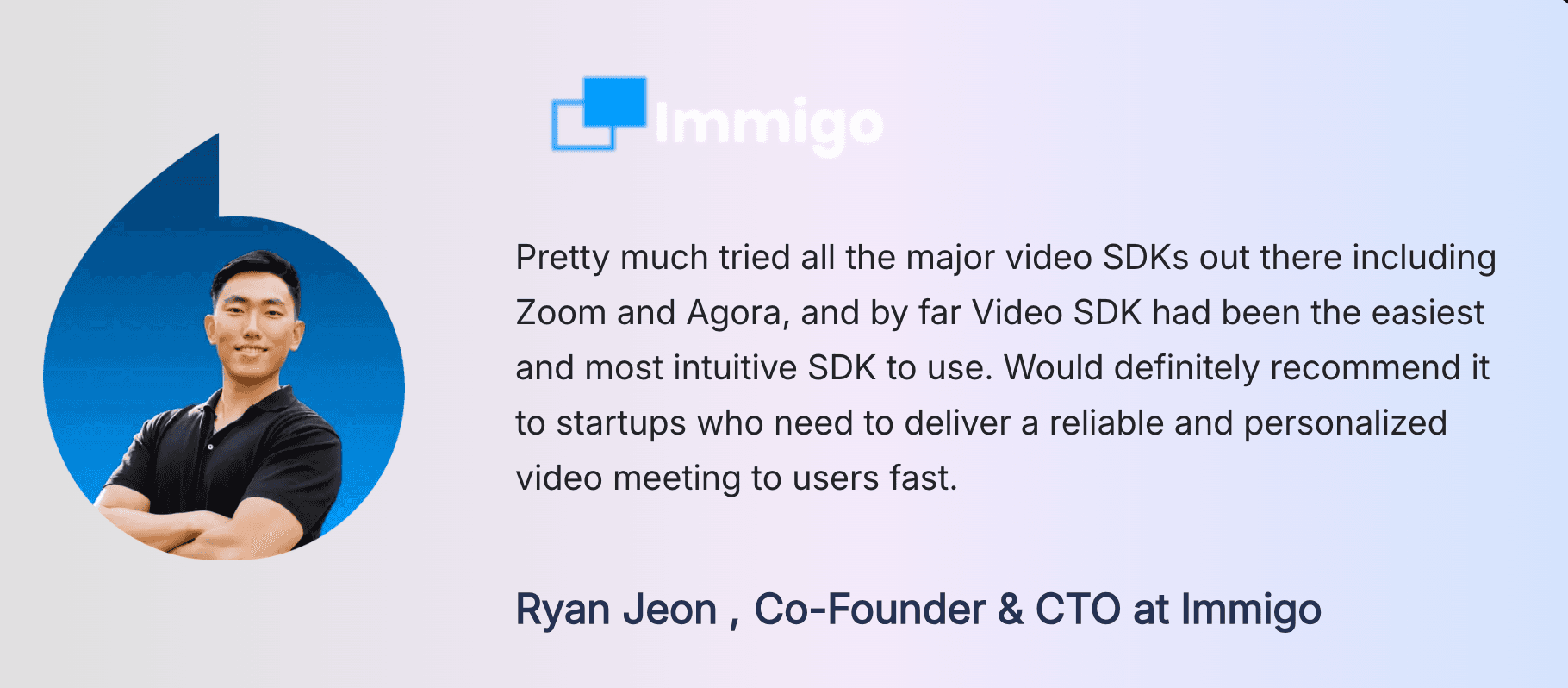
Immigo reported that they went live in under a week and now runs sessions across 120 countries.
Talk Your Heart Out, a Singapore-based therapy platform, moved from Twilio.
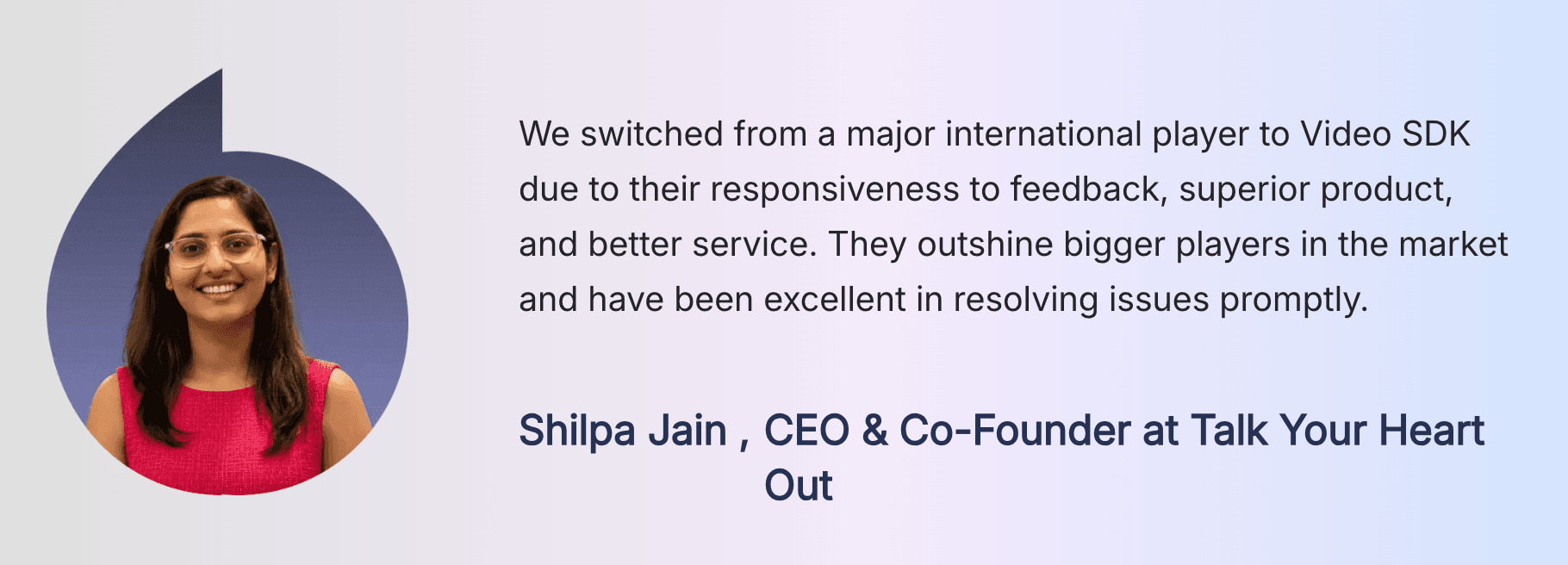
TYHO, struggled with quality and support of twilio but with VideoSDK, maintained a smooth, hassle-free experience, ensuring optimal user interactions even in the face of network fluctuations.
Glossary
Room: The container a video call happens in, identified by a room ID. Participants join a room, and server-side operations such as recording and streaming target that room ID.
Meeting token: A JWT signed on your server with your API secret that authorises one participant to join one room. Scoping it to a room ID and a participant ID is what stops a leaked room ID from becoming an open door.
SFU (selective forwarding unit): The media server that receives one upload from each participant and forwards copies to the others. It is why a 20-person call does not require 19 uploads from every device.
Track: A single stream of audio or video published by one participant. Interfaces subscribe to tracks, not to participants, which is why media arrives on its own event.
Participant minute: The billing unit used by almost every video call API. One participant connected for one minute equals one participant minute, so a 4-person 30-minute call is 120 participant minutes.
Interactive live streaming: A streaming mode that keeps latency low enough for viewers to be promoted to active speakers, unlike standard HLS where the delay runs into tens of seconds.
Key takeaways
- A video call API replaces the signaling service, media servers, and TURN relays behind a live call, and bills per participant minute rather than per room.
- Per-minute rates cluster tightly: VideoSDK, Daily, Agora, and Twilio all sit at roughly $0.004 for HD video, while Amazon Chime SDK charges $0.0017 for any modality.
- At 1,000 one-hour 1:1 calls per month, the gap between the four WebRTC-native vendors is about $41, so features and limits decide the choice, not price.
- Recording, streaming, and transcription are usually the larger line items, and a product that records every session pays more for storage than for calling.
- Platform coverage, compliance add-ons, and concurrency quotas eliminate vendors faster than anything else, so check those three before you compare rates.
Conclusion
Choosing a video call API is mostly a process of elimination. Start with the platforms you must ship on, then compliance, then the concurrency your busiest hour needs. Price the features you will actually enable, not the headline rate, because recording and streaming usually outweigh calling.
VideoSDK covers the ten points above with SDKs on ten platforms, per-participant and composite recording, interactive live streaming, and HIPAA and GDPR add-ons. Start with the React quickstart or the JavaScript quickstart, sign up at VideoSDK for $20 free credit, and check live rates on the pricing page.
Which video call API are you evaluating, and what is the constraint that keeps ruling options out? Drop a comment, or bring the question to the VideoSDK Discord.
Frequently asked questions
How to do a video call?
To do a video call, open an app that supports video, select the person or group you want to reach, and tap the video camera icon. Both sides need an internet connection and a camera. Inside the app, that camera button is wired to a video call API or an equivalent in-house stack, which creates the session and routes the media.
How to video call on Android from a browser?
Open Chrome on the Android device, go to the meeting link, and allow camera and microphone access when prompted. No install is required, because Android Chrome supports WebRTC natively. This browser path is exactly what a video call API for websites provides, and it is why link-based joining is the standard fallback when a participant will not download an app.
How to video call someone who does not have your app?
Send them a join link rather than asking them to install anything. Products built on a video call SDK generate a room, mint a guest token, and hand back a URL that opens the call in the recipient's browser. Restrict the guest token to that one room with a short expiry, so the link stops working after the call.
What is the difference between a video call API and a video call SDK?
The API is the server-side surface, called from your backend with your secret, used to create rooms, mint tokens, and control recording. The video call SDK is the client-side package inside your web or mobile app that holds the WebRTC connection and renders media. A working product uses both, with the token as the handoff between them.
How much does a video call API cost?
Video call API pricing is per participant minute. As of September 8, 2026, VideoSDK charges $0.004 for HD video and $0.001 for audio only, Daily charges $0.004 and $0.00099, Agora charges $3.99 and $0.99 per 1,000 minutes, Twilio Video charges $0.004 for Group Rooms, and Amazon Chime SDK charges $0.0017 for any modality. Recording, streaming, and transcription bill separately and often exceed the calling cost.
Can I embed a video call SDK into an existing website?
Yes. To embed video call SDK components into a page you already have, install the JavaScript or React package, request a token from your own backend, and mount the call inside a component or a container element. If you would rather not build the interface, a prebuilt UI kit drops a complete call screen in with an iframe or a single component, and you can move to the custom SDK later without changing the room and token model.
Is there a free video call API?
There is no fully free production video call API, but every major vendor has a free entry point. Daily and Agora each include 10,000 free minutes per month on an ongoing basis. VideoSDK gives a one-time $20 free credit on signup, which covers roughly 5,000 participant minutes of HD video. Open-source options such as Jitsi and LiveKit are free to license and shift the cost to servers you run and operate.
What is a live video call API?
A live video call API is the same product described here, with the word live emphasising real-time two-way media rather than recorded or one-way playback. Latency is the distinguishing number: interactive calling runs in the hundreds of milliseconds, while VideoSDK's documentation puts standard HLS at around 5 to 6 seconds. If viewers need to speak, ask a question, or be promoted to the stage, you need the interactive path rather than the broadcast one.
How many participants can a video call API support?
Two limits apply and vendors usually publish only one. VideoSDK documents a per-room default of 100 participants with 15 active speakers, 1,000 viewers for interactive live streaming, and 200 for HLS. Separately, an organisation-wide concurrency ceiling caps how many hosts can be connected across all rooms at once, at 50 on the free plan and 500 on pay-as-you-go, extendable with add-on packs. The account-level number is the one that constrains a product with a spiky schedule.