



Telemedicine app development is the work of building the patient app, clinician dashboard and admin panel that let people see a clinician remotely, with the video visit at the centre. A typical build scopes features by role, embeds a video SDK instead of running media servers, signs a business associate agreement (BAA) and pilots with clinicians.
This guide follows one video visit from booking to follow-up, shows where visits fail and how to fix each failure, and works out what a visit costs. It explains how US rules affect product design; it is not legal advice.
What is telemedicine app development?
Telemedicine app development covers the product, design and engineering work behind software for clinical care at a distance. Telemedicine is the clinical care itself; telehealth is the wider term that also covers remote monitoring and patient education.
A telemedicine app has three faces and the systems behind them:
- Patient app (web or mobile): booking, reminders, the visit, messages and payments.
- Clinician dashboard: schedule, waiting lobby, patient chart, notes and prescribing.
- Admin panel: clinician onboarding, availability, billing and reports.
- Behind them: scheduling, the EHR connection, payments, e-prescribing and the video visit layer.
Challenges in traditional healthcare delivery, and how telemedicine software solves them
| Problem in traditional care | What telemedicine software does |
|---|---|
| Travel and waiting-room time | Visits from home, with a virtual lobby and reminders |
| Too few clinicians in rural areas | Connects patients with licensed clinicians elsewhere |
| Missed follow-ups | Short scheduled check-ins with automated reminders |
| Limited access to behavioural health | Private one-to-one therapy sessions on any device |
| Records spread across systems | Visit notes and summaries written back to the EHR |
Telemedicine market demand and future trends
Three facts shape what you build: who uses video visits, what clinicians can prescribe after one, and where they can practise.
| What the data says | What it means for your app |
|---|---|
| 37.0% of US adults used telemedicine in a year, rising from 29.4% at ages 18 to 29 to 43.3% at 65 and over (CDC National Center for Health Statistics, 2021 data) | Older patients are your heaviest users: browser join from a link, large controls, a plain-language device check and an audio-only fallback |
| DEA flexibilities for prescribing controlled medications by telemedicine run through 31 December 2026 | If you prescribe them, keep an in-person or referral path ready and track the rule |
| The Interstate Medical Licensure Compact lists 44 member states and 2 territories (31 October 2026) | Multi-state care is practical for physicians: store each clinician's licensed states and filter bookings by the patient's location |
Five trends are worth planning for, each with a design choice to make now:
- AI-assisted documentation and triage: decide early which visits may be transcribed, because transcribing patient data needs its own compliance setup.
- Remote patient monitoring: leave room on the clinician's visit screen for recent device readings.
- Asynchronous (store-and-forward) care: let a clinician turn a photo or form review into a video follow-up in one step.
- FHIR-based interoperability: write visit notes back to the EHR as structured data, not as attached PDFs.
- Hybrid care: keep in-person and video visits in one schedule and one patient record.
Published market-size estimates disagree with each other, so size capacity on your own expected visit volume.
What types of telehealth apps can you build?
Telehealth app development starts with the type of care you deliver, because it decides how central video is and which systems you connect.
| Type | Who buys it | Role of video | Main integrations |
|---|---|---|---|
| Scheduled video visits | Clinics, care networks | Core: every visit is a call | Scheduling, EHR, payments |
| On-demand urgent care | Virtual care providers, employers | Core, with a queue and fast joins | Triage, e-prescribing, payments |
| Teletherapy | Behavioural health platforms | Core, recurring one-to-one sessions | Scheduling, notes, payments |
| Store-and-forward | Dermatology, specialist review | Optional follow-up calls | Image upload, EHR |
| Remote monitoring | Chronic care programmes, health systems | Occasional check-in calls | Device data, EHR, alerts |
| B2B platforms sold to clinics | Software vendors serving many clinics | Core, deployed per clinic | Each clinic's EHR and billing |
Four of the six put video at the centre, so the rest of this guide follows one visit.
The video visit journey, from appointment to follow-up
A telemedicine video visit runs through seven steps, each with its own design decision.
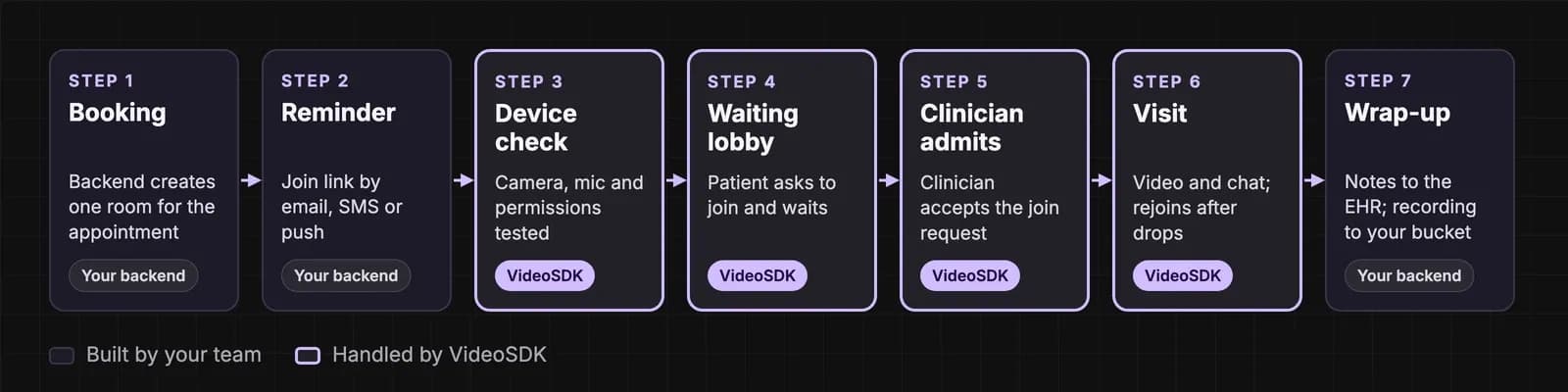
- Booking. The patient picks a slot; your backend creates one video room for that appointment.
- Reminder. A join link by email, SMS or push opens in the browser or the app.
- Device check. The patient tests camera and microphone and grants permissions, so problems surface before the clinician joins.
- Waiting lobby. The patient asks to join; the clinician sees who is waiting.
- Clinician admits the patient when ready, which keeps a running-late clinic private.
- Visit. Video, audio, chat and screen share. If the network drops, the app shows "reconnecting" and rejoins on its own.
- Wrap-up. Notes go back to the EHR, and a consented recording goes to your own cloud bucket.
Steps 3, 5 and 6 decide whether the visit happens at all.
Must-have features of a telemedicine app
The must-have features of a telemedicine app differ by role, and most can wait until after the MVP.
| Role | In the MVP | Add later |
|---|---|---|
| Patient | Booking, reminders, device check, video visit, chat, payments | Family accounts, interpreters, photo upload, device readings |
| Clinician | Schedule, waiting lobby, admit and remove, notes, prescriptions | Group visits, note templates, AI-assisted notes |
| Admin | Onboarding, availability, billing, basic reports | Multi-clinic management, audit exports |
Keep the MVP to one visit type done well. The visit itself needs eight essentials from day one: device check, lobby and admit control, automatic reconnection, chat, screen share, recording with consent, noise cancellation and an audio-only fallback.
Why video visits fail, and how to design for it
Telehealth video visits fail at five points, each with a design fix. VideoSDK is a real-time communication platform with audio and video calling SDKs for web, mobile and desktop, and the fixes below use its building blocks.
- Failed joins. Blocked permissions and unsupported browsers stop patients before the visit. A pre-call check tests devices and permissions first, while no clinician is waiting.
- Dropped calls. When a network drops, the meeting's connection state moves to "reconnecting" and the SDK tries to rejoin automatically. Show that state on screen, and offer audio-only if video keeps dropping.
- Weak networks. Simulcast sends several quality layers so each viewer gets what their connection carries. Network quality events report CPU, bandwidth or congestion limits, so the app can suggest turning video off.
- Hospital and office firewalls. Cloud Proxy tries UDP first and falls back to TCP, which most firewalls allow.
- Finding the cause afterwards. Our dashboard shows each participant's join time, device, browser, operating system, call health, errors and traces (participant details).
Examedi, a home healthcare marketplace in Latin America, removed a 50% call failure rate after moving to VideoSDK (Examedi's story). Curable, a telemedicine platform, uses our call quality analytics for faster root-cause analysis (Curable's story). For screen-by-screen patterns, see our guide to building a telehealth video platform.
Build, buy or embed: the build decision
The build decision for a telemedicine app comes down to one rule: build what makes your care different and integrate the rest.
| Layer | Build, buy or integrate | Why |
|---|---|---|
| Patient and clinician flows | Build | This is your product and your care model |
| Scheduling | Build or integrate | Simple rules are quick to build; multi-clinic rules justify a service |
| EHR connection | Integrate | Connect through each EHR's APIs, usually FHIR |
| Payments | Integrate | A payment processor keeps card data out of your systems |
| E-prescribing | Integrate | A certified service; controlled substances add DEA requirements |
| Video visit | Embed an SDK | Real-time media is its own infrastructure |
Building video yourself means media servers in several regions, TURN relays for strict networks, SDKs for every device, monitoring and an on-call team: a second product with its own staff.
A clinic with no engineering team is better served by a white-label or off-the-shelf product, trading control of the patient experience for speed.
Decision rule: build when the visit flow is your product, integrate where a regulated or standard system exists, and embed video when you need control over the visit without running media infrastructure.
Tech stack for telemedicine application development
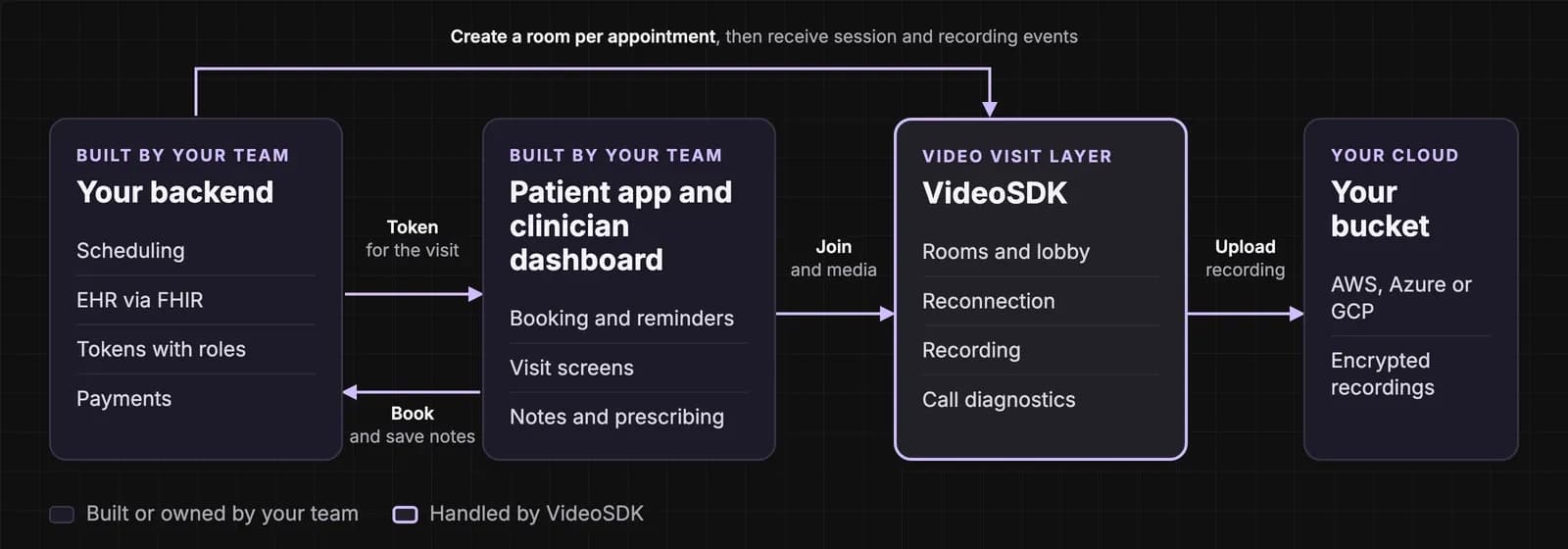
The tech stack for telemedicine application development has six layers.
| Layer | What it does | Typical choices |
|---|---|---|
| Patient app | Booking, visit, messages | Web app, iOS and Android, or cross-platform (React Native, Flutter) |
| Clinician dashboard | Schedule, lobby, notes | Web app |
| Backend | Appointments, users, tokens, rules | Node.js, Python or .NET on a HIPAA-eligible cloud |
| EHR connection | Reads and writes patient records | FHIR APIs; HL7 v2 interfaces for older systems |
| Video visit | Rooms, lobby, recording, diagnostics | A video SDK such as VideoSDK (JavaScript, React, React Native, Flutter, Android, iOS) |
| Storage | Recordings and files | Your own AWS, Azure or GCP bucket |
How to build a telehealth app in 8 steps
To build a telehealth app, work through eight steps, each with an output and owner.
- Discovery and compliance map. Care type, states, countries and the rules that apply. Owner: product lead with legal counsel.
- Scope the MVP. One visit type, three roles. Owner: product lead.
- Design the flows. Booking to wrap-up, including failure screens, tested with clinicians. Owner: design.
- Build the backend and integrations. Appointments, tokens, EHR and payments. Owner: engineering.
- Embed video visits. Rooms, lobby, reconnection and recording, ending in an end-to-end test visit. Owner: engineering.
- Test. Devices, browsers, low bandwidth, firewalls and a penetration test. Owner: QA and security.
- Pilot with clinicians. Real visits, measured by completion rate and join failures. Owner: product and clinical operations.
- Launch and monitor. Weekly visit and call quality review, plus a support runbook. Owner: engineering and support.
For your engineering team: building the visit with VideoSDK
- Joining. Create one room per appointment from your backend. Issue tokens on the server with roles: the clinician's token carries allow_join and the patient's carries ask_join, so the patient waits in the waiting lobby until the clinician accepts. Run the pre-call check before the patient asks to join.
- Staying connected. Drive the visit screen from connection state and network quality events, and turn on simulcast.
- Privacy. End-to-end encryption encrypts media on the sender's device; your team holds the keys, and VideoSDK never stores them. Store recordings in your own AWS, Azure or GCP bucket and encrypt them with your own key.
- Moving from another provider. Talk Your Heart Out, an online therapy platform, reached an 88% referral rate after moving from its previous provider to VideoSDK (Talk Your Heart Out's story).
For a code walkthrough, see our tutorial on building a HIPAA-compliant telemedicine app with React.
Telemedicine compliance: US rules, selling abroad and compliance options on VideoSDK
Telemedicine compliance shapes product design from the first sprint: who joins a visit, where recordings live and which vendors sign agreements. Facts are as of 13 November 2026.
US rules
- HIPAA. The Health Insurance Portability and Accountability Act protects health information (PHI); HHS's Office for Civil Rights enforces it. Every vendor handling PHI for you, including your video provider, signs a BAA, so keep a list of each tool that sees patient data, from analytics to support chat.
- State licensing. Licences are issued by states, so check the patient's location when booking.
- DEA. Telemedicine flexibilities for prescribing controlled substances run through 31 December 2026; check for a newer rule before launch.
- FDA. Software that meets the device definition in section 201(h) of the Federal Food, Drug, and Cosmetic Act is regulated as a device; check features such as symptom triage against FDA's device software guidance (2022).
- ONC. The ONC Health IT Certification Program is voluntary; ask early whether your customers require certified health IT, because it changes the build.
- FTC. The Health Breach Notification Rule, amended in 2024, covers health apps and personal health record vendors outside HIPAA; a direct-to-consumer app needs a breach notice plan under it.
Selling outside the US
EU patients bring GDPR and requests for EU hosting. UK buyers assess suppliers against NHS England's DTAC, Canada buys through provincial procurement, German statutory outpatient care uses certified video services, France applies ANS and HDS hosting requirements, and Dutch providers work to NEN 7510.
What VideoSDK provides
- HIPAA add-on with a BAA, on Pay-As-You-Go and Enterprise plans. Media and signalling are encrypted with TLS and SRTP, nothing is stored unless you turn on recording, and recordings go straight to your bucket (HIPAA compliance).
- GDPR add-on with a Data Processing Agreement, EU data residency and recording only with consent (GDPR compliance).
- SOC 2 Type II and ISO 27001 add-ons with audit documentation, control mapping and questionnaire support (SOC 2 Type II, ISO 27001).
- Geo-fencing, which keeps calls on servers in one of five regions: USA, Europe, UAE, Singapore or India (geo-fencing). Patients far from the chosen region may see lower call quality, so use it where rules require it.
- Cloud Proxy for strict firewalls, plus end-to-end encryption and role-based tokens.
In HIPAA mode, visits run with composite recording, chat, whiteboard, noise cancellation and SIP. For transcription or AI summaries on patient data, talk to our team. Compliance is shared: you still own consent, access control inside your app, retention and audits. Our HIPAA-compliant video conferencing API guide covers the BAA in depth; the HIPAA solution page summarises the setup.
How much does telemedicine app development cost?
Telemedicine app costs depend on platforms, features, EHR integration, compliance work and team location. Published agency estimates (November 2026) put an MVP at about $30,000 to $75,000, a mid-sized app at $75,000 to $150,000, and a full platform at $150,000 to $400,000 or more, built over roughly 3 to 8 months.
One agency's module estimates (July 2026):
| Module | Typical build cost |
|---|---|
| Video visits | $10,000 to $50,000+ |
| Scheduling | $2,000 to $10,000 |
| EHR integration | $15,000 to $100,000+ |
| E-prescribing | $10,000 to $50,000+ |
EHR integration has the widest range, so price it after you know which EHRs your customers use.
Running cost per visit: a worked example
VideoSDK bills video by participant-minute, the meeting length multiplied by the number of participants (pricing, as of 13 November 2026).
| Item | Calculation | Cost |
|---|---|---|
| 20-minute one-to-one video visit | 2 participants × 20 minutes = 40 participant-minutes × $0.004 (HD 720p) | $0.16 |
| Recording that visit | 20 recorded minutes × $0.015 | $0.30 |
| 10,000 visits a month, video only | 10,000 × $0.16 | $1,600 |
Recording costs more than the video itself, so record only the visits that need it. An audio-only participant is billed at $0.001 a minute. New accounts get $20 in free credit.
Benefits, things to take care of, and mistakes to avoid
Patients skip travel and waiting rooms, clinicians control their schedules, and the business reaches patients beyond its clinics. Prove it from the first pilot with four numbers: completed visit rate, join failure rate, minutes from lobby to admission, and no-show rate. Our session dashboard shows join times, call health and errors for each visit; your scheduling data covers the rest.
Mistakes to avoid:
- Treating video as one line on the feature list.
- No "reconnecting" screen, so a short drop looks like a failed visit.
- Recording without consent.
- Any vendor touching PHI without a BAA.
- Booking clinicians not licensed where the patient is.
- Building media servers before you have users.
- Underestimating EHR integration.
Key takeaways
- Design for the failure points: device check, lobby, reconnection, audio-only fallback and call diagnostics.
- Build your care flows, integrate EHR, payments and e-prescribing, and embed video through an SDK.
- In the US, sign BAAs, check state licensing and track the DEA flexibilities.
- At $0.004 per participant-minute, a 20-minute one-to-one visit costs $0.16 in video on VideoSDK.
Start with one visit type and measure completed visits. Sign up for VideoSDK and run an end-to-end test visit with the $20 credit.
Frequently asked questions
How long does it take to build a telemedicine app?
A telemedicine MVP with one visit type takes about 2 to 4 months, and a full platform 3 to 8 months or longer, according to published agency estimates (November 2026). EHR integration and security testing stretch timelines most, so start both early.
Can patients join a telehealth visit without downloading an app?
Yes. A web app built on our JavaScript or React SDK runs the visit in the browser, so patients join from a link. Run the device check there too, because permission prompts differ between browsers, and offer a mobile app for repeat patients.
Can a telemedicine app serve patients in other states?
Yes, when the clinician is licensed where the patient is located. Ask for the patient's location at booking and only offer clinicians licensed in that state. The Interstate Medical Licensure Compact speeds up multi-state licences for physicians; check rules for nurse practitioners and therapists separately.
How do you move a telehealth app to a new video provider?
Map rooms, tokens, events and recording storage to the new provider, then run it behind a feature flag for a share of visits. Compare join failures and call quality, and switch the rest once they match or improve. Recordings in your own bucket don't need to move.
How do telemedicine apps make money?
Telemedicine apps earn through per-visit fees, subscriptions, insurance and employer billing, or software licences sold to clinics, charged per clinician or per visit. Pick the model before building, because it decides your payment, billing and reporting features.