


Telehealth EHR integration connects a video visit to the electronic health record (EHR), so the visit launches from the chart (the patient's record in the EHR) or portal with the right patient and appointment, and visit events, notes and recording references flow back into the chart. It is integrated only when the clinician finishes the visit without a second system.
This guide follows one embedded video visit through the six handoffs where integrations break: launch, identity, join, call, write-back and EHR upgrades. Each section ends with a decision, test or checklist for your next design review. It explains how standards and US rules shape the design; it is not legal advice.
What should telehealth EHR integration accomplish?
Telehealth EHR integration should deliver three outcomes. The visit starts where each user already works: the clinician in the chart, the patient in the portal. The clinician stays in one workspace for the whole visit. And the visit is documented when the call ends.
The benefits follow: less double entry, fewer scheduling mismatches, faster billing and a complete record for the next clinician. A 2022 peer-reviewed review of EHR interoperability and telehealth reports that physicians spend about 2 hours on EHR tasks for every hour of clinical work. A video tool that adds screens adds to that load.
Do this: write the three outcomes as acceptance criteria before you compare any vendor, like "visit opens from the chart in one click", "clinician opens zero extra screens", "visit status appears in the chart within one minute of the call ending", etc.
How is it different from a standalone telehealth platform?
A standalone telehealth platform runs beside the chart: the clinician opens the EHR in one window and the video tool in another, then copies times, notes and outcomes across. An integrated visit starts from the chart and writes back to it.
There is also a middle state that many projects stop at. In telemedicine EHR integration, "connected" means data moves between the two systems, for example an appointment syncs into the video tool. "Integrated" means the clinician takes fewer steps.
Use the two-system test. After a pilot visit, count every screen the clinician opened outside the EHR, and every value they typed that the system already knew. The target for both is zero. Anything above zero is a backlog item.
Which integration pattern fits the clinical workflow?
Telehealth integration with an EHR follows one of four paths.
| Path | Who builds it | Control over the call | Upgrade risk | Best when |
|---|---|---|---|---|
| Native EHR video | EHR vendor | Low: you take the vendor's experience | Low | One EHR, standard visits, no product of your own |
| Marketplace app | Third-party video vendor | Medium: their product inside the EHR | Medium | A health system wants a ready app it can approve |
| Your own video layer, launched from the EHR or portal | You, on a video software development kit (SDK) | High: your lobby, branding, events and data | Medium, if launch and write-back are tested per EHR | You sell a telehealth product to many clinics |
| Integration engine in the middle | Interface team | Depends on the video path behind it | Low to medium | Older systems that speak Health Level Seven (HL7) version 2 messages, not modern application programming interfaces (APIs) |
The decision rule is who owns the front door. If clinicians start every visit from the chart of a single EHR, native video or a marketplace app may be enough. If patients start from your portal, or you serve clinics on several EHRs, build the call once in your own video layer and add a thin launch and write-back adapter per EHR. Our guide to building a telehealth video platform covers the full architecture behind that layer.
Do this: list every EHR your first five customers run, and who starts the visit in each. That list picks your path.
How does information move through an integrated telehealth visit?
In an EHR telehealth integration, information moves through six handoffs: launch, identity, join, call, write-back and upgrade. Each has its own way of failing.
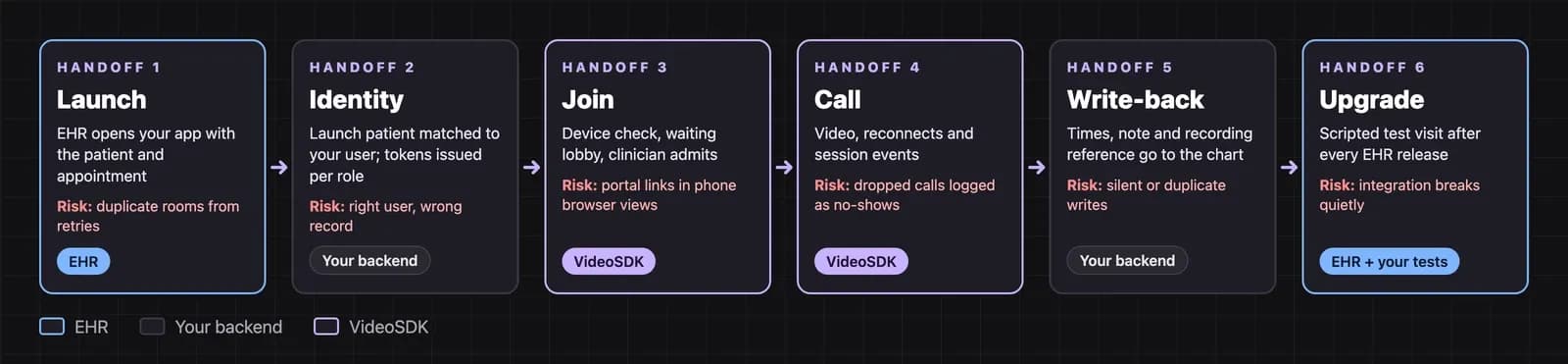
The call itself produces the events your backend turns into chart entries. VideoSDK sends webhooks for session and participant events, and you can set a webhook URL per room so each appointment reports to the right handler.
| Video event | What your backend does | What lands in the chart |
|---|---|---|
| Session started | Marks the appointment in progress | Visit start time |
| Participant joined | Records who joined and when | Arrival times; late join flags |
| Participant left | Reads the leave reason, such as a connection error | Dropped call versus completed visit |
| Session ended | Closes the appointment and triggers note write-back | Visit end time and duration |
| Recording stopped | Stores the file reference from your own storage | A link or reference, not the video |
The leave reason matters most: a participant who left on a connection error is a dropped visit that needs a callback, not a no-show.
Do this: treat every webhook as "at least once". Store each event's ID before writing to the chart, and skip any ID you have already processed, so a retry never creates a second note.
Launch: how does a SMART on FHIR launch start the video visit?
FHIR (Fast Healthcare Interoperability Resources) is the HL7 standard for exchanging health data through APIs. SMART (Substitutable Medical Applications, Reusable Technologies) App Launch is the HL7 specification for opening an app from an EHR with authorization and context. Together, a SMART on FHIR launch starts the video visit with the right patient already chosen.
From the chart or from the portal
In an EHR launch, the clinician clicks a button in the chart, and the EHR opens your app with the patient, and optionally the encounter, already set. In a standalone launch, the user opens your app from outside the EHR, such as a patient portal or a link in a reminder, and your app asks the EHR for the patient context it needs.
As of 16 November 2026, SMART App Launch 2.2 is the current published version. It requires apps to support PKCE (Proof Key for Code Exchange), which protects the sign-in step, and it lets the launch carry patient and encounter context. In the US, EHRs certified under the Office of the National Coordinator for Health Information Technology (ONC) program must offer a FHIR API with SMART App Launch, so the same launch pattern repeats across certified EHRs. Each EHR still runs its own app registration and approval, which often sets your timeline more than the code.
One room per appointment, one token per person
Once the launch hands you an appointment, the video layer takes over. With VideoSDK, your backend creates a room and sets your appointment ID as the room's custom ID, so a retried request returns the same room instead of a second one. It then issues an access token for each person. Tokens are generated on your server, scoped to that room and set to expire.
Permissions on the token decide the flow. The clinician's token lets them join directly. The patient's token asks to join, so the patient waits in the waiting lobby until the clinician admits them.
Do this: make room creation idempotent on the appointment ID before you build anything else. Users double-click and EHRs retry.
Identity: how should patient identity and access be evaluated?
Patient identity and access are two halves of one test: the right person joins, and they see only what their role allows.
- The launch patient is the person who joins. Match the launch patient to your user record before issuing a token.
- Duplicate records are resolved before go-live. Otherwise write-back lands on whichever record the launch picked.
- Rights are split by role. Viewing, documenting and signing are separate; an interpreter joining the call needs none of them.
On the video side, clinician and patient tokens carry different permissions, a room can be limited to a list of allowed participant IDs, and session history records who joined, when and from which device (participant details).
Do this: test identity and access together. The failure to look for is the right user viewing the wrong record.
Write-back: what should leaders decide about clinical documentation?
Clinical documentation is where integration pays off. Leaders need three decisions before engineering starts: which system is the record for each item, who owns each note by role, and what the clinician sees when write-back fails.
What can return to the chart: visit status and times, the clinician's note, and a reference to the recording. Support for creating notes, encounters and documents through FHIR varies by EHR and by each customer's configuration, so confirm every write you plan in that EHR's sandbox before you promise it to a customer.
On HIPAA (Health Insurance Portability and Accountability Act) setups, recordings go straight to your own cloud storage, so the chart holds a reference and your storage holds the file. For transcription or AI-written notes on patient data, talk to our team about the right setup.
Do this: show the clinician a visible "not yet in chart" flag when a write fails, with a retry. A silent failure is worse, because everyone assumes the record is complete.
Join and call: how do you keep embedded visits joinable?
Embedded visits fail like standalone ones: blocked cameras, weak networks, hospital firewalls. The fixes are a pre-call device check before the lobby, a visible reconnecting state on both screens, and firewall rules or a proxy option for hospital networks, all covered in our telehealth use-case guide.
What is specific to integration is the link. A portal or EHR link often opens inside a phone app's built-in browser view, where camera permissions behave differently from a full browser.
When a call does fail, you need the cause, not a ticket that says "video didn't work". Curable, a digital health company, uses call quality analytics for root-cause analysis of call issues (Curable's story). Our telemedicine app development guide covers each join failure and its fix in full.
Do this: add "joined from portal mobile app" as its own row in your test plan, per portal.
Upgrades: what breaks when the EHR changes?
EHR upgrades break integrations more quietly than outages do. A release can change an API version or field mapping, and the first sign is often a clinician noticing visits missing from the chart.
Do this: keep a test patient in each EHR's sandbox, run one scripted visit (launch, join, end, write-back) after every EHR release, and alert when the share of visits that log automatically drops below your normal rate. Ask each customer for their upgrade calendar.
What should an interoperability review cover?
An interoperability review checks that each system agrees on what moves, when and who owns it. Run this sheet with the EHR team, video layer and integration engine.
| Area | Question | Who answers | Evidence to ask for |
|---|---|---|---|
| Scope | Which data moves in each direction? | All three | A field-level mapping |
| Patient matching | How is the launch patient matched to your user? | Your backend | Match rules and duplicate handling |
| Permissions | Which role can view, document and sign? | EHR team | Role list from the customer |
| Downtime | What happens when the EHR or video layer is down? | All three | A written fallback for clinicians |
| Ownership | Who fixes a failed write at 2 a.m.? | All three | A named owner per interface |
The row teams skip most often is downtime: agree how clinicians run and document a visit when one side is down.
What separates integrations that work from those that fail?
What works
Integrations that hold up share four habits: one named owner per interface, writes that are safe to retry, monitoring after go-live, and training on the new workflow.
Where telehealth EHR integrations fail
Each common failure maps to a handoff in the diagram above, which is where you prevent it.
- Partial integration (write-back): video launches from the chart, but notes are still typed by hand.
- Assumed coverage (call and write-back): a business associate agreement (BAA) with one vendor is taken to cover the whole stack.
- Staff workarounds (launch): clinicians keep a second window open because the launch is slow or unreliable.
- Badly mapped data (write-back): times, roles or visit types land in the wrong fields.
- Duplicate writes (write-back): retried events create a second note or encounter.
What it means for you: when a pilot fails, find the handoff first. It tells you which team owns the fix.
How can a facility judge workflow fit before rollout?
Workflow fit is judged in a pilot, not a demo. Run one clinic, one visit type, for two weeks, and track four measures: the share of visits logged automatically, the join success rate, minutes from call end to a complete chart, and the two-system test score.
Do this: set the pass marks before the pilot starts, with the clinical sponsor.
What should healthcare leaders ask vendors?
Ask for evidence, not yes or no.
| Ask | Why it matters | A good answer |
|---|---|---|
| Which FHIR and SMART versions do you support? | Decides launch and write-back scope | Named versions and a sandbox |
| How long does app approval take? | Often sets the go-live date | A typical range and the steps |
| Which call events do you expose? | Drives write-back and reporting | A documented webhook list |
| What happens when an event fails to deliver? | Prevents silent gaps in the chart | Retries plus a way to fetch session history |
| What does your BAA cover? | Gaps are your liability | A component-by-component answer |
| Where do recordings go, and in which region? | Data residency and retention | Your own storage, a chosen region |
Ask the last two of every vendor that touches the visit.
Who holds PHI, and what does an integrated visit cost?
Protected health information (PHI) passes through more components in an integrated visit than in a standalone one: the video layer, the integration engine, your storage and any AI service. Each one that handles PHI for you needs its own BAA.
On our side, VideoSDK offers a HIPAA add-on with a BAA, encrypts media and signalling with TLS (Transport Layer Security) and SRTP (Secure Real-time Transport Protocol), sends recordings straight to your bucket, and can keep calls in one region with geo-fencing. Our guide to HIPAA-compliant video conferencing APIs covers the BAA in depth.
Cost has two parts. Video is the small one: video on VideoSDK starts from $0.004 per participant-minute for HD, as of 18 November 2026 (see our pricing page and pricing FAQ). A 20-minute one-to-one visit where each person receives one 720p stream (HD tier) comes to about $0.16; the figure changes if anyone receives more or higher-resolution video, such as a screen share or a third participant. EHR integration is the large and variable one: engineering time per EHR adapter, any integration engine licence, and app approval effort. Divide those by expected visits over the contract for a cost per integrated visit.
Selling outside the US
The SMART on FHIR launch pattern is an open HL7 standard, so the design carries across borders; hosting and procurement rules change. For EU patients, VideoSDK offers a General Data Protection Regulation (GDPR) add-on with a Data Processing Agreement and EU data residency. UK buyers assess suppliers against NHS England's Digital Technology Assessment Criteria (DTAC), and Canadian buyers through provincial procurement, so check those before you quote.
For the engineer: build it with VideoSDK
VideoSDK provides real-time video and audio SDKs and APIs for building video visits into your own product. For an EHR-launched visit, these are the docs you need, each linked where it first appears above:
- Rooms: custom room IDs and per-room webhooks.
- Tokens: server-side generation, permissions and expiry.
- Waiting lobby: admitting the patient.
- Webhooks: session and participant events for write-back.
- Telehealth guide: pre-call check, connection states and firewalls.
For code, see our tutorials on building a HIPAA-compliant telemedicine app with React and building an online doctor consultation platform.
Key takeaways
- An integration is finished when clinicians pass the two-system test, not when data moves.
- Choose your path by who owns the front door: the chart, the portal, or both across many EHRs.
- SMART on FHIR handles the launch; one room per appointment and one token per person handle the call.
- Write-back needs idempotent events, a named owner and a visible failure flag.
- Re-test launch and write-back after every EHR upgrade.
Start with one EHR sandbox and one visit type. Sign up for VideoSDK and run a test visit from launch to write-back.
Frequently asked questions
What is EHR in telehealth?
In telehealth, the EHR (electronic health record) is the system that holds the patient's chart, schedule and notes. A telehealth visit either runs beside it, with staff copying details across, or is integrated, launching from the chart and writing times, notes and recording references back automatically.
Do I need FHIR for telehealth EHR integration?
Not always, but it is the default for new work. FHIR with SMART App Launch is how certified US EHRs let apps launch with patient context. Older systems may only exchange HL7 version 2 messages, which an integration engine translates.
How long does a telehealth EHR integration take?
Plan in two tracks. The video visit itself can be built in weeks with an SDK. The EHR side depends on each vendor's app approval and the customer's security review, which often take longer than the code. Ask each EHR vendor for its approval timeline at the start.
Can a video API write notes back to the EHR?
A video API produces the events and files; your backend writes them to the EHR. Your backend listens for session and participant events, then uses the EHR's FHIR API to create the records that EHR allows. Which records can be written varies by EHR, so confirm each one in its sandbox.
Can patients join an EHR-launched visit without an app?
Yes. When the visit runs in a web app, the patient joins from a portal link or reminder in the browser and waits in the lobby until the clinician admits them. Test the link inside each portal's mobile app as well, because built-in browser views handle camera permissions differently.