


Moodle video conferencing means running live classes inside Moodle courses, so students join from the course page and attendance, recordings and grades stay in Moodle. You can turn on the built-in BigBlueButton activity, install a meeting-app plugin, or connect your own classroom, built on a video SDK, to Moodle through LTI 1.3.
Most Moodle sites start with a meeting link, and students take a detour out of the course to join it. This guide covers the route that brings the class back into Moodle: your own classroom on VideoSDK, how to size it by concurrent users, what it costs, and the consent rules that apply when you record students.
Why video conferencing integration matters in Moodle
Video conferencing integration in Moodle decides whether a live class is part of the course or a detour away from it. Without integration, a teacher pastes a meeting link into the course page. Students leave Moodle to join, some lose the link or arrive late, and afterwards attendance sits in one tool, the recording in another, and Moodle knows about neither.
An integrated live class works differently:
| Meeting link in the course | Integrated live class | |
|---|---|---|
| Joining | Students leave Moodle and sign in again | Students join from the course page with their Moodle identity |
| Roles | Anyone with the link can enter | Moodle roles decide who teaches and who attends |
| Attendance | Exported by hand, if at all | Written back to the course automatically |
| Recordings | Stored in the meeting tool | Attached to the lesson in Moodle |
| Branding | The meeting tool's | Yours |
The difference between those two columns is the difference between a meeting link and a learning architecture. In an LMS with virtual classroom features built in, the live class is one more activity in the course, tracked like a quiz or an assignment.
Part 1: Choose your path. There are a few ready-made ways to add live classes to Moodle, and one route where you own the classroom.
How can you add live classes to Moodle?
Moodle live classes come from one of three ready-made sources or from a classroom you build:
- Built-in BigBlueButton. BigBlueButton has shipped in Moodle core since Moodle 4.0, disabled until an administrator turns it on. As of 11 November 2026, the free hosted server offered for Moodle 4.0 and later caps sessions at 60 minutes and 25 concurrent users, and its recordings expire after seven days. Beyond that, you host and size the servers yourself or pay a hosting provider.
- Meeting-app plugins. Plugins connect familiar meeting tools to Moodle courses, usually with a paid licence per host. The class still runs in the meeting tool's interface and brand.
- Hosted classroom tools. Some classroom vendors connect to Moodle as an external tool. Setup is quick, but the interface, branding and class data stay with the vendor.
- Your own classroom on a video SDK. Your team builds the classroom on a video SDK and connects it to Moodle. It takes engineering time, and in return you own the interface, the data and the cost per minute.
A ready-made option suits occasional classes and staff meetings. Your own classroom pays off when you run large batches, sell a branded product, need your own mobile app, want captions or class summaries, or must support LMSs other than Moodle. If Moodle is only one part of a wider product, our e-learning app development guide covers the full build.
Building your own Moodle virtual classroom on VideoSDK
A Moodle virtual classroom built on VideoSDK is a live class your team designs and runs, with VideoSDK providing the video layer and Moodle providing courses, enrolment and grades. VideoSDK is a real-time video and audio platform with calling and interactive live streaming SDKs and APIs.
There are two ways to connect it to Moodle:
| LTI 1.3 external tool | Moodle activity plugin | |
|---|---|---|
| What it is | Your classroom app, registered in Moodle as an external tool | A Moodle plugin your team writes and installs on each Moodle site |
| Sign-in | Moodle launches the tool with the user's identity and role | Runs inside Moodle's own session |
| Works with other LMSs | Yes, any LMS that supports LTI 1.3 | Moodle only |
| Grades and class lists | Through LTI Advantage services | Through Moodle's own APIs |
| Best for | EdTech products serving many institutions | One institution's own Moodle site |
LTI 1.3 suits EdTech products because the same classroom then plugs into other LMSs without a rebuild. Learning Tools Interoperability (LTI) is the 1EdTech standard for connecting external tools to an LMS. Moodle's documentation calls LTI 1.3 plus three services "LTI Advantage": Deep Linking lets a teacher add a class to a course, Assignment and Grade Services send scores to the gradebook, and Names and Role Provisioning Services share the class list.
VideoSDK provides the class itself. As of 11 November 2026 that includes:
- Two-way classes for small batches, where everyone can speak and be seen.
- Interactive live streaming for large lectures. The teacher and co-teacher send video, students watch and take part through chat, polls, reactions and raised hands, and the teacher can invite a student on stage to speak. For the largest audiences, HLS delivers the class through a player with a typical delay of 15 to 30 seconds. Our virtual lectures guide covers these roles.
- Classroom tools: whiteboard, polls, Q&A, breakout rooms, raise hand, screen share, and remote mute and spotlight.
- Recording and captions: cloud recording that can start automatically with the class, storage in your own AWS S3, Azure Blob or Google Cloud Storage bucket, and real-time transcription that supports Hindi and Indian English.
- Events: webhooks for session, participant, recording, HLS and transcription events, which carry attendance and recordings back to Moodle.
Your team builds the LTI tool or plugin, the classroom interface, the backend that creates rooms and issues access tokens, and the logic that writes attendance, recordings and grades into Moodle. One limit to plan for: transcription and recording encryption cannot be turned on together on the same API key, so classes that need encrypted recordings and classes that need captions may need separate keys. For how classroom roles and moderation work, see how a virtual classroom API works.
Part 2: Plan it properly. Settle these questions before the first live class.
Key requirements before implementation
Key requirements for a Moodle video conferencing project fall into four areas, best agreed between your Moodle admin, product lead and engineers before choosing a route.
| Area | Questions to settle |
|---|---|
| Moodle | Which Moodle version and hosting? How do users sign in? Which roles teach (teacher, non-editing teacher) and which attend? Are courses split into groups or batches? |
| Classroom | Which tools does a class need: whiteboard, screen share, polls, breakout rooms, hand raise, captions? Which classes are recorded? |
| Data | Where are recordings stored, for how long, and who can watch them? What counts as attendance: joining, or staying a minimum time? |
| Students | Which devices and connections do students use? Is there an audio-only fallback? |
Student connections matter more than most teams expect. TRAI counted 1,114 million internet subscribers at the end of June 2026, 1,066 million of them wireless, so many students join from a phone on mobile data. Plan for adaptive video quality and an audio-only mode for weak connections; VideoSDK supports both.
How many students can join a Moodle live class? Sizing by concurrent users
Moodle live class capacity depends on concurrent users: the number of people live at the busiest hour, not the number enrolled.
Work it out with one formula: peak concurrency = live classes at the busiest hour × people per class. Imagine a coaching institute that runs 20 batches of 25 students plus a teacher at 7 pm, and a 300-student revision lecture at the same hour: 20 × 26 + 301 = 821 concurrent participants.
Where that load sits depends on the route:
- Self-hosted BigBlueButton needs servers sized for the peak and kept separate from the Moodle server. The free hosted server's 25-user cap rules it out for the revision lecture.
- A cloud video SDK keeps video traffic off your Moodle server entirely. Moodle handles only the launch and the data written back.
Class format changes the sizing too. Small batches stay fully two-way. Moodle live streaming of a large lecture works better as an interactive live stream, where only the teacher and invited students send video, or as HLS when hundreds of students mainly watch and a 15 to 30 second delay is acceptable. That choice also shapes cost, as the next section shows. Before launch, check the room and viewer limits documented for your plan.
What does Moodle video conferencing cost?
Moodle video conferencing cost on a video SDK is driven by participant minutes, class format and recording; Moodle adds no per-minute charge of its own. VideoSDK pay-as-you-go rates as of 12 November 2026:
| Item | Rate |
|---|---|
| Two-way video, HD (720p) | $0.004 per participant minute |
| Interactive live streaming viewer, HD | $0.002 per viewer minute |
| HLS viewer, HD | $0.001 per viewer minute, plus $0.04 per minute of HD encoding |
| Cloud recording, HD | $0.015 per recorded minute |
| Recording storage | $0.003 per minute stored, per month |
| Real-time transcription | $0.02 per minute |
Worked example (hypothetical): the coaching institute above, with 30 batches and 2 revision lectures a day, 60 minutes each, over 26 teaching days.
| Item | Calculation | Monthly cost |
|---|---|---|
| Small batches | 780 classes × 26 people × 60 min × $0.004 ($6.24 a class) | $4,867.20 |
| Revision lectures over HLS | 52 lectures × ($0.24 teacher + $18.00 viewers + $2.40 encoding) | $1,073.28 |
| Recording every class | 832 classes × 60 min × $0.015 | $748.80 |
| Storage | 49,920 minutes × $0.003, for each month recordings are kept | $149.76 |
| Total, first month | $6,839.04 |
The number to watch is cost per student hour. A two-way batch costs about $0.25 per student hour and the HLS lecture about $0.07. Running the lecture as an interactive live stream instead of HLS costs $36.24 rather than $20.64, in exchange for lower delay and students on stage. Each month of recordings adds $149.76 to the storage bill for as long as it is kept, so set a retention period per course.
Compare ready-made options, priced per host licence or by server and support costs, on the same per-student-hour basis. Budget too for engineering time to build and maintain the integration, and for support during class hours. New VideoSDK accounts receive a $20 credit; see pricing for volume rates.
Part 3: Connect it to Moodle. Integration is what turns a video call into part of the course.
From meeting links to learning architecture: making the class part of the course
A live class becomes part of a Moodle course when four things flow between Moodle and the classroom without anyone copying them by hand:
- Joining. The student opens the class in the course and lands in it, signed in, with the right role. With LTI 1.3, Moodle sends identity and role in the launch.
- Attendance. Participant-joined and participant-left webhooks tell your backend who attended and for how long. Your backend writes that to Moodle activity completion or an attendance activity.
- Recordings. When a recording finishes, the recording-stopped webhook tells your backend where the file is, and the replay is attached to the lesson next to the notes.
- Grades. Live quiz or participation scores go to the Moodle gradebook through LTI Assignment and Grade Services.
These four flows are what a product lead should ask to see in a demo.
For your engineering team: how the integration fits together
An LTI 1.3 integration between Moodle and a VideoSDK classroom runs in seven steps, with your backend in the middle:
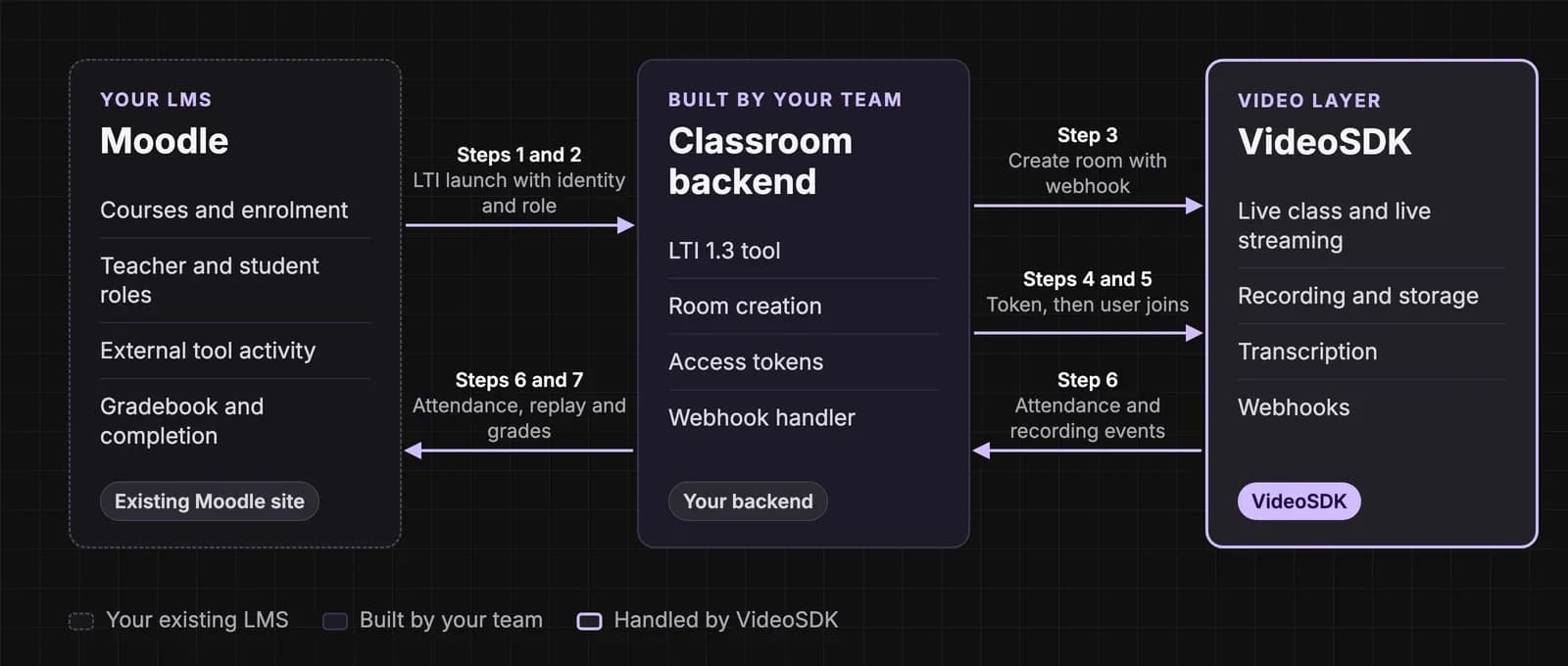
- Register the tool. A Moodle admin adds your classroom as an LTI 1.3 external tool with Deep Linking enabled, so teachers can add a class from the activity chooser.
- Launch. When a teacher or student opens the activity, Moodle signs them in to your tool through the LTI 1.3 launch, which uses OpenID Connect, and passes their role.
- Create the room. Your backend creates a VideoSDK room for the class through the create room API, with your webhook URL and, if every class is recorded, automatic recording.
- Issue a token. Your backend generates a short-lived access token for that user. The API secret never reaches the browser.
- Join with the right role. Teachers join able to send video. In a large lecture, students join to watch and are invited on stage when they raise a hand.
- Write back. Your handler for webhooks records attendance on participant events and attaches the replay on recording-stopped.
- Return grades. Scores go to the Moodle gradebook through Assignment and Grade Services.
A Moodle activity plugin follows steps 3 to 6 in the same way, with Moodle's own session replacing the LTI launch. In both cases Moodle never carries video traffic, so the Moodle server needs no resizing for live classes.
Consent, privacy and data location
Building for learners in India
- Notice and consent: a recording of a student is personal data under the Digital Personal Data Protection (DPDP) Act, 2023. Consent must come with or after a notice and be free, specific, informed, unconditional and unambiguous (Sections 5 and 6). Tell students and parents before the first class that classes are recorded, why, and who can watch.
- Children: anyone under 18 is a child. You need verifiable parental consent before processing their data, and may not track, behaviourally monitor or target ads at them (Section 9). Educational institutions get a narrow exemption for educational activities and student safety; whether your platform qualifies is a question for counsel.
- Retention: erase personal data once its purpose is served or consent is withdrawn, unless a law requires you to keep it (Section 8(7)). The DPDP Rules separately require keeping personal data, traffic data and processing logs for at least one year (Rule 8(3)), so agree a retention period with counsel that satisfies both. The Rules were notified on 13 November 2025, and their notice, security, breach and children's consent obligations apply from May 2027.
- Data location: for institutions that want class traffic kept on Indian servers, VideoSDK's geo-fencing restricts connections to servers in chosen regions, including India. It is available on the Enterprise plan.
- Accessibility: the Rights of Persons with Disabilities Act, 2016 (Section 46) requires private service providers to follow the government's accessibility rules. WCAG 2.1 sets captions for live video at Level AA (success criterion 1.2.4) and for recorded video at Level A (1.2.2).
Selling to learners abroad
- United States: COPPA covers services directed at children under 13 and treats a child's photo, video or voice recording as personal information. Under FERPA, a class video can be an education record, and vendors generally receive such records as "school officials" under the school's direct control. Public schools and universities must make the web content and apps they provide, including vendors', meet WCAG 2.1 AA under the ADA Title II rule, from 26 April 2027 for larger entities.
- European Union: GDPR applies to EU learners' data, and services offered directly to children need parental consent below age 16, which member states can lower to 13.
This is a planning summary, not legal advice.
Key takeaways
- A meeting link puts the class outside Moodle; an integrated class keeps identity, attendance, recordings and grades in the course.
- Ready-made plugins suit occasional classes; your own classroom on VideoSDK, connected through LTI 1.3, suits branded products, large batches and more than one LMS.
- Size live classes by peak concurrent users, and move large lectures to interactive live streaming or HLS.
- In the worked example, a two-way batch costs about $0.25 per student hour and an HLS lecture about $0.07.
- Plan DPDP notice, parental consent and retention before recording the first class.
Moodle keeps the course; your classroom keeps the student in it. To build it, sign up for VideoSDK and start with the virtual lectures guide.
Frequently asked questions
Does Moodle have built-in video conferencing?
Yes. Since Moodle 4.0, BigBlueButton ships in Moodle core as an activity, disabled by default. An administrator turns it on, then uses the free hosted server, which limits sessions to 60 minutes and 25 concurrent users, or connects a self-hosted or commercially hosted BigBlueButton server for longer, larger classes.
Can a custom video classroom connect to Moodle through LTI?
Yes. Moodle supports LTI 1.3 external tools, so a classroom you build on a video SDK can be registered as a tool. Moodle then signs users in to it with their role, teachers add classes through Deep Linking, and scores return to the gradebook through Assignment and Grade Services. The same tool works with other LMSs that support LTI 1.3.
How do I record Moodle live classes and keep them private?
Record in the classroom, not on teachers' laptops. Start recording automatically with each class, store files in your own cloud bucket, and attach each replay to its lesson when the recording-stopped webhook arrives. Check enrolment before returning a playback link, make links expire, and encrypt recordings that need it, using a separate API key if those classes also need captions.
Can Moodle live classes have Hindi captions?
Yes, with real-time transcription. VideoSDK's real-time transcription supports Hindi and Indian English, so captions can appear during the class and the transcript can be kept with the replay. For other Indian languages, contact our team about availability. Real-time transcription costs $0.02 per minute as of 12 November 2026.
Can students join Moodle live classes from a phone?
Yes. Students open the class from the Moodle course in their phone's browser. If you also ship your own mobile app, VideoSDK's iOS, Android, React Native and Flutter SDKs let students join the same class there. Offer an audio-only mode for students on weak mobile connections.