


E-learning app development is the process of building a web, mobile or desktop application that delivers courses, live classes, tests and progress tracking to learners. A typical build moves through four phases: deciding what to build and for whom, designing a minimum viable product (MVP), building and launching it, then managing cost, compliance and scale.
This guide follows those phases, from choosing an app type to adding live classes and estimating cost.
What is e-learning app development?
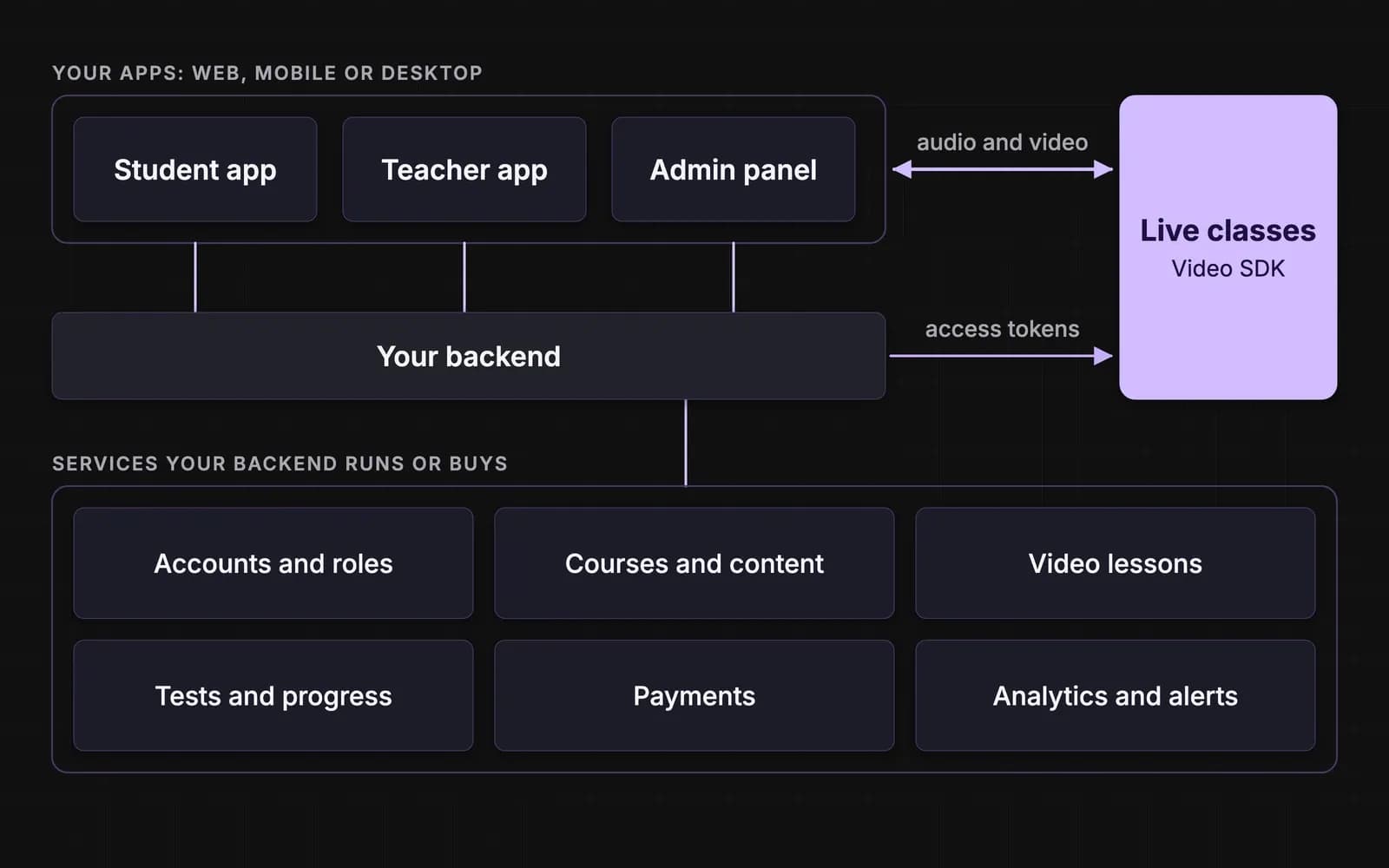
E-learning app development covers the product, design and engineering work behind a learning app, and the decisions that come before any code. Coaching institutes, schools, edtech startups and corporate training teams all build these apps, and most share the same parts: accounts and roles, courses, recorded lessons, live classes, tests, payments and analytics.
The work falls into four phases:
| Phase | What you decide or produce | Usually owned by |
|---|---|---|
| 1. Decide | App type, platforms, target users, white label or custom | Founder |
| 2. Design the MVP | Feature scope, user flows, tech stack | Product lead |
| 3. Build and launch | Working app, live classes, content, testing | Product lead and engineering |
| 4. Cost, compliance and scale | Budget, running costs, privacy and payment rules, fixes after launch | Founder and product lead |
E-learning app market trends in India
Three shifts shape elearning app development in India:
- Hybrid learning: online-first brands now teach in classrooms too. PhysicsWallah's November 2025 IPO prospectus lists 112 offline Vidyapeeth centres and 78 hybrid Pathshala centres as of 30 June 2025, so apps increasingly serve students who learn in a centre and at home.
- Mobile-first reach: TRAI counted about 1,114 million internet subscribers at the end of June 2026, 1,066 million of them on wireless connections, so phone-first design and classes that cope with weak networks matter.
- Computer-based exams: JEE Main Paper 1 is a computer-based test, so test-prep apps need exam-style mock tests on laptops and desktops, not only phones.
Phase 1: Decide. Three early decisions shape the budget more than any feature: app type, users, and whether to build at all.
Deciding what type of app to build
The app type sets how central live classes are and where the money goes.
| App type | Who usually pays | Role of live classes | Main cost driver |
|---|---|---|---|
| Recorded course app | Adult learners | Optional | Video hosting and course production |
| Live tutoring, one-to-one or small group | Parents, adult learners | Core | Class minutes and scheduling |
| Test prep | Students and parents | Core for lectures and doubt sessions | Question banks, mock tests, analytics |
| School or LMS app | Schools, colleges | Supporting | Roles, integrations, reporting |
| Language learning | Adult learners | Supporting to core | Speaking practice and content |
| Corporate training | Employers | Supporting | Single sign-on, LMS integration, reporting |
Choose your platforms
| Platform | Fits when | Trade-off |
|---|---|---|
| Web app | Fastest launch; corporate training; schools on laptops | Weaker offline support and push notifications |
| Mobile app (Android, iOS) | Students learning on phones; daily practice and test prep | App store review; install size matters |
| Desktop app | Proctored tests, long study sessions, exam-style mock tests | Smallest audience; usually added later |
| Cross-platform (one codebase) | Most MVPs that need web and mobile together | Some device features need native work |
Identify core users and customers (and what they value)
In most learning products the user is not the payer: a student uses the app, a parent or school pays, a teacher delivers and an admin runs it.
| Role | What they value | Features that follow |
|---|---|---|
| Student | A clear next step, short lessons, works on their device and data plan | Progress tracking, downloads, doubt-solving, reminders |
| Teacher | Control of the class and less admin work | Scheduling, moderation, attendance, grading, recordings |
| Parent | Visibility and value for money | Attendance and progress reports, fee payments, alerts |
| Admin | Smooth operations and reporting | Batch and user management, content approval, usage and revenue dashboards |
Treat the buyer as its own persona: schools and employers buy on reporting and data handling, parents on results and trust, adult learners on price.
White label or custom: pros and cons
The first build decision in education app development is whether to license a ready-made platform (white label) or build your own (custom).
| Factor | White label | Custom |
|---|---|---|
| Time to launch | Weeks | Months |
| Upfront cost | Low: a licence or subscription | High: a design and engineering team |
| Control over features and design | Limited to the vendor's roadmap | Full |
| Data ownership | Set by the vendor contract | Yours |
| Differentiation | Low; competitors can buy the same product | High |
| Cost at scale | Per-user or per-seat fees grow with you | Infrastructure and usage costs you manage |
A hybrid is common: a licensed platform for courses and tests, plus a custom live class layer on a video SDK. Go white label to validate demand quickly; go custom when the learning experience is what you sell, or when per-seat fees overtake the cost of owning the product.
Phase 2: Design the MVP. The product lead now turns those decisions into a feature scope, user flows and a tech stack.
Key features and benefits of an e-learning app
Scope features in two tiers:
| Feature | In the MVP | Add later |
|---|---|---|
| Sign-up, login and roles | Phone or email login; student, teacher, admin roles | Single sign-on for schools and companies |
| Courses and lessons | Catalogue, lesson pages, recorded video | Recommendations, learning paths |
| Live classes | If live teaching is the product | Breakout rooms, interactive live streams |
| Tests and quizzes | Quizzes with instant scoring | Full mock exams, adaptive tests |
| Progress tracking | Per-course progress | Parent reports, certificates |
| Payments | One-time purchase or subscription | Coupons, bundles, batch pricing |
| Doubt-solving | Text and image questions to teachers | AI-assisted answers |
| Analytics | Core events (sign-up, class joined, lesson completed) | Cohort and revenue dashboards |
The benefits follow: learners study on their own schedule and replay missed classes, educators teach beyond one city, and the business gets recurring revenue and data on what keeps students.
You're going custom: product flow and design
Map the core journeys before designing screens: sign up, find a course, attend a live class, take a test, see progress and renew.
Design rules that matter for learners in India:
- Every screen size: layouts that adapt from phone to laptop, since one student may watch on a phone and test on a family laptop.
- Low-cost devices and data: a small install, light screens and a choice of video quality.
- Offline study: downloadable lessons and notes on mobile, with progress synced on reconnection.
- Language: interface and content in the languages your learners use, not only English.
- Accessibility: captions, readable contrast, and keyboard and screen-reader support on web.
Track four metrics from day one: activation, live class attendance, course completion and renewal.
Choosing the right technology stack for e-learning application development
| Layer | What it does | Typical choices | Build or buy |
|---|---|---|---|
| Web front end | Browser app for students, teachers and admins | React, Next.js | Build |
| Mobile apps | Android and iOS apps | React Native or Flutter, or native | Build |
| Desktop app (optional) | Installed app for tests or long sessions | A desktop wrapper around the web app | Build later |
| Backend and database | Users, courses, enrolments, business logic | Node.js, Python or Java; PostgreSQL | Build |
| Recorded video | Storing, encoding and streaming lessons | Cloud storage, a CDN, adaptive streaming | Buy |
| Live classes | Real-time audio, video and screen share | A video SDK such as VideoSDK | Buy |
| Payments | UPI, cards and subscriptions | An RBI-authorised payment aggregator | Buy |
| Integrations | Launching inside a school's LMS, importing courses | LTI 1.3, SCORM, xAPI | Build on standards |
Phase 3: Build and launch. Every feature outside the MVP list waits for usage data.
How to develop an educational app: 7 steps
- Research the market and learners. Output: a problem statement, a target learner and competitors' gaps. Owner: founder.
- Scope the MVP. Output: an in-and-out feature list and launch metrics. Owner: product lead.
- Design flows and screens. Output: a prototype tested with real students and teachers. Owner: product lead and designer.
- Build in short cycles. Output: working apps with live classes and payments integrated. Owner: engineering.
- Load content. Output: first courses, question banks and a class schedule. Owner: academic team.
- Test in real conditions. Output: fixes from low-cost phones, slow networks, common browsers and a pilot batch. Owner: QA.
- Launch and improve. Output: a public release and a weekly metrics review that sets what to build next. Owner: founder and product lead.
Adding live classes: delivery modes, build vs buy, and building with VideoSDK
Choose the delivery mode
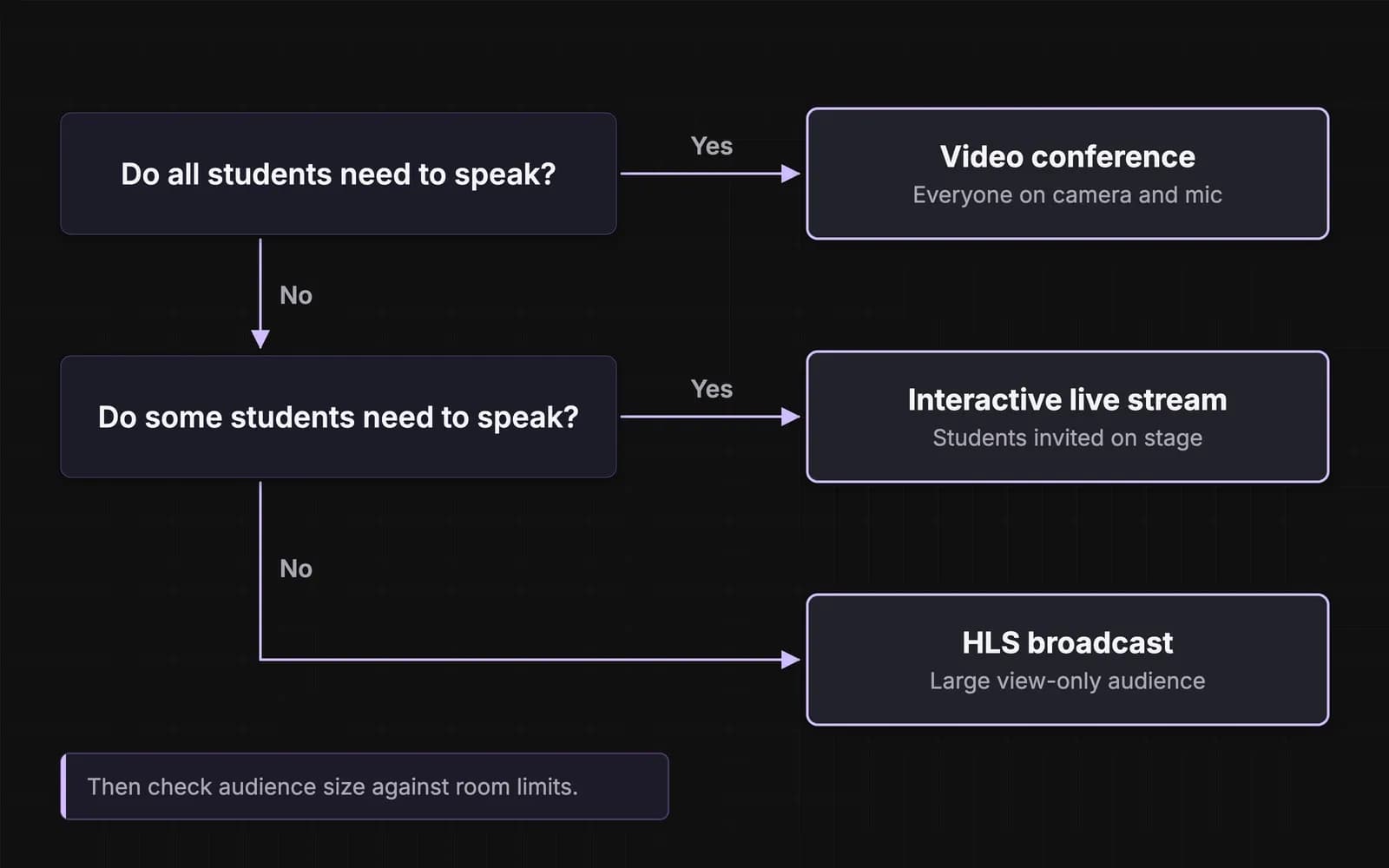
Live classes run in one of three delivery modes, chosen by how many students need to speak:
| Delivery mode | Who is on camera and mic | Delay behind live | Best class shape |
|---|---|---|---|
| Video conference | Every participant | Real time | Tutoring, seminars, group work |
| Interactive live stream | Teacher, plus students invited on stage | Real time | Lectures with live doubt-solving |
| HLS broadcast | Teacher only; students use chat or polls | About 30 seconds with typical settings | Large one-way lectures, replays |
The HLS delay comes from the protocol: players start at least three segments behind live (RFC 8216).
The decision rule: use a video conference when every student needs to speak, an interactive live stream when a few speak and the rest watch, and HLS when nobody in the audience speaks and the audience exceeds real-time room limits.
Build or buy the live class layer
Building real-time video in-house means running media servers, network relays, recording pipelines and regional capacity, then testing on every device. That rarely differentiates a learning product, so most teams embed a video SDK: your backend creates rooms and issues access tokens, and the SDK carries audio and video.
Building live classes with VideoSDK
VideoSDK provides real-time video and audio calling and interactive live streaming SDKs for live classes. For an e-learning app that covers:
- All three delivery modes: video conferences, interactive live streams where the teacher brings students on stage, and HLS broadcasts for larger audiences.
- Classroom tools: cloud recording, whiteboard, polls, Q&A, raise hand, chat, breakout rooms, screen share and permission controls for teachers.
- Platforms: JavaScript and React SDKs for web apps, which run in desktop browsers, and Android, iOS, React Native and Flutter SDKs for mobile.
- Room limits: 100 participants, 15 active speakers, 1,000 interactive live stream viewers and 200 HLS viewers per room by default.
Education teams already run classes this way:
- Coderschool, a coding-education platform in Vietnam, reports a 140% increase in session hours and more than 100,000 sessions a month.
- Immigo, which runs live English classes, went live in under a week and reports a 110% boost in conversion rate.
- ForagerOne went live in under two weeks and streams 100 concurrent live classes.
For occasional classes inside an LMS a school already runs, a meeting tool integrated with that LMS fits better than custom development. For classroom roles and moderation, see how a virtual classroom API works.
Phase 4: Cost, compliance and scale. Next: what it costs, which rules apply and what breaks for real users.
How much does e-learning app development cost?
E-learning app development cost has two parts: the one-time build and the running cost of usage. The build is driven by the number of platforms, features (live classes, mock tests, AI and integrations add the most), design depth, and the team's model and location. Course recording and question banks are often a separate budget.
Agency estimates vary widely. One agency, AnyforSoft, publishes these tiers (checked November 2026):
| Tier | Build cost | Build time | Typical scope (our summary) |
|---|---|---|---|
| Basic | $25,000–$50,000 | 3–6 months | One platform, recorded courses, quizzes, payments |
| Mid-level | $50,000–$150,000 | 6–9 months | Web and mobile, live classes, progress tracking, analytics |
| Advanced | $150,000–$300,000+ | 9–12+ months | Multiple platforms, AI features, LMS integrations, custom reporting |
Buying layers is the biggest lever: live video, payments and hosting bought as services turn months of specialist engineering into usage fees.
Running cost of live classes: a worked example
Live class costs scale with minutes. VideoSDK's pay-as-you-go rates (as of 6 November 2026):
- Video call: $0.004 per participant-minute; a participant with their camera off is billed at the audio rate of $0.001
- Interactive live stream: $0.004 per speaker-minute and $0.002 per viewer-minute
- Cloud recording (HD): $0.015 per minute; storage $0.003 per minute per month
Seminar: 1 teacher and 24 students, 60 minutes, cameras on, recorded. 25 × 60 = 1,500 participant-minutes × $0.004 = $6.00, plus recording at 60 × $0.015 = $0.90: $6.90, plus $0.18 a month while the recording is stored.
Lecture: 1 teacher and 150 students as an interactive live stream, 60 minutes. Speaker 60 × $0.004 = $0.24, plus 9,000 viewer-minutes × $0.002 = $18.00: $18.24 before recording.
A tutoring business running 200 recorded seminars a month would pay about $1,380 a month for live classes. New VideoSDK accounts receive a $20 credit; see pricing for volume rates.
Common user issues in edtech app development (and how to fix them)
| Issue | What users experience | Fix |
|---|---|---|
| Weak connections | Frozen video, dropped classes | Adaptive video quality, audio-first fallback, automatic reconnect, recordings of missed parts |
| App size and storage | Uninstalls to free space | A small install, lessons downloaded on demand, a clear-downloads option |
| Data and battery use | Classes drain data packs | Video quality settings, audio-only mode, Wi-Fi-only downloads |
| Echo and noise | Teachers cannot hear questions | Echo cancellation, mute on entry, raise hand before speaking |
| Low engagement | Drop-off after the first week | Short lessons, in-class polls and quizzes, streaks, parent updates |
Privacy, payment and accessibility rules
Building for learners in India
- Children's data: under the Digital Personal Data Protection Act, 2023, anyone under 18 is a child. You need verifiable parental consent before processing their data, and may not track, behaviourally monitor or target ads at them (Section 9). Educational institutions get a narrow exemption for tracking needed for education or student safety.
- Timing: the DPDP Rules, 2025 were notified on 13 November 2025. Their obligations on notices, security, breach reporting and children's consent apply from May 2027, so build consent flows into the MVP.
- Subscriptions: under RBI's e-mandate framework (April 2026), the first auto-debit needs extra authentication, later debits up to ₹15,000 do not, and the bank must notify the customer at least 24 hours before each debit.
- Accessibility: the Rights of Persons with Disabilities Act, 2016 (Section 46) requires private service providers to follow the government's accessibility rules.
Selling to learners abroad
- United States: COPPA covers services directed at children under 13 and treats a child's photo, video or voice recording as personal information. FERPA generally lets a vendor receive student records from a school only as a "school official" under the school's direct control. Public schools and universities must make the web content and apps they provide, including vendors', meet WCAG 2.1 AA under the ADA Title II rule, from 26 April 2027 for larger entities.
- European Union: GDPR applies to EU learners' data, and services offered directly to children need parental consent below age 16, which member states can lower to 13.
This is a planning summary, not legal advice.
Key takeaways
- E-learning app development runs in four phases: decide, design the MVP, build and launch, then manage cost, compliance and scale.
- Choose the live class delivery mode by how many students need to speak, and buy the live video layer rather than build it.
- In India, plan for the DPDP Rules and RBI auto-debit rules from the start; add COPPA, FERPA or GDPR if you sell abroad.
To see how VideoSDK fits an edtech product, explore our EdTech solutions or book a demo.
Frequently asked questions
How long does it take to build an e-learning app?
Published agency estimates put a basic e-learning app at 3 to 6 months, a mid-level app at 6 to 9 months and an advanced platform at 9 to 12 months or more. A white-label platform can launch in weeks.
What are the 7 stages of app development?
For an e-learning app: research the market and learners, scope the MVP, design flows and screens, build in short cycles, load content, test in real conditions, and launch and improve.
Should an e-learning app be web, mobile or desktop?
Start with where learners study: phones call for a mobile app, laptops in schools and companies for a web app, and proctored tests or long sessions for desktop. Most MVPs launch on mobile and web from one codebase.
Can I build my own LMS?
Yes, when the course experience is your product. If you sell to schools or companies that already run an LMS, integrate instead: launch inside it through LTI 1.3 and exchange content through SCORM or xAPI.
Can AI tools build an e-learning app?
AI app builders can produce prototypes and simple course apps quickly. Live classes, payments, data protection and scaling still need engineering and proven services, so AI shortens a build rather than replacing it.