


Use WebRTC when your users start in a browser or mobile app and you need sub-second, encrypted voice and video with no telephony hardware. Use SIP when your users start on the public phone network (PSTN), or when you must integrate with an existing PBX, contact center, or SIP trunk. Use both together, bridged by a WebRTC-to-SIP gateway, when a single conversation must span a browser widget and a phone line. The most common mistake is treating them as rivals when they are really two entry points into the same media layer.
Choosing between WebRTC and SIP is one of the first architecture decisions you make when building any voice or video product, and it quietly shapes everything after it: latency, cost, security posture, and how easily you can add phone support later. The two protocols come from different worlds. SIP, standardized by the IETF in RFC 3261, was designed for the telecom era, connecting desk phones, PBXs, and carrier trunks. WebRTC, standardized by the W3C and IETF, was designed for the browser era, where a user clicks a button and is talking within seconds.
The practical question for most teams in 2026 is not which protocol is universally better. It is which entry point your users start from, and whether your product needs to reach the phone network at all. This article compares WebRTC and SIP across signaling, media transport, architecture, latency, security, and cost, and finishes with a migration strategy so you can keep both doors open.
WebRTC vs SIP: Core Differences
The WebRTC vs SIP comparison comes down to three layers: how calls are set up, how media travels, and what endpoints are supported. SIP is a dedicated call-control signaling protocol carried over UDP, TCP, or TLS, with media typically flowing as RTP through a media server or Session Border Controller. WebRTC does not mandate a signaling protocol at all; developers usually run signaling over a WebSocket or HTTPS channel using JSON, while media flows as encrypted DTLS-SRTP directly between peers or through an SFU (Selective Forwarding Unit).
| Attribute | WebRTC | SIP |
|---|---|---|
| Signaling | Flexible, typically WebSocket/JSON over HTTPS | Dedicated SIP messages (INVITE, REGISTER, BYE) |
| Media transport | DTLS-SRTP (mandatory encryption) | RTP, optionally SRTP with TLS signaling |
| Typical endpoints | Browsers, mobile apps, IoT devices | Desk phones, PBXs, carrier trunks, contact centers |
| NAT traversal | Built-in ICE/STUN/TURN framework | Requires SBC or manual configuration |
| Typical use case | In-app calling, live video, AI voice agents | PSTN calling, IVR, call-center queues |
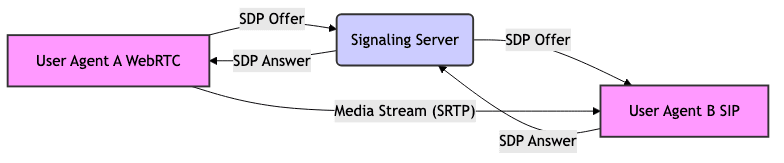
The two paths converge when a gateway translates between them, which is exactly how hybrid contact centers work:
Signaling Layer
WebRTC deliberately leaves signaling undefined in the specification, which surprises developers coming from telephony. Your application owns the signaling channel, usually a WebSocket or HTTPS connection exchanging JSON session descriptions and ICE candidates. This flexibility means you can authenticate users with your own tokens, embed call setup inside your app's existing API surface, and integrate call state with your product logic directly. SIP, by contrast, uses a fixed, well-defined message set: REGISTER to announce an endpoint, INVITE to start a session, BYE to end it. That rigidity is a strength in carrier environments, where every vendor interoperates because the protocol is identical everywhere.
Media Transport
Both protocols ultimately carry voice and video over RTP. The difference is what wraps it. WebRTC mandates DTLS-SRTP, meaning every media packet is encrypted by default with keys negotiated during connection setup; there is no option to send plaintext media in a compliant browser. SIP deployments range from plain RTP (still common on internal PBX legs) to SRTP with TLS-protected signaling, but encryption is optional and must be configured. In practice, teams integrating both protocols find that WebRTC's mandatory encryption simplifies compliance, while SIP's optional encryption requires explicit engineering and an SBC to enforce it at the network boundary.
When to Choose WebRTC vs SIP for Your Application
The decision matrix for WebRTC vs SIP starts with one question: where does your user's device sit? If the answer is a browser tab or a mobile app you control, WebRTC is the natural fit. If the answer is a physical phone number on the PSTN, SIP is the natural fit. Everything else, including latency targets, codec choices, and infrastructure, follows from that entry point.
- Pure browser widget (click-to-talk, in-app support): WebRTC. No phone number, no carrier, no trunk. The call never touches the PSTN.
- Pure phone-line IVR or reminder dialer: SIP. Your users are reachable only through carrier trunks, and WebRTC cannot dial a phone number by itself.
- Hybrid contact center (agents in a browser dashboard, customers on phones): both, bridged by a gateway or SBC.
- Video-enabled support or telehealth: WebRTC, because SIP video interoperability across carriers is inconsistent and expensive.
A second axis is existing infrastructure. If your company already runs Asterisk, FreeSWITCH, or a Cisco PBX, SIP integration is a configuration exercise, not a rebuild. If you are greenfield and building a product-native calling experience, starting with WebRTC and adding a SIP bridge later is almost always cheaper than the reverse.
Browser-First Use Cases
Click-to-talk widgets on support pages, in-app voice assistants, live-chat escalations into voice, and telehealth consultations are the classic WebRTC scenarios. The user is already in your interface, authentication is already handled by your session, and adding a call is a button rather than a phone number. Latency stays low because media flows directly between the browser and your media server, never crossing the PSTN. VideoSDK's video calling SDK is built for exactly this pattern: participants join a room from any browser or mobile app with sub-300ms latency, with recording, transcription, and chat available in the same session.
Phone-First Use Cases
Inbound customer lines, IVR menus, call-center queues, and outbound appointment reminders all start on the PSTN. A caller dials a real phone number, the carrier delivers the call over a SIP trunk to your infrastructure, and your application answers it. WebRTC has no concept of a phone number; it cannot register with a carrier or receive a PSTN call. In these scenarios SIP is not a choice, it is a requirement, and your engineering effort goes into call routing, queueing, and recording rather than browser connectivity.
Hybrid Deployments
Most mature products end up hybrid. A customer starts on a phone line, an agent answers in a browser dashboard; or a user starts in your app and asks to be transferred to a phone. The bridge is a WebRTC-to-SIP gateway or an SBC with WebRTC support, translating signaling (SIP INVITE to your JSON signaling) and media (SRTP to DTLS-SRTP) in both directions. VideoSDK provides this bridge natively through its telephony and SIP integration, which connects SIP trunks from providers like Twilio, Vonage, Telnyx, and Plivo into WebRTC rooms, including AI agent routing for inbound calls.
Architecture Deep Dive
Three architectures cover nearly every real deployment, and understanding them makes the protocol choice concrete.
Architecture 1: Pure WebRTC. Browsers or mobile apps connect to a media server (an SFU) over DTLS-SRTP. Signaling runs over HTTPS/WebSocket to your application server, which authenticates participants and issues room or session tokens. Media never touches the PSTN. This is the architecture behind in-app calling, live streaming, and AI voice agents where the user interacts from a web page.
Architecture 2: Pure SIP. A carrier trunk terminates on an SBC, which fronts a PBX or media server. Desk phones and softphones register via SIP, calls are routed with SIP messages, and media flows as RTP through the media server. This is the architecture of traditional contact centers and enterprise telephony.
Architecture 3: WebRTC-to-SIP gateway. A browser participant and a PSTN participant join the same session through a gateway that translates both signaling and media.
NAT Traversal: Why ICE, STUN, and TURN Matter for WebRTC
WebRTC's biggest hidden complexity is NAT traversal. Most devices sit behind routers and firewalls that block direct peer-to-peer media. WebRTC solves this with the ICE framework: it gathers STUN candidates to discover the device's public address, attempts a direct connection, and falls back to a TURN relay, your server, when direct connectivity fails. TURN fallback is the cost driver to plan for: relayed media consumes your bandwidth, and in production deployments a meaningful fraction of calls, often 10 to 20 percent depending on your user base, end up relayed. SIP deployments handle the same problem at the network edge with an SBC, which terminates media centrally so endpoints never need to traverse NAT on their own.
The Session Border Controller's Role in SIP
The SBC is the SIP world's security and translation layer. It sits at the network boundary, authenticates trunk traffic, normalizes codecs, hides internal topology, and blocks malformed signaling. When a hybrid deployment bridges WebRTC to SIP, the SBC (or a gateway with equivalent functions) also performs codec translation, converting Opus from the browser leg to G.711 for the carrier leg, and encryption translation between DTLS-SRTP and SRTP. Teams that skip a proper SBC in hybrid deployments consistently run into one-way audio and failed codec negotiation, the two most common hybrid integration bugs.
Performance and Latency Comparison
Latency is where the two protocols diverge most in practice. The ITU's G.114 recommendation sets 150 milliseconds one-way as the threshold for acceptable conversational voice; beyond that, users begin talking over each other. Pure WebRTC sessions, where media flows directly between a browser and a nearby media server, routinely land in the 40 to 120 millisecond range. SIP calls that cross the PSTN accumulate latency at every hop: trunk to SBC, SBC to carrier, carrier transit, and the final leg, often totaling 150 to 300 milliseconds for international routes.
Codec choice compounds the difference. WebRTC mandates Opus, an adaptive-bitrate codec that adjusts from 6 to 510 kbps based on available bandwidth, which is why WebRTC calls degrade gracefully on poor networks. SIP carrier legs typically use G.711, a fixed 64 kbps codec with no adaptation, or G.729 where licensing permits. On a stable wired network the difference is barely audible; on a congested mobile network, Opus's adaptability is decisive.
For teams layering AI on top of voice, end-to-end latency budgets are even tighter. Independent benchmarks such as Artificial Analysis's Speech Arena (2026) show that total voice-agent response time is dominated by the STT-LLM-TTS pipeline, so every millisecond saved in the transport layer matters; a WebRTC leg with sub-150ms transport leaves more budget for model inference than a PSTN leg that has already spent 200 milliseconds before the audio reaches your server.
Security Considerations
WebRTC's security model is mandatory by design: DTLS-SRTP encrypts all media, and signaling runs over TLS-protected channels you control. Authentication is whatever your application implements, typically JWT-style tokens issued by your server, which means you can scope access per room, per participant, and per role. VideoSDK's token-based authentication follows this pattern, with tokens generated server-side and never exposing secrets to the client, as described in the authentication and token guide.
SIP's security is real but optional. TLS protects signaling, SRTP protects media, and Digest authentication verifies endpoints, but each must be explicitly enabled and enforced, typically by the SBC. Legacy deployments frequently run plain RTP on internal legs, which is a compliance gap for regulated workloads. For GDPR, HIPAA, or PCI-scoped voice products, WebRTC's encryption-by-default is simpler to audit; SIP can meet the same bar, but only with disciplined SBC configuration, IP whitelisting, and geo-fencing at the boundary, capabilities VideoSDK's telephony layer provides out of the box.
Cost and Operational Overhead
The cost structures of the two protocols are almost inverted. SIP's costs are carrier-driven: per-minute trunk fees that vary by destination (a US domestic minute costs a fraction of a call to a mobile in another region), plus DID number rental, plus SBC licensing if you self-host. Flat-rate unlimited trunks exist but usually cap concurrent channels.
WebRTC's costs are infrastructure-driven: TURN relay bandwidth for the fraction of users who cannot connect directly, SFU capacity that scales with concurrent participants and video quality, and, in hybrid deployments, gateway or SBC costs on top. A browser-to-browser voice call with no PSTN leg has zero per-minute cost, which is why pure in-app calling products are dramatically cheaper at scale than dial-out products.
| Cost driver | WebRTC | SIP |
|---|---|---|
| Per-minute fees | None (no PSTN leg) | Carrier per-minute, destination-dependent |
| Infrastructure | SFU + TURN bandwidth | SBC + PBX + trunk management |
| Number rental | Not required | DID numbers, monthly per number |
| Scaling pattern | Scales with concurrent media | Scales with concurrent channels |
| Best for | High-volume in-app calling | Reachability to any phone |
The honest summary: WebRTC is cheaper per minute but only reaches devices running your app or a browser; SIP costs more per minute but reaches every phone on Earth. Hybrid deployments pay both cost structures, which is why the decision to add PSTN reachability should be driven by product need, not by protocol enthusiasm. (https://www.videosdk.live/pricing) before modeling your own totals.
Migration and Future-Proofing Tips
Design your stack so the protocol choice is reversible. Keep your application's calling interface abstracted from the transport: your product logic should know about rooms, participants, and sessions, not about SIP INVITEs or ICE candidates specifically. Choose a media layer that speaks both legs, meaning Opus on the WebRTC side with automatic translation to G.711 on the carrier side, so adding a gateway later is a configuration change rather than a re-architecture. VideoSDK's architecture supports this directly: the same room that hosts browser participants can host PSTN participants through its SIP integration, and AI voice agents built on the VideoSDK Agent SDK can join either leg.
For monitoring, track transport-level metrics on both sides: connection success rate, TURN relay percentage, and packet loss for WebRTC legs; call answer rate, post-dial delay, and codec negotiation failures for SIP legs. Session analytics exposed through VideoSDK's REST APIs give you a single pane over both, which matters when a support complaint could originate on either side of the bridge.
Definitions Glossary
WebRTC: A W3C and IETF standard for browser and app-based real-time voice, video, and data communication, with mandatory DTLS-SRTP encryption and built-in NAT traversal via ICE, STUN, and TURN.
SIP (Session Initiation Protocol): An IETF signaling protocol (RFC 3261) used to create, modify, and terminate voice and video sessions across IP networks, carriers, and PBX systems.
SIP Trunking: A carrier service that delivers PSTN phone lines over SIP, letting internet-based systems place and receive calls on real phone numbers without physical lines.
Session Border Controller (SBC): A network device that secures, translates, and routes SIP traffic at the network boundary, handling authentication, codec translation, and topology hiding.
ICE / STUN / TURN: The WebRTC NAT traversal framework: ICE coordinates candidate addresses, STUN discovers public addresses, and TURN relays media through your server when direct connection fails.
DTLS-SRTP: The mandatory WebRTC media encryption scheme, where DTLS negotiates keys and SRTP encrypts every audio and video packet.
Key Takeaways
- Choose WebRTC when users start in a browser or your app, you need low latency and video, and no phone number is required.
- Choose SIP when users start on the PSTN, or when you must integrate with an existing PBX, contact center, or carrier trunk.
- Both protocols carry media over RTP; the real differences are signaling style, mandatory versus optional encryption, and endpoint reachability.
- Hybrid deployments bridge the two with a WebRTC-to-SIP gateway or SBC, translating both signaling and codecs in both directions.
- WebRTC is cheaper per minute but app-restricted; SIP costs carrier fees but reaches every phone on Earth.
- VideoSDK's SIP-to-WebRTC bridge lets one room host browser participants, PSTN callers, and AI voice agents on the same session.
Conclusion
The WebRTC vs SIP decision is really an entry-point decision: browsers and apps on one side, the global phone network on the other, with a gateway joining them when your product needs both. Start from where your users are, budget for TURN and SFU costs on the WebRTC side and per-minute trunk fees on the SIP side, and keep your architecture modular so the bridge can be added later. If you are planning a hybrid voice product, explore VideoSDK's telephony and SIP integration and try it free on the VideoSDK dashboard. What are you building with WebRTC or SIP? Drop a comment, I'd love to hear which side of the bridge your use case lives on.
Core Functionality and Architecture of WebRTC
WebRTC primarily focuses on enabling peer-to-peer connections directly within the browser. It handles audio and video capture, encoding, and transmission. WebRTC employs protocols like ICE (Internet Connectivity Establishment) for NAT traversal, STUN (Session Traversal Utilities for NAT) and TURN (Traversal Using Relays around NAT) servers to assist in establishing connections when direct peer-to-peer is not possible. SDP (Session Description Protocol) is used to negotiate media capabilities between peers. SRTP (Secure Real-time Transport Protocol) provides encryption for media streams. The architecture facilitates peer-to-peer communication
JavaScript: Simple WebRTC connection
1// Simplified example - not a complete working implementation
2const peerConnection = new RTCPeerConnection();
3
4// Handle incoming media streams
5peerConnection.ontrack = (event) => {
6  const remoteStream = event.streams[0];
7  // Attach the remote stream to a video element
8  const remoteVideo = document.getElementById('remoteVideo');
9  remoteVideo.srcObject = remoteStream;
10};
11
12// Create an offer (for the caller)
13async function createOffer() {
14  const offer = await peerConnection.createOffer();
15  await peerConnection.setLocalDescription(offer);
16  // Send the offer to the remote peer (via signaling server)
17}
18
19// Answer an offer (for the receiver)
20async function answerOffer(offer) {
21  await peerConnection.setRemoteDescription(new RTCSessionDescription(offer));
22  const answer = await peerConnection.createAnswer();
23  await peerConnection.setLocalDescription(answer);
24  // Send the answer to the remote peer (via signaling server)
25}
Key Features and Advantages of WebRTC
- Browser-Based: No plugins or installations required, simplifying user experience.
- Peer-to-Peer: Direct communication minimizes latency and reliance on central servers when possible.
- Open Source: Free to use and modify, fostering innovation and community contributions.
- Secure: Built-in encryption (SRTP) ensures secure communication.
- Adaptive: Dynamically adjusts media quality based on network conditions.
- NAT Traversal: Includes mechanisms (STUN/TURN) to overcome NAT issues.
WebRTC's WebRTC API and its JavaScript APIs have enabled a wide range of applications.
What is SIP?
SIP (Session Initiation Protocol) is a signaling protocol used for initiating, maintaining, and terminating real-time sessions involving voice, video, and messaging applications. It's a text-based protocol, similar to HTTP, making it relatively easy to understand and debug. SIP is widely adopted in VoIP (Voice over IP) systems and unified communication platforms.
Core Functionality and Architecture of SIP
SIP works by sending requests and responses between user agents (endpoints) and SIP servers. Key components include: User Agents (UAs), Proxy Servers, Registrar Servers, and Redirect Servers. SIP uses URLs to identify users and resources. A typical SIP session involves a series of messages to establish the call (INVITE), negotiate media capabilities (SDP), maintain the session, and terminate the call (BYE). It is the standard SIP protocol. Unlike WebRTC, SIP relies heavily on a server-based architecture. Understanding SIP architecture is critical for effective use.
Key Features and Advantages of SIP
- Scalability: Designed for large-scale deployments with robust server infrastructure.
- Interoperability: Well-established standard, ensuring compatibility between different VoIP systems.
- Feature-Rich: Supports a wide range of call control features, such as call forwarding, call waiting, and conferencing.
- Flexibility: Can be used with various media codecs and transport protocols.
- Security: Supports encryption and authentication mechanisms for secure communication.
- Centralized Control: SIP servers provide centralized call control and management capabilities.
Key Differences Between WebRTC and SIP
While both WebRTC and SIP facilitate real-time communication, their approaches differ significantly, particularly in signaling, architecture, and deployment complexity.
Signaling: How WebRTC and SIP Establish Connections
WebRTC doesn't mandate a specific signaling protocol. Developers are free to choose their preferred signaling mechanism, often using WebSocket or other real-time communication technologies to exchange SDP (Session Description Protocol) information. This flexibility allows for seamless integration with existing web applications. In contrast, SIP is a signaling protocol. It uses a defined set of messages (INVITE, ACK, BYE, etc.) and response codes to establish and manage sessions. SIP uses SDP, as well, within the SIP messages.
Peer-to-Peer vs. Server-Based Architecture
WebRTC strives for direct peer-to-peer connections whenever possible, minimizing latency and bandwidth costs. However, when direct connections are not feasible due to NAT or firewall restrictions, WebRTC utilizes TURN servers to relay traffic. SIP, on the other hand, typically relies on a server-based architecture, with SIP servers handling call routing, authentication, and other control functions. While peer-to-peer SIP implementations exist, they are less common.
Scalability and Deployment Complexity
SIP is designed for scalability, capable of handling a large number of concurrent calls through a robust server infrastructure. Deploying and managing a SIP infrastructure can be complex, requiring expertise in network configuration, server administration, and security. WebRTC, while offering the potential for peer-to-peer connections, can face scalability challenges when dealing with a large number of users. Signaling servers and TURN servers can become bottlenecks. Deploying WebRTC often involves integrating with existing web infrastructure, which may have its own complexities.
Security Considerations
Both WebRTC and SIP offer security features. WebRTC mandates encryption (SRTP) for media streams. SIP supports encryption through TLS and SIPS. Security best practices should be followed when implementing either technology.
Cost Implications
WebRTC's open-source nature and potential for peer-to-peer communication can lead to lower infrastructure costs. However, the cost of signaling servers and TURN servers should be considered. SIP infrastructure can involve significant hardware and software costs, as well as ongoing maintenance and support expenses. The cost of WebRTC vs SIP is important to evaluate.
WebRTC and SIP: A Symbiotic Relationship
Despite their differences, WebRTC and SIP can work together to create powerful communication solutions. SIP can be used as the signaling protocol for WebRTC, leveraging SIP's robust features and established infrastructure to manage WebRTC sessions. This integration allows WebRTC to benefit from SIP's scalability and interoperability while retaining its browser-based advantages.
Using SIP for WebRTC Signaling
Instead of relying on custom signaling mechanisms, developers can use SIP to manage the exchange of SDP information between WebRTC peers. This simplifies integration with existing SIP-based VoIP systems and provides a standardized approach to session management. By integrating SIP protocol with WebRTC, existing VoIP systems can migrate to the web environment.
Leveraging WebRTC's Strengths Within a SIP Infrastructure
WebRTC's browser-based capabilities can be integrated into SIP-based communication platforms to provide users with a seamless web-based experience. For example, a SIP-based contact center can use WebRTC to enable customers to connect with agents directly from their web browsers, without requiring any plugins or software installations. This approach combines the strengths of both technologies, offering a flexible and feature-rich communication solution. This type of architecture allows for leveraging WebRTC's strengths within a broader SIP infrastructure.
Practical Use Cases: When to Choose WebRTC vs. SIP
The choice between WebRTC and SIP depends on the specific requirements of the application. WebRTC is well-suited for browser-based, peer-to-peer communication scenarios, while SIP is a better choice for large-scale VoIP systems and enterprise communication platforms.
WebRTC Use Cases:
- Browser-based video chat: WebRTC's simplicity and browser integration make it ideal for video chat applications directly within a web browser. No downloads are needed.
- P2P file sharing: WebRTC's peer-to-peer capabilities can be used to create file sharing applications that bypass central servers, improving speed and security.
- Interactive gaming: WebRTC's low latency makes it suitable for real-time multiplayer games.
- Screensharing: Implementing screensharing features directly into web applications.
These WebRTC applications highlight its versatility.
SIP Use Cases:
- Traditional VoIP telephony: SIP is the dominant signaling protocol for VoIP, providing a robust and scalable solution for voice communication over IP networks.
- Enterprise communication systems: SIP is used to build unified communication platforms that integrate voice, video, messaging, and other communication channels.
- Contact centers: SIP enables contact centers to handle a large volume of inbound and outbound calls, providing features such as call routing, queue management, and reporting.
- Video conferencing systems: SIP can be used to establish and manage video conferences, especially in larger, more structured environments.
These SIP applications are well-established and provide key benefits for enterprise users.
Future Trends and Integrations
The future of real-time communication will likely involve a convergence of WebRTC and SIP, with both technologies playing complementary roles. WebRTC will continue to drive innovation in browser-based communication, while SIP will remain a critical component of enterprise communication infrastructure.
The Convergence of WebRTC and SIP
As WebRTC matures and gains wider adoption, we can expect to see more seamless integrations with SIP-based systems. This will enable users to seamlessly transition between web-based and traditional telephony environments, creating a unified communication experience. This convergence of WebRTC and SIP will require some additional engineering. One potential direction is to use SIP for WebRTC signaling.
Emerging Applications and Technologies
New applications and technologies are constantly emerging in the real-time communication space. These include advancements in video and audio codecs, improved NAT traversal techniques, and the integration of AI and machine learning into communication systems. WebRTC and SIP will both play a role in these developments, driving innovation and shaping the future of real-time communication. The use of open-source communication is also becoming more prevalent.
Conclusion: Choosing the Right Technology for Your Needs
The choice between WebRTC and SIP depends on the specific requirements of your application. Consider factors such as scalability, security, cost, and deployment complexity when making your decision. Understanding both technologies, and how to use them in tandem, is critical for modern developers. WebRTC is typically better for browser-based applications with less control over the infrastructure. SIP is suitable for larger, infrastructure-heavy communication applications. The decision rests on understanding the requirements and technical skill of the team to navigate the complexities of each protocol, and whether the use case is more focused on creating a good web experience or if it requires the reliability of an enterprise-grade VoIP solution.
Free $20 Balance for AI Voice Agents & Video Calls
FAQ