


WebRTC API examples typically cover three building blocks: a peer connection that negotiates media, a signaling channel that exchanges session descriptions, and an ICE layer that finds a usable network path. This guide walks through two complete examples, a browser-to-browser video call in JavaScript and a Go media server using Pion, in plain language with no code. For production apps, VideoSDK wraps all of this into a single SDK with rooms, tokens, and adaptive streaming built in.
Every developer who tries to build real-time video into an app hits the same wall: the WebRTC specification is a sprawling set of APIs, and the official samples explain individual pieces without showing how they fit together. You find a getUserMedia example here, an ICE candidate example there, and a signaling snippet somewhere else. Stitching them into one working call is left as an exercise for the reader.
This guide closes that gap. We walk through two complete WebRTC API examples end to end: a browser-to-browser video call using JavaScript, and a Go media server built on the Pion library. Along the way we cover signaling, ICE candidates handling, codec negotiation, debugging, and the production concerns that sample applications skip. Everything is explained in natural language, so you can follow the logic in any language or SDK you choose.
Understanding WebRTC Architecture
Every WebRTC API example, no matter the platform, has to address the same core components. Understanding how they interact before you build saves hours of debugging later.
Core Components: PeerConnection, ICE, and SDP
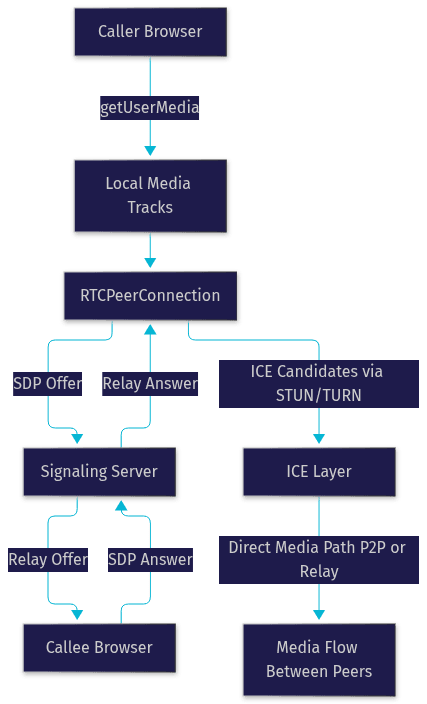
The RTCPeerConnection is the central object in every WebRTC example. It manages the media pipeline between two endpoints: it gathers local media tracks, negotiates their parameters with the remote side, and establishes the transport. Negotiation happens through the Session Description Protocol (SDP), where each side describes the codecs and media it wants to send or receive in an offer and answer exchange.
Between offer and answer sits ICE, the Interactive Connectivity Establishment framework. ICE probes the network with STUN servers to discover public-facing addresses, and falls back to TURN relays when direct paths fail behind strict NATs or corporate firewalls. The peer connection, ICE, and signaling layers interact in a fixed sequence, which the diagram below shows.
Media Flow and Codecs
Media moves through the peer connection as tracks: one audio track and one or more video tracks per participant. Each track carries an encoded stream, and the codec choice is negotiated during the SDP exchange. For audio, Opus is the near-universal default because it handles both speech and music well across bandwidth ranges. For video, VP8 and VP9 are royalty-free and widely supported in browsers, while H.264 offers strong hardware acceleration on many devices. Codec negotiation matters because a mismatched codec list between peers is one of the most common reasons a call connects but shows no video.
Setting Up a Simple WebRTC Example
Before any call can happen, three preparatory decisions shape everything downstream: your language and SDK choice, your signaling design, and how you instantiate the peer connection.
Choosing a Language and SDK
Browser JavaScript remains the most common starting point because the WebRTC API is native to the platform: no library is needed for the core peer connection. Go with the Pion library is a strong choice for server-side examples, since Pion is a pure-Go implementation with no external dependencies, ideal for building media servers, SFUs, and testing tools. Other popular bindings exist for Python, Rust, C++, and Unity, and managed SDKs like VideoSDK abstract the whole stack across ten-plus platforms, including a Prebuilt UI Kit for zero-code embedding.
Signaling Basics
WebRTC deliberately does not define how peers find each other. That job belongs to your signaling server, which relays SDP offers and answers plus ICE candidates between participants. Typical message types include join announcements, offers, answers, candidate exchanges, and leave events. Any transport works: WebSockets are the standard choice, but HTTP polling or even manual copy-paste works for learning examples.
Security is critical here. Your signaling channel should authenticate users with tokens issued server-side, never with credentials exposed in the client. VideoSDK handles this pattern natively: you generate a meeting token on your backend and pass it to the SDK, which scopes what each participant can do in a room.
Creating the PeerConnection
Instantiating a peer connection involves three things: constructing the object with a configuration that lists your STUN and TURN servers, attaching event listeners for incoming tracks and ICE candidates, and adding your local media tracks before generating an offer. The configuration object is where you point the ICE layer at public STUN servers for address discovery and at authenticated TURN servers for relay fallback. Getting this configuration right up front prevents most connectivity failures later.
Example Walkthrough: Browser-to-Browser Video Call
This walkthrough narrates a complete call between two browsers. The sequence below shows the full offer/answer and ICE exchange.

HTML Page Structure
The minimal page for this example needs two video elements, one for the local camera preview and one for the remote stream, plus a button to start the call. The remote video element stays empty until the incoming track event fires. A small status area for connection state helps enormously during debugging, since it lets you see whether the call is still gathering candidates or has failed outright.
JavaScript Flow Description
The flow begins when the caller requests camera and microphone access through the browser's media capture API. Once granted, the local stream is attached to the first video element for preview. The caller then creates a peer connection with its STUN and TURN configuration, adds each local track to it, and registers listeners for incoming remote tracks and for locally discovered ICE candidates.
Next, the caller asks the peer connection to generate an offer, which is an SDP blob describing all supported codecs and media. The caller sets that offer as its own local description and sends it over the signaling channel. On the receiving side, the callee sets the offer as its remote description, generates an answer describing which codecs it actually supports, sets that answer locally, and sends it back. When the caller applies the answer as its remote description, negotiation is complete and both sides know exactly which codecs will carry the media.
Handling ICE Candidates
ICE gathering runs in two phases in most examples. During and after the SDP exchange, each side discovers network candidates: host addresses, server-reflexive addresses learned from STUN, and relay candidates from TURN. Each discovered candidate is sent to the peer through the signaling channel, a technique called trickle ICE, and the ICE layer tests candidate pairs in parallel until it finds one that connects.
Trickle ICE improves connection latency because media can start flowing as soon as any working pair is found, rather than waiting for every candidate to be gathered. The fallback approach, gathering all candidates first and embedding them in the SDP before sending, is slower but simpler for constrained networks. If connectivity fails entirely, the culprit is almost always a missing TURN server, since roughly a fraction of real-world networks block direct paths and require relay.
Example Walkthrough: Go Server with Pion
The same call logic translates cleanly to a server-side context using Pion, the pure-Go WebRTC implementation used widely in production media infrastructure.
Overview of the Pion Library
Pion is an open-source WebRTC stack written entirely in Go with no dependency on the browser or on native WebRTC binaries. Its ecosystem includes an interceptor framework for customizing RTP processing, examples for every major use case, and integrations with media tooling. Because it runs anywhere Go runs, Pion is a favorite for building SFUs, recording servers, and test harnesses that simulate thousands of participants.
Building an Offer and Answer
In a Pion server example, the flow inverts: the server often acts as the answerer. A browser client generates an offer through its normal flow and sends it to the Go server over your signaling transport. The server creates a Pion peer connection with its configured STUN and TURN settings, sets the incoming offer as its remote description, and then generates an answer the same way a browser would, by describing the codecs and media it is prepared to receive.
The SDP exchange deserves emphasis here. Pion gives you fine control over which codecs you accept, so you can restrict negotiation to, say, VP8 and Opus only, guaranteeing compatibility with your downstream media pipeline. Once the answer travels back to the browser and is applied as its remote description, ICE proceeds exactly as in the browser example, and the server begins receiving RTP packets on the negotiated tracks.
Media Pipeline with GStreamer
To do something useful with incoming media, a common pattern hooks a GStreamer pipeline to the Pion tracks. Incoming RTP packets are read from each track and fed into a GStreamer depayloader and decoder, then processed, re-encoded, or written to disk for recording. The pipeline diagram below shows the flow.
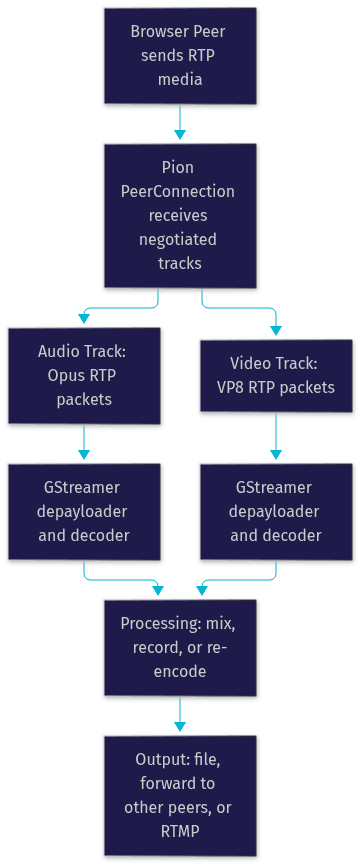
Codec selection is the critical decision at this stage. Your GStreamer pipeline must be built to handle the exact codec negotiated in the SDP, otherwise the decoder receives packets it cannot parse. Buffer flow matters too: reading from Pion tracks and pushing into GStreamer must happen without blocking, or jitter accumulates and the output stutters.
Common Pitfalls and Debugging Tips
Most WebRTC example failures cluster into three categories: connectivity, codecs, and security.
ICE Connectivity Issues
When a call never leaves the connecting state, the cause is usually NAT traversal. Symmetric NATs and corporate firewalls block direct paths, and without a TURN server there is no fallback. Diagnose with the browser's built-in WebRTC internals page, which shows every ICE candidate pair and its state. If all pairs fail, add an authenticated TURN server to your peer connection configuration. In production, expect a meaningful percentage of users to need TURN, and budget for its bandwidth cost.
Codec Mismatches
A call that connects with audio but no video usually means the video codec lists did not overlap. VP8 versus H.264 is the classic case: one side offering only H.264 and the other only VP8 produces a negotiated track with no usable codec. The fix is to enforce a common codec set on both sides during configuration, restricting each peer connection to codecs your whole pipeline supports.
Security and Token Handling
Authenticate your signaling channel with server-issued tokens, scope those tokens to specific rooms and roles, and always serve pages over HTTPS, since browsers block media capture on insecure origins. For sensitive applications, DTLS-SRTP already encrypts media end to end at the transport layer, but signaling security remains your responsibility. VideoSDK's token-based authentication model handles this pattern out of the box.
Extending Examples: Data Channels and Screen Sharing
Once a basic call works, two extensions unlock most real applications.
Using Data Channels for Chat
The RTCDataChannel API opens a direct, peer-to-peer pipe for arbitrary data alongside media. A chat feature establishes a reliable, ordered channel during negotiation, then both sides exchange text messages as they arrive. Because the channel is direct, chat latency matches media latency, often well under 100 milliseconds on good connections. Typical patterns include sending typing indicators over an unordered channel and message payloads over the reliable one.
Adding Screen Sharing
Screen sharing swaps a participant's camera video track for a screen-capture stream. The browser's screen capture API returns a new stream, and you replace the outgoing video track on the existing peer connection rather than creating a new one. This triggers renegotiation: a fresh offer and answer exchange updates the SDP to reflect the new track. Handle the case where the user stops sharing, which requires swapping back to the camera track and renegotiating again. VideoSDK exposes this as a first-class screen share feature with no manual renegotiation.
Performance and Scaling Considerations
A two-peer example is easy. Production traffic is not, and two concerns dominate.
Bandwidth Adaptation
WebRTC continuously measures available bandwidth and adjusts the video encoder's bitrate and resolution to match, a mechanism that keeps calls usable on fluctuating networks. Developers influence this in a few ways: setting maximum and minimum bitrate bounds on video senders, preferring specific resolutions, and responding to quality-limitation events to degrade gracefully. Managed SDKs like VideoSDK build network-adaptive streaming on top of these primitives, adjusting both bitrate and resolution automatically.
Using TURN Servers
Provision a TURN fleet when your user base includes enterprise networks, mobile carriers, or regions with strict NAT. TURN relays every packet, so it carries real bandwidth cost and adds a few tens of milliseconds of latency compared to direct paths. Size the fleet by geography to keep relay latency low, and monitor relay usage, since a spike often reveals a network change affecting direct connectivity for a user segment.
When to Use a Managed SDK Instead of Raw WebRTC
Raw WebRTC API examples teach you the fundamentals, and every real-time developer should understand them. But shipping a production video feature means solving signaling, TURN fleets, reconnection handling, recording, and multi-platform parity on your own. A managed SDK like VideoSDK provides rooms, server-side token generation, recording, real-time transcription, and interactive live streaming through one consistent API across React, Flutter, Android, iOS, React Native, Unity, and more. Use raw WebRTC when you need total control over the media pipeline; use a managed SDK when the product you are shipping is the application, not the infrastructure.
Definitions Glossary
RTCPeerConnection: The browser API object that manages media negotiation and transport between two endpoints, holding local tracks, the SDP state, and the ICE session.
SDP (Session Description Protocol): The text format used in the offer and answer exchange, describing which codecs, tracks, and parameters each side supports.
ICE Candidates: Network address candidates discovered via host interfaces, STUN, or TURN, tested in pairs until a usable media path is found.
STUN/TURN Servers: STUN helps peers discover their public network address; TURN relays media when no direct path exists, at the cost of bandwidth and added latency.
Trickle ICE: The practice of sending each ICE candidate to the peer as it is discovered, letting media flow before gathering completes, which reduces connection latency.
Pion: A pure-Go, open-source WebRTC implementation used to build server-side media infrastructure without browser dependencies.
Key Takeaways
- Every WebRTC API example reduces to the same three layers: peer connection, signaling, and ICE, and understanding their sequence makes any sample readable.
- The browser-to-browser flow is always getUserMedia, create the peer connection, add tracks, exchange an offer and answer over signaling, then exchange ICE candidates until media flows.
- Trickle ICE cuts connection latency by letting media start before candidate gathering finishes, but a TURN server remains mandatory for networks that block direct paths.
- Codec mismatches, not network failures, cause most "connected but no video" bugs, so restrict both peers to a common codec set.
- For production apps, managed SDKs like VideoSDK eliminate the signaling, TURN, reconnection, and multi-platform work that raw WebRTC examples leave to you.
Conclusion
Working through WebRTC API examples, from a browser video call to a Go media server with Pion, gives you the mental model that every real-time application is built on. The offer/answer exchange, ICE candidate handling, and codec negotiation you practiced here are the same mechanics running inside production systems at scale. When you are ready to ship rather than study, VideoSDK's quickstart gets a working video call into your app in minutes, with a free tier to start. What are you building with WebRTC? Drop a comment, I'd love to hear what kind of real-time use case you're working on.
Advanced WebRTC Examples: Adding Functionality
These examples demonstrate how to add more advanced functionality to your WebRTC applications.
Video Chat Implementation
To enable video chat, ensure that the
mediaConstraints include video:javascript
1const mediaConstraints = {
2    audio: true,
3    video: true
4};
javascript
1// Add video to the HTML
2<video id="localVideo" autoplay muted playsinline style="width:300px;"></video>
3<video id="remoteVideo" autoplay playsinline style="width:300px;"></video>
Audio Chat Implementation
To create an audio-only chat application, set the video constraint to false:
javascript
1const mediaConstraints = {
2    audio: true,
3    video: false
4};
javascript
1// No video element needed in HTML
2<audio id="localAudio" autoplay muted playsinline></audio>
3<audio id="remoteAudio" autoplay playsinline></audio>
Screen Sharing
To implement screen sharing, use the
getDisplayMedia API:javascript
1async function startScreenShare() {
2  try {
3    const stream = await navigator.mediaDevices.getDisplayMedia({
4      video: true,
5      audio: true //optional
6    });
7
8    localVideo.srcObject = stream;
9
10     stream.getTracks().forEach(track => {
11            peerConnection.addTrack(track, localStream);
12        });
13
14  } catch (err) {
15    console.error("Error: " + err);
16  }
17}
Data Channels for Text Communication
Create a data channel to send text messages between peers:
javascript
1const dataChannel = peerConnection.createDataChannel('chat');
2
3dataChannel.onopen = () => console.log('Data channel opened');
4dataChannel.onmessage = event => console.log('Received message:', event.data);
5
6dataChannel.send('Hello from Peer 1!');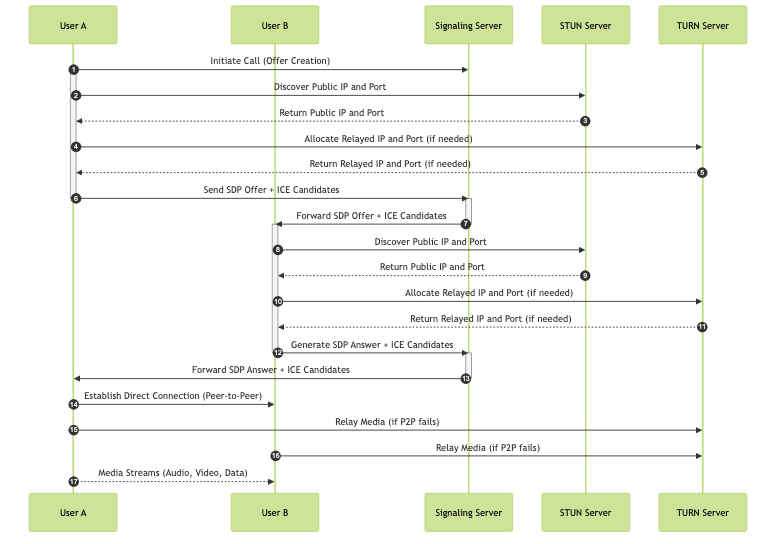
Handling WebRTC Challenges and Best Practices
Signaling
Signaling is the process of exchanging metadata between peers to establish a WebRTC connection. This typically involves exchanging SDP offers and answers, as well as ICE candidates. A separate signaling server is needed to coordinate this process. Common signaling methods include WebSockets, Socket.IO, or REST APIs.
STUN and TURN Servers
STUN (Session Traversal Utilities for NAT) and TURN (Traversal Using Relays around NAT) servers are essential for WebRTC to work behind Network Address Translation (NAT) firewalls. STUN servers help peers discover their public IP address and port, while TURN servers provide a relay service when direct peer-to-peer connections are not possible. Public STUN servers are available, and you can set up your own TURN server if needed for higher reliability.
Error Handling and Robustness
Implement robust error handling to gracefully handle exceptions and network issues. Listen for
iceconnectionstatechange events to detect connection failures. Implement retry mechanisms and user-friendly error messages to improve the user experience.Security Considerations
WebRTC uses DTLS (Datagram Transport Layer Security) to encrypt media streams and data channels. Ensure that your signaling channel is also secured using HTTPS or WSS (WebSocket Secure). Be mindful of potential security vulnerabilities and follow best practices for securing your WebRTC applications.
Optimizing WebRTC Performance
Choosing Appropriate Media Constraints
Optimize media constraints to balance video quality and bandwidth usage. Lowering the resolution or frame rate can significantly reduce bandwidth consumption. Use appropriate codecs that are widely supported.
Bandwidth Management
Implement adaptive bitrate streaming to dynamically adjust the video quality based on the available bandwidth. Monitor network conditions and adjust the media constraints accordingly. Consider using techniques such as Simulcast to send multiple streams at different quality levels.
Reducing Latency
Minimize latency by optimizing network configurations and reducing processing overhead. Use low-latency codecs and prioritize real-time traffic. Choose a signaling server geographically close to your users.
Conclusion: Expanding your WebRTC Knowledge
WebRTC is a powerful technology for building real-time communication applications. By understanding the core components and implementing best practices, you can create high-quality, reliable WebRTC experiences. Continue to explore advanced features and optimization techniques to further enhance your WebRTC skills.
- Learn more about WebRTC: WebRTC official website
- WebRTC API Reference: MDN Web Docs
Free $20 Balance for AI Voice Agents & Video Calls
FAQ