


A React Native Twilio video call integrates Twilio Programmable Video into a React Native application to enable real-time video communication through token-authenticated rooms. Developers render local and remote video streams, manage WebRTC media tracks, and handle participant lifecycle events. Twilio has announced the sunset of its Video product, making alternatives like VideoSDK worth evaluating for new projects. See the React Native quickstart for a modern alternative.
Video calling has become a baseline expectation in mobile applications across telehealth, education, customer support, and social networking. React Native developers building these experiences often turn to Twilio Programmable Video because of its mature SDK, extensive documentation, and WebRTC-based architecture. However, Twilio announced the sunset of its Programmable Video product, with end-of-life dates that mean new projects should carefully evaluate long-term viability before committing.
This guide walks through the complete process of building a React Native Twilio video call application, from environment setup through production deployment. You will learn how token authentication works, how to render local and remote video streams, how to handle edge cases like network drops and participant disconnections, and what alternatives exist if you are starting a new project today. Whether you are maintaining an existing Twilio Video integration or evaluating your options, this walkthrough covers the practical details that quickstarts skip.
What Is a React Native Twilio Video Call?
A React Native Twilio video call is a real-time video communication session built by integrating the Twilio Programmable Video SDK into a React Native mobile application. The SDK wraps WebRTC functionality behind a native module interface, exposing React components and JavaScript methods that handle room connection, media track management, and participant video rendering without requiring developers to work with raw WebRTC APIs.
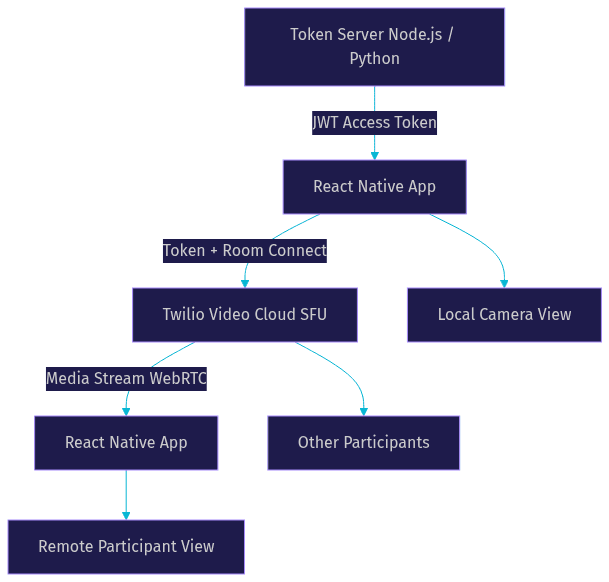
The core architecture maps cleanly to WebRTC concepts. Twilio provides a Selective Forwarding Unit (SFU) that routes media between participants rather than using peer-to-peer mesh connections. The React Native SDK exposes this through three primary component types: a main video component that manages the room connection and track events, a local view component that renders the device camera feed, and a participant view component that renders remote video streams. Each component corresponds to a WebRTC media track that the SFU forwards between connected participants.
VideoSDK provides similar real-time video calling capabilities through its React Native SDK, offering a rooms-based architecture with sub-300ms latency and broader platform coverage including Flutter, iOS, Android, and Unity. For developers evaluating alternatives to Twilio Video, VideoSDK's multi-platform SDK breadth and Prebuilt UI Kit provide a migration path worth considering.
Core Concepts Explained
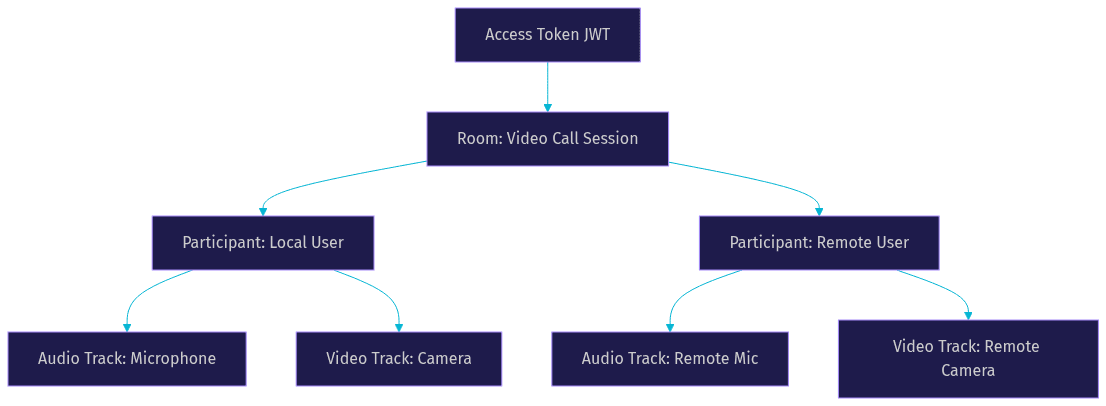
Twilio Programmable Video organizes communication around four core concepts that every React Native developer must understand before building a video call feature.
A Room is the top-level container for a video call session. Participants join a room using an access token generated server-side, and the room manages the connection lifecycle. Rooms can be configured as peer-to-peer or group rooms, with group rooms using the SFU for routing.
A Participant represents a single user connected to a room. Each participant has an identity string and a set of media tracks. The local participant represents the current device, while remote participants represent other connected users.
A Track is a single media stream, either audio or video, belonging to a participant. Video tracks carry camera or screen share feeds, while audio tracks carry microphone input. The SDK exposes track events that fire when tracks are added, removed, or enabled and disabled.
A Token is a JWT-based access credential that authenticates a participant joining a room. Tokens are generated server-side using your Twilio API credentials and must never be embedded in the client application. Token generation requires specifying a room name, participant identity, and expiration time.
Prerequisites and Environment Setup
Setting up a React Native Twilio video call requires specific tooling and account configuration before writing any integration logic. React Native version 0.70 or later is recommended, as earlier versions may have compatibility issues with the native modules that the Twilio Video SDK depends on. You need Node.js, a working iOS development environment with Xcode, and an Android development environment with Android Studio.
You must create a Twilio account and obtain your Account SID and API Key credentials from the Twilio Console. These credentials are used exclusively on your server to generate access tokens. Never expose them in your React Native application bundle, as they grant full access to your Twilio account.
If you are using Expo, you need to verify that the Twilio Video community library supports your Expo SDK version. Expo managed workflow projects require a config plugin or ejection to bare workflow for native module support. Bare React Native projects have more flexibility but require manual native dependency linking through CocoaPods on iOS and Gradle on Android.
Installing the Twilio Video SDK
The Twilio Video SDK for React Native is distributed as a community-maintained npm package rather than an official Twilio-published library. You install it using your preferred package manager, adding the dependency to your project. After installation, iOS projects require running CocoaPods to install native dependencies. Android projects typically auto-link through React Native's autolinking mechanism, but you should verify that the native module appears in your build output.
If you are using Expo with a managed workflow, you may need to create a development build or eject to bare workflow because the Twilio Video SDK requires native code that cannot run in Expo Go. This is a common stumbling block for developers who start with Expo and later need to add video calling capabilities.
Configuring Permissions
Video calling requires camera and microphone permissions on both platforms. On iOS, you must add usage description strings to your Info.plist file explaining why your app needs camera and microphone access. These strings are displayed to users when the system shows the permission dialog, and Apple rejects apps from the App Store if these descriptions are missing or too vague.
On Android, you must add camera and record audio permissions to your AndroidManifest.xml file. Android 6.0 and later also requires runtime permission requests, meaning your React Native code must prompt the user to grant permissions before attempting to access the camera or microphone. The Twilio Video SDK will fail silently or throw errors if permissions are not granted before you attempt to publish local media tracks.
For Expo projects using a config plugin, the plugin can automatically inject the required permission entries into your native configuration files. This simplifies the setup but you still need to handle runtime permission requests in your JavaScript code.
Building the Video Call Flow
Building a complete React Native Twilio video call requires orchestrating several components: a server that generates access tokens, a client that fetches tokens and connects to rooms, and UI components that render local and remote video streams. Each step has specific considerations that affect reliability and user experience.
Token Server Overview
The token server is a critical component that generates JWT access tokens using your Twilio API credentials. This server can be built with any backend technology, including Node.js, Python, or Ruby. Its primary responsibility is to receive a request from your React Native app containing a room name and participant identity, then return a signed JWT that the client uses to join the room.
Security is paramount here. Your Twilio Account SID and API Secret must never be included in your React Native bundle. The token server should enforce authentication, rate limiting, and token expiration. Tokens should expire within a reasonable window, typically one to four hours, to limit exposure if a token is intercepted. Some implementations also validate that the requesting user is authorized to join the specified room before issuing a token.
Connecting to a Room
Once your React Native app receives an access token from your token server, it passes the token to the Twilio Video SDK to establish a room connection. The SDK uses the token to authenticate with Twilio's SFU infrastructure, which then negotiates WebRTC connections with other participants in the room.
The SDK emits connection events that your application must handle. These include room connected, participant joined, participant disconnected, track added, track removed, and room disconnected events. Your React Native code should register event listeners immediately after initializing the SDK component and before attempting to connect, otherwise you may miss early events if participants are already in the room when you join.
A common mistake is assuming that the room connection is instantaneous. Network conditions, token validation, and SFU assignment all take time. Your UI should show a connecting state and handle connection failures gracefully with retry logic.
Rendering Video Streams
The Twilio Video SDK for React Native provides dedicated view components for rendering video. The local view component displays the device camera feed and supports mirror mode for front-facing camera previews. The participant view component renders remote participant video tracks and requires you to pass the specific track object you want to display.
For layout, a common pattern is to render the local video as a small picture-in-picture overlay in a corner of the screen, with the remote participant video filling the main area. In multi-party calls, you need to iterate over the participant array and render each participant's video track in a grid or speaker-focused layout. React Native's FlatList or ScrollView components work well for this, but you should key each video view by participant identity and track ID to prevent rendering glitches when participants join and leave.
Handling Common Edge Cases
Production video calling applications encounter edge cases that quickstart tutorials rarely address. Participant disconnections, duplicate video tracks, empty participant arrays, network interruptions, and app lifecycle transitions all require explicit handling to maintain a stable user experience.
When a participant disconnects, the SDK fires a participant disconnected event. Your code must clean up the associated video view component and remove the participant from your state. Failing to do this leaves stale video views that can cause memory leaks and rendering errors. Conversely, when a participant reconnects after a network drop, you may receive duplicate track events. Your code should check whether a track already exists before adding it to your render list.
An empty participant array when joining a room is another common issue. This typically occurs when the room connection completes before participant data is fully synced. Your code should handle this by waiting for participant joined events rather than assuming all participants are available immediately after connection.
App lifecycle transitions are particularly important on mobile. When your React Native app goes to the background, iOS and Android may suspend WebRTC connections. You should detect background transitions and optionally disable video to preserve audio-only communication, then re-enable video when the app returns to the foreground.
Reconnection Strategy
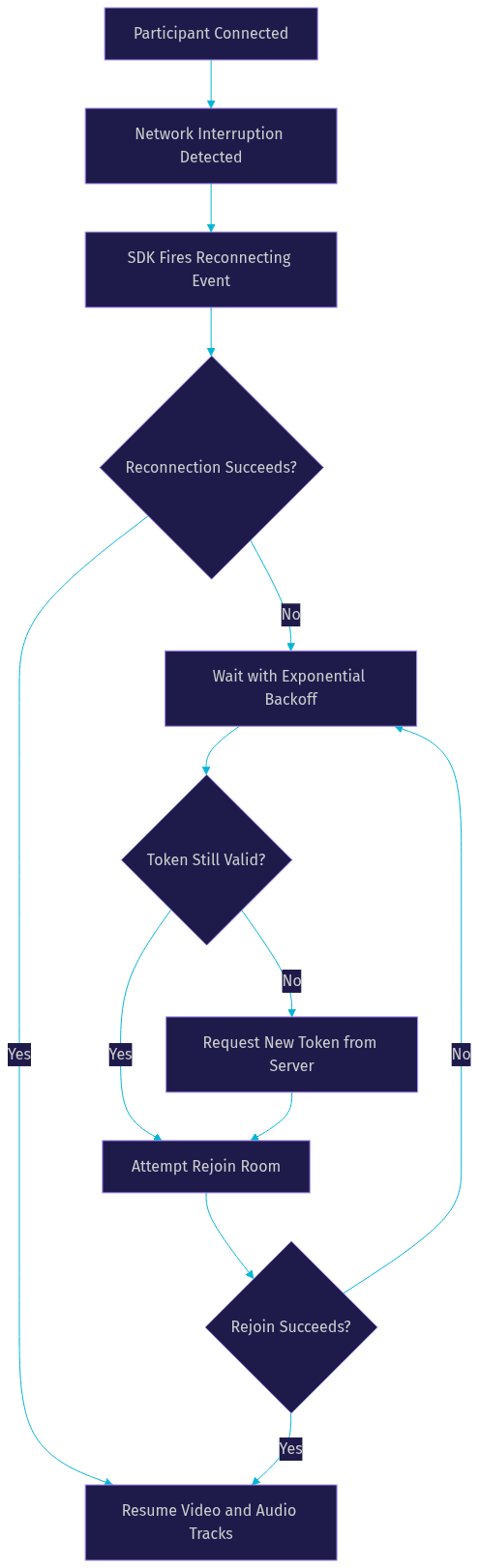
Network interruptions cause participants to drop from rooms unexpectedly. The Twilio Video SDK provides reconnection events that indicate when a participant is attempting to reconnect and when reconnection succeeds or fails. Your application should listen for these events and update the UI to show a reconnecting state.
If reconnection fails after a timeout period, your code should attempt to rejoin the room using a fresh access token. The original token may still be valid, but requesting a new one ensures that expired tokens do not cause repeated failures. You should implement exponential backoff for rejoin attempts to avoid overwhelming your token server during network-wide outages.
Debugging Tips
Debugging React Native Twilio video call issues requires platform-specific tools. On iOS, use the Xcode console to view native WebRTC logs that are not surfaced in the React Native debugger. On Android, use Logcat with a filter for WebRTC and Twilio-related tags to capture native module output. The React Native debugger shows JavaScript-level events but misses lower-level connection and track issues.
Twilio also provides a debug console in the Twilio web dashboard where you can inspect room connections, participant events, and media track statistics. This is invaluable for diagnosing issues that only appear in production. Common problems to look for include tracks that are published but not subscribed, participants who connect but never publish media, and rooms that remain active after all participants have left.
Performance Optimizations
Video calling is resource-intensive on mobile devices. The Twilio Video SDK supports bandwidth adaptation, which automatically adjusts video bitrate and resolution based on available network bandwidth. You should enable this feature and avoid forcing fixed video parameters that exceed what the network can sustain.
On low-bandwidth networks, consider disabling video tracks entirely and falling back to audio-only communication. The SDK allows you to enable and disable individual tracks without disconnecting from the room. When video is re-enabled, the SDK renegotiates the connection, which takes a few seconds.
Codec selection also impacts performance. VP8 is the default codec for Twilio Video and offers good compatibility across devices. H.264 provides hardware acceleration on iOS and many Android devices, reducing CPU usage and battery drain. Your codec choice should consider the target devices and the tradeoff between quality and battery life.
Advanced Features
Beyond basic one-to-one video calls, the Twilio Video SDK supports several advanced features that enhance the calling experience. Screen sharing, multi-party layouts, and prebuilt UI components extend the functionality available to React Native developers.
Screen Sharing Walkthrough
Screen sharing in a React Native Twilio video call involves capturing the device screen as a video track and publishing it to the room alongside or instead of the camera feed. On iOS, screen sharing requires a Broadcast Extension, which is a separate native module that captures screen content outside your main app process. On Android, screen sharing uses the Media Projection API, which requires user permission to capture screen content.
The high-level flow is to request screen capture permission from the user, create a local screen share track using the SDK, publish that track to the room, and render it in a participant view component on remote devices. Remote participants see the shared screen as a regular video track, so no special rendering logic is needed on the receiving end. You should provide UI controls to start and stop screen sharing and clearly indicate when screen sharing is active.
Multi-Party Layouts
Multi-party video calls require thoughtful layout design. Gallery view displays all participants in a grid, giving equal visual weight to each person. This works well for small group calls with up to eight participants but becomes unwieldy with larger groups. Speaker view highlights the active speaker in a large central view with other participants in a smaller strip or grid.
Implementing active speaker detection in React Native requires listening for audio level events from the SDK and updating your layout state when the dominant speaker changes. The Twilio Video SDK provides dominant speaker events for group rooms. Your layout should animate smoothly between speaker changes to avoid jarring visual jumps. React Native's Animated API or a layout animation library can handle these transitions.
For developers looking for a faster path to production, VideoSDK offers a Prebuilt UI Kit that handles gallery view, speaker view, screen sharing, chat, and participant management without custom UI code. This can significantly reduce development time for teams that need a complete video calling experience quickly.
Testing on Real Devices
Testing a React Native Twilio video call on simulators or emulators is insufficient for validating real-world behavior. iOS simulators cannot access the camera and have limited microphone support. Android emulators can use the host webcam but introduce latency and encoding artifacts that do not represent real device performance.
You should test on at least one physical iOS device and one physical Android device, ideally covering different OS versions and device capabilities. Test with both front and rear cameras, with Bluetooth headsets connected and disconnected, and with the app in foreground and background states.
For local development, your token server runs on localhost, which is not accessible from a physical mobile device on a different network. Use a tunneling service like ngrok to expose your local token server to the internet temporarily. This allows your physical test devices to fetch access tokens during development without deploying your token server to a public host.
Production Checklist
Before shipping your React Native Twilio video call to production, verify these critical items. Your token server must be accessible over HTTPS. Mixed-content requests from an HTTPS app to an HTTP token server will be blocked by mobile platforms. Deploy your token server behind a reverse proxy with TLS termination.
TURN server fallback ensures that participants behind restrictive firewalls can still connect. Twilio provides TURN servers as part of its infrastructure, but you should verify that your SDK configuration uses them. If you migrate to an alternative provider like VideoSDK, confirm that TURN fallback is included in the default configuration.
App store permissions require clear usage descriptions. Apple and Google both require you to explain why your app needs camera and microphone access. Vague descriptions like "for video calls" may be rejected. Specify the feature and user benefit, such as "Camera access is required for video consultations with your healthcare provider."
Monitoring and analytics help you diagnose production issues. Twilio provides room and participant analytics through its console. If you use an alternative provider, verify that equivalent monitoring is available. Track connection success rates, average call duration, and track subscription failures as key metrics.
Definitions Glossary
Room: A container for a video call session in Twilio Programmable Video. Participants join a room using an access token, and the room manages the connection lifecycle and media routing through an SFU.
Participant: A single user connected to a video room. Each participant has an identity, a set of audio and video tracks, and a connection state that changes throughout the call lifecycle.
Track: A single media stream belonging to a participant. Video tracks carry camera or screen share feeds, while audio tracks carry microphone input. Tracks can be published, subscribed, enabled, and disabled independently.
Access Token: A JWT-based credential that authenticates a participant joining a Twilio Video room. Tokens are generated server-side using Twilio API credentials and must never be exposed in the client application.
SFU (Selective Forwarding Unit): A media server that receives video and audio streams from all participants and selectively forwards them to other participants. This is more scalable than peer-to-peer mesh connections for multi-party calls.
Key Takeaways
A React Native Twilio video call requires a server-side token generation service, client-side SDK integration, and careful handling of participant and track lifecycle events.
Twilio has announced the sunset of Programmable Video, meaning developers starting new projects should evaluate alternatives like VideoSDK that offer multi-platform SDKs and a Prebuilt UI Kit for faster deployment.
Edge cases including network interruptions, duplicate tracks, empty participant arrays, and app background transitions require explicit handling to maintain a stable video calling experience.
Testing on physical devices is essential because simulators and emulators cannot accurately represent camera behavior, network conditions, or hardware encoding performance.
Production deployment requires HTTPS for your token server, TURN server fallback for firewall traversal, clear app store permission descriptions, and monitoring for connection success rates and track failures.
Conclusion
Building a React Native Twilio video call involves orchestrating token authentication, room connections, media track management, and video rendering across iOS and Android. The end-to-end flow from token server through SDK initialization to participant view rendering is well-documented but requires attention to edge cases that production apps inevitably encounter. With Twilio's Programmable Video sunset underway, developers should evaluate alternatives for new projects. VideoSDK provides a React Native video calling SDK with multi-platform support, a Prebuilt UI Kit, and sub-300ms latency that simplifies many of the integration challenges covered in this guide. You can explore code samples and sign up for a free tier at app.videosdk.live/login to start building. What are you building with video calling in React Native? Drop a comment below, I would love to hear what kind of video call use case you are working on.
Free $20 Balance for AI Voice Agents & Video Calls
FAQ