


YouTube RTMPS is a secure ingest protocol for sending your live stream from an encoder to YouTube servers, while HLS is the delivery protocol YouTube uses to distribute that stream to viewers. RTMPS encrypts the upload with TLS, and HLS segments the video for adaptive playback. For sub-second interactive streaming, consider VideoSDK Interactive Live Streaming.
Choosing the right streaming protocol directly impacts your viewer experience, latency, and security. When broadcasting on YouTube, the choice between RTMPS and HLS often confuses developers and streamers because they serve different stages of the pipeline. You need to understand how each handles video data, network fluctuations, and encryption. A wrong decision here leads to buffering, dropped frames, or compromised stream keys. By the end of this guide, you will know exactly when to use YouTube RTMPS versus HLS, and how VideoSDK Interactive Live Streaming offers a powerful alternative for real-time audience engagement.
What is YouTube RTMPS vs HLS?
YouTube RTMPS vs HLS is a comparison between two streaming protocols that operate at different stages of the broadcast pipeline. RTMPS (Real-Time Messaging Protocol Secure) is primarily an ingest protocol originally created by Adobe. It handles the secure transmission of video data from your broadcasting software, like OBS or Streamlabs, to YouTube's ingest servers. HLS (HTTP Live Streaming) is a delivery protocol developed by Apple. YouTube uses HLS to distribute the processed video to viewers across various devices. You can read the official HTTP Live Streaming specification for detailed protocol mechanics. Understanding the distinction between ingest and delivery is the foundation of streaming protocol comparison.
Ingest vs Delivery
The streaming pipeline operates in two distinct stages: ingest and delivery. Ingest is the upload path where your encoder sends a single high-quality stream to the platform. Delivery is the download path where the platform distributes that stream to thousands or millions of viewers. RTMPS handles the ingest stage, ensuring your stream reaches YouTube securely over a persistent connection. HLS handles the delivery stage, breaking the video into small chunks that viewers can download efficiently over standard HTTP. This separation allows YouTube to optimize the upload for stability and the download for scalability.
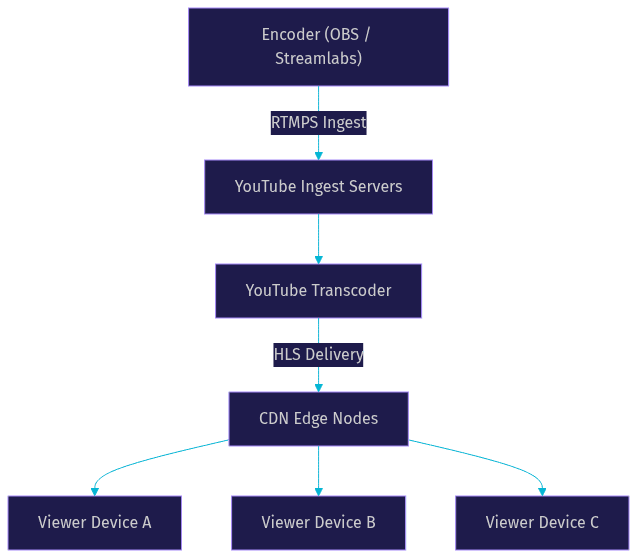
Architecture Comparison
The architectural difference between RTMPS and HLS dictates how they perform under varying network conditions. RTMPS relies on a persistent TCP connection, while HLS uses segmented HTTP delivery. This fundamental split determines their scalability, reliability, and compatibility with modern content delivery networks.
Persistent Connection (RTMPS)
RTMPS maintains a persistent TCP connection between the encoder and the ingest server for the entire duration of the stream. This connection carries a continuous flow of audio and video packets. Because the connection stays open, RTMPS offers relatively low ingest latency. However, persistent connections are vulnerable to network interruptions. If the connection drops, the encoder must re-establish it, which can cause stream stuttering. Firewalls can also block persistent non-standard ports, though RTMPS uses standard TLS over port 443 to mitigate this. Firewall traversal is generally reliable because port 443 is almost always open for HTTPS traffic.
Segmented Delivery (HLS)
HLS breaks the video stream into small sequential files, typically two to ten seconds long. The player downloads a manifest file that points to these segments. This HTTP-based approach is inherently CDN-friendly. CDNs can cache these segments at edge locations globally, allowing HLS to scale to massive audiences without overloading origin servers. If a viewer's network drops, the player simply requests the next segment from the CDN, making playback highly resilient. Tokenized URLs can be used to secure these segments, ensuring only authorized viewers can access the content. CDN scalability is where HLS truly outshines persistent connection protocols.
Latency Characteristics
Latency is the most critical differentiator in the YouTube RTMPS vs HLS comparison. Standard HLS introduces significant end-to-end delay. The encoder buffers video, the server segments it, the CDN caches it, and the player buffers it again before playback. This process typically adds 10 to 30 seconds of latency. RTMPS ingest itself is fast, but the delivery protocol determines the final viewer delay. YouTube live streaming latency is heavily influenced by the chosen delivery format.
Low-latency HLS (LL-HLS) reduces this delay by using partial segments and faster manifest updates. YouTube supports LL-HLS for ultra-low latency streams, bringing delay down to roughly two to five seconds. However, achieving this requires specific encoder settings and network stability. LL-HLS demands precise segment duration control and efficient manifest management. For true sub-second interaction, neither standard HLS nor LL-HLS is sufficient. Developers building interactive live shopping or gaming streams often turn to WebRTC-based solutions like VideoSDK Interactive Live Streaming to achieve sub-second latency. The W3C WebRTC specification defines the standards that make this real-time communication possible.
Security and Encryption
Security is a major reason YouTube transitioned from RTMP to RTMPS. Standard RTMP transmits data in plaintext, exposing your stream to interception. RTMPS wraps the RTMP payload in a TLS encryption layer. This protects your stream key and video content during the ingest process. YouTube now requires RTMPS for all new streams to ensure streaming security. TLS encryption for streaming is now the industry standard.
HLS delivery also supports encryption. YouTube can use signed manifests and tokenized URLs to restrict access to premium content. For long-running streams, protecting your ingest endpoint is critical. Never expose your YouTube stream key in client-side code. Always generate it server-side and rotate it periodically if your streaming workflow allows. Streaming key protection is a fundamental best practice for live streaming security.
Adaptive Bitrate and Viewer Experience
HLS natively supports adaptive bitrate streaming (ABR). The manifest file contains multiple renditions of the same video at different resolutions and bitrates. The player monitors the viewer's bandwidth and seamlessly switches between renditions to prevent buffering. This creates a smooth viewer experience across diverse network conditions, from fiber connections to mobile networks. HLS adaptive bitrate is the primary reason HLS dominates video delivery.
RTMPS ingest typically sends a single bitrate stream to the server. The server then transcodes that stream into multiple HLS renditions for delivery. While you can configure your encoder to send multiple RTMPS streams at different qualities, this consumes more upload bandwidth. Relying on the server to handle ABR is standard practice, but it requires YouTube to process your stream, which adds to the overall latency. Buffering and abandonment rates drop significantly when ABR is implemented effectively.
Setup Complexity and Encoder Support
RTMPS is the default ingest protocol in modern broadcasting software. OBS, Streamlabs, and vMix all support RTMPS out of the box. You simply paste your YouTube stream key and server URL into YouTube Studio settings, and the encoder handles the TLS handshake. Setup is straightforward for developers and content creators alike. Encoder compatibility is nearly universal for RTMPS.
HLS ingest is less common and more complex. Most encoders do not natively support HLS ingest because HLS is fundamentally a delivery protocol. If you need to push an HLS stream to a custom server, you typically need a dedicated transcoder or media server like Wowza or an SRT-to-HLS bridge. This adds setup complexity. For developers seeking a simpler path to low-latency streaming without encoder headaches, VideoSDK Interactive Live Streaming abstracts this complexity entirely.
When to Choose YouTube RTMPS vs HLS
Understanding when to use each protocol depends on your specific streaming goals. Since YouTube uses RTMPS for ingest and HLS for delivery, you do not strictly choose one over the other on their platform. However, if you are building a custom streaming architecture, your choice matters. The decision hinges on audience size, network stability, security needs, latency tolerance, and device compatibility.
Decision Matrix
- Use RTMPS when you need to securely ingest a live stream from an encoder to a media server.
- Use HLS when you need to deliver a stream to a massive, global audience with maximum compatibility.
- Use RTMPS when your encoder software supports it natively and you need a reliable persistent connection.
- Use HLS when viewer network conditions are unpredictable and you need adaptive bitrate streaming.
- Use LL-HLS when you need lower delivery latency but can tolerate a few seconds of delay.
- Use WebRTC-based ILS when you need sub-second latency for real-time audience interaction.
VideoSDK Perspective: Using Interactive Live Streaming (ILS)
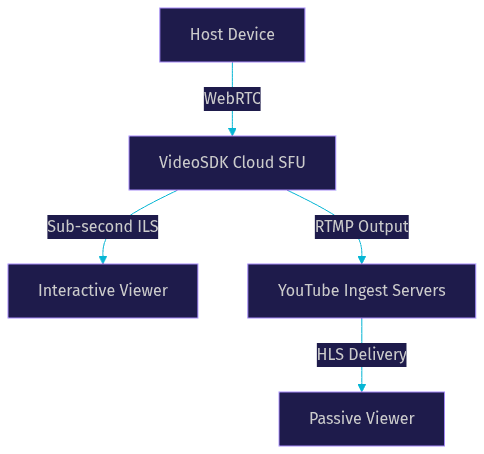
If your use case demands real-time interaction, YouTube's RTMPS and HLS pipeline introduces too much friction. VideoSDK Interactive Live Streaming (ILS) provides a WebRTC-based alternative that bypasses traditional CDN delays. With VideoSDK ILS, you can achieve sub-second latency, allowing viewers to become active participants. This is ideal for live shopping, webinars, and gaming tournaments.
VideoSDK also supports RTMP output, meaning you can simultaneously broadcast your interactive VideoSDK stream to YouTube for standard viewers. This hybrid approach gives you the best of both worlds: real-time interaction for active participants and scalable HLS delivery for passive viewers. VideoSDK handles the adaptive bitrate and network optimization automatically. You can learn more about building these workflows in the VideoSDK documentation.
Production Considerations
Deploying a streaming workflow in production requires careful planning. For RTMPS ingest, ensure your firewall rules allow outbound traffic on port 443. Monitor your encoder's dropped frames metric, as this indicates network instability between your encoder and the ingest server. Implement a fallback strategy. If your primary encoder fails, a backup encoder should be ready to take over using the same stream key. RTMP fallback mechanisms can save a broadcast during unexpected failures.
For HLS delivery, consider segment duration carefully. Shorter segments reduce latency but increase manifest requests, which can strain the CDN. Longer segments improve stability but increase buffering. Token rotation and stream key protection are essential for preventing unauthorized access. Finally, consider the cost implications. Server-side transcoding for ABR consumes significant compute resources. VideoSDK's built-in adaptive streaming can reduce these infrastructure costs. Following live streaming best practices ensures a reliable broadcast.
Definitions Glossary
RTMPS: Real-Time Messaging Protocol Secure. An ingest protocol that encrypts video data with TLS before sending it to a media server.
HLS: HTTP Live Streaming. A delivery protocol that breaks video into small segments for CDN distribution and adaptive playback.
Ingest: The process of sending a live video stream from an encoder to a server or platform.
Adaptive Bitrate (ABR): A technique that adjusts video quality in real time based on the viewer's network bandwidth.
Low-Latency HLS (LL-HLS): An extension of HLS that uses partial segments to reduce end-to-end delivery delay.
Interactive Live Streaming (ILS): A WebRTC-based streaming mode that enables sub-second latency for real-time audience participation.
Key Takeaways
- YouTube RTMPS secures the ingest path from your encoder to YouTube servers using TLS encryption.
- YouTube HLS handles the delivery path, segmenting video for scalable CDN distribution and adaptive playback.
- Standard HLS introduces 10 to 30 seconds of latency, while LL-HLS reduces this to a few seconds.
- RTMPS is natively supported by modern encoders, while HLS ingest requires additional tooling.
- For sub-second interactive streaming, VideoSDK Interactive Live Streaming offers a superior alternative to the traditional RTMPS and HLS pipeline.
Conclusion
The YouTube RTMPS vs HLS comparison highlights two protocols serving distinct purposes in the streaming pipeline. RTMPS secures your ingest, while HLS scales your delivery. If your goal is one-way broadcasting to a massive audience, YouTube's default pipeline works well. However, if you are building a platform that requires real-time audience interaction, sub-second latency is non-negotiable. Explore VideoSDK Interactive Live Streaming to build interactive streaming experiences without the latency baggage of traditional HLS. What are you building with VideoSDK? Drop a comment and let me know your streaming use case.
HLS: The HTTP Live Streaming Protocol
How HLS Works
HLS segments the video into small chunks (typically a few seconds each) and delivers them over HTTP. An index file (playlist file, with
.m3u8 extension) lists the available segments and their order. The player downloads the playlist file and sequentially requests the video segments. HLS supports adaptive bitrate streaming (ABS), where the player switches between different quality levels based on network conditions. This is typically implemented via multiple m3u8 playlists, each listing segments encoded at a particular bitrate.Example HLS Playlist (.m3u8) file
1#EXTM3U
2#EXT-X-VERSION:3
3#EXT-X-MEDIA-SEQUENCE:0
4#EXT-X-TARGETDURATION:10
5#EXTINF:10.0,
6segment0.ts
7#EXTINF:10.0,
8segment1.ts
9#EXTINF:10.0,
10segment2.ts
11#EXT-X-ENDLIST
Advantages of HLS
- Wide Compatibility: Supported by virtually all modern devices and browsers, including iOS and Android.
- Scalability: Leverages standard HTTP infrastructure, making it highly scalable using CDNs (Content Delivery Networks).
- Adaptive Bitrate Streaming (ABS): Dynamically adjusts video quality based on the user's network conditions, providing a smooth viewing experience.
- Firewall Friendly: Uses standard HTTP ports (80 and 443), minimizing firewall issues.
- Security: HLS supports encryption.
Disadvantages of HLS
- Higher Latency: Due to the segmentation and buffering involved, HLS typically has higher latency than RTMP. Efforts are underway to reduce this latency with Low-Latency HLS (LL-HLS).
- Increased Complexity: Setting up HLS can be more complex than setting up RTMP.
- Bandwidth Overhead: The segmentation process can introduce some bandwidth overhead.
RTMP vs. HLS: A Head-to-Head Comparison
Latency: Real-time vs. Delayed Streaming
RTMP traditionally offers lower latency (around 5 seconds or less) compared to HLS. HLS, without specific optimizations, typically introduces latencies of 15-30 seconds or more. However, with the introduction of Low-Latency HLS (LL-HLS), this gap is narrowing. LL-HLS aims to achieve latencies of 3-5 seconds by reducing segment sizes and optimizing the delivery process. However, LL-HLS introduces its own set of complexities and isn't universally supported.
Compatibility and Browser Support
HLS has significantly better compatibility than RTMP, especially with modern web browsers. RTMP relied on Flash, which is no longer supported. HLS is natively supported by most browsers and operating systems. This makes HLS the clear winner for reaching a broad audience without requiring plugins.
Scalability and Distribution
HLS excels in scalability due to its HTTP-based nature. It seamlessly integrates with CDNs, allowing for efficient distribution of content to a large number of viewers. RTMP, while scalable, requires more specialized infrastructure and is less easily integrated with standard CDNs.
Security and Encryption
HLS supports encryption using HTTPS and AES encryption of the video segments. This provides a secure way to deliver content and protect it from unauthorized access. RTMP also supports encryption, but its implementation is less standardized and widely used.
Bandwidth Consumption
Both RTMP and HLS bandwidth consumption depend on the video bitrate. HLS, due to segmentation, can have slightly higher overhead. However, HLS's adaptive bitrate capabilities can result in lower overall bandwidth usage for viewers with poor network connections, as the player can switch to a lower quality stream.
Cost and Implementation
RTMP can be simpler to implement for basic streaming setups. However, scaling RTMP and ensuring compatibility can increase costs. HLS, while potentially more complex to set up initially, can be more cost-effective in the long run due to its integration with standard HTTP infrastructure and CDNs. Services that provide streaming infrastructure typically charge by bandwidth used. Bandwidth consideration for HLS is important to consider. Encoding servers are also important considerations for both protocols.
Choosing the Right Protocol for Your YouTube Livestream
Factors to Consider
- Latency Requirements: If near real-time interaction is critical (e.g., live gaming or interactive Q&A), then optimizing for low latency ingest to YouTube is crucial. It's important to remember YouTube will convert to HLS.
- Target Audience: If you need to reach a wide audience across various devices and browsers, HLS is the better choice for distribution.
- Scalability Needs: If you anticipate a large number of concurrent viewers, HLS offers better scalability.
- Security Concerns: If security is a priority, HLS provides robust encryption options.
- Bandwidth Costs: Consider the bandwidth implications of each protocol, especially for viewers with limited bandwidth.
- Complexity and Cost: Balancing the complexity of setting up each protocol with the overall cost is a critical factor.
Scenario-Based Recommendations
- Gaming Livestream: Use RTMP or SRT for ingest to YouTube because of the low latency requirement, understanding YouTube will convert it for delivery.
- Large-Scale Event: Use HLS for distribution due to its superior scalability and compatibility.
- Mobile-Focused Livestream: Use HLS for distribution to ensure seamless playback on iOS and Android devices.
Conclusion: Making an Informed Decision
While RTMP remains a viable option for ingest to platforms like YouTube, HLS has become the dominant protocol for delivery due to its wide compatibility, scalability, and adaptive bitrate capabilities. Understanding the trade-offs between latency, compatibility, and cost is crucial for making an informed decision about which protocol is best suited for your specific YouTube livestreaming needs. Choose wisely and optimize for the best possible viewing experience for your audience.
Free $20 Balance for AI Voice Agents & Video Calls
FAQ