


MiroTalk SFU WebRTC is an open-source, self-hosted video conferencing platform built on mediasoup that uses a Selective Forwarding Unit architecture to route real-time audio and video streams between participants with minimal latency. Unlike MCU-based solutions that decode and mix media server-side, an SFU forwards raw RTP packets directly, reducing CPU overhead and enabling scalable multi-party calls. Developers choose MiroTalk SFU when they need full data control, unlimited rooms, and deep extensibility through REST APIs and AI integrations without vendor lock-in.
Introduction
Self-hosted WebRTC solutions give developers something cloud APIs cannot: total control over media routing, data residency, and infrastructure costs. When you run your own Selective Forwarding Unit, no third party sees your participants' streams, and you can scale horizontally by adding server capacity rather than paying per-minute usage fees.
MiroTalk SFU WebRTC has emerged as a popular choice in this space. Built on top of mediasoup, it offers a production-ready SFU with features that rival commercial platforms: 8K video support, RTMP output for OBS streaming, AI integration hooks, and a multilingual interface. For teams evaluating open-source WebRTC platforms, understanding how MiroTalk SFU works under the hood helps you decide whether it fits your architecture or whether a managed solution like VideoSDK's video calling API better serves your needs.
What is MiroTalk SFU WebRTC?
MiroTalk SFU is defined as an open-source WebRTC application that uses a Selective Forwarding Unit to facilitate real-time video and audio communication between multiple participants. The project builds on mediasoup, a Node.js and C++ based WebRTC media server, to handle the heavy lifting of media routing, codec negotiation, and bandwidth adaptation.
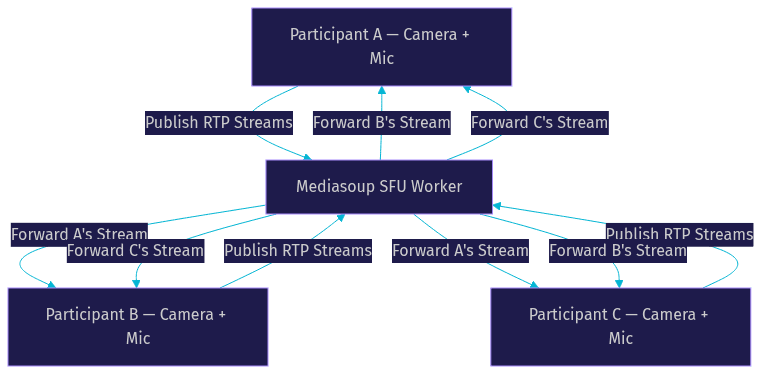
MiroTalk SFU works by establishing peer connections between each participant and the mediasoup server. Instead of participants connecting directly to each other in a full mesh topology that does not scale, each participant sends one set of media streams to the SFU, and the SFU forwards those streams to all other participants. This reduces the upload burden on each client dramatically.
Compared to traditional MCU (Multipoint Control Unit) architectures, where the server decodes all incoming streams, composites them into a single layout, and re-encodes the result, an SFU never decodes or re-encodes media. It operates on raw RTP packets, forwarding them with minimal processing. This means lower server CPU usage, lower latency, and preservation of original stream quality. The trade-off is that each participant receives multiple individual streams rather than one composited feed, which shifts some rendering work to the client.
How the SFU Architecture Works
A Selective Forwarding Unit sits between participants in a WebRTC session and intelligently routes media streams based on each receiver's available bandwidth and subscribed quality layers. The core principle is straightforward: the server forwards what it receives without modifying the payload.
In MiroTalk SFU, mediasoup acts as the media engine. When a participant joins a room, their browser negotiates a WebRTC peer connection with the mediasoup worker process. The participant publishes audio and video tracks as RTP streams to the server. Other participants in the same room subscribe to those tracks, and mediasoup forwards the RTP packets to each subscriber.
The SFU supports simulcast, which means a sender can transmit multiple quality layers of the same video stream simultaneously. The SFU then selects the appropriate layer for each receiver based on their downstream bandwidth. If a receiver's connection degrades, the SFU automatically switches them to a lower layer without interrupting the call.
Media Flow Details
Before media can flow, participants must complete ICE (Interactive Connectivity Establishment) negotiation. MiroTalk SFU relies on STUN and TURN servers to help participants discover their public IP addresses and traverse NAT environments. The STUN server handles straightforward NAT cases, while the TURN server relays media when direct peer-to-server connectivity fails, such as behind restrictive corporate firewalls.
Once ICE succeeds, the connection uses DTLS (Datagram Transport Layer Security) to exchange encryption keys, and all subsequent media packets are encrypted using SRTP (Secure Real-time Transport Protocol). Bandwidth-adaptive forwarding happens at the SFU level: mediasoup monitors each subscriber's receive-side bandwidth estimation and adjusts which simulcast layer it forwards, ensuring smooth playback even on unstable connections.
Key Features and Benefits
MiroTalk SFU packs a feature set that competes with commercial WebRTC platforms. Video quality goes up to 8K at 60 frames per second, depending on client hardware and network conditions. Screen sharing supports full-desktop and application-window capture with system audio. Built-in recording captures composite or individual participant streams directly on the server.
For live broadcasting, MiroTalk SFU supports RTMP output, which means you can push your conference stream to OBS Studio, YouTube Live, or Twitch without additional encoding software. This makes it suitable for webinars and virtual events where a broader audience needs a one-to-many viewing experience alongside the interactive SFU session.
AI integration is where MiroTalk SFU distinguishes itself from other open-source options. The project includes optional extensions for ChatGPT-powered meeting assistants and VideoAI for real-time video analysis. Developers can wire these into the room lifecycle to provide transcription, summarization, or automated responses during calls.
Additional features include unlimited room creation, a multilingual user interface supporting over 30 languages, white-labeling for custom branding, in-call chat messaging, file sharing, and breakout rooms. The platform also supports dual-stream layouts with gallery view and speaker view, switching dynamically based on active speaker detection.
Self-Hosted Deployment Options
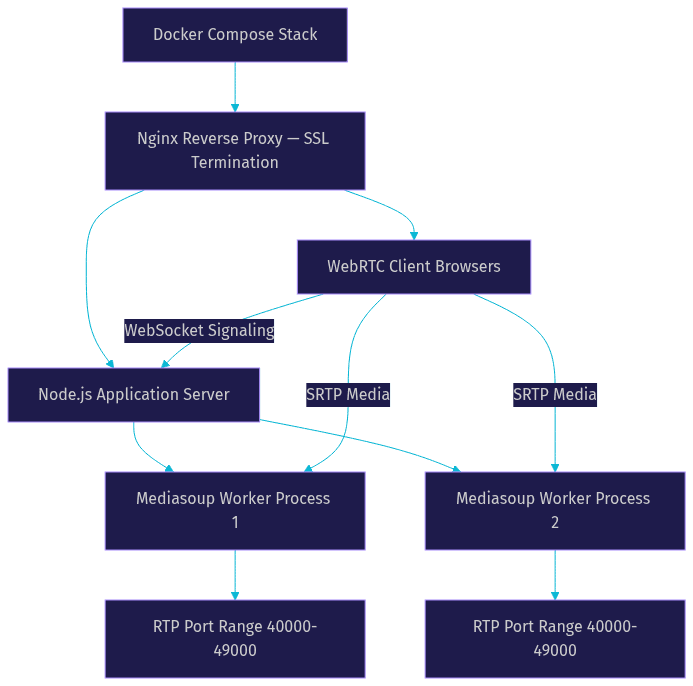
MiroTalk SFU offers two primary deployment paths: Docker-based containerized installation and manual Node.js setup. The Docker approach is recommended for most developers because it bundles the application, mediasoup, and Nginx reverse proxy into a single orchestration stack. You pull the image, configure your environment variables, and bring the stack online with one command.
For manual deployment, you need a server running Ubuntu 20.04 or later with Node.js installed. The process involves cloning the repository, installing dependencies, building the frontend assets, and starting the Node.js server with mediasoup worker processes. This path gives you more control over the stack but requires deeper knowledge of Linux administration and WebRTC networking.
Recommended server specifications depend on your expected participant count. For small rooms with up to 12 participants, a server with 2 CPU cores, 4 GB of RAM, and a stable 100 Mbps connection suffices. For larger conferences with 50 or more participants, consider 4 to 8 CPU cores, 16 GB of RAM, and gigabit networking. Mediasoup is CPU-intensive because each forwarded stream consumes processing cycles, so CPU is typically the bottleneck before bandwidth.
Configuration Essentials
Configuration in MiroTalk SFU centers on environment variables that control server behavior. You specify the listening port for the web application, the announceable host address (your domain or public IP), and the range of UDP ports that mediasoup uses for RTP traffic. These RTP ports must be open on your firewall for media to flow between participants and the server.
SSL and TLS configuration is mandatory for WebRTC in production. Browsers require HTTPS to grant camera and microphone permissions, so you need valid certificates for your domain. The Docker deployment includes automatic Let's Encrypt certificate provisioning, while manual setups require you to configure certificates through Nginx or your preferred reverse proxy.
Room security relies on token-based authentication. MiroTalk SFU generates JWT tokens that validate a participant's identity and room membership before allowing them to join. You can configure tokens with expiration times and role-based permissions such as host, guest, or moderator to control what each participant can do within a room.
Scalability and Performance Considerations
Scaling an SFU-based system comes down to CPU capacity and port management. Each mediasoup worker process handles a set of rooms and their associated media routing. As participant count grows, you add more worker processes or distribute rooms across multiple server instances.
A single mediasoup worker can typically handle 100 to 200 concurrent participants in a single room, depending on video quality settings and available CPU. For rooms exceeding that, you need a distributed deployment where multiple servers share the load. MiroTalk SFU supports horizontal scaling through its API, though the configuration requires manual setup of a signaling layer that coordinates room placement across server nodes.
Port allocation is a common scaling bottleneck. Mediasoup uses UDP ports for RTP traffic, and each forwarded stream consumes ports. If your port range is too narrow for your participant count, new connections fail silently. A range of 10,000 ports, for example 40000 to 49099, is a reasonable starting point for mid-sized deployments.
Network-adaptive bitrate keeps calls stable under varying conditions. Mediasoup's congestion control algorithm monitors round-trip time and packet loss, adjusting the forwarding bitrate in real time. In practice, participants on strong connections receive high-quality streams while those on mobile networks receive degraded but continuous video. Latency typically stays under 150 milliseconds for server-side forwarding, though end-to-end latency depends on client network conditions and can reach 300 to 500 milliseconds on poor connections.
For monitoring, mediasoup exposes internal metrics through its API. You can track active producers, consumers, bitrates, and packet loss per participant. Integrating these metrics with a monitoring tool like Prometheus or Grafana gives you visibility into server health and helps you identify scaling thresholds before they become user-facing problems.
Security and Privacy
MiroTalk SFU inherits WebRTC's built-in security model. All media streams are encrypted using SRTP, with key exchange handled through DTLS during the ICE negotiation phase. This means even if traffic passes through your server, the media payload remains encrypted and cannot be inspected by the server operator.
Self-hosting provides a significant privacy advantage: your media never touches a third-party cloud. For organizations subject to GDPR, HIPAA, or other data residency requirements, running MiroTalk SFU on your own infrastructure in a controlled jurisdiction ensures that participant data stays within your compliance boundary. This is a key reason healthcare providers, legal firms, and government agencies prefer self-hosted WebRTC over cloud APIs.
For authentication, MiroTalk SFU supports JWT-based tokens and OIDC (OpenID Connect) integration. OIDC allows you to connect the platform to existing identity providers like Keycloak, Auth0, or Azure Active Directory, giving you single sign-on and centralized user management. You can also configure room-level passwords and waiting rooms for additional access control.
Integrations and Extensibility
MiroTalk SFU exposes a REST API that lets you build custom applications on top of the platform. You can programmatically create rooms, manage participants, start and stop recordings, and retrieve session analytics. This makes it possible to embed MiroTalk SFU into larger applications such as learning management systems, telehealth portals, or customer support dashboards.
Webhook support enables event-driven workflows. The platform can notify your backend when participants join or leave, when recordings complete, or when rooms reach capacity. Community-contributed connectors for Slack and Discord allow you to push meeting notifications into team channels automatically.
For developers building AI-powered experiences, MiroTalk SFU's architecture supports custom video tracks and audio processing pipelines. You can inject processed video such as virtual backgrounds, face filters, or augmented reality overlays, or route audio through external speech-to-text and text-to-speech services. This extensibility mirrors what managed platforms offer through their SDKs, though it requires more integration work on your end. If you need AI voice agents with built-in STT, LLM, and TTS orchestration, VideoSDK's AI agent platform provides a managed alternative with Python-based pipeline construction and deterministic conversation flows through Conversational Graph.
Comparing MiroTalk SFU to Other WebRTC Solutions
Choosing a WebRTC platform depends on your team's expertise, budget, and feature requirements. The table below compares MiroTalk SFU with four popular alternatives across key dimensions.
| Feature | MiroTalk SFU | Jitsi Meet | LiveKit | VideoSDK | Agora |
|---|---|---|---|---|---|
| Architecture | SFU (mediasoup) | SFU (Jitsi Videobridge) | SFU (custom) | SFU (managed) | SD-RTN (proprietary) |
| Open Source | Yes (AGPL) | Yes (Apache 2.0) | Yes (Apache 2.0) | No (SDK + cloud) | No |
| Self-Hosting | Full support | Full support | Full support | No (cloud only) | No |
| Max Video Quality | 8K at 60fps | 1080p | 4K | Full HD | Full HD |
| AI Integration | ChatGPT, VideoAI extensions | Limited | SDK extensibility | Built-in AI agents | Limited |
| RTMP Output | Built-in | Requires plugin | Via egress service | Built-in | Built-in |
| Prebuilt UI | Yes (white-labelable) | Yes | Yes | Yes (Prebuilt UI Kit) | Yes |
| Pricing | Free (self-hosted) | Free (self-hosted) | Free tier + paid cloud | Free tier + paid plans | Usage-based |
| Best For | Full control, self-hosted SFU | Quick open-source setup | Real-time apps with SDK | Managed multi-platform SDK | Global scale, low latency |
MiroTalk SFU excels when you need a self-hosted SFU with deep customization and AI extensibility. Jitsi Meet is easier to set up but offers less granular control over media routing. LiveKit provides a modern SDK experience with both self-hosted and cloud options. VideoSDK stands out for developers who want managed infrastructure with broad SDK coverage across 10+ platforms including React, Flutter, and Unity, plus built-in AI voice agents and interactive live streaming with sub-second latency. Agora remains strong for global-scale deployments where proprietary network optimization matters more than open-source flexibility.
Best Practices and Common Pitfalls
Running MiroTalk SFU in production requires attention to networking and infrastructure details that local development does not surface. First, ensure your server has a valid HTTPS certificate before testing with real participants. Browsers block camera and microphone access on non-HTTPS origins, and this failure manifests as a generic permission error that is easy to misdiagnose.
Configure a TURN server with proper credentials. Without a TURN relay, participants behind symmetric NAT or restrictive firewalls will fail to connect. Many developers test locally, see everything working, and then discover a significant percentage of their users cannot join once deployed. A TURN server on the same or nearby infrastructure resolves this.
Open the full UDP port range that mediasoup uses for RTP traffic in your firewall. A common mistake is opening only the web application port and the signaling port, leaving RTP ports blocked. Media flows over UDP, and if those ports are closed, participants connect to the signaling layer but never see or hear each other.
Handle participant reconnections gracefully. Network interruptions cause participants to drop temporarily, and mediasoup's reconnection logic needs time to renegotiate ICE. Build your client UI to show a reconnecting state rather than immediately removing the participant from the room, which prevents flickering and improves perceived stability.
Definitions Glossary
Selective Forwarding Unit (SFU): A media routing architecture where the server receives RTP streams from each participant and forwards them to other participants without decoding or re-encoding the media. This reduces server CPU usage compared to MCU architectures.
Mediasoup: A WebRTC media server library built on Node.js and C++ that powers MiroTalk SFU's media routing, codec negotiation, and bandwidth adaptation capabilities.
MCU (Multipoint Control Unit): A legacy conferencing architecture where the server decodes all incoming streams, composites them into a single video layout, and re-encodes the result for distribution. Higher CPU cost and higher latency than SFU.
Simulcast: A technique where a sender transmits multiple quality layers of the same video stream simultaneously, allowing the SFU to select the appropriate layer for each receiver based on their bandwidth.
ICE (Interactive Connectivity Establishment): The WebRTC protocol that finds the best network path between peers using STUN and TURN servers to traverse NAT and firewall environments.
SRTP (Secure Real-time Transport Protocol): The encryption standard for WebRTC media. All audio and video packets are encrypted using keys exchanged via DTLS during connection setup.
Key Takeaways
- MiroTalk SFU WebRTC provides a self-hosted, open-source SFU architecture built on mediasoup, offering full control over media routing and data residency without vendor lock-in.
- The SFU model forwards raw RTP packets without decoding, resulting in lower server CPU usage and lower latency compared to MCU-based conferencing systems.
- Production deployment requires careful attention to UDP port configuration, TURN server setup, and HTTPS certificate provisioning to ensure all participants can connect reliably.
- MiroTalk SFU's AI integration capabilities, RTMP output, and REST API make it extensible for custom workflows, though managed platforms like VideoSDK reduce operational overhead with built-in features across 10+ SDK platforms.
- For teams that prioritize data sovereignty, unlimited rooms, and deep customization over managed convenience, MiroTalk SFU is a compelling choice in the open-source WebRTC landscape.
Conclusion
MiroTalk SFU WebRTC delivers a capable, self-hosted SFU platform for developers who need granular control over their real-time communication infrastructure. Its mediasoup foundation, AI extensibility, and comprehensive feature set make it a strong contender for teams building custom video conferencing solutions on their own servers. The trade-off is operational complexity: you manage scaling, monitoring, TURN servers, and security yourself.
If your team would rather focus on building features than maintaining WebRTC infrastructure, VideoSDK's video calling API offers a managed alternative with Prebuilt UI, multi-platform SDKs, and built-in AI voice agents. You can start with the free tier and ship a working video call in minutes.
What are you building with WebRTC? Drop a comment below, I'd love to hear whether you're going the self-hosted route with MiroTalk SFU or leaning toward a managed SDK. You can also join the VideoSDK Discord community to discuss real-time communication architecture with fellow developers.
Step 5: Implement Participant View
UI for Participant View
The participant view is the main interface where users can see the video streams of all participants. This involves setting up a video grid that dynamically adjusts based on the number of participants.
Streaming Setup
First, ensure your
room.html file has a designated area for the video grid. The #video-grid element will contain all the video elements for the participants:HTML
1<div id="video-grid"></div>Update the
styles.css file to style the video grid:CSS
1#video-grid {
2    display: grid;
3    grid-template-columns: repeat(auto-fill, minmax(200px, 1fr));
4    gap: 10px;
5    padding: 10px;
6}
7
8#video-grid video {
9    width: 100%;
10    height: auto;
11    border-radius: 8px;
12    background: black;
13}
Managing Multiple Participants
Next, add JavaScript to manage video streams for multiple participants. Update the
scripts.js file to handle adding new video elements to the video grid:JavaScript
1const videoGrid = document.getElementById('video-grid');
2let localStream;
3let peerConnections = {};
4
5async function init() {
6    localStream = await navigator.mediaDevices.getUserMedia({ video: true, audio: true });
7    addVideoStream(localStream, 'local');
8
9    socket.on('user-connected', userId => {
10        connectToNewUser(userId, localStream);
11    });
12
13    socket.on('user-disconnected', userId => {
14        if (peerConnections[userId]) peerConnections[userId].close();
15        document.getElementById(userId).remove();
16    });
17}
18
19function addVideoStream(stream, id) {
20    const video = document.createElement('video');
21    video.srcObject = stream;
22    video.id = id;
23    video.addEventListener('loadedmetadata', () => {
24        video.play();
25    });
26    videoGrid.append(video);
27}
28
29function connectToNewUser(userId, stream) {
30    const call = peer.call(userId, stream);
31    const video = document.createElement('video');
32    call.on('stream', userVideoStream => {
33        addVideoStream(userVideoStream, userId);
34    });
35    call.on('close', () => {
36        video.remove();
37    });
38    peerConnections[userId] = call;
39}
40
41init();
This script initializes the local video stream, handles the addition of new participants, and removes participants who disconnect. The
addVideoStream function creates a video element for each participant and adds it to the video grid.Handling Video Streams
The
connectToNewUser function sets up a connection to new users using WebRTC's peer-to-peer connection. When a new user connects, their video stream is added to the video grid, and their disconnection removes the video element.By implementing the participant view, you create a dynamic and responsive interface where users can see and interact with all participants in the MiroTalk SFU WebRTC application. This setup ensures a smooth and engaging video conferencing experience.
Step 6: Run Your Code Now
Testing the Application
With all the components in place, it's time to test your MiroTalk SFU WebRTC application. Ensure your development environment is set up correctly and all necessary dependencies are installed. Start the server using the following command:
bash
1npm startOpen your browser and navigate to
http://localhost:3000. Enter a username on the join screen and click "Join" to enter the meeting room. Open another browser window or tab and repeat the process to simulate multiple participants joining the meeting.Debugging Common Issues
If you encounter any issues, here are a few common troubleshooting steps:
- Check Console for Errors: Open the browser's developer console to check for any JavaScript errors or warnings.
- Verify Configuration: Ensure your
.envfile is correctly set up with the proper IP addresses and ports. - Network Permissions: Make sure your browser has permissions to access the camera and microphone.
Optimization Tips
To enhance performance and scalability, consider the following optimization tips:
- Media Constraints: Adjust media constraints for video and audio to balance quality and bandwidth usage.
- Load Balancing: Implement load balancing techniques to distribute the load across multiple servers.
- Scalability: Use scalable infrastructure solutions like Kubernetes or Docker to manage and deploy your application efficiently.
Example Configuration for Media Constraints
You can adjust the media constraints in your
scripts.js file to improve performance:JavaScript
1const constraints = {
2    video: {
3        width: { ideal: 1280 },
4        height: { ideal: 720 }
5    },
6    audio: true
7};
8
9navigator.mediaDevices.getUserMedia(constraints)
10    .then(stream => {
11        // Your code to handle the stream
12    })
13    .catch(error => {
14        console.error('Error accessing media devices.', error);
15    });
By following these steps, you can run your MiroTalk SFU WebRTC application smoothly and efficiently. Testing the application thoroughly and applying optimization techniques will ensure a robust and scalable video conferencing solution.
Conclusion
In this guide, we've walked through the process of setting up and implementing a MiroTalk SFU WebRTC application using C++/Node.js and MediaSoup. From initial configuration and environment setup to designing the user interface and managing real-time video streams, each step has been carefully outlined to help you build a robust and scalable video conferencing solution. By following these steps, you can create an efficient SFU-based WebRTC application that meets modern communication needs.
Free $20 Balance for AI Voice Agents & Video Calls
FAQ