


A voice app is any application whose primary interface is real-time spoken audio, ranging from push-to-talk messaging and team voice rooms to AI voice assistants. Modern voice apps are built on WebRTC for sub-second latency, protected with end-to-end encryption, and increasingly enhanced with on-device AI for transcription and assistance. VideoSDK provides the real-time audio infrastructure, SDKs, and AI agent tooling that let developers ship a production voice app across web and mobile in days rather than months.
Voice is having a moment, and it is not a nostalgia cycle. The shift started with walkie-talkie style apps like Voxer and Zello, accelerated through pandemic-era remote work, and has now converged with AI: large language models that can listen, understand, and speak back in real time. The result is a new category of products where the microphone, not the keyboard, is the primary input.
A voice app is any application where spoken audio is the core interaction, not an add-on. That includes push-to-talk messaging apps, always-on team voice channels, voice-first customer support, language exchange platforms, and AI voice assistants. What ties them together is a hard technical requirement: low-latency, reliable, real-time voice communication.
By the end of this article you will understand the technologies behind modern voice apps, the design and privacy decisions that separate good products from frustrating ones, and how platforms like VideoSDK let you build one without reinventing the real-time stack.
What Is a Voice App?
A voice app is defined as an application in which real-time or near-real-time spoken audio is the primary mode of communication between users, or between a user and an AI system. A voice app works by capturing microphone audio, compressing it with a voice codec, transmitting it over a low-latency channel, and playing it back at the receiving end, all within a few hundred milliseconds.
This is different from a traditional phone call, which is circuit-bound, tied to a phone number, and limited to two fixed roles. It is also different from text messaging with voice notes bolted on. A true voice app treats audio as a first-class, interactive medium: presence indicators, push-to-talk activation, live transcription, and AI responses are all part of the experience.
Core characteristics include real-time audio streaming, push-to-talk or always-on activation modes, and increasingly, AI integration for transcription, translation, or conversational assistance.
Core Technologies Powering Modern Voice Apps
Every modern voice app stands on three technical pillars: real-time transport, encryption, and AI processing. Understanding how they fit together is the difference between a voice app that feels instant and one that feels like a walkie-talkie from 2003.
WebRTC and Peer-to-Peer Streaming
WebRTC is the transport foundation of nearly every browser-based and most mobile voice apps. It is an open standard, maintained by the W3C and IETF, that handles audio capture, encoding, secure transport, and playback natively in browsers and via libraries on iOS and Android.
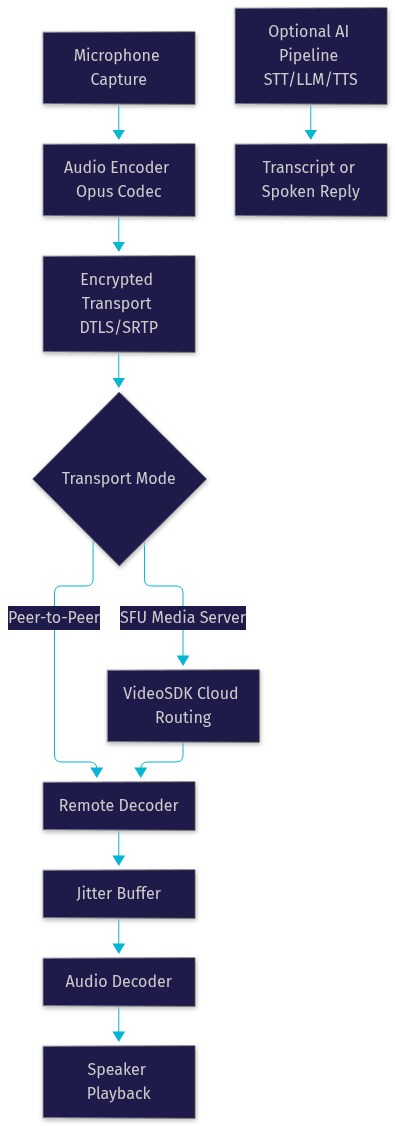
WebRTC voice apps work by establishing a peer connection negotiated through a signaling layer, then streaming audio directly between participants or through a media server when group calls or reliability require it. With an optimized codec such as Opus, one-way voice latency can stay under 300 milliseconds, which is fast enough for natural conversation. For group scenarios, a Selective Forwarding Unit (SFU) routes each participant's stream without re-encoding, keeping latency low even with many speakers.
Building this yourself means handling signaling, ICE negotiation, STUN/TURN fallback for restrictive networks, and jitter management. Managed SDKs like VideoSDK's audio calling API abstract all of it behind a room-based model: participants join a room, and audio tracks flow automatically with adaptive bitrate and built-in noise suppression.
End-to-End Encryption and Security Protocols
WebRTC mandates encryption by design. Every voice app built on it uses DTLS to negotiate keys and SRTP to encrypt the media itself, meaning audio packets are encrypted in transit by default. That protects against network-level eavesdropping but not against a malicious or compromised media server.
True end-to-end encrypted voice apps go further: keys are exchanged only between the communicating devices, so the server routing the audio cannot decrypt it. Signal's voice calls and FaceTime audio are the reference implementations. The trade-off is real: end-to-end encryption makes server-side features like cloud recording, live transcription, and AI assistance significantly harder, because the server cannot read the audio.
AI and On-Device Processing
The newest pillar is AI. Speech-to-text converts spoken audio into searchable, archivable text. Large language models interpret intent and generate responses. Text-to-speech turns those responses back into natural spoken audio.
On-device processing, where the model runs locally on the phone, reduces latency and keeps audio private. Cloud pipelines offer more capability at the cost of a network round trip. VideoSDK's AI voice agent SDK takes the cloud approach with an optimized pipeline, connecting STT, LLM, and TTS providers inside a real-time room so an AI participant can hold a spoken conversation with sub-second response times.
The full data flow of a voice app, from microphone to speaker, looks like this:
Key Use Cases and Market Segments
Voice apps are not one market but several, each with different latency budgets, privacy requirements, and business models. Knowing which segment you are building for shapes every downstream decision.
Personal Communication and Social Interaction
Push-to-talk apps for couples, families, and friend groups recreate the intimacy of a phone call with the low-commitment feel of texting. You press, you talk, they hear it whenever they check in. Voice messaging apps in this segment win on simplicity: one-tap activation, lock-screen support, and instant playback. The technical bar is moderate latency, since messages are often asynchronous, but reliability across poor mobile networks is critical.
Remote Teams and Enterprise Collaboration
Always-on voice channels, sometimes called huddles, replace the friction of scheduling a call with the ambient presence of sitting near colleagues. A quick voice ping resolves in ten seconds what a text thread churns through for twenty minutes. Enterprise voice chat apps for teams need integration with Slack and Microsoft Teams, role-based access control, and administrative oversight. VideoSDK's audio room SDK supports this model directly, with rooms that persist, roles like host and speaker, and REST APIs for server-side participant management.
Customer Support and Service Agents
Voice-first help desks reduce handling time because speaking is faster than typing for both customer and agent. A customer describes a problem once, an AI voice agent triages it, and a human joins only when needed. VideoSDK's telephony and SIP integration extends this to plain phone calls, bridging traditional phone networks into the same AI-assisted rooms.
Language Learning and Cultural Exchange
Conversational practice with native speakers is the highest-value activity in language learning, and it is fundamentally a voice experience. These apps pair learners for live conversation, often with real-time transcription and translation layered on top. AI practice partners are a fast-growing complement, offering unlimited, judgment-free conversation with instant correction.
Accessibility and Hands-Free Scenarios
For users with motor impairments, visual fatigue, or situational constraints like driving or cooking, voice is not a convenience, it is the interface. Hands-free voice apps with robust voice control, captioning, and haptic feedback open products to users that text-first design excludes.
Designing a User-Friendly Voice App
The technology only matters if the experience feels effortless. Voice app UX has hard rules that text apps do not, because audio is ephemeral and latency is audible.
UI and UX Principles for Push-to-Talk
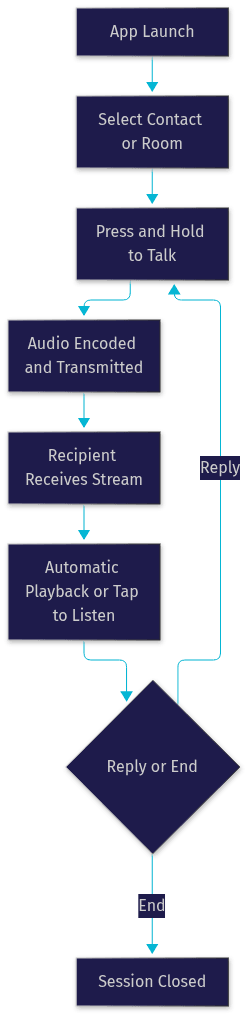
One-tap activation is non-negotiable. Every additional tap before speaking is friction that kills the impulse to talk at all. The best push-to-talk apps support activation from the lock screen, a persistent widget, or a hardware button, and give immediate visual feedback that transmission has started: a pulsing indicator, a waveform, or a subtle haptic pulse.
Presence matters too. Showing who is currently speaking, who is online, and whether your message has been heard replaces the social cues a phone call provides naturally.
Latency Optimization Techniques
Latency is the single most audible quality metric in a voice app. Above roughly 400 milliseconds one-way, conversation becomes turn-taking with awkward pauses; below 200 milliseconds it feels like being in the same room.
Three levers control it. First, codec selection: Opus at low bitrate settings balances quality and speed well for voice. Second, jitter buffers: dynamic buffers absorb network variation without adding fixed delay, and adaptive implementations grow only when the network actually degrades. Third, network routing: edge servers and regional media nodes shorten the physical path audio travels. VideoSDK handles all three automatically with network-adaptive streaming that adjusts bitrate and resolution in real time as conditions change.
Accessibility Considerations
Live captioning makes voice content consumable for deaf and hard-of-hearing users and for anyone in a noisy environment. High-contrast UI and large touch targets support low-vision users. Haptic cues confirm transmission states without requiring visual attention. Treating these as core features rather than settings buried in a menu is both good practice and, in many jurisdictions, a legal requirement.
The user journey through a typical push-to-talk interaction follows a short, well-defined path:
Privacy and Security Best Practices
Voice is uniquely sensitive data. It carries identity, emotion, location cues, and content in a single stream, and users intuitively know it. Privacy failures in a voice app are terminal for trust.
End-to-End Encryption Implementation
Effective end-to-end encryption for a voice app starts with key exchange that never touches your servers in plaintext. Devices negotiate keys directly, ideally verified with a short authentication string or safety number that users can compare out of band. Servers become zero-knowledge routers: they move encrypted packets but cannot read them.
The honest trade-off, as noted earlier, is that server-side features like cloud recording and AI transcription conflict with strict end-to-end encryption. Decide your position early, because it shapes your architecture. If you need both, on-device AI processing is the emerging compromise.
Metadata Minimization
Encryption protects content, but metadata can be just as revealing. Who talked to whom, when, for how long, and from which network can paint a detailed picture even with encrypted audio. Minimize by design: avoid logging call duration and participant lists beyond what is operationally necessary, retain logs for the shortest viable period, and document the policy publicly.
Compliance with GDPR, CCPA, and App Store Policies
GDPR and CCPA both treat voice recordings as personal data, which means consent, deletion rights, and data residency obligations apply. Apple's App Store and Google Play additionally require clear disclosure of microphone access and recording practices. Building compliance in from the start is dramatically cheaper than retrofitting it, and transparency about voice data handling is increasingly a competitive advantage users actively check for.
Monetization Strategies for Voice Apps
A voice app earns revenue in three proven ways. The freemium model offers core voice messaging free and charges for premium features: unlimited history, live transcription, AI assistant minutes, or higher quality audio. In-app purchases work well for identity and expression features, such as custom voice skins, sound packs, or extra cloud storage for archived conversations. Enterprise licensing sells secure, administrable internal voice communication to organizations, where reliability and compliance command a meaningful per-seat price.
The strongest 2026 pattern combines all three: a free consumer tier that grows the network, a subscription tier for power users who want AI features, and an enterprise tier for teams that need security guarantees.
Future Trends: AI-Driven Voice Interactions
The next three years of voice app evolution will be defined by AI, and specifically by how close the AI gets to the microphone.
Conversational AI Integration
Real-time voice assistants are moving from command-and-response to genuine conversation. Context-aware replies, where the assistant remembers the thread of a spoken exchange and responds naturally to interruptions, are now technically achievable with real-time multimodal models. VideoSDK's Conversational Graph addresses the reliability side of this trend: instead of letting the model improvise the flow, developers define a deterministic graph of conversation steps, which matters enormously for support, booking, and compliance scenarios.
Multilingual Support and On-Device Models
On-device speech models are shrinking while improving, enabling real-time translation and multilingual conversation without sending audio to the cloud. This simultaneously reduces latency and eliminates the biggest privacy objection to voice AI. For language learning apps in particular, on-device correction and feedback feel instant in a way cloud round trips cannot match.
Emerging Hardware
Wearables, earbuds with always-listening assistants, and AR glasses are pulling voice apps off the phone screen entirely. When the microphone is always in your ear, the voice app becomes an ambient layer over daily life rather than an app you open. Developers building for this shift should look at SDKs with broad platform reach, including embedded and IoT targets, which is exactly the gap VideoSDK's multi-platform coverage, including Unity and IoT SDKs, is designed to fill.
How to Choose the Right Voice App for Your Needs
Whether you are picking a voice app to use or deciding what to build, the evaluation comes down to four criteria: latency, encryption, platform support, and AI capability.
For personal and family use, prioritize simplicity and reliability: one-tap push-to-talk, lock-screen activation, and end-to-end encryption. For team and business use, prioritize administration and integration: role-based access, Slack and Teams connectivity, and enterprise compliance. For AI-driven experiences, prioritize pipeline quality: which speech-to-text and text-to-speech providers are supported, how the agent handles interruptions, and whether the flow can be made deterministic for business-critical conversations.
If you are building rather than buying, the decision matrix is similar but weighted toward developer experience: SDK breadth across your target platforms, how much of the transport layer you get for free, and whether recording, transcription, and AI agents are included or bolted on. VideoSDK's audio calling documentation and code samples are a fast way to evaluate that trade-off concretely.
Definitions Glossary
Voice app: An application where real-time spoken audio is the primary interface, covering push-to-talk messaging, team voice rooms, and AI voice assistants.
Push-to-talk: An interaction pattern where holding a button opens an audio channel and releasing it sends the message, mimicking walkie-talkie behavior.
WebRTC: An open standard for real-time peer-to-peer audio and video in browsers and apps, the transport layer beneath most modern voice apps.
SRTP: Secure Real-time Transport Protocol, the encrypted media channel WebRTC uses to protect voice packets in transit.
Room: In VideoSDK's architecture, the virtual space participants join to exchange audio streams, identified by a unique room ID and secured with a server-generated token.
Agent Worker: The Python process that runs a VideoSDK AI voice agent, managing its session and its speech-to-text, LLM, and text-to-speech pipeline.
Key Takeaways
- A voice app is any application where real-time spoken audio is the primary interface, spanning social push-to-talk, team huddles, customer support, language learning, and AI assistants.
- WebRTC with the Opus codec, DTLS/SRTP encryption, and AI pipelines for speech-to-text and text-to-speech are the three technical pillars every modern voice app is built on.
- Latency is the most audible quality metric: below 200 milliseconds one-way feels like presence, above 400 milliseconds feels like a bad phone call.
- End-to-end encryption and metadata minimization are trust requirements for voice data, but they trade off directly against server-side features like cloud recording and AI transcription.
- VideoSDK provides the full real-time voice stack, from audio rooms with network-adaptive streaming to AI voice agents and deterministic Conversational Graph flows, across more than ten platforms including web, mobile, Unity, and IoT.
Conclusion
Voice apps sit at the intersection of the two strongest currents in software: real-time communication and AI. The technology stack is mature, the use cases are proven across personal, enterprise, support, and education markets, and the tooling has never been more accessible. What separates a great voice app from a forgotten one is disciplined attention to latency, privacy, and effortless interaction design.
If you are building one, start with the VideoSDK audio calling quickstart to get a working voice room running, then explore the AI voice agent docs when you are ready to add a conversational layer. You can create a free account at app.videosdk.live and join the VideoSDK Discord community to compare notes with other developers.
What are you building with voice? Drop a comment, I would love to hear what kind of voice app use case you are working on.
Free $20 Balance for AI Voice Agents & Video Calls
FAQ