


AI agent apps are applications built around autonomous AI agents that don't just answer questions but plan, call external tools, remember past interactions, and complete multi-step tasks on their own. Unlike traditional chatbots that follow scripted flows, ai agent apps combine a language model, tool integration, memory, and orchestration into a system that acts. VideoSDK's open-source AI Agent SDK shows how these components come together, connecting LLMs, speech-to-text, and text-to-speech providers to real-time communication rooms for voice-first agents. This guide covers the architecture, platforms, use cases, and implementation roadmap for building ai agent apps in 2026.
The shift from chatbots to agents happened faster than most teams expected. By 2026, agentic AI has moved from research demos to production workloads: enterprises now deploy agents that resolve support tickets end-to-end, qualify leads, and draft legal documents without a human in the loop for routine cases. Industry surveys consistently show that a majority of enterprises are piloting or deploying AI agents, and developer interest has exploded in parallel, with agent frameworks becoming some of the fastest-growing project categories on GitHub.
That growth creates a problem for builders: the landscape is crowded, the terminology is fuzzy, and the gap between a demo and a production agent is wide. This article fixes that. You'll learn what actually defines ai agent apps, the four building blocks every agent architecture shares, which platforms lead in 2026, how to choose one for your business, real use cases with measurable outcomes, and a step-by-step implementation roadmap that ends with a deployed, monitored agent.
What Are AI Agent Apps?
AI agent apps are defined as software applications in which an autonomous AI agent, rather than a human user, drives the interaction loop: perceiving input, reasoning about a goal, deciding which actions to take, executing those actions through tools, and evaluating the result. An AI agent app works by wrapping a large language model in a control loop that grants it access to external capabilities, such as APIs, databases, browsers, and communication channels, plus memory that persists across turns and sessions.
The difference from a chatbot is autonomy. A traditional bot maps input to a canned response or a scripted decision tree. An agent plans. Ask a support agent to process a refund and it will look up the order, check the refund policy, call the payments API, and confirm the outcome, adjusting its plan when a step fails.
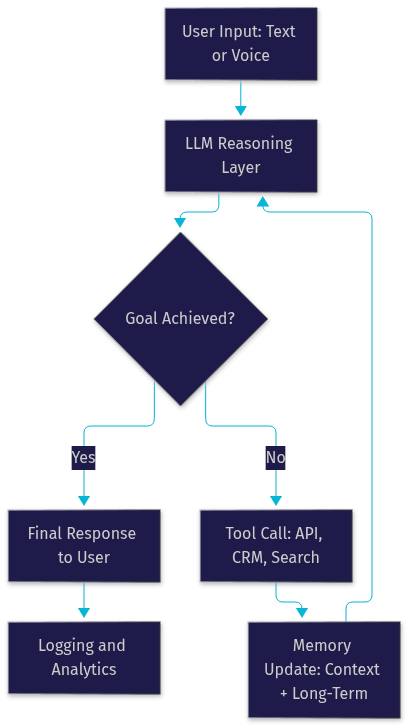
Every ai agent app shares four core components: a language model for reasoning, tool use for acting on the world, memory for continuity, and orchestration for coordinating the overall flow. Get these four right and most other decisions become implementation details.
Core Building Blocks of an AI Agent App
The architecture of ai agent apps is surprisingly consistent across vendors and frameworks. Whether you're building a customer support agent or a sales qualification bot, you'll compose the same four layers, and the quality of each layer determines how far your agent gets past the demo stage.
Language Model (LLM) Layer
The LLM is the reasoning engine. In 2026, builders choose between frontier models from OpenAI, Anthropic, and Google, faster inference-focused providers like Cerebras, and open-weight models like Llama and Mistral for self-hosted deployments. The trade-off is capability versus cost and latency: frontier models reason better on complex, multi-step tasks, while smaller models win on price and response speed for narrow, well-scoped agents. Many production teams run a hybrid, using a strong model for planning and a cheap one for routine steps.
Tool Integration and APIs
Tools are how an agent acts. A tool is any callable capability exposed to the model: a web search, a CRM lookup, a calendar booking action, or a payment refund endpoint. The agent decides when to call which tool, passes structured arguments, and reads the result back into its context. The Model Context Protocol (MCP) has emerged as a standard way to plug agents into external systems, and VideoSDK's AI Agent SDK supports MCP integration natively, letting voice agents call the same tool servers your text agents use.
Memory and State Management
Memory gives agents continuity. Short-term memory lives inside the context window and holds the current conversation, while long-term memory persists user preferences, past resolutions, and extracted facts across sessions. Context window limits force design decisions: teams summarize older turns, retrieve relevant facts from a vector store, and manage what stays in scope. Retrieval-augmented generation (RAG) is the standard pattern for grounding an agent in your own documentation without fine-tuning.
Orchestration Frameworks
Orchestration coordinates the loop. Popular open-source options include CrewAI, LangGraph, and VideoSDK's own agents framework for voice-first deployments.
The full pipeline looks like this:
Popular AI Agent Platforms
Choosing a platform in 2026 means choosing a point on three axes: model provider, hosting model, and ecosystem depth. The leading options each occupy a distinct position.
OpenAI's ecosystem, including its Realtime API for voice, offers the most mature tooling for teams that want fast time-to-market and don't mind vendor lock-in. Anthropic's Claude models are a favorite for agentic workflows that demand careful instruction-following and long-context reasoning, and Claude's tool-use APIs are widely used in enterprise automation. Google's Gemini family, including Gemini Live for real-time multimodal interaction, is strong for teams already invested in Google Cloud and for use cases that mix text, voice, and vision.
On the open-source side, projects like AgentZero, Hermes, and the community around open-weight models give teams full control over deployment, data residency, and cost. VideoSDK's AI Agent SDK sits in a distinctive position: it's open source, Python-based, and provider-agnostic, connecting any combination of LLM, STT, and TTS providers to real-time VideoSDK rooms. That means the same agent can serve web users, mobile users, and phone callers through built-in SIP telephony integration.
SaaS vs Self-Hosted AI Agent Apps
SaaS agent platforms win on speed: managed infrastructure, built-in observability, and no DevOps burden. You pay per usage, scale is someone else's problem, and updates arrive automatically. The trade-offs are cost at volume, limited customization of the inference stack, and data flowing through a third party.
Self-hosting wins on control and economics at scale. You keep data inside your own perimeter, choose your models, and avoid per-token markup. The cost is operational: you own GPU capacity or inference contracts, uptime, upgrades, and security patching. VideoSDK supports both models, offering a managed Agent Cloud and self-hosted deployment via Docker or Kubernetes.
Open-Source Highlights
The open-source agent ecosystem in 2026 is genuinely production-grade. Community support is fast, issues get patched in days rather than vendor support-ticket cycles, and extensibility means you can add a custom tool or a niche model provider without waiting for a roadmap. Cost is the headline: with open-weight models and self-hosted orchestration, teams routinely cut inference spend dramatically compared to frontier API pricing at volume.
The risk is maintenance burden and model quality on complex reasoning tasks. A pragmatic pattern many teams adopt: open-source orchestration with frontier models behind an API, keeping the control layer portable while renting the best reasoning available.
Choosing the Right AI Agent Apps for Your Business
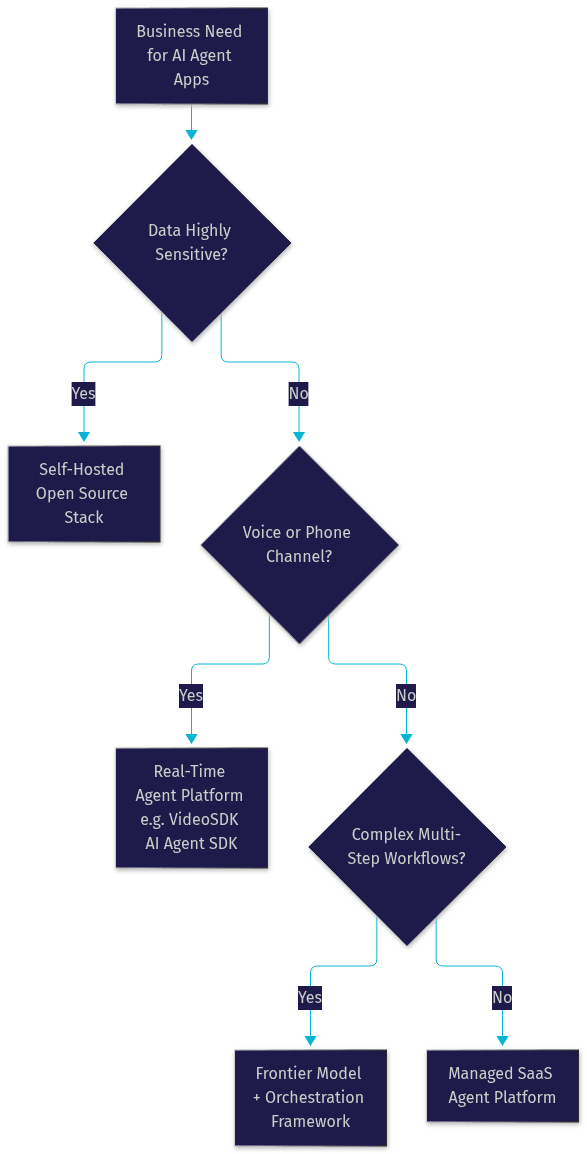
The right choice depends less on which platform is "best" and more on your constraints. Use this decision framework before committing:
- Use case complexity: Simple Q&A needs a basic model and one tool; multi-step workflows need strong planning models and orchestration.
- Data sensitivity: Regulated data (health, finance, legal) pushes you toward self-hosting or a vendor with strong compliance certifications.
- Interaction channel: Text-only agents are simplest; voice agents need real-time STT, TTS, and sub-second latency, which is where VideoSDK's agent infrastructure specializes.
- Scale and growth: Per-token pricing is fine for pilots; at high volume, self-hosted inference or committed rates change the math.
- Team expertise: A Python team can self-host open-source frameworks; a small team without DevOps should start with managed SaaS.
- Integration surface: Count the systems the agent must touch (CRM, ticketing, calendar, payments) and check native connectors or MCP support.
- Budget: Model the full cost including inference, platform fees, and engineering time, not just the headline API price.
Real-World Use Cases
The most instructive way to understand ai agent apps is to look at where they're already delivering measurable results in production.
Customer Support Automation
Support agents triage inbound tickets, classify intent and urgency, pull the customer's order history from internal tools, and resolve routine issues (refunds, address changes, subscription pauses) end-to-end. Complex cases get escalated to humans with a full summary attached. Teams deploying this pattern consistently report large reductions in first-response time and meaningful deflection of routine ticket volume, with the agent handling a substantial share of conversations without human intervention.
Sales and Lead Qualification
A web-chat agent engages visitors, asks qualifying questions about budget, timeline, and need, scores the lead against your ICP, books a demo directly into a rep's calendar, and hands off hot leads with full context. Unlike a static form, the agent adapts its questions based on answers, and it works around the clock. Outbound variants, including AI phone agents placing qualification calls through SIP telephony, are increasingly common in B2B sales.
Internal Productivity
Internal agents automate the work that eats knowledge workers' days: scheduling meetings across time zones, retrieving answers from scattered documentation, drafting status reports, and filing expenses. The winning pattern is an agent connected to your internal tools via MCP, so it can act (book, file, retrieve) rather than just advise.
Creative Content Generation
Creative agents draft marketing copy, video scripts, product descriptions, and code snippets, then iterate against feedback. E-commerce teams use them to generate category-specific product copy at scale, and dev teams use them for boilerplate, tests, and documentation drafts that a human then reviews.
Compliance and Legal Workflows
Legal and compliance teams now deploy agents for first-pass document review, contract clause extraction, and policy checks, with human counsel reviewing flagged items. Deterministic flow engines like VideoSDK's Conversational Graph matter here, ensuring every required step happens in order rather than leaving branching to model judgment.
Implementation Roadmap
Building ai agent apps follows a repeatable path. Here's the sequence that takes you from idea to a monitored production deployment.
- Define the problem and success metrics. Pick one workflow with clear inputs and outputs, such as refund processing or lead qualification. Set measurable targets: resolution rate, escalation rate, latency, and cost per interaction. Agents without explicit success metrics drift.
- Select a platform and model. Apply the decision framework above. For voice or phone channels, evaluate VideoSDK's AI Agent SDK, which connects your choice of LLM, STT, and TTS providers into real-time rooms. For text-first workflows, an orchestration framework plus a frontier model API is the fastest start.
- Set up authentication and API access. Generate server-side credentials for your model provider and agent platform, and never expose secrets in client-side code. Scope each credential to the minimum permissions the agent needs, and plan for key rotation from day one.
- Configure tool plugins and memory. Register the tools your agent needs (CRM lookups, payments, calendar) and define their permission boundaries explicitly. Set up short-term context management and, if the use case warrants it, long-term memory or RAG over your documentation. For voice agents, configure turn detection so the agent knows when the user has finished speaking.
- Test with realistic scenarios. Run the agent against real historical conversations, edge cases, and adversarial inputs before launch. Test tool failure paths: what happens when the CRM is down or a payment call times out? A fallback response is part of the design, not an afterthought.
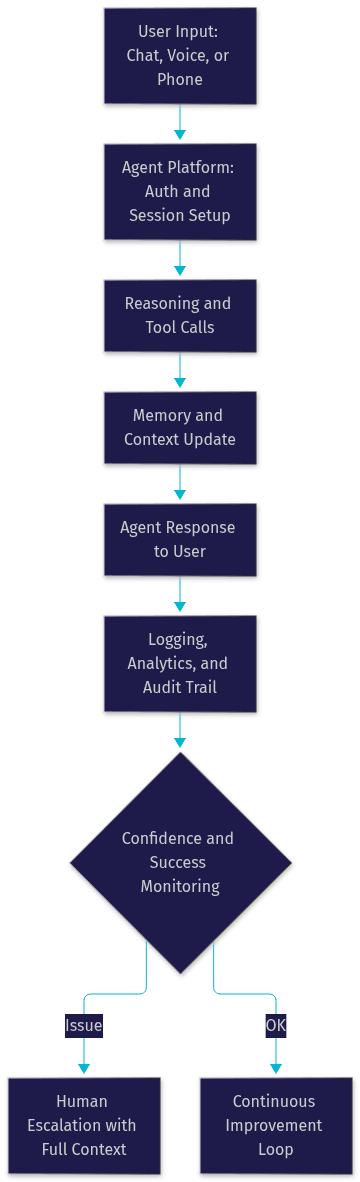
- Deploy with monitoring and fallback. Ship behind a feature flag, log every interaction and tool call for audit, monitor latency and cost dashboards, and define a human-escalation path that triggers on low confidence or repeated failure. Roll out to a percentage of traffic and expand gradually.
Security, Privacy, and Governance
AI agent apps carry a unique risk profile because they act, not just advise. A chatbot that hallucinates is embarrassing; an agent that executes a wrong refund is a financial event. Treat agent security as a first-class design constraint.
Start with permission scoping: every tool the agent can call should have the narrowest possible authority, and destructive actions (payments, deletions, data exports) should require confirmation or human approval. Keep secrets server-side, generate short-lived tokens for client sessions, and rotate credentials on a schedule. Enable audit logs for every tool invocation so you can reconstruct exactly what an agent did and why. For regulated industries, verify data residency and processing agreements with every provider in the chain, including model, STT, and TTS vendors. Finally, set spending and rate limits per agent session; autonomous loops with unbounded tool calls are a classic runaway-cost failure mode.
Future Trends for AI Agent Apps
Three trends will shape ai agent apps through 2026 and beyond. First, multimodal perception: agents increasingly see screens, read documents, and interpret voice tone, not just parse text, enabled by real-time multimodal models like OpenAI Realtime and Gemini Live. Second, autonomous sub-agents: orchestrator agents that spawn specialized workers for subtasks, fan out parallel tool calls, and merge results, a pattern VideoSDK's agent framework supports through multi-agent switching. Third, tighter integration with the physical world: agents connecting to IoT devices and phone networks, so the same agent that chats on your website can answer a SIP phone call or control a smart device. Deterministic orchestration layers like Conversational Graph will grow in parallel, because as agents take on regulated workflows, businesses need flows where business rules, not model judgment, control branching.
Definitions Glossary
AI Agent App: An application built around an autonomous AI agent that plans, calls tools, and completes multi-step tasks, combining an LLM, tool access, memory, and orchestration.
Agent Worker: The Python process that runs a VideoSDK AI agent and manages its session lifecycle inside a real-time communication room.
Tool Use: The mechanism by which an agent calls external capabilities such as APIs, CRMs, or search, passing structured arguments and reading results back into its reasoning context.
Agent Memory: The persistence layer of an agent, split into short-term context (the current conversation) and long-term memory (facts and preferences retained across sessions).
MCP (Model Context Protocol): An emerging standard for connecting AI agents to external systems and data sources through standardized tool servers.
Conversational Graph: VideoSDK's deterministic, graph-based orchestration layer where developers define conversation flow as nodes and transitions while the LLM handles only natural language generation.
Key Takeaways
- AI agent apps differ from chatbots because they act autonomously: planning, calling tools, and completing multi-step tasks rather than following scripted responses.
- Every agent architecture shares four building blocks: a language model for reasoning, tools for action, memory for continuity, and orchestration for coordination.
- Platform choice should follow your constraints, not vendor rankings: data sensitivity, interaction channel, workflow complexity, scale, and team expertise.
- Voice and phone-based agents require real-time infrastructure with sub-second latency, which is exactly what VideoSDK's open-source AI Agent SDK provides by connecting LLM, STT, and TTS providers to real-time rooms.
- Security for agents means permission-scoped tools, server-side secrets, full audit logs, and bounded spending, because agents that act carry operational risk that chatbots don't.
Conclusion
AI agent apps have crossed from novelty to production infrastructure, and the teams winning with them are the ones that treat architecture, platform selection, and governance as deliberate decisions. Start with one well-scoped workflow, apply the decision framework above, test against realistic failure paths, and deploy with monitoring and human escalation from day one. When you're ready to build, explore the VideoSDK AI Agent SDK for rapid prototyping of voice-first agents, browse the code samples, and sign up free at app.videosdk.live to get started with ai agent apps in minutes. What kind of AI agent app are you planning to build? Drop a comment, I'd love to hear about your use case.
Autonomous AI Agents
Autonomous AI agents are capable of completing complex tasks without human intervention. They can adapt to changing environments, learn from their experiences, and make decisions independently. These agents are often used in situations where human involvement is impractical or impossible. These agents can create complex AI agent workflows, AI agent architecture and even AI agent programming using the AI agent tools available.
- Example: Agents that manage supply chains, optimize energy consumption in smart grids, and perform automated trading in financial markets. Ethical considerations AI agents are paramount in autonomous system development.
Top 10 AI Agent Apps and Their Features
Here's an analysis of some leading AI agent apps, showcasing their key features and intended users. Please note that the AI agent marketplace is rapidly evolving, so this list is subject to change.
App 1: AgentGPT
AgentGPT allows you to configure and deploy autonomous AI agents. You can name your agent and set a goal, and then it will attempt to reach the goal by planning and executing subtasks. AgentGPT focuses on automation and handling complex tasks. There are ethical considerations AI agents developers must consider with the growth of the platform.
App 2: Auto-GPT
Auto-GPT is an experimental open-source application pushing the boundaries of what's possible with GPT-3. It attempts to chain together LLM "thoughts," to autonomously achieve whatever goal you set. As one of the earliest autonomous AI agents, it has spurred much excitement.
App 3: TaskRabbit
TaskRabbit connects users with freelancers who can handle various tasks, and increasingly, those freelancers are leveraging AI agents to become more efficient. This is a good illustration of AI agent integration with existing marketplaces. Task-oriented AI agents fit very well within the TaskRabbit ecosystem.
App 4: Microsoft Copilot
Microsoft Copilot, deeply integrated into Windows and Office apps, leverages AI to assist users with a wide range of tasks, from drafting emails to summarizing documents. Copilot highlights how large companies are building AI agent apps into their core product offerings.
App 5: Jasper
Jasper is an AI writing assistant that generates high-quality content for various purposes, including blog posts, social media updates, and marketing copy. This is a good example of using AI agents for creative applications.
App 6: Replika
Replika is an AI companion that offers personalized conversations and emotional support. This showcases how conversational AI agents can be used to improve mental well-being. They are also improving the AI agent customization options within the app.
App 7: Otter.ai
Otter.ai is an AI-powered transcription service that automatically converts audio recordings into text. This is helpful for meetings, interviews, and lectures. Otter.ai focuses on business applications of task-oriented AI agents.
App 8: Fireflies.ai
Fireflies.ai is another AI meeting assistant that records, transcribes, and summarizes meetings. It integrates with various video conferencing platforms. Fireflies.ai uses intelligent AI agents to improve business productivity.
App 9: Mem
Mem is a self-organizing workspace that uses AI to connect your notes, documents, and tasks. It helps you find information faster and stay organized. Mem excels in personal productivity use cases.
App 10: Synthesia
Synthesia allows you to create AI-generated videos from text. This is used for training videos, product demos, and marketing content. Synthesia showcases AI agent applications in creative endeavors.
Building Your Own AI Agent App
Building your own AI agent app requires careful planning and execution. This section outlines the key steps involved in the development process.
Choosing the Right Framework
Selecting the right framework is crucial for streamlining the development process. LangChain is a popular choice, offering a comprehensive set of tools and libraries for building AI agents. Other relevant frameworks include TensorFlow and PyTorch, particularly when extensive custom ML models are needed.
python
1from langchain.agents import load_tools
2from langchain.agents import initialize_agent
3from langchain.llms import OpenAI
4
5import os
6
7os.environ["OPENAI_API_KEY"] = "YOUR_API_KEY"  # Replace with your actual API key
8
9# Load some tools to use. Note that the `llm-math` tool uses an LLM, so we need to pass that in.
10tools = load_tools(["serpapi", "llm-math"], llm=OpenAI(temperature=0))
11
12# Finally, let's initialize an agent with the tools, the language model, and the type of agent we want to use.
13agent = initialize_agent(tools, OpenAI(temperature=0), agent="zero-shot-react-description", verbose=True)
14
15# Now let's test it out!
16agent.run("Who is Leo DiCaprio's girlfriend? What is her current age raised to the 0.43 power?")
Designing the Agent's Workflow
The agent's workflow defines how it interacts with its environment and makes decisions. This involves defining the agent's goals, actions, and decision-making process. Consider using a state diagram or flowchart to visualize the workflow.
python
1def select_action(state, available_actions):
2    # Implement your agent's decision-making logic here
3    # This is a simplified example
4    if "search" in available_actions:
5        return "search", {"query": "current weather"}
6    elif "calculate" in available_actions:
7        return "calculate", {"expression": "2 + 2"}
8    else:
9        return "no_op", {}
10
11# Example usage
12current_state = {"location": "New York", "time": "10:00 AM"}
13available_actions = ["search", "calculate", "no_op"]
14action, parameters = select_action(current_state, available_actions)
15print(f"Selected action: {action} with parameters: {parameters}")
Integrating APIs and External Services
Integrating APIs allows your agent to access external data and services, expanding its capabilities. You may need to acquire the API for AI agents for full capabilities. This could be for a commercial AI agent app, an open-source AI agent app, or any AI agent apps that require external integrations. Many AI agent apps rely on the OpenAI API for NLP capabilities.
Use Cases for AI Agent Apps
AI agent apps have a wide range of applications across various industries and domains.
Business Applications
AI agent apps can automate customer service, conduct market research, and streamline sales processes. They can also be used for fraud detection, risk management, and supply chain optimization. The deployment of AI agent management systems is also growing rapidly.
- Examples: Customer service chatbots, automated market research tools, and sales automation systems.
Personal Productivity
AI agent apps can help with task management, scheduling, note-taking, and email management. They can also provide personalized recommendations and insights to improve productivity. The AI agent cost for personal productivity is often low, with many freemium options available.
- Examples: Task management apps, scheduling assistants, and note-taking apps.
Creative Applications
AI agent apps can be used for content generation, music composition, and art creation. They can assist artists and creators in exploring new ideas and pushing the boundaries of creativity. Integrating API for AI agents is vital for creating creative content.
- Examples: Content generation tools, music composition software, and AI-powered art generators.
The Future of AI Agent Apps
The future of AI agent apps is bright, with ongoing advancements in AI and NLP promising even more sophisticated and versatile agents. As AI becomes more integrated into our daily lives, AI agent apps will play an increasingly important role in shaping how we interact with technology.
Free $20 Balance for AI Voice Agents & Video Calls
FAQ